
Introduction
Thank you for choosing the PPLEE CR1018 Digital LED Mirror Alarm Clock. This manual provides essential information for the proper setup, operation, and maintenance of your new alarm clock. Please read it thoroughly before use and retain it for future reference.
Пакеттин мазмуну
Пакетте бардык буюмдар бар экенин текшериңиз:
- PPLEE CR1018 Digital LED Mirror Alarm Clock
- Кубаттуу адаптер
- CR2032 Coin Cell Battery (pre-installed for backup)
- User Manual
Продукт бүттүview
Familiarize yourself with the alarm clock's components and controls.

Сүрөт 1: Алдыңкы view of the alarm clock with its large 8.7-inch LED mirror display.

2-сүрөт: Жогорку view showing control buttons for Dimmer, Hour, Minute, Time 12H/24H, Snooze, Alarm 1, Alarm 2, Volume/DST, and Alarm Off.

3-сүрөт: Арткы view with DC IN 5V port, two 5V 1A USB charging ports, and the CR2032 battery compartment.
Жайгашуу
- Кубат туташуу: Connect the provided power adapter to the DC IN 5V port on the back of the alarm clock and plug it into a standard wall outlet. The display will light up.
- Батареянын камдык көчүрмөсү: A CR2032 coin cell battery is pre-installed. This battery serves as a backup to retain time and alarm settings during a power outage. The display will go blank and alarms will not sound during battery backup mode. Ensure the plastic pull tab is removed from the battery compartment if present.
Иштөө нускамалары
Убакытты коюу
- Press and hold the "SET TIME" button until the hour digits begin to flash.
- Use the "HOUR" and "MINUTE" buttons to adjust the time.
- Убакытты орнотуу режимин ырастоо жана чыгуу үчүн "УБАКЫТТЫ ОРНОТУУ" баскычын кайрадан басыңыз.
Ойготкучтарды орнотуу (кош ойготкучтар)
The clock supports two independent alarms (ALARM 1 and ALARM 2).
- Press and hold the "ALARM 1" button until the hour digits for Alarm 1 begin to flash.
- Каалаган ойготкуч убакытын коюу үчүн "СААТ" жана "МҮНӨТ" баскычтарын колдонуңуз.
- Press "ALARM 1" again to confirm and activate Alarm 1. A small alarm icon will appear on the display.
- Repeat steps 1-3 for "ALARM 2" if a second alarm is desired.

Figure 4: Dual alarm functionality allows setting two separate wake-up times.
Тындырма функциясы
When an alarm sounds, press the large "SNOOZE" button to temporarily silence the alarm for 9 minutes. The alarm will sound again after 9 minutes. To turn off the snooze mode, press the "ALARM OFF" button.
Adjusting Brightness (Dimmer)
The display brightness can be adjusted to 8 levels. Press the "DIMMER" button repeatedly to cycle through the brightness levels. If you want a dark mode, switch the clock dimmer to "OFF", and the red indicator on top will stay on.
Үндү тууралоо
The alarm volume can be adjusted from 90-110 dB, with 7 levels. Press the "VOLUME" button repeatedly to cycle through the volume levels.

Figure 5: Visual representation of adjustable brightness and volume levels.
12/24H Mode & DST Function
Press the "12/24H" button to switch between 12-hour and 24-hour time formats. Press the "DST" button to activate or deactivate Daylight Saving Time (DST) mode.

Figure 6: Switching between 12-hour, 24-hour, and DST display modes.
USB заряддоо порттору
The alarm clock is equipped with two 5V 1A USB charging ports on the back. You can use these ports to charge your mobile phone or other USB-powered devices.
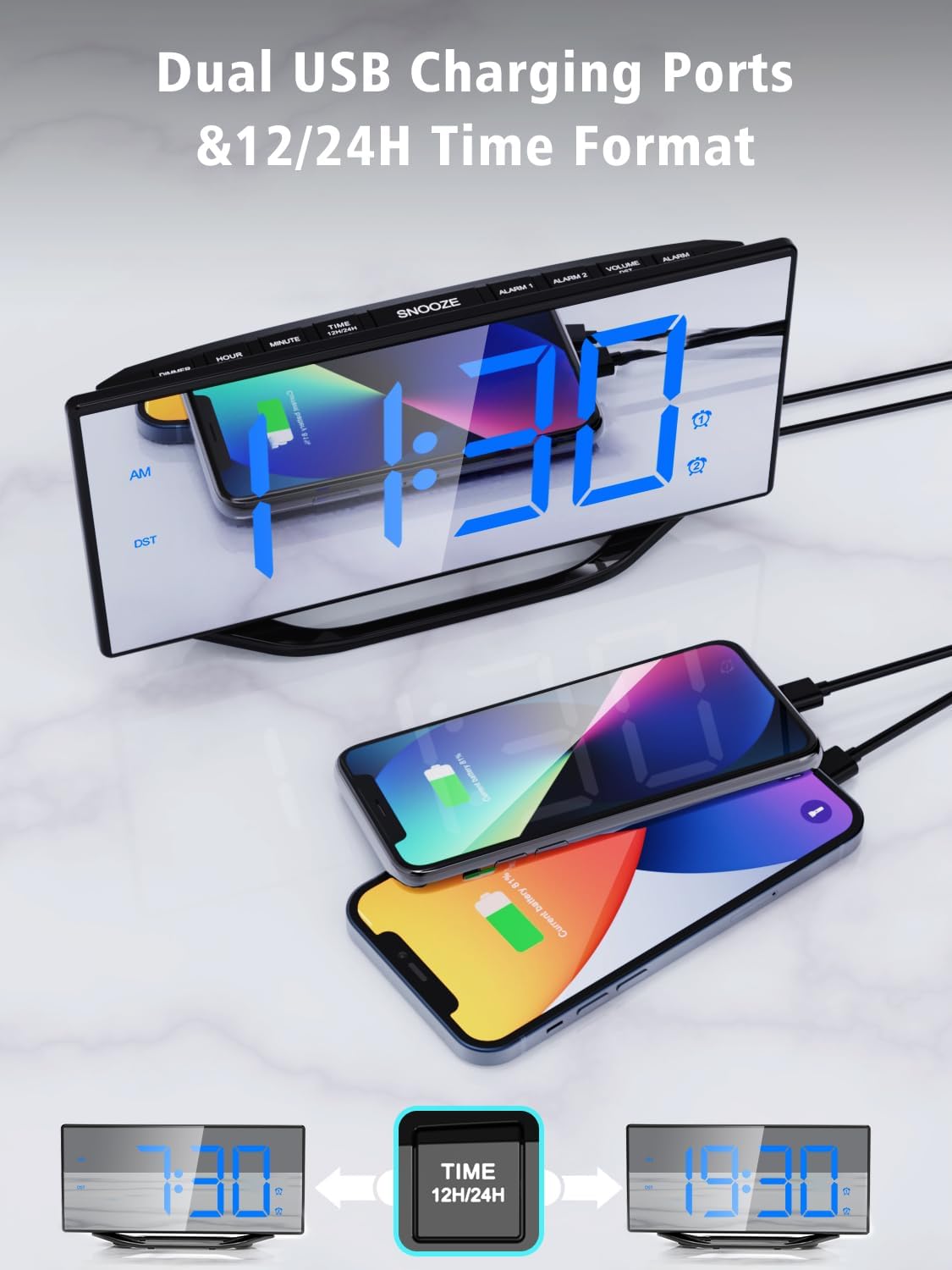
Figure 7: Utilizing the dual USB charging ports for convenience.
Техникалык тейлөө
- Тазалоо: Wipe the mirror display and body with a soft, dry cloth. Avoid abrasive cleaners or solvents.
- Батареяны алмаштыруу: If the backup battery needs replacement, open the battery compartment on the back, remove the old CR2032 battery, and insert a new one with the correct polarity.
- Сактагыч: If storing the alarm clock for an extended period, disconnect it from power and remove the backup battery.
Проблемаларды чечүү
| Көйгөй | Мүмкүн себеп | Чечим |
|---|---|---|
| Дисплей бош | Эч кандай күч же күчtage. | Ensure the power adapter is securely connected and plugged into a working outlet. If there's a power outage, the backup battery will maintain settings but the display will be off. |
| Ойготкуч угулбайт | Ойготкуч иштетилген эмес же үн өтө төмөн. | Check if the alarm icon is displayed. If not, set the alarm again. Adjust the volume using the "VOLUME" button. |
| Убакыт туура эмес | Time not set correctly or backup battery is depleted. | Reset the time using the "SET TIME" button. Replace the CR2032 backup battery if necessary. |
Техникалык шарттар
| Өзгөчөлүк | Деталь |
|---|---|
| Модель номери | CR1018 |
| Дисплей түрү | Digital LED Mirror |
| Дисплей өлчөмү | 8.7 дюйм |
| Продукциянын өлчөмдөрү | 7.79"W x 4.02"H |
| Power Source | AC Powered (Adapter included) |
| Батареянын камдык көчүрмөсү | 1 x CR2032 (кошулган) |
| USB заряддоо порттору | 2 x 5V 1A |
| Жарыктык деңгээли | 8 деңгээл |
| Үн деңгээли | 7 деңгээл (90-110 дБ) |
| Убакыт форматы | 12H/24H |
| Өзгөчөлүктөр | Dual Alarms, Snooze, DST Function |
Расмий продукт Video
Видео: Бүттүview of the PPLEE Dual Digital Alarm Clock, highlighting its large number display, backup battery, and USB charger port. This video demonstrates key features and functionality.
Кепилдик жана колдоо
PPLEE provides a 1-year warranty, 90-day money-back guarantee, and 24-hour response service. If you have any questions or require support regarding your product, please contact us via Amazon. We are committed to providing prompt assistance.