
1. Киришүү
This manual provides detailed instructions for the DORHEA ADS1115 16-Bit Analog to Digital Converter (ADC) Module. Designed for use with microcontrollers like the Raspberry Pi, this module offers high-precision analog signal conversion. Please read this manual thoroughly before setup and operation to ensure correct usage and optimal performance.
2. Продукт бүтүп калдыview жана өзгөчөлүктөрү
The DORHEA ADS1115 module is a 16-bit precision analog-to-digital converter, ideal for applications requiring high-resolution analog measurements. It communicates via an I2C interface, simplifying integration with various microcontrollers.
Негизги өзгөчөлүктөрү:
- Жогорку тактык: 16-bit resolution at up to 860 samples per second (SPS).
- Wide Supply Range: Operates from 2.0V to 5.5V.
- Low Current Consumption: Approximately 150µA in continuous mode; features an auto shut-down single-shot mode.
- Flexible Input Channels: Configurable as four single-ended inputs or two differential inputs.
- Программалануучу пайда Amplifier (PGA): Internal PGA with gains up to x16 to boost smaller signals.
- I2C интерфейси: Pin-selectable addresses (0x48-0x4B) allow up to four modules on a single 2-wire I2C bus.
- Internal References: Includes a low-drift voltage reference and internal oscillator.
- Компакт дизайн: Small breakout board with ferrites for stable AVDD and AGND.
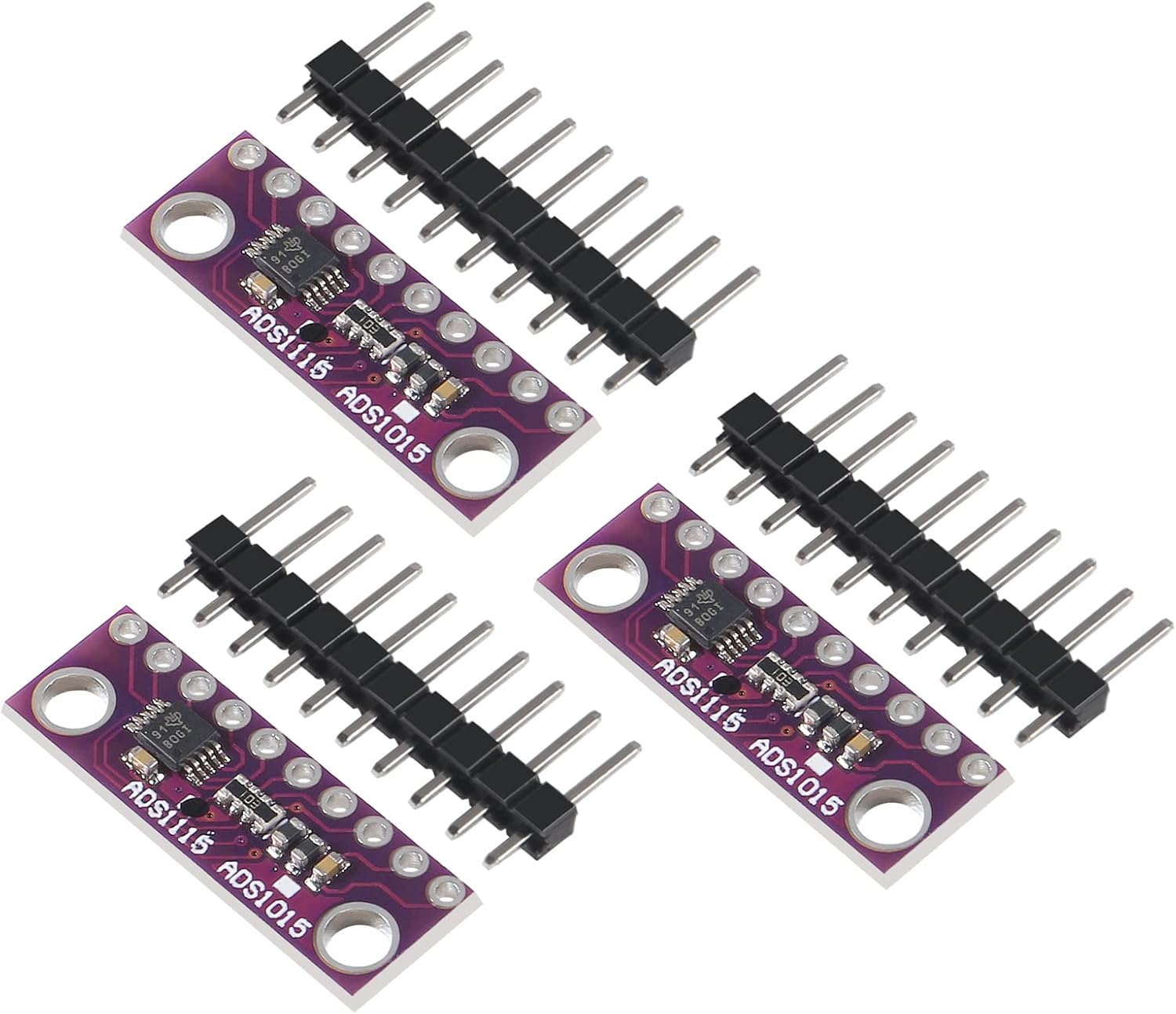
Figure 1: Three DORHEA ADS1115 16-Bit ADC modules, each with a set of header pins.
3. Пакеттин мазмуну
Ар бир пакетке төмөнкүлөр кирет:
- 3 x DORHEA ADS1115 16-Bit I2C ADC 4-Channel Development Boards
4. Техникалык шарттар
| Параметр | Нарк |
|---|---|
| Модел | ADS1115 |
| Резолюция | 16-бит |
| Supply Voltage | 2.0Вдан 5.5Вга чейин |
| Интерфейс | I2C |
| Каналдар | 4 single-ended or 2 differential |
| Программалануучу пайда Amplifier (PGA) | x16 чейин |
| Маалымат ылдамдыгы | 8 SPS to 860 SPS |
| I2C Address Range | 0x48-0x4B (pin-selectable) |
| Пакеттин өлчөмдөрү | 3.15 x 2.36 x 0.47 дюйм |
| Элемент Салмагы | 0.634 унция |
| Өндүрүүчү | DORHEA |

Figure 2: Physical dimensions of the ADS1115 module and its accompanying header pins.
5. Орнотуу
Setting up the ADS1115 module involves connecting it to your microcontroller via the I2C bus and providing power. The module typically comes with header pins that need to be soldered if not pre-attached.
5.1 Тирөөчтүн сүрөттөмөсү

3-сүрөт: Жогорку view of the ADS1115 module, detailing pin labels (VCC, GND, SCL, SDA, ADDR, ALERT, A0-A3) and integrated components.
- VCC (or VDD): Power supply input (2.0V to 5.5V).
- GND: Жерге туташтыруу.
- SCL: I2C Clock line. Connect to your microcontroller's SCL pin.
- SDA: I2C Data line. Connect to your microcontroller's SDA pin.
- ADDR: Address selection pin. This pin determines the I2C address of the module.
- ЭСКЕРТҮҮ: Optional alert/interrupt output pin.
- A0, A1, A2, A3: Analog input channels.
5.2 I2C Address Selection
The ADS1115 module has a configurable I2C address. By default, the ADDR pin is typically pulled to GND, setting the address to 0x48. You can change the address by connecting the ADDR pin to VCC, SDA, or SCL, allowing up to four modules to operate on the same I2C bus. Refer to the ADS1115 datasheet for specific address configurations.
5.3 Туташуунун негизги кадамдары
- Solder Header Pins: If the header pins are not pre-soldered, attach them to the module.
- Кубат туташуу: Connect the VCC pin of the ADS1115 to the 3.3V or 5V power supply of your microcontroller (within the 2.0V-5.5V range). Connect the GND pin to the microcontroller's ground.
- I2C Connection: Connect the SCL pin of the ADS1115 to your microcontroller's SCL pin. Connect the SDA pin of the ADS1115 to your microcontroller's SDA pin.
- Аналогдук киргизүү: Connect the analog signal you wish to measure to one of the A0-A3 input pins.
Видео 1: Бүттүview of the ADS1115 module and a basic connection diagram showing how to interface it with an Arduino board and a sensor on a breadboard.
6. Иштөө нускамалары
Operating the ADS1115 module primarily involves sending commands and reading data via the I2C interface from your microcontroller. Libraries are available for popular platforms like Arduino and Raspberry Pi to simplify this process.
6.1 Модулду инициализациялоо
After physical connection, you will need to initialize the I2C communication in your microcontroller's code. Most libraries handle the low-level I2C communication, allowing you to focus on configuring the ADC.
6.2 Конфигурация регистрлери
The ADS1115 has several configuration registers that control its operation:
- Input Multiplexer (MUX): Selects the analog input channels (e.g., A0 for single-ended, A0-A1 for differential).
- Программалануучу пайда Amplifier (PGA): Sets the full-scale range (FSR) of the ADC. Options typically range from ±0.256V to ±6.144V. Choose a gain that matches your input signal's voltage range for optimal resolution.
- Иштөө режими: Continuous conversion mode or single-shot mode (power-down after one conversion).
- Дайындардын ылдамдыгы: Configures the number of samples per second (SPS), from 8 SPS to 860 SPS. Higher rates mean faster readings but can introduce more noise.
- Comparator Mode: Configures the ALERT pin for various comparison functions.
6.3 Reading Analog Values
To read an analog value, configure the desired channel and PGA settings, then initiate a conversion (if in single-shot mode). Once the conversion is complete, read the 16-bit digital value from the conversion register. This raw digital value can then be converted to a voltage based on the selected PGA setting.
7. Техникалык тейлөө
The ADS1115 module is a robust electronic component, but proper handling and care will ensure its longevity.
- Этияттык менен мамиле кылуу: Avoid dropping or subjecting the module to physical shock.
- Кургак кармоо: Protect the module from moisture and liquids, which can cause short circuits and damage.
- Тазалык: Модулду чаңдан жана таштандылардан таза кармаңыз. Зарыл болсо, тазалоо үчүн жумшак, кургак щетканы же кысылган абаны колдонуңуз.
- Статикалык разряд: Always handle electronic components with anti-static precautions to prevent damage from electrostatic discharge (ESD).
- Сактагыч: Store the module in a cool, dry place, preferably in its original anti-static packaging when not in use.
8. Кыйынчылыктарды
If you encounter issues with your ADS1115 module, consider the following troubleshooting steps:
- No I2C Communication:
- Verify all power (VCC, GND) and I2C (SCL, SDA) connections are secure and correct.
- Check the I2C address. Ensure your code is attempting to communicate with the correct address (default 0x48 if ADDR is grounded).
- Confirm that your microcontroller's I2C bus is properly initialized and functioning.
- Ensure pull-up resistors are present on the SCL and SDA lines (often built into development boards or libraries).
- Incorrect Readings or Low Resolution:
- Verify Module Type: It has been reported that some modules advertised as ADS1115 (16-bit) may actually be ADS1015 (12-bit). Check the markings on the chip itself. An ADS1115 chip typically has 'BOGI' or similar 16-bit specific markings, while an ADS1015 might have 'BRPI'. If you received an ADS1015, its maximum resolution will be 12-bit, not 16-bit.
- Check your PGA settings. If the PGA is set too high for your input signal, you might clip the signal. If it's too low, you might not utilize the full resolution.
- Ensure your analog input signal is within the module's operating voltage range (0V to VCC for single-ended, or within the FSR for differential).
- Reduce the data rate (SPS) if noise is an issue, as lower rates often provide cleaner readings.
- Check for external noise sources affecting your analog input lines. Use shielded cables if necessary.
- Модуль күйбөйт:
- кубат менен камсыз кылуу Voltage 2.0Vден 5.5Vге чейинки диапазондо.
- Check for any short circuits on the board or connections.
9. Кепилдик жана колдоо
Specific warranty details for the DORHEA ADS1115 module are not provided in this document. For warranty claims, technical support, or further assistance, please contact your retailer or the manufacturer, DORHEA, directly through their official support channels.
кире аласыз DORHEA Store on Amazon көбүрөөк маалымат алуу же алардын колдоо кызматына кайрылуу.