
AOSHIDA RC-15A
Topping RC-15A Remote Control User Manual
Model: RC-15A
Brand: AOSHIDA
1. Киришүү
This manual provides detailed instructions for the proper use and maintenance of your Topping RC-15A Remote Control. The RC-15A is designed to provide convenient wireless control over various Topping Digital-to-Analog Converters (DACs) and Headphone Ampаудио тажрыйбаңызды жакшыртуучу көтөргүчтөр.
Түзмөктүн оптималдуу иштешин жана узак мөөнөттүү кызмат кылуусун камсыз кылуу үчүн аны колдонуудан мурун, ушул колдонмону кылдат окуп чыгыңыз.
2. Продукт бүтүп калдыview
The Topping RC-15A is a compact infrared remote control. It features a range of buttons for power, volume adjustment, input selection, and other specific functions depending on the connected Topping device.
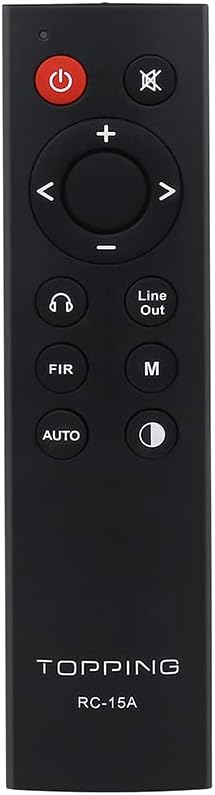
2.1-сүрөт: Фронт view of the RC-15A remote control, displaying the button layout including power, mute, volume up/down, navigation, input selection, and mode buttons.
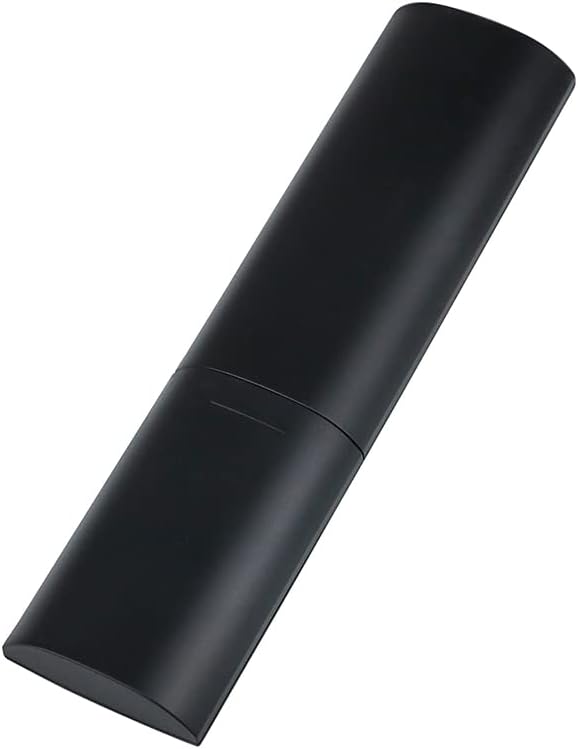
2.2-сүрөт: Каптал жана арткы view of the RC-15A remote control, highlighting its sleek, black casing жана эргономикалык дизайн.
Баскыч функциялары:
- Кубат баскычы (●): Turns the connected Topping device on or off.
- Үнсүз баскычы (✕): Аудио чыгышынын үнүн өчүрөт же ачат.
- Үндү жогорулатуу/төмөндөтүү (+/-): Үн деңгээлин жогорулатат же азайтат.
- Navigation Buttons (◀ ▶ ▲ ▼): Used for menu navigation or input selection, depending on the device.
- Headphone Output Button (♫): Switches to headphone output mode (if supported by the device).
- Line Out Button: Switches to line output mode (if supported by the device).
- FIR Button: Function varies by device, often related to filter settings.
- M баскычы: Mode or Menu button, function varies by device.
- AUTO баскычы: Automatic input selection or mode (function varies by device).
- Display Brightness Button (☽): Adjusts the display brightness of the connected device.
3. Орнотуу
Батарея орнотуу:
The RC-15A remote control requires batteries for operation. Batteries are not included and must be purchased separately. It typically uses two AAA batteries (Lithium recommended for longer life).
- Пульттун артындагы батарея отсегин табыңыз.
- Батареянын капкагын ачуу үчүн ылдый же жебе менен көрсөтүлгөн багытта жылдырыңыз.
- Оң (+) жана терс (-) терминалдары бөлүмдүн ичиндеги белгилер менен туура дал келишин камсыз кылып, эки AAA батарейкасын салыңыз.
- Батарейканын капкагын жабыңыз, аны кайра ордуна жылдырыңыз, ал чыкылдатмайынча.
Эскертүү: Эгерде алыстан башкаруу пульту көпкө чейин колдонулбаса, агып кетүүнүн жана бузулуунун алдын алуу үчүн батарейкаларды алып салыңыз.
4. Иштөө нускамалары
The RC-15A remote control operates via infrared (IR) signals. Ensure there is a clear line of sight between the remote control and the IR receiver on your Topping device.
Шайкеш түзмөктөр:
The RC-15A is pre-programmed to work with a range of Topping DACs and audio devices, including but not limited to:
- Topping E30, E30 II, E50, E70, E70V
- Topping DX3 Pro, DX3 Pro+, DX5, DX5 Lite, DX7 Pro, DX7 Pro+
- Topping D30 Pro, D50s, D90se, D90
Негизги операция:
- Күйгүзүү/өчүрүү: Point the remote at your Topping device and press the Күч баскычы.
- Үндү көзөмөлдөө: колдонуу + button to increase volume and the - үнүн азайтуу үчүн баскыч.
- Үнсүз: басыңыз Үнсүз аудиону убактылуу өчүрүү үчүн баскычты басыңыз. Үнсүздөн чыгаруу үчүн кайра басыңыз.
- Киргизүүнү тандоо: Use the navigation buttons (left/right arrows) or dedicated input buttons (if available on your device) to cycle through available inputs.
- Меню навигациясы: For devices with on-screen menus, use the navigation arrows (up/down/left/right) and potentially the 'M' or 'AUTO' button for selection or confirmation. Refer to your specific Topping device's manual for detailed menu operations.
Маанилүү: The specific functions of some buttons (e.g., FIR, M, AUTO, Headphone Output, Line Out) may vary depending on the model and firmware version of your Topping DAC or amplifier. Always consult the user manual of your specific Topping audio device for detailed compatibility and functionality.
5. Техникалык тейлөө
Proper maintenance ensures the longevity and reliable operation of your RC-15A remote control.
- Тазалоо: Wipe the remote control with a soft, dry cloth. Do not use abrasive cleaners, waxes, or solvents as they may damage the finish or internal components.
- Батареяны алмаштыруу: Пульттун иш аралыгы азайганда же ал жооп бербей калганда, батареяларды алмаштырыңыз. Ар дайым бардык батареяларды бир эле учурда бирдей типтеги жаңылары менен алмаштырыңыз.
- Сактагыч: Пультту күн нурунан жана өтө температурадан алыс салкын, кургак жерде сактаңыз.
- Тамчылардан качуу: Пультту ички схемага зыян келтирүүчү физикалык соккулардан жана тамчылардан коргоңуз.
6. Кыйынчылыктарды
If you encounter issues with your RC-15A remote control, try the following troubleshooting steps:
| Көйгөй | Мүмкүн себеп | Чечим |
|---|---|---|
| Пульт жооп бербей жатат. | Өлгөн же аз батареялар. | Батареяларды жаңысына алмаштырыңыз. |
| Пульт жооп бербей жатат. | No clear line of sight to device. | Ensure no obstructions between remote and device's IR receiver. Point directly at the device. |
| Алыстан байланышуу аралыгы начар. | Алсыз батарейкалар. | Батареяларды алмаштырыңыз. |
| Атайын баскыч иштебей жатат. | Баскыч тыгылып калган же бузулган. | Gently press the button multiple times. If still unresponsive, the remote may be faulty. |
| Алыстан башкаруу айрым функциялар үчүн иштейт, ал эми башкалары үчүн иштебейт. | Function not supported by your specific Topping device model. | Refer to the user manual of your Topping DAC/amplifier to confirm supported remote functions. |
7. Техникалык шарттар
| Өзгөчөлүк | Деталь |
|---|---|
| Модел | RC-15A |
| Бренд | AOSHIDA (Manufacturer: TOPPING) |
| Байланыш технологиясы | Инфракызыл (IR) |
| Өзгөчөлүктөр | Pre-programmed for Topping devices |
| Шайкеш түзмөктөр | Topping E30, E30 II, E50, E70, E70V, DX3 Pro, DX3 Pro+, DX5, DX5 Lite, DX7 Pro, DX7 Pro+, D30 Pro, D50s, D90se, D90 |
| Батареялар талап кылынат | Ооба (2 x AAA, камтылган эмес) |
| Өлчөмдөрү (болжол менен) | 21.6 x 11.7 x 9.1 см (Пацелка өлчөмдөрү) |
| Салмагы (болжол менен) | 40 г |
8. Кепилдик жана колдоо
Information regarding the specific warranty period and support contact for the Topping RC-15A remote control is typically provided with the original purchase of your Topping audio device or on the manufacturer's official webсайт.
For technical support, warranty claims, or further inquiries, please refer to the documentation included with your Topping DAC/amplifier or visit the official Topping or AOSHIDA webсайт.
Ask a question about this manual
Ask about setup, troubleshooting, compatibility, parts, safety, or missing instructions. Manuals+ will review the question and use this page’s manual context to help answer it.