
1. Киришүү
This manual provides detailed instructions for the proper use and maintenance of your Cellularline Task Dual-Mode Headset. Please read this manual thoroughly before using the product to ensure optimal performance and longevity.
The Cellularline Task headset is designed for versatility, offering both wired and wireless (Bluetooth) connectivity. It features a detachable microphone, making it suitable for smart working, remote learning, and music listening.
2. Продукт бүтүп калдыview
The Cellularline Task headset combines comfort with functionality, featuring over-ear cushions and intuitive controls. Its dual-mode capability allows seamless switching between wired and Bluetooth connections.

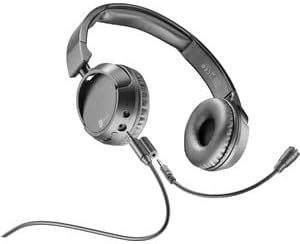
2.1-сүрөт: Cellularline Task Dual-Mode Headset with detachable microphone connected.
Негизги өзгөчөлүктөрү:
- Dual-mode stereo headset (wired and Bluetooth).
- Wireless communication technology compatible with various devices (iPhone, Samsung, Huawei, Xiaomi, etc.).
- Modern design with comfortable over-ear cushions.
- Adaptable and removable microphone, ideal for video calls and audio recording.
- Volume limitation feature for hearing protection.
- Up to 18 hours of continuous music playback or talk time.
3. Орнотуу
3.1 Пакеттин мазмуну
Before proceeding, ensure your package contains the following items:
- Cellularline Task Headset
- Алынуучу микрофон
- Заряддоо кабели (USB)
- Аудио кабель (3.5 мм уяча)
- Колдонуучунун Колдонмосу (бул документ)
3.2 Гарнитураны заряддоо
Before first use, fully charge the headset. Connect the provided USB charging cable to the charging port on the headset and to a compatible USB power source. The LED indicator will show charging status and turn off or change color when fully charged.
3.3 Алынып туруучу микрофонду тиркөө
The microphone can be easily attached or detached based on your usage needs.
- Гарнитуранын сол кулакчынынан микрофондун киргизүү портун табыңыз.
- Align the 3.5mm jack of the detachable microphone with the port.
- Микрофондун уячасын портко бекем орнотулганга чейин акырын түртүңүз.
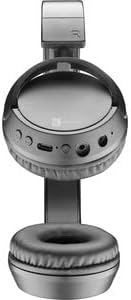
3.1-сүрөт: Headset with the detachable microphone removed, showing the input port.
3.4 Зымдуу туташуу
Гарнитураны зымдуу режимде колдонуу үчүн:
- Гарнитура өчүрүлгөнүн текшериңиз.
- Connect one end of the 3.5mm audio cable to the audio input port on the headset.
- Connect the other end of the 3.5mm audio cable to the audio output jack of your device (e.g., computer, smartphone, tablet).
- The headset will function as a wired headset, drawing power from the connected device if needed, or using its own battery for active features.

3.2-сүрөт: Headset connected via 3.5mm audio cable, demonstrating wired mode.
3.5 Bluetooth жупташтыруу
Гарнитураңызды Bluetooth аркылуу зымсыз туташтыруу үчүн:
- Күйгүзүү: Press and hold the Power button on the headset until the LED indicator flashes, indicating pairing mode.
- Bluetooth иштетүү: Түзмөгүңүздө (смартфон, планшет, компьютер) Bluetooth жөндөөлөрүнө өтүп, Bluetooth иштетилгенин текшериңиз.
- Издөө Түзмөктөр: Your device will scan for available Bluetooth devices.
- Гарнитураны тандоо: From the list of found devices, select "Cellularline Task" (or similar name).
- Байланышты ырастоо: Once connected, the LED indicator on the headset will change to a steady light or flash slowly, and your device will confirm the connection.
The headset is compatible with iPhone, Samsung, Huawei, Xiaomi, and other Bluetooth-enabled devices.
4. Иштөө нускамалары
4.1 Күйгүзүү/өчүрүү
- Күйгүзүү: LED индикатору күйгөнгө чейин Кубат баскычын болжол менен 3 секунд басып туруңуз.
- Өчүрүү: LED индикатору өчмөйүнчө кубат баскычын болжол менен 5 секунд басып туруңуз.
4.2 Үндү башкаруу
The headset features tactile controls for volume adjustment.
4.1-сүрөт: Жакын план view of the earcup showing control buttons for volume and playback.
- Көлөмүн жогорулатуу: '+' баскычын басыңыз.
- Көлөмдү азайтуу: '-' баскычын басыңыз.
The headset includes a volume limitation feature to protect your hearing.
4.3 Чалууларды башкаруу
When connected via Bluetooth, you can manage calls directly from the headset:
- Чакырууга жооп берүү: Көп функциялуу баскычты (адатта, Кубат баскычы же атайын чакыруу баскычы) бир жолу басыңыз.
- Чакырууну аяктоо: Чалуу учурунда Көп функциялуу баскычты бир жолу басыңыз.
- Чакырууну четке кагуу: Press and hold the Multi-function button for 2 seconds when an incoming call rings.
4.4 Музыканы ойнотуу
When connected via Bluetooth, control your music playback:
- Ойнотуу/тындыруу: Көп функциялуу баскычты бир жолу басыңыз.
- Кийинки трек: '+' баскычын басып, кармап туруңуз.
- Мурунку трек: '-' баскычын басып, кармап туруңуз.
4.5 Микрофонду колдонуу
The detachable microphone is designed for clear voice capture during calls or recordings.
- Ensure the microphone is securely attached (refer to Section 3.3).
- Position the microphone appropriately for optimal voice pickup.
- When using the headset in wired mode, the microphone functionality will depend on the connected device's compatibility with 4-pole 3.5mm jacks.
5. Техникалык тейлөө
5.1 Тазалоо
- Гарнитураны тазалоо үчүн жумшак, кургак чүпүрөктү колдонуңуз.
- Абразивдүү тазалагычтарды, эриткичтерди же катуу химиялык заттарды колдонбоңуз.
- Ар кандай тешиктерге ным кирүүдөн сактаңыз.
5.2 Сактоо
- Гарнитураны күн нурунан жана экстремалдык температурадан алыс салкын, кургак жерде сактаңыз.
- If storing for an extended period, ensure the battery is partially charged (around 50%) to maintain battery health.
5.3 Батареяга кам көрүү
- Батареяны бат-баттан толук кубаттап калуудан алыс болуңуз.
- Батареяны жогорку температурага калтырбаңыз.
- If the headset will not be used for a long time, charge it every few months to prevent deep discharge.
6. Кыйынчылыктарды
6.1 Headset Does Not Power On
- Ensure the headset is fully charged. Connect it to a power source and wait a few minutes before attempting to power on again.
- Башка заряддоо кабелин же кубат адаптерин колдонуп көрүңүз.
6.2 Үн жок же үнү төмөн
- Гарнитурадагы жана туташкан түзмөктөгү үн деңгээлин текшериңиз.
- Эгер Bluetooth колдонуп жатсаңыз, гарнитура туура жупташтырылганын жана туташтырылганын текшериңиз.
- If using wired mode, ensure the 3.5mm audio cable is fully inserted into both the headset and the device.
- Башка аудио булагы же түзмөк менен сынап көрүңүз.
6.3 Bluetooth жупташтыруу көйгөйлөрү
- Гарнитура жупташтыруу режиминде экенин текшериңиз (LED күйүп-өчүп турат).
- Түзмөгүңүздөгү Bluetooth'ду өчүрүп, күйгүзүңүз.
- Forget the headset from your device's Bluetooth list and attempt to pair again.
- Ensure the headset is within the effective range of your device (typically 10 meters).
6.4 Микрофон иштебейт
- Ажыратылуучу микрофон гарнитурага бекем бекитилгенин текшериңиз.
- Check microphone settings on your connected device to ensure the headset's microphone is selected as the input device.
- Микрофонду башка колдонмо же түзмөк менен сынап көрүңүз.
- Ensure the microphone is not muted on your device or via any headset controls (if applicable).
7. Техникалык шарттар
| Бренд | Cellularline |
| Модель аты | BTHEADBTASKK |
| Байланыш технологиясы | Зымсыз (Bluetooth), Зымдуу (3.5 мм уяча) |
| Зымсыз байланыш технологиясы | Bluetooth |
| Форма фактору | Ашыкча кулак |
| Өзгөчөлүктөр | Fast Charging, Volume Control, Included Microphone |
| Ойнотуу убактысы | 18 саатка чейин |
| Talk Time | 18 саат |
| Шайкеш түзмөктөр | Laptop, Tablet, Mobile Phone, Universal |
| Башкаруу түрү | Сенсордук башкаруу, алыстан башкаруу |
| Материал | Пластмасса, резина |
| Түс | Кара |
8. Кепилдик жана колдоо
Cellularline products are designed and manufactured to the highest quality standards. For information regarding warranty coverage, please refer to the warranty card included with your product or visit the official Cellularline webсайт.
If you encounter any issues not covered in this manual or require further assistance, please contact Cellularline customer support through their official webсайт же продукт таңгагында көрсөтүлгөн байланыш маалыматы.
Webсайт: www.cellularline.com