
1. Киришүү
The Cleer Audio Alpha headphones are designed to provide an immersive audio experience with advanced features for enhanced listening. This manual provides essential information for setting up, operating, and maintaining your headphones.
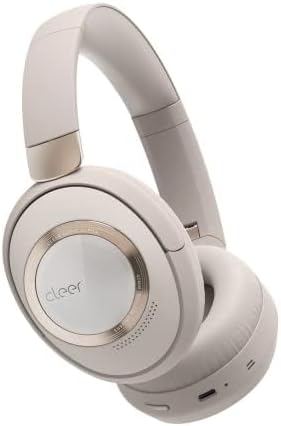
Figure 1: Cleer Audio Alpha headphones (Stone color)
2. Кутуда эмне бар
Your Cleer Audio Alpha headphones package includes the following items:
- Cleer Audio Alpha Headphones
- USB-Aдан USB-Cге заряддоо кабели
- 3.5 мм аудио кабели
- Hard Carrying Case
- Учак адаптери
- Quick Start Guide
- Колдонуучунун Колдонмосу (бул документ)
- Кепилдик картасы

Figure 2: Included accessories with Cleer Audio Alpha headphones
3. Продукт бүтүп калдыview жана Дизайн
The Cleer Audio Alpha headphones are designed for comfort and durability, featuring a matte finish and gold accents. The earcups are magnetically attached for easy cleaning or replacement.

Figure 3: Headband and earcup details
The headphones feature soft, memory foam earcups and a padded headband for extended wear comfort. The earcups can swivel and fold for compact storage in the provided hard carrying case.

Figure 4: Headphones stored in their travel case
4. Орнотуу
4.1 Наушниктерди заряддоо
Before first use, fully charge your headphones. Connect the provided USB-C charging cable to the USB-C port on the left earcup and to a power source. A 10-minute quick charge provides an additional 4 hours of playback.

Figure 5: Battery life and quick charge capabilities
4.2 Bluetooth жупташтыруу
The Alpha headphones support Bluetooth 5.1 with Qualcomm aptX Adaptive technology for high-quality wireless audio. They also feature Multipoint Connection, allowing simultaneous connection to two devices.
- Power on the headphones by sliding the power button on the right earcup.
- Аспабыңызда Bluetooth'ду жандырыңыз (смартфон, планшет, компьютер).
- Select "Cleer ALPHA" from the list of available Bluetooth devices.
- Once paired, a voice prompt will confirm the connection.

Figure 6: Multipoint connection setup
4.3 Cleer+ App Control
Download the free Cleer+ app from your device's app store to unlock the full performance and customization options of your Alpha headphones. The app allows you to:
- Adjust noise-canceling and ambient noise levels.
- EQ жөндөөлөрүн өзгөчөлөштүрүү.
- Manage device controls.
- Микропрограмма жаңыртууларын алыңыз.

Figure 7: Cleer+ App interface for customization
5. Иштөө нускамалары
5.1 Adaptive Noise Cancellation and Ambient Mode
The Alpha headphones feature adaptive noise cancellation to block out distractions. Use Ambient mode to allow external sounds to pass through, enabling conversations without removing your headphones.
- Toggle between Noise Cancellation, Ambient Mode, and Off using the dedicated ANC button on the left earcup.
- Smart Noise Cancellation automatically adjusts levels based on your environment.

Figure 8: Adaptive Noise Cancellation in action

Figure 9: Ambient Sound Control
5.2 Интуитивдик сенсордук башкаруу элементтери
The right earcup features touch controls for various functions:
- Өйдө/ылдый сүрүү: Үндү тууралоо.
- Swipe Forward/Backward: Тректерди өткөрүп жиберүү.
- Эки жолу таптоо: Музыканы ойнотуу/тындыруу, Чалууларга жооп берүү/аяктоо.
- Palm over earcup: Temporarily reduces volume and noise cancellation for quick conversations.

Figure 10: Intuitive Touch Controls
5.3 Smart Wear Detection
The headphones automatically play or pause audio when you put them on or take them off, ensuring a seamless listening experience.

Figure 11: Smart Wear Detection
5.4 Dirac Virtuo Spatial Audio
Experience an expanded soundstage and immersive audio with Dirac Virtuo spatial audio technology. This feature works with all content and does not require specially encoded tracks.

Figure 12: Dirac Virtuo Spatial Audio
5.5 Зымдуу туташуу
For situations where wireless connectivity is not preferred or available, you can connect the headphones using the provided 3.5mm audio cable. This allows for continued listening even if the battery is depleted.
6. Аудионун сапаты
The Alpha headphones are equipped with 40mm ironless drivers, delivering high-resolution audio with accurate bass for an immersive sound experience. They support Hi-Res and Lossless Audio formats.

Figure 13: 40mm Ironless Driver technology

Figure 14: Hi-Res & Lossless Audio support
7. Техникалык тейлөө
The earcups are magnetically attached, allowing for easy removal for cleaning or replacement. Regularly wipe the headphones with a soft, dry cloth to maintain their appearance.
8. Кыйынчылыктарды
If you encounter any issues with your Cleer Audio Alpha headphones, please refer to the following general troubleshooting tips:
- Кубат жок: Наушниктердин толук заряддалганын текшериңиз.
- Жупташуу мүмкүн эмес: Ensure Bluetooth is enabled on your device and the headphones are in pairing mode. Try restarting both devices.
- Начар аудио сапаты: Check the audio source. Ensure the headphones are within Bluetooth range. If using a wired connection, check the cable.
- ANC иштебейт: Ensure ANC is enabled and not in Ambient mode.
- Тийүү башкаруулары жооп бербейт: Ensure the headphones are powered on and connected. Try restarting the headphones.
For more detailed troubleshooting or persistent issues, please contact Cleer Audio customer support.
9. Техникалык шарттар
| Өзгөчөлүк | Спецификация |
|---|---|
| Модель аты | Альфа |
| Байланыш технологиясы | Bluetooth 5.1 |
| Зымсыз байланыш технологиясы | Bluetooth |
| Noise Control | Активдүү ызы-чууну жокко чыгаруу |
| Аудио драйвер түрү | Dynamic Driver (40mm Ironless) |
| Frequency Response | 20 Гц - 20 КГц |
| Батареянын иштөө мөөнөтү | 35 саатка чейин |
| Заряддоо убактысы (тез кубаттоо) | 4 саат ойнотуу үчүн 10 мүнөт |
| Башкаруу ыкмасы | тийүү |
| Микрофон | Dual-Microphone with Qualcomm cVc technology |
| Элемент Салмагы | 11.4 унция (323 грамм) |
| Продукциянын өлчөмдөрү | 8.78 x 7.13 x 2.72 дюйм |
| Материал | Пластик |
10. Кепилдик жана колдоо
For warranty information and customer support, please refer to the warranty card included in your product packaging or visit the official Cleer Audio website. Ensure you register your product for any applicable warranty benefits.