
1. Киришүү
The VOLTCRAFT TK-1000 is a versatile calibrator designed for precise measurement and simulation of temperature and voltage. It supports a wide range of thermocouple and Resistance Temperature Detector (RTD) types, making it suitable for various professional measurement applications. This manual provides essential information for the safe and effective use of your device.
Негизги өзгөчөлүктөрү:
- High output and measurement precision (up to 0.05% steps).
- Measures and simulates nine different thermocouple types (J, K, T, E, R, S, B, Wre325, Wre526).
- Measures and simulates four different RTD types (Pt100, Pt10, Cu50, Cu100).
- Step and ramp functions for quick linearity detection.
- Adjustable LCD backlight for clear readability in various lighting conditions.
- Memory function for frequently used settings.
- Temperature display in °C and °F.
- Батареянын иштөө мөөнөтүн үнөмдөө үчүн автоматтык түрдө өчүрүү функциясы.
2. Коопсуздук маалыматы
Электр тогуна урунууну, жаракат алууну же шайманга зыян келтирүүнү алдын алуу үчүн ар дайым төмөнкү коопсуздук чараларын сактаңыз:
- Аппаратты ачпаңыз casing unless explicitly instructed for battery replacement.
- Ensure test leads are removed before opening the battery compartment.
- Use only the specified battery type (9V 6LR61).
- Аппаратты нымдуу жерде иштетпеңиз же damp шарттар.
- Аппаратты экстремалдык температурага же тике күн нуруна кабылуудан сактаңыз.
- Эгерде түзмөк бузулгандай көрүнсө, аны колдонбоңуз.
3. Орнотуу
3.1. Батареяны орнотуу
The VOLTCRAFT TK-1000 requires one 9V 6LR61 battery for operation. The battery is supplied with the device.
- Түзмөктүн өчүрүлгөнүн жана бардык сыноо өткөргүчтөрү ажыратылганын текшериңиз.
- Аппараттын артындагы батарея бөлүкчөсүнүн капкагын табыңыз.
- Use a suitable screwdriver to loosen the screw securing the battery compartment cover.
- Этияттык менен капкакты алып салыңыз.
- Insert the 9V battery, observing the correct polarity (+/-).
- Батарея бөлүкчөсүнүн капкагын ордуна коюңуз жана буроону бекемдеңиз.
3.1-сүрөт: Арткы view of the calibrator with the battery compartment open, showing where the 9V battery should be inserted.

3.2-сүрөт: Арткы view of the calibrator with a 9V battery correctly installed in its compartment.
3.2. Сыноо линияларын туташтыруу
The calibrator comes with a pair of test leads and crocodile clips for various measurement and simulation tasks.
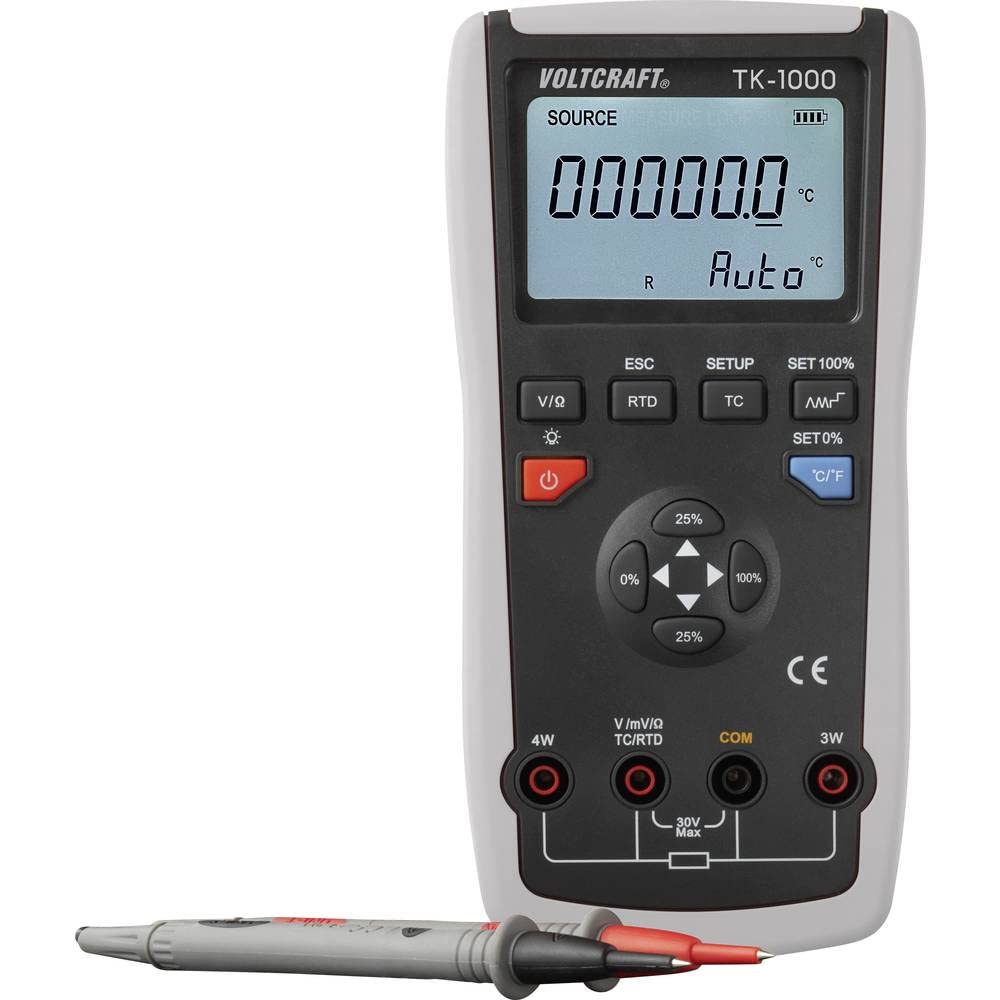
- Identify the input jacks on the front panel of the device. These include 4W, V/mV/Ω/TC/RTD, COM, and 3W.
- Том үчүнtage, current, or resistance measurements/simulations, connect the red test lead to the V/mV/Ω/TC/RTD jack and the black test lead to the COM jack.
- For 4-wire RTD measurements, connect the appropriate leads to the 4W and COM jacks.
- For 3-wire RTD measurements, connect the appropriate leads to the 3W and COM jacks.
- Иштөө алдында бардык туташуулардын коопсуз экенин текшериңиз.

Сүрөт 3.3: Алдыңкы view of the calibrator, highlighting the display, control buttons, and input terminals for test lead connections.
4. Иштөө нускамалары
4.1. Күйгүзүү/өчүрүү
басыңыз Күч button (usually marked with a circle and a vertical line) to turn the device on or off. The device features an automatic power-off function to save battery life if inactive for an extended period.
4.2. Режимди тандоо
The TK-1000 can measure and simulate various signals. Use the dedicated buttons to select the desired mode:
- V/I/Ω: Том үчүнtage, current, and resistance measurements/simulations.
- RTD: For Resistance Temperature Detector (Pt100, Pt10, Cu50, Cu100) measurements/simulations.
- TC: For Thermocouple (J, K, T, E, R, S, B, Wre325, Wre526) measurements/simulations.
4.3. Setting Values and Units
Once a mode is selected, use the navigation buttons (e.g., arrow keys, percentage buttons 0%, 25%, 100%) to adjust the output or simulation value. The C / F button allows you to switch between Celsius (°C) and Fahrenheit (°F) for temperature readings.
4.4. Арткы жарыкты тууралоо
The LCD backlight can be adjusted for optimal visibility. Press the Арткы жарык button (often indicated by a sun icon) to cycle through different brightness levels or to turn the backlight on/off.
4.5. Step and Ramp Функциялар
The TK-1000 includes step and ramp functions for linearity detection. Refer to the on-screen prompts or specific function buttons (if available) to activate and configure these features. These functions allow the calibrator to automatically increment or sweep through a range of values.
4.6. Saving Settings
The device allows you to memorize frequently used settings for convenience. Consult the device's display and menu options for instructions on how to save and recall custom configurations.
5. Техникалык тейлөө
5.1. Батареяны алмаштыруу
When the low battery indicator appears on the display, replace the 9V battery as described in Section 3.1. Prompt battery replacement ensures continuous and accurate operation.
5.2. Тазалоо
To clean the device, wipe the exterior with a soft, damp кездеме. Абразивдүү тазалоочу каражаттарды же эриткичтерди колдонбоңуз, анткени алар териге зыян келтириши мүмкүн.asing or display. Ensure the device is powered off and disconnected from all leads before cleaning.
5.3. Сактоо
When not in use for extended periods, store the calibrator in its protective carrying case in a cool, dry place. Remove the battery if storing for several months to prevent leakage and potential damage to the device.
6. Кыйынчылыктарды
This section addresses common issues you might encounter with the VOLTCRAFT TK-1000.
6.1. Түзмөк күйбөйт
- Батареяны текшерүү: Ensure the 9V battery is correctly installed and not depleted. Replace if necessary.
- Батареянын полярдуулугу: Verify that the battery is inserted with the correct polarity.
6.2. Inaccurate Readings/Simulations
- Байланыштарды текшерүү: Ensure all test leads and probes are securely connected to the correct input jacks.
- Туура режим: Verify that the correct measurement/simulation mode (TC, RTD, V/I/Ω) is selected for your application.
- Зонд түрү: For temperature measurements, ensure the correct thermocouple or RTD type is selected in the device settings.
- Экологиялык факторлор: Extreme temperatures or electromagnetic interference can affect accuracy. Operate in a stable environment.
6.3. Маселелерди көрсөтүү
- Дисплей жок/Күнкүрт дисплей: Check battery level. Adjust backlight brightness.
- Бузулган дисплей: Try powering the device off and on again. If the issue persists, contact support.
7. Техникалык шарттар
| Өзгөчөлүк | Спецификация |
|---|---|
| Модел | VOLTCRAFT TK-1000 (VC-11769560) |
| Measurement/Simulation Types | 9 Thermocouple types (J, K, T, E, R, S, B, Wre325, Wre526), 4 RTD types (Pt100, Pt10, Cu50, Cu100) |
| Тактык | Up to 0.05% steps |
| Дисплейдин саны | 200,000 |
| Электр камсыздоо | 1x 9V 6LR61 battery |
| Өлчөмдөрү (L x W x Y) | 19.3 x 9.6 x 4.7 см (7.6 x 3.8 x 1.85 дюйм) |
| Салмагы | 370 грамм (0.82 фунт) |
| Функциялар | Step, Ramp, Memory for settings, Auto power-off, LCD backlight adjustment |
8. Кепилдик жана колдоо
Кепилдик маалыматы: Specific warranty details for the VOLTCRAFT TK-1000 are typically provided with your purchase documentation or can be found on the official VOLTCRAFT webсайт. Кепилдик дооматтары үчүн сатып алганыңыздын далилин сактап коюңуз.
Кардарларды колдоо: For technical assistance, troubleshooting beyond this manual, or service inquiries, please contact VOLTCRAFT customer support. Contact information can usually be found on the product packaging, the VOLTCRAFT webсайты же сатуучу аркылуу.