
1. Продукт бүтүп калдыview
The emotal Dual-Mic AI Noise Cancelling Bluetooth Headset is designed for clear communication and extended use, ideal for cell phone calls, driving, and business environments. It features advanced AI noise-cancelling technology, dual HD microphones, and a lightweight, ergonomic design for comfort.
Негизги өзгөчөлүктөр төмөнкүлөрдү камтыйт:
- AI Noise-Cancelling: Isolates your voice from background noise for crystal-clear conversations.
- Кеңейтилген сүйлөшүү убактысы: Up to 30 hours of HD talk time and 240 hours of standby on a 1.5-hour charge. Includes a quick charge feature for 3 hours of playtime with a 10-minute charge.
- Ultralight & Ergonomic: Weighing only 0.5oz, designed for comfortable, secure fit during long periods of use.
- IPX6 Суу өткөрбөйт: Чачылышынан жана терден коргоону камсыз кылат.
- Кош батарея системасы: Comes with an extra battery for continuous use.

Image: The emotal Dual-Mic AI Noise Cancelling Bluetooth Headset, showcasing its sleek black design and over-ear hook.
2. Пакеттин мазмуну
Пакетте бардык буюмдар бар экенин текшериңиз:
- 1x emotal Bluetooth Headset
- 1x USB-C заряддоо кабели
- 6x Eartips (one pair pre-installed)
- 1x Колдонуучунун колдонмосу
- 1x кошумча батарея
3. Орнотуу колдонмосу
3.1 Алгачкы заряддоо
Before first use, fully charge the headset. The headset needs to be detached from the ear hook for charging.
- Detach the main headset unit from the ear hook.
- Connect the USB-C cable to the charging port on the headset unit.
- USB-C кабелинин экинчи учун туура келген USB кубат булагына туташтырыңыз (мисалы, дубал адаптери, компьютердин USB порту).
- The indicator light will show charging status (refer to LED indicator section for details). A full charge takes approximately 1.5 hours.
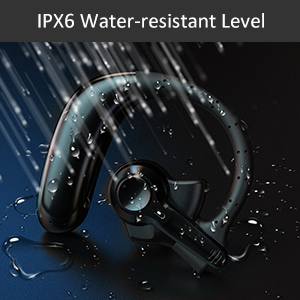
Image: Correct USB-C charging method for the headset, showing the detachable unit being charged.
3.2 Eartip Selection
For optimal sound quality and comfort, select the eartip size that best fits your ear canal. Three sizes are provided.

Image: Illustration of different eartip sizes and how to achieve a secure and comfortable fit in the ear.
3.3 Гарнитураны тагынуу
The headset is designed for use in either the left or right ear. The main unit can be rotated and the microphone adjusted for optimal positioning.
- Place the ear hook over your ear.
- Insert the eartip into your ear canal.
- Adjust the main unit by rotating it 180 degrees to switch between left and right ear wear.
- Adjust the microphone boom to point towards your mouth for clear voice pickup.
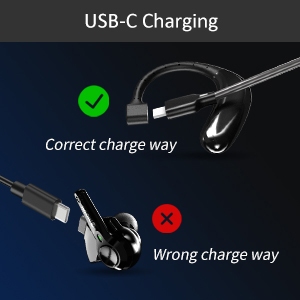
Image: Step-by-step guide on how to switch the headset for left or right ear use by rotating the main unit and adjusting the microphone.
3.4 Bluetooth жупташтыруу
To connect your headset to a device:
- Гарнитура заряддалганын жана өчүрүлгөнүн текшериңиз.
- Press and hold the multi-function button on the headset for 3-5 seconds until the indicator light flashes blue and red, indicating pairing mode.
- Түзмөгүңүздө (смартфон, планшет, ноутбук) Bluetooth иштетиңиз.
- Издөө "emotal UFO4-01" (or similar name) in the list of available Bluetooth devices.
- Select the headset to connect. Once connected, the indicator light will turn solid blue or flash slowly.
Эскертүү: The headset cannot connect with two devices simultaneously.
4. Иштөө нускамалары
4.1 Негизги башкаруу каражаттары
The headset features a single multi-function button for various operations:
- Күйгүзүү/өчүрүү: Long touch for 3 seconds to power on, 5 seconds to power off.
- Кийинки ыр: Double touch the button.
- Чалууга жооп берүү/түп коюу: Double touch the button.
- Көлөмү: Long touch the button. (Note: There is no dedicated volume down or mute button on the headset itself. Volume down must be controlled via the connected device.)
- Үн жардамчысын иштетүү (Siri/Google Жардамчысы): Triple touch the button.

Image: Visual representation of the single button controls for power, music playback, call management, volume, and voice assistant activation.
4.2 Чалууларды башкаруу
The dual-mic AI noise-cancelling technology ensures clear conversations even in noisy environments.

Image: Diagram illustrating how dual-mic and AI noise cancelling technology reduce background noise for clearer calls, showing "Before" and "After" sound wave comparisons.
For business professionals and truckers, the headset provides a hands-free solution for reliable communication on the go.
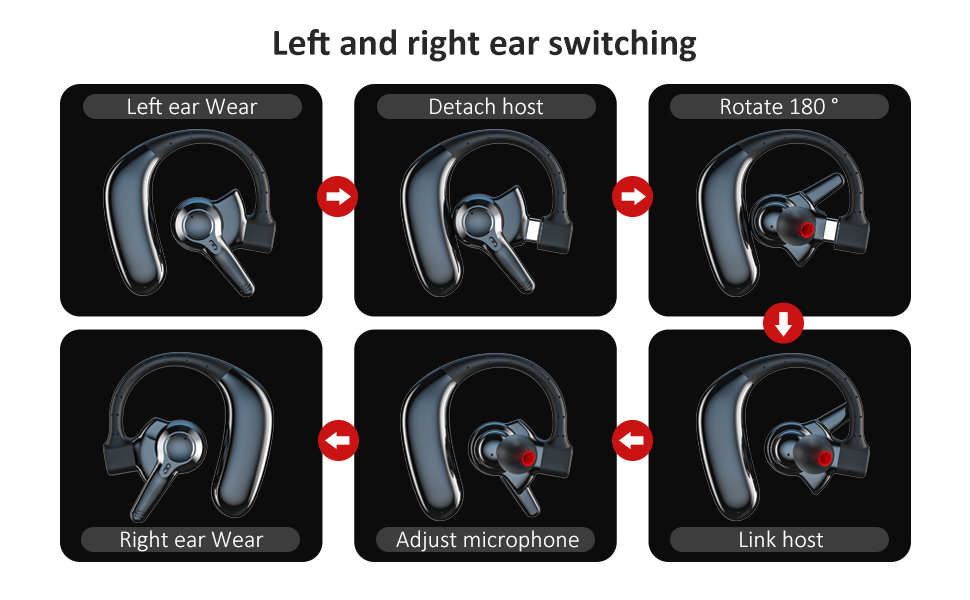
Image: A man driving a car while wearing the headset, emphasizing its hands-free functionality for calls on the road.
4.3 Батареяны башкаруу
The headset offers significant battery life and comes with an extra battery for extended use.

Image: Visual representation of the headset's battery life, highlighting 30 hours of HD talk time and 240 hours of standby time.
To swap batteries:
- Gently detach the current battery unit from the headset.
- Attach the fully charged spare battery to the headset.
- Charge the depleted battery using the USB-C cable for future use.
5. Техникалык тейлөө жана кам көрүү
To ensure the longevity and optimal performance of your emotal Bluetooth Headset, follow these care instructions:
- Тазалоо: Гарнитураны жумшак, кургак чүпүрөк менен сүртүңүз. Абразивдүү тазалагычтарды же эриткичтерди колдонбоңуз.
- Суу каршылык: The headset is IPX6 waterproof, meaning it is protected against powerful water jets. It can withstand sweat and light rain, but it is not designed for submersion in water.
- Сактагыч: Гарнитураны салкын, кургак жерде, экстремалдык температурадан жана тике күн нурунан алыс сактаңыз.
- Батареяга кам көрүү: Avoid fully depleting the battery frequently. Charge it regularly to maintain battery health.
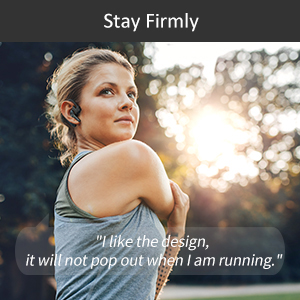
Image: Visual depicting the headset's IPX6 water resistance, showing water splashing on the device.
6. Кыйынчылыктарды
Эгер гарнитураңызда көйгөйлөргө туш болсоңуз, төмөнкү чечимдерди колдонуп көрүңүз:
| Көйгөй | Мүмкүн чечим |
|---|---|
| Гарнитура күйбөй жатат. | Ensure the headset is fully charged. Press and hold the multi-function button for 3 seconds. |
| Түзмөк менен жупташтыруу мүмкүн эмес. | Ensure Bluetooth is enabled on your device and the headset is in pairing mode (flashing blue/red light). Make sure the headset is not already connected to another device. Restart both devices and try again. |
| Чалуулар учурунда үн сапаты начар. | Ensure the microphone is adjusted to point towards your mouth. Check for obstructions. Move closer to your connected device to avoid interference. |
| Үн өтө төмөн/жогорку. | Adjust volume using the long touch on the multi-function button (volume up only) or directly from your connected device. |
| Гарнитура бат-баттан ажыратылат. | Ensure you are within the Bluetooth range (approx. 33 feet/10 meters). Avoid strong electromagnetic interference. Re-pair the headset if necessary. |
7. Техникалык шарттар
| Өзгөчөлүк | Деталь |
|---|---|
| Модель аты | UFO4-01 |
| Байланыш технологиясы | Зымсыз (Bluetooth 5.0) |
| Noise Control | Active Noise Cancellation (AI Noise Cancelling) |
| Talk Time | Up to 30 Hours HD Talk Time |
| Күтүү убактысы | 240 саатка чейин |
| Заряддоо убактысы | Болжол менен 1.5 саат |
| Сууга туруктуулук деңгээли | IPX6 суу өткөрбөйт |
| Элемент Салмагы | 0.48 унция (болжол менен 0.03 фунт) |
| Продукциянын өлчөмдөрү | 2.36 x 1.96 x 1.1 дюйм |
| Шайкеш түзмөктөр | Cellphones (iOS/Android), Windows |
| Башкаруу түрү | Үн менен башкаруу (Siri, Google Жардамчысы) |
| Наушник формасы | Circle (In Ear with Over-Ear Hook) |
| Материал | Композит |
| UPC | 850040753158 |
8. Кепилдик жана колдоо
emotal offers comprehensive customer support for your headset:
- Кепилдик: Replacement within 18 months of purchase.
- Кардарларды тейлөө: 24-hour customer service is available for any concerns or inquiries. Please contact us via message through your purchase platform.
- Кошумча ресурстар: For further details, you may refer to the official User Guide and Safety Information PDFs available online.
For the most up-to-date support information, please visit the official emotal store or contact customer service directly.