
1. Киришүү
Thank you for choosing the ENUOSUMA Retro FM Radio. This device combines classic aesthetics with modern functionality, offering FM radio, Bluetooth 5.0 connectivity, an alarm clock, and multiple media playback options. Its compact and portable design, along with a built-in rechargeable battery, makes it suitable for various environments.
This manual provides detailed instructions for setting up and operating your radio to ensure optimal performance and user experience.

Сүрөт 1: Алдыңкы view of the ENUOSUMA Retro FM Radio, featuring a wooden casing, a black control panel with an LCD display showing '23:26', a speaker grille, and various buttons for alarm, mode, track control, and a rotary knob for power/volume and select/pause.
2. Пакеттин мазмуну
Сураныч, пакетте төмөнкү нерселерди текшериңиз:
- 1 x ENUOSUMA Retro FM Radio (Bluetooth Speaker)
- 1 x Аудио кабели
- 1 x USB заряддоо кабели (Type-C)
- 1 x User Manual
3. Продукциянын өзгөчөлүктөрү
- Көп режимдүү функциялар: FM Radio, Bluetooth 5.0, Clock, Alarm.
- Жогорку сапаттагы аудио: Built-in 5W stereo speaker with 3D stereo audio.
- Кош ойготкучтар: Кайтаруу функциясы бар эки көз карандысыз ойготкучту коюңуз.
- Санариптик дисплей: Clear LCD display for time, mode, and frequency.
- Hands Free Чалуу: Integrated microphone for Bluetooth calls.
- Бир нече киргизүү параметрлери: TF card slot, USB port, AUX input.
- Портативдик дизайн: Compact size with a 2000mAh rechargeable battery for up to 9 hours of playtime.
- Ретро эстетика: Distinctive wooden casing for a classic look.
4. Башкаруу элементтери жана портторview
Familiarize yourself with the buttons and ports on your ENUOSUMA Retro FM Radio:
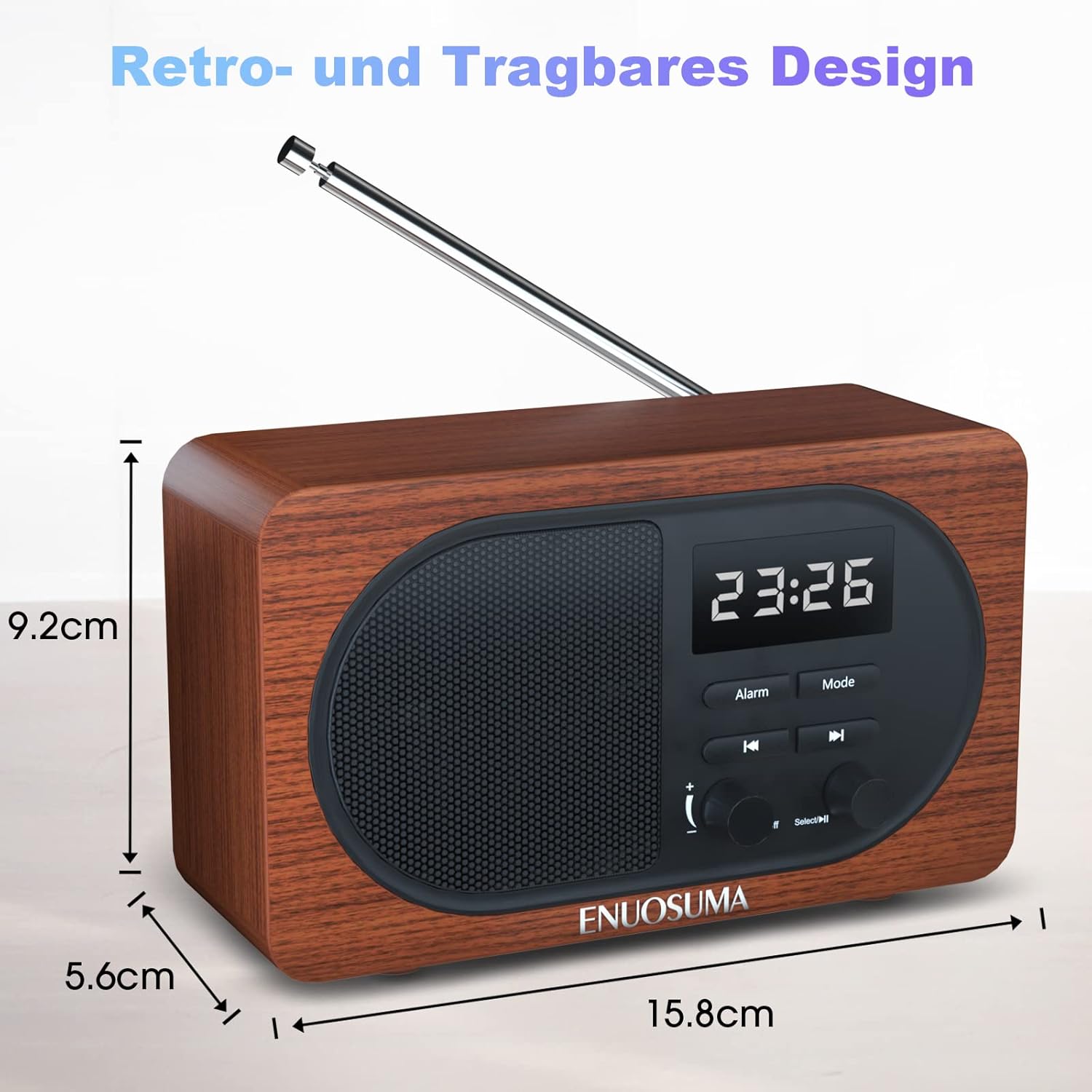
Figure 2: Detailed diagram labeling the front controls and rear ports of the ENUOSUMA Retro FM Radio.
- Power ON/OFF / Volume +/-: Rotate to adjust volume. Press and hold to power on/off.
- Select / Pause: Press to select or pause playback. Long press in FM mode for auto-search.
- Ойготкуч функциясы: Button to set and manage alarms.
- Режим: Press to switch between FM, Bluetooth, TF Card, USB, and AUX modes.
- Мурунку трек: Press to go to the previous track (in media playback modes) or tune down (in FM mode).
- Кийинки трек: Press to go to the next track (in media playback modes) or tune up (in FM mode).
- Aux Киргизүү: тышкы аудио түзмөктөр үчүн 3.5 мм уячасы.
- USB Disk Port: For USB flash drives with audio files.
- TF карта уячасы: For MicroSD/TF cards with audio files.
- Type-C заряддоо порту: Ички батареяны заряддоо үчүн.
- Микрофон (МИК): Үнсүз чалуу үчүн.
5. Орнотуу
5.1 Алгачкы заряддоо
Before first use, fully charge the radio. Connect the supplied Type-C USB charging cable to the Type-C Charging Port (10) on the back of the radio and the other end to a USB power adapter (not included) or a computer's USB port. The charging indicator will show the charging status.
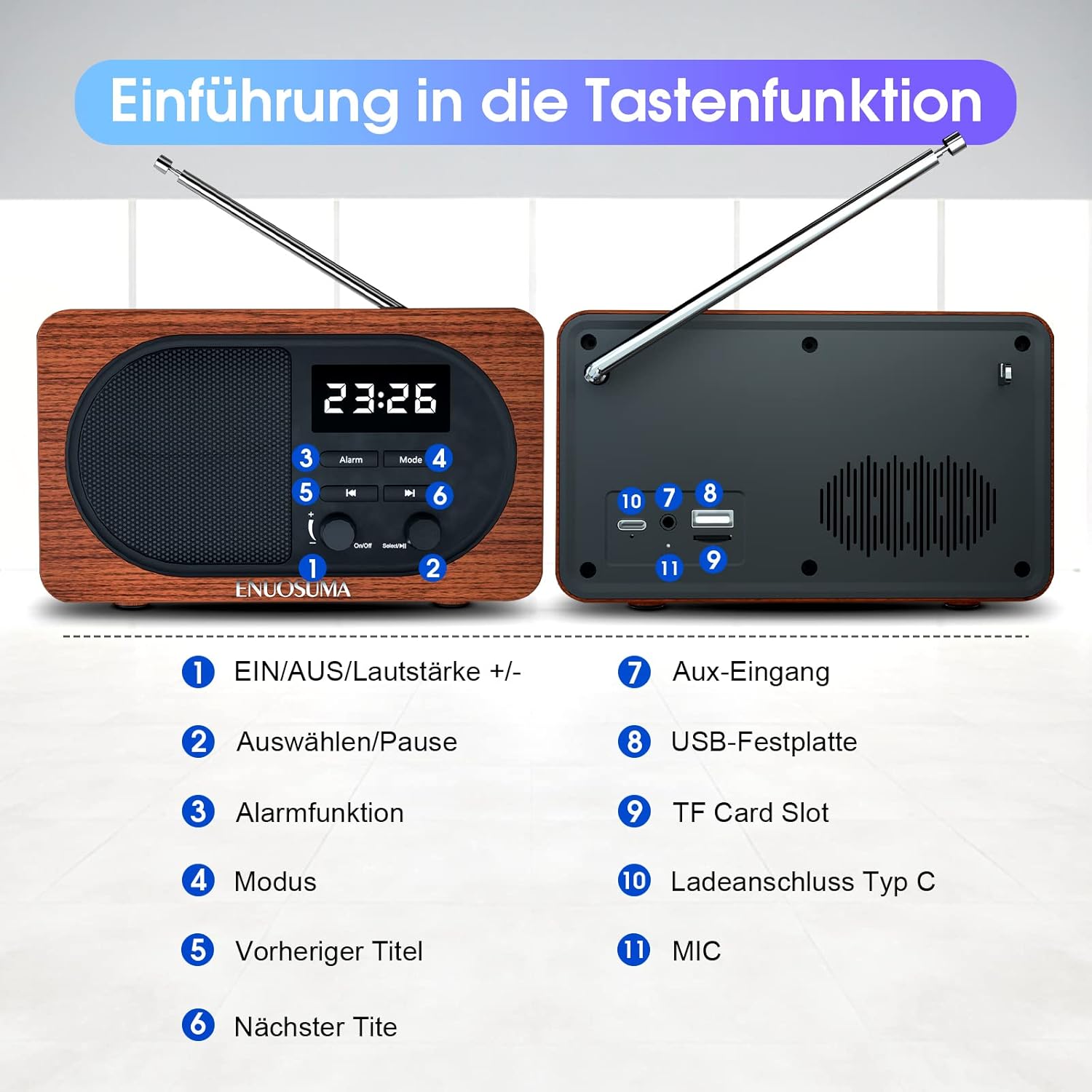
Figure 3: The radio's Type-C port can be used for charging the device. The image also illustrates the snooze function and the extendable antenna.
6. Иштөө нускамалары
6.1 Күйгүзүү/өчүрүү жана үндү башкаруу
- Күйгүзүү: Press and hold the Power ON/OFF / Volume +/- knob (1) until the display lights up.
- Өчүрүү: Press and hold the Power ON/OFF / Volume +/- knob (1) again.
- Үндү тууралоо: Rotate the Power ON/OFF / Volume +/- knob (1) clockwise to increase volume and counter-clockwise to decrease volume.
6.2 Режимди тандоо
Press the 'Mode' button (4) repeatedly to cycle through available modes: FM Radio, Bluetooth, TF Card, USB, and AUX.
6.3 FM радиосунун иштеши
- FM режимине кириңиз: Press the 'Mode' button (4) until 'FM' is displayed.
- Антеннаны узартуу: For best reception, fully extend the telescopic antenna located on the back of the radio.
- Автоматтык канал издөө: Long press the 'Select / Pause' button (2). The radio will automatically scan and store available FM stations. The number of stations found depends on signal strength.
- Кол менен жөндөө: In FM mode, briefly press the 'Previous Track' (5) or 'Next Track' (6) buttons to fine-tune the frequency.
- Navigate Stored Stations: After an auto-search, briefly press 'Previous Track' (5) or 'Next Track' (6) to cycle through stored stations.
6.4 Bluetooth жупташтыруу
- Bluetooth режимине кириңиз: Press the 'Mode' button (4) until 'Bluetooth' or 'BT' is displayed, and you hear an audible prompt. The radio will enter pairing mode.
- Түзмөгүңүздө Bluetooth иштетүү: On your smartphone, tablet, or other Bluetooth-enabled device, go to Bluetooth settings and enable Bluetooth.
- Түзмөктү тандоо: Look for 'ENUOSUMA' (or similar name) in the list of available devices and select it to pair.
- Ырастоо: Once paired, you will hear a confirmation sound from the radio. You can now play audio from your device through the radio.

Figure 4: The radio supports Bluetooth 5.0 for wireless connection to devices such as smartphones, laptops, and tablets.
6.5 Alarm Clock Setup
- Орнотуу убактысы: In clock mode, press and hold the 'Alarm' button (3) to enter time setting. Use 'Previous Track' (5) and 'Next Track' (6) to adjust hours and minutes, and 'Select / Pause' (2) to confirm and move to the next setting.
- 12/24 саат форматы: The radio supports both 12-hour and 24-hour time formats. This can typically be toggled during time setting or via a dedicated setting.
- Ойготкуч орнотуу: Briefly press the 'Alarm' button (3) to select Alarm 1 or Alarm 2. Press and hold the 'Alarm' button (3) to set the alarm time. Use 'Previous Track' (5) and 'Next Track' (6) to adjust, and 'Select / Pause' (2) to confirm.
- Чырым Function: Сигнал чыкканда, 5 мүнөттүк тындыруу функциясын иштетүү үчүн каалаган баскычты (өчүрүүдөн башка) басыңыз.

Figure 5: This infographic highlights the 12/24 hour time display, clock and FM modes, built-in microphone, and various input interfaces.
6.6 Media Playback (TF Card, USB, AUX)
- TF картасы/USB ойнотуу: Insert a TF card into the TF Card Slot (9) or a USB flash drive into the USB Disk Port (8) with compatible audio files. The radio will automatically switch to the respective mode or you can select it using the 'Mode' button (4). Use 'Previous Track' (5), 'Next Track' (6), and 'Select / Pause' (2) for playback control.
- AUX киргизүү: Connect an external audio device (e.g., MP3 player, smartphone) to the Aux Input (7) using the supplied audio cable. Select AUX mode using the 'Mode' button (4). Audio will be played through the radio's speaker.
6.7 Hands-Free функциясы
When connected via Bluetooth to a smartphone, the built-in Microphone (11) allows you to answer and make calls directly through the radio. Use the 'Select / Pause' button (2) to answer or end calls.
7. Техникалык тейлөө
- Түзмөктү кургак кармаңыз. Сууга же ашыкча нымдуулукка дуушар кылбаңыз.
- Радиону жумшак, кургак чүпүрөк менен тазалаңыз. Абразивдүү тазалагычтарды же эриткичтерди колдонбоңуз.
- Радиону узак убакыт бою колдонбогон учурда салкын, кургак жерде сактаңыз.
- Аппаратты өз алдынча бөлүүгө же оңдоого аракет кылбаңыз. Квалификациялуу тейлөө кызматкерлерине кайрылыңыз.
8. Кыйынчылыктарды
| Көйгөй | Мүмкүн себеп | Чечим |
|---|---|---|
| Радио күйбөйт. | Батарея аз же кубат жок. | Charge the radio using the Type-C USB cable. Ensure the charging cable is properly connected. |
| FM кабыл алуу начар. | Антенна узартылган эмес, сигнал аймагы алсыз. | Fully extend the telescopic antenna. Try repositioning the radio to an area with better signal reception. |
| Bluetooth түзмөгү жупташа албайт. | Radio not in pairing mode, Bluetooth off on device, device too far. | Ensure the radio is in Bluetooth mode. Make sure Bluetooth is enabled on your device and it's within range (approx. 10 meters). Restart both devices. |
| TF картадан/USBден үн чыкпай жатат. | Туура эмес режим, колдоого алынбайт file формат, бузулган files. | Ensure the radio is in TF Card or USB mode. Check if the audio files are in a supported format (e.g., MP3). Try another TF card or USB drive. |
| Убакытты/ойготкучту коюуга мүмкүн эмес. | Туура эмес баскычтардын ырааттуулугу. | Refer to section 6.5 for detailed instructions on setting time and alarms. Ensure you are pressing and holding the correct buttons as indicated. |
9. Техникалык шарттар
| Өзгөчөлүк | Спецификация |
|---|---|
| Бренд | ENUOSUMA |
| Модель номери | BS22 |
| Продукциянын өлчөмдөрү | 16 x 5.8 x 9.3 см |
| Элемент Салмагы | 0.64 килограмм |
| Байланыш технологиясы | Bluetooth 5.0, USB, AUX |
| Өзгөчөлүктөр | Audio Input, FM Radio, Alarm Clock, Built-in Microphone |
| Динамик чыгаруу күчү | 5 Ватт (Стерео) |
| FM жыштык диапазону | 108 МГц чейин |
| Батарея сыйымдуулугу | 2000mAh |
| Оюн убактысы | 9 саатка чейин |
| Заряддоо порту | C түрүндөгү USB |
10. Кепилдик жана колдоо
ENUOSUMA products are designed for reliability and performance. If you encounter any product quality problems or require assistance, please contact our customer service team. We are committed to providing 24-hour customer support to address your concerns.
Кепилдик дооматтары үчүн сатып алганыңыздын далилин сактап коюңуз.