
PPLEE CR1018I
PPLEE Extra Loud Vibrating Alarm Clock with Bed Shaker
Model: CR1018I
1. Продукт бүтүп калдыview
The PPLEE Extra Loud Vibrating Alarm Clock is designed to provide effective wake-up solutions for deep sleepers, individuals with hearing impairment, and the deaf. It features multiple wake-up modes, a large digital display, dual alarm settings, and convenient charging capabilities.

Image 1.1: The PPLEE Extra Loud Vibrating Alarm Clock with its bed shaker accessory.
Негизги өзгөчөлүктөрү:
- Strong Bed Shaker & Loud Alarm Buzzer: Offers three wake-up modes: loud buzzer, strong bed shaker, or a combination of both.
- 8.7" Large Mirror LED Display: Provides clear time visibility and can also function as a makeup mirror.
- Dual Alarms with Snooze Function: Allows setting two independent alarms with a 9-minute snooze option.
- Жөнгө салынуучу жарыктык жана үн көлөмү: Features 8 levels of display brightness and 7 levels of alarm volume.
- USB кубаттоо порту: Conveniently charge your mobile devices directly from the clock.
- Батареянын камдык көчүрмөсү: Электр энергиясы өчүрүлгөн учурда убакытты жана ойготкуч жөндөөлөрүн сактайтtages (CR2032 battery included).
- 12/24H Mode & DST Function: Supports both 12-hour and 24-hour time formats, along with Daylight Saving Time adjustment.
2. Пакеттин мазмуну
Сураныч, төмөнкү нерселер үчүн кутучаны белгилеңиз:
- 1 x PPLEE Mirror Alarm Clock
- 1 x Bed Shaker
- 1 x Power Plug with USB Cable
- 1 x Instruction Manual
- 1 x CR2032 Cell Coin Battery (pre-installed or separate)

Сүрөт 2.1: Продукт пакетине киргизилген бардык компоненттер.
3. Орнотуу колдонмосу
3.1 Кубат туташтыруу
- Connect the USB cable to the alarm clock's power input port.
- Кубат адаптерин стандарттуу электр розеткасына сайыңыз. Сааттын дисплейи күйөт.
- Ensure the CR2032 backup battery is installed in its compartment. This battery preserves time and alarm settings during power interruptions.

Сүрөт 3.1: Арткы view of the alarm clock showing the AC power input and backup battery compartment.
3.2 Bed Shaker Placement
The bed shaker provides a strong vibration to assist in waking. For optimal effectiveness, place the bed shaker in one of the following locations:
- Under your pillow.
- Under your fitted sheet.
- Between your mattress and box spring.

Image 3.2: Recommended placements for the bed shaker to maximize vibration effectiveness.
4. Иштөө нускамалары
4.1 Убакытты коюу
- басып, кармап туруңуз УБАКЫТТЫ ОРНОТУУ баскычын сааттын цифралары жаркылдай баштаганга чейин басыңыз.
- колдонуу HOUR жана MINUTE убакытты тууралоо үчүн баскычтар.
- Басыңыз УБАКЫТТЫ ОРНОТУУ ырастоо жана убакыт орнотуу режиминен чыгуу үчүн кайра.
4.2 Ойготкучтарды орнотуу (ойготкуч 1 & Ойготкуч 2)
Саат эки көз карандысыз ойготкучту колдойт.
- басып, кармап туруңуз 1-ДАБЛ or 2-ДАБЛ ойготкучтун убакытынын сандары күйүп-өчкөнгө чейин баскычын басыңыз.
- колдонуу HOUR жана MINUTE каалаган ойготкуч убактысын коюу үчүн баскычтарды басыңыз.
- Басыңыз 1-ДАБЛ or 2-ДАБЛ again to confirm the alarm time.
- To activate or deactivate an alarm, short press the corresponding 1-ДАБЛ or 2-ДАБЛ баскычы. Дисплейде ойготкучтун сөлөкөтү пайда болот/жок болот.

Image 4.1: The dual alarm feature allows setting two separate wake-up times.
4.3 Тындыруу функциясы
Ойготкуч чыкканда, басыңыз СОЮЗ Ойготкучту 9 мүнөткө убактылуу өчүрүү үчүн баскычын басыңыз. Ойготкуч тындыруу мезгилинен кийин кайрадан чырылдайт.
4.4 Turning Off Alarms
- Temporary Turn Off: басыңыз ОЙГОЛГОН ӨЧҮРҮҮ button once when the alarm is sounding to stop it for the current day. It will reactivate the next day.
- Permanent Turn Off: басып, кармап туруңуз ОЙГОЛГОН ӨЧҮРҮҮ button to deactivate the alarm permanently. The alarm icon will disappear from the display.
4.5 Дисплейдин жарыктыгын жөндөө
The display has 8 levels of brightness. Short press the DIMMER button repeatedly to cycle through the brightness levels (OFF, Level 1-7). When in 'OFF' mode, the red indicator on top will remain on.
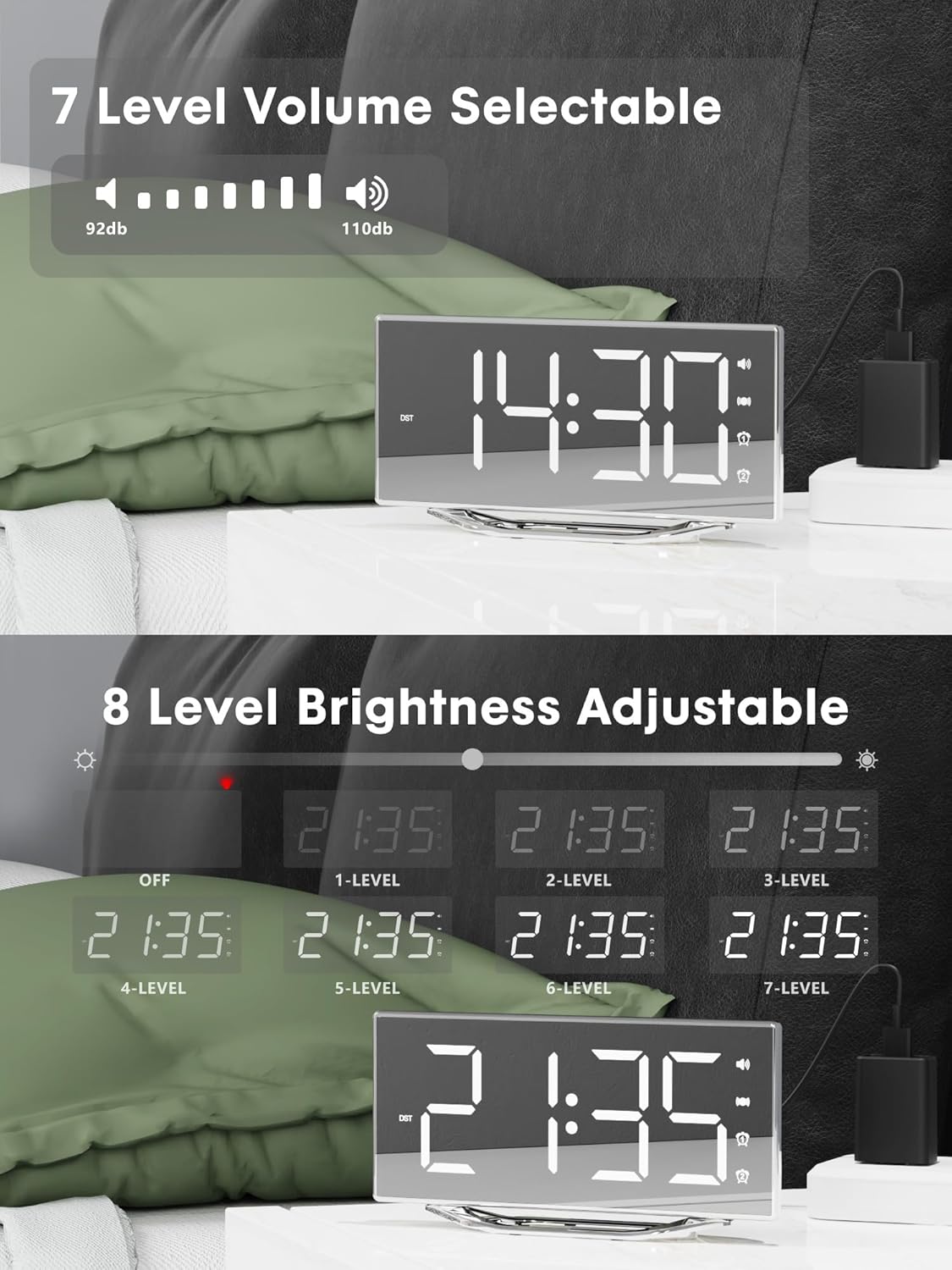
Image 4.2: Visual representation of the 8-level brightness adjustment for the LED display.
4.6 Ойготкучтун үнүн тууралоо
The alarm buzzer has 7 adjustable volume levels. Short press the VOLUME button repeatedly to cycle through the volume levels.

Image 4.3: The alarm volume can be adjusted across 7 levels, from 92dB to 110dB.
4.7 Selecting Wake-Up Mode
басыңыз BUZZ/VIB button to select your preferred wake-up method:
- Loud Buzzer only
- Strong Bed Shaker only
- Both Buzzer and Shaker

Image 4.4: The alarm clock offers three distinct wake-up modes for personalized use.
4.8 12/24 Hour Format & DST
- 12/24 саат форматы: баскычын кыска басыңыз 12/24H button to switch between 12-hour and 24-hour time display.
- DST функциясы: баскычын кыска басыңыз DST button to activate or deactivate Daylight Saving Time.

Image 4.5: The clock supports both 12-hour and 24-hour time formats, and features a USB charging port.
4.9 USB кубаттоо порту
The integrated USB charging port allows you to charge your smartphone or other USB-powered devices directly from the alarm clock. Simply connect your device's USB charging cable to the port on the clock.
5. Техникалык тейлөө
- Clean the clock surface with a soft, dry cloth. Avoid using abrasive cleaners or solvents.
- Саатты суудан жана жогорку нымдуулуктан алыс кармаңыз.
- Do not expose the clock to direct sunlight or extreme temperatures.
- If the clock will not be used for an extended period, consider removing the backup battery to prevent leakage.
6. Кыйынчылыктарды
| Көйгөй | Мүмкүн себеп | Чечим |
|---|---|---|
| Сааттын дисплейи өчүк. | No power supply; power cable loose. | Ensure the power adapter is securely plugged into the clock and a working outlet. Check if the dimmer is set to 'OFF'. |
| Сигнализация үн чыгарбайт/дирилдебейт. | Alarm not activated; volume too low; bed shaker not connected or placed incorrectly. | Verify alarm is activated (icon visible). Increase alarm volume. Ensure bed shaker is securely plugged in and properly placed. |
| Электр кубаты өчүрүлгөндөн кийин убакыт/жөндөөлөр баштапкы абалга келтирилетtage. | Резервдик батарея түгөндү же орнотулган эмес. | Replace the CR2032 backup battery. Ensure it is installed correctly. |
| USB кубаттоо иштебей жатат. | Device not compatible; cable faulty; clock not powered. | Ensure the clock is powered. Try a different USB cable. Verify your device is compatible with standard USB charging. |
7. Техникалык шарттар
| Өзгөчөлүк | Деталь |
|---|---|
| Бренд | PPLEE |
| Модель номери | CR1018I |
| Түс | Silver Surface (with Bed Shaker) |
| Дисплей түрү | Digital LED |
| Продукциянын өлчөмдөрү | 8.7"W x 8.7"H (Display size) |
| Power Source | Электр зымдары |
| Камдык батарея | 1 x CR2032 (кошулган) |
| Материал | Пластик |
| Элемент Салмагы | 7 унция (0.2 килограмм) |
| Ойготкуч режимдери | Buzzer, Vibration, Buzzer + Vibration |
| Дисплей жарыктыгы | 8 Levels (including OFF) |
| Ойготкучтун үнү | 7 деңгээл |
| Убакыт форматы | 12 саат/24 саат тандалышы мүмкүн |
| Өзгөчөлүктөр | Dual Alarms, Snooze, USB Charging Port, DST Function, Mirror Surface |
8. Кепилдик жана колдоо
PPLEE is committed to providing high-quality products and customer satisfaction.
- 1 жылдык кепилдик: The product is covered by a 1-year warranty from the date of purchase against manufacturing defects.
- 90 күндүк акчаны кайтарып берүү кепилдиги: If you are unsatisfied with the product, you may be eligible for a full refund within 90 days of purchase.
- Lifetime Free Support: PPLEE offers free lifetime user support for any questions or concerns regarding the product.
- 24-Hour Response Service: For any inquiries, please contact us via Amazon. We aim to respond within 24 hours.

Image 8.1: Summary of warranty and support offerings.
Ask a question about this manual
Ask about setup, troubleshooting, compatibility, parts, safety, or missing instructions. Manuals+ will review the question and use this page’s manual context to help answer it.