
1. Киришүү
Сатып алганыңыз үчүн рахматasing the SUNTEK Monocular Night Vision NV-300. This device is an advanced optical instrument designed to provide clear visibility in low-light and complete darkness by utilizing faint ambient light or infrared (IR) reflection. It is ideal for various outdoor activities such as bird watching, surveillance, and night survival games. Please read this manual thoroughly before operating the device to ensure proper use and optimal performance.
2. Продукт бүтүп калдыview
The SUNTEK NV-300 features a robust design with a 40mm objective lens, 5x fixed optical zoom, and up to 8x digital zoom, allowing for detailed observation. It records in 1080P resolution and has a simple waterproof construction for durability in various environments.
2.1. Компоненттер
- Monocular Night Vision Device (NV-300)
- Сактоочу баштык
- USB Cable (for data transfer/charging)
- User Manual
2.2. Түзмөктүн жайгашуусу
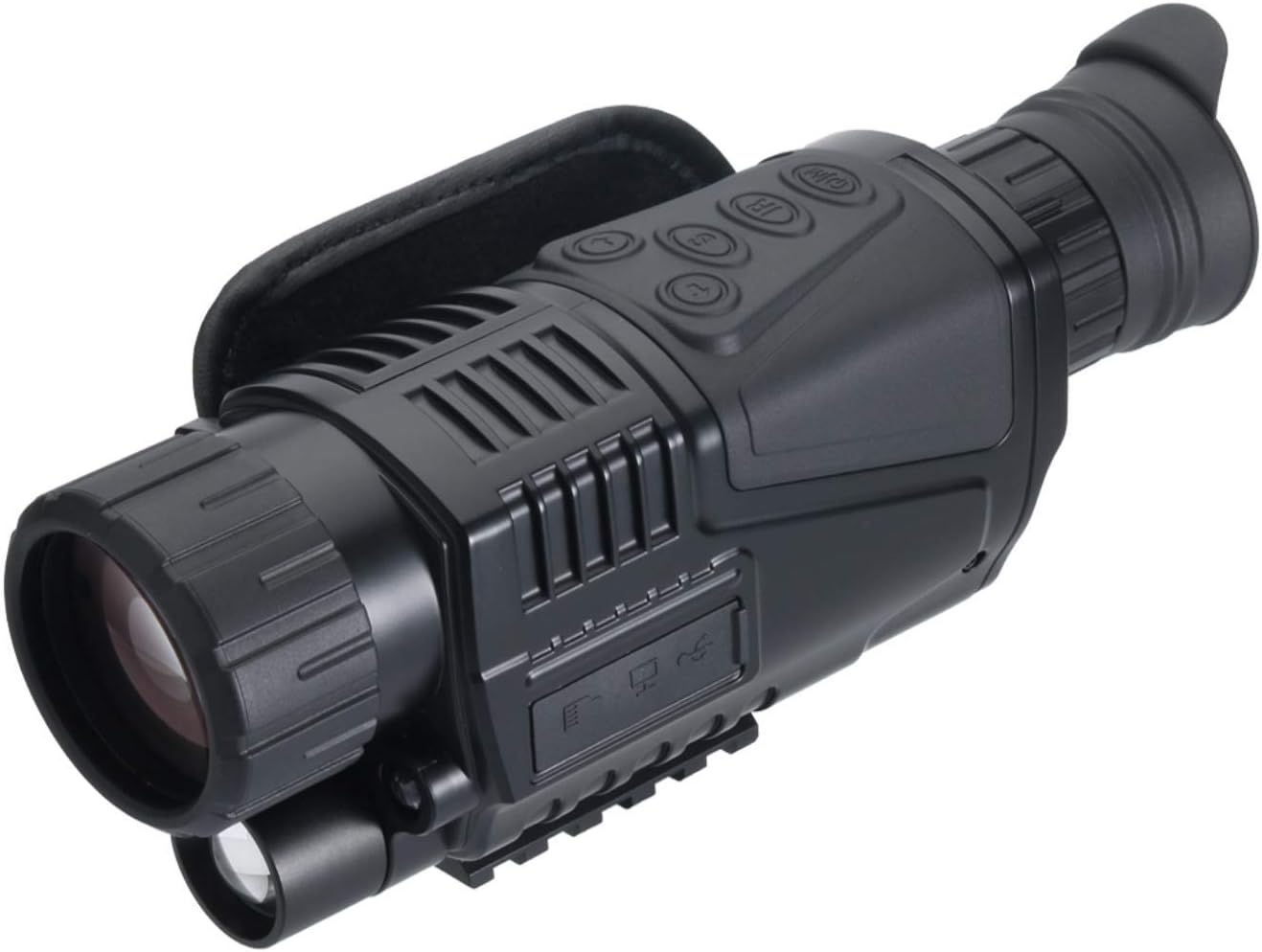
2.2.1-сүрөт: Бурчтуу view of the NV-300, highlighting the main body and controls.

2.2.2-сүрөт: Каптал view of the NV-300, illustrating the ports and overall shape.

2.2.3-сүрөт: алдыңкы жагы view of the NV-300, showing the eyepiece and focus adjustment.
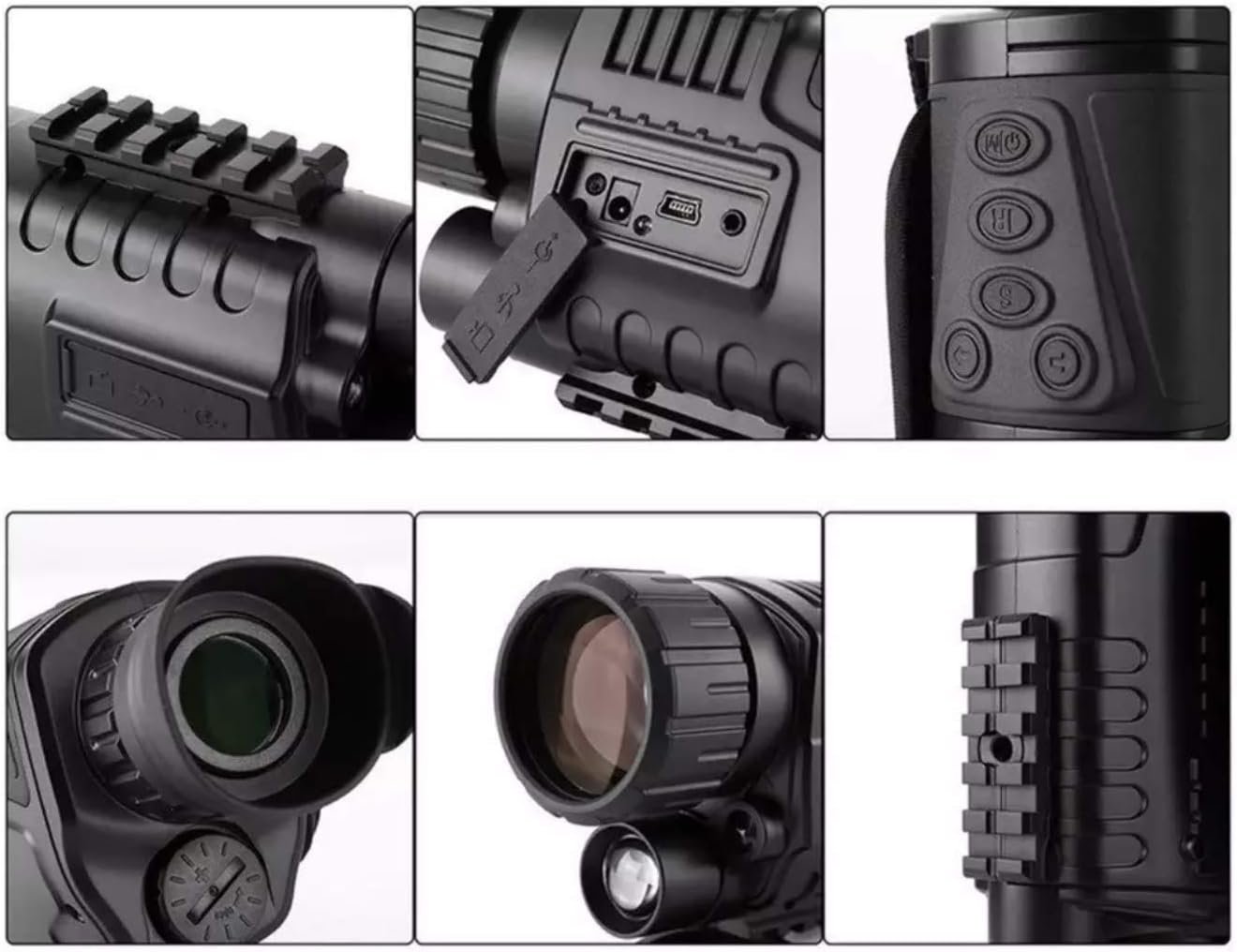
2.2.4-сүрөт: Детальдуу views of various parts of the NV-300, including ports, buttons, and the mounting rail.
3. Орнотуу
3.1. Батареяны орнотуу
- Батарея бөлүмүнүн капкагын, адатта, түзмөктүн капталынан же астынан табыңыз.
- Капкакты белгилерине ылайык бурап же жылдырып ачыңыз.
- Insert the required batteries (not specified in product data, assume standard AA or rechargeable pack) according to the polarity indicators (+/-).
- Close the battery compartment cover securely to ensure the simple waterproof seal is maintained.
3.2. Баштапкы күйгүзүү
Press and hold the power button (usually marked with a power symbol) for a few seconds until the display illuminates. The device will perform a self-check before entering observation mode.
3.3. Монтаждоо (кошумча)
The NV-300 features a Picatinny mount for attachment to compatible rails. Align the mount on the device with the rail and secure it using the appropriate fasteners. Ensure the device is firmly attached before use.
4. Иштөө нускамалары
4.1. Күйгүзүү/өчүрүү
- Күйгүзүү үчүн: Экран иштетилгенче кубат баскычын басып, кармап туруңуз.
- Өчүрүү үчүн: Press and hold the power button again until the screen shuts down.
4.2. Фокусту тууралоо
Rotate the focus ring on the objective lens (front of the device) until the image on the display appears sharp and clear. Adjust the diopter on the eyepiece (rear of the device) for individual eye comfort if available.
4.3. Чоңойтуу функциясы
- аппарат бар 5x fixed optical zoom.
- Use the digital zoom buttons (often marked with '+' and '-' or zoom icons) to increase magnification up to 8x санариптик масштаб.
4.4. Activating IR Illumination
In complete darkness, activate the infrared (IR) illuminator. This button is typically marked with an 'IR' symbol. Multiple levels of IR intensity may be available; cycle through them to find the optimal brightness for your environment.
4.5. Recording Video and Taking Photos
The NV-300 supports 1080P resolution recording. Insert a compatible microSD card (not included) into the designated slot. Use the dedicated photo/video buttons (often marked with a camera or video camera icon) to capture images or start/stop video recording. Refer to the on-screen menu for specific recording settings.
4.6. Меню навигациясы
Press the 'Menu' button to access device settings. Use the directional buttons (up/down/left/right) to navigate through options and the 'OK' or 'Enter' button to confirm selections. Settings may include date/time, resolution, IR intensity, and display brightness.
5. Техникалык тейлөө
5.1. Тазалоо
- Линзалар: Оптикалык линзалар үчүн атайын иштелип чыккан жумшак, мамыксыз чүпүрөктү колдонуңуз. Линзалардын бетин акырын сүртүңүз. Өжөр тактар үчүн аз өлчөмдөгү линза тазалоочу суюктукту колдонуңуз. Абразивдүү материалдарды же ашыкча күч колдонуудан алыс болуңуз.
- Дене: Түзмөктүн корпусун жумшак, d менен сүртүңүзamp кездеме. Катуу химиялык заттарды же эриткичтерди колдонбоңуз.
5.2. Сактоо
When not in use, store the NV-300 in its provided storage pouch in a cool, dry place, away from direct sunlight and extreme temperatures. Remove batteries if the device will not be used for an extended period to prevent leakage.
5.3. Батареяга кам көрүү
Always use high-quality batteries. If using rechargeable batteries, follow the manufacturer's charging instructions. Do not mix old and new batteries or different types of batteries.
6. Кыйынчылыктарды
- Түзмөк күйбөйт:
- Батарея орнотулганын текшерип, туура полярдуулугун текшериңиз.
- Жаңы батареялар менен алмаштырыңыз же кайра заряддалуучу батареялардын толук заряддалганын текшериңиз.
- Сүрөт бүдөмүк:
- Adjust the objective lens focus ring.
- Объективди жана окулярдын линзаларын тазалаңыз.
- Караңгыда начар көрүнүү:
- Ensure the IR illuminator is activated.
- Increase the IR intensity level.
- Check for obstructions in front of the objective lens or IR illuminator.
- Cannot record or save images/videos:
- Ensure a compatible microSD card is inserted correctly.
- Check if the microSD card has sufficient free space.
- microSD картасын форматтаңыз (бул бардык маалыматтарды өчүрөт).
7. Техникалык шарттар
| Өзгөчөлүк | Спецификация |
|---|---|
| Продукт моделинин номери | ca-nv300 |
| Түс | Кара |
| Материал | Пластик |
| Type | Survival / Night Vision Scope |
| Пакеттин өлчөмдөрү | 22 x 14 x 8 см |
| Элемент Салмагы | 500 г |
| Максималдуу чоңойтуу | 5x (Optical), 8x (Digital) |
| Объективдүү линзанын диаметри | 40 мм |
| Резолюция | 1080P |
| Монтаж түрү | Пикатинни тоосу |
8. Кепилдик жана колдоо
For warranty information and technical support, please refer to the documentation provided at the time of purchase or contact the seller, ChaosAirsoft, directly. Keep your purchase receipt as proof of purchase.