
1. Киришүү
This manual provides detailed instructions for the safe and effective use of your Flashpoint Zoom Li-on III R2 TTL On-Camera Flash for Fujifilm cameras. Please read this manual thoroughly before operation to ensure proper functionality and to prevent damage to the unit or injury to yourself.
The Flashpoint Zoom Li-on III R2 is a high-performance speedlight designed for Fujifilm cameras, featuring a powerful 76Ws output, 2.4GHz wireless R2 system, 1/8000s High-Speed Sync (HSS), and a quick manual-TTL switch for versatile lighting control. It is powered by a 7.2V/2600mAh Li-ion battery, providing up to 450 full-power flashes with a rapid 1.5s recycle time.

Image: The Flashpoint Zoom Li-on III R2 TTL On-Camera Flash unit.
2. Коопсуздук маалыматы
- Жарк этүүчү аппаратты ажыратпаңыз же өзгөртпөңүз. Жогорку томtage компоненттери бар.
- Агрегатты кургак кармаңыз. Жамгырга же нымдуулукка жол бербеңиз.
- Do not touch the flash tube after firing, as it can be hot.
- Көзгө түздөн-түз тийүүдөн сактаныңыз, айрыкча жакын аралыкта жарк этиңиз, анткени ал көрүү начарлашы мүмкүн.
- Балдар жетпеген жерде сактаңыз.
- Белгиленген батарейканы жана заряддагычты гана колдонуңуз.
- Кокустан түшүп кетпеши үчүн жарк камерага же стендге бекем орнотулганын текшериңиз.
3. Продукциянын компоненттери
The Flashpoint Zoom Li-on III R2 package typically includes the following items:
- Flashpoint Zoom Li-on III R2 TTL On-Camera Flash Unit
- Ли-иондук батарейка (7.2V/2600mAh)
- Батарея заряддагыч
- USB заряддоо кабели
- Мини стенд
- Коргоочу кап
- Көрсөтмө (бул документ)

Image: Contents of the Flashpoint Zoom Li-on III R2 package, including the flash unit, battery, charger, cable, mini stand, and case.
4. Орнотуу
4.1 Батареяны орнотуу жана заряддоо
- Жаркылдатуучу блоктогу батарея бөлүмүнүн капкагын ачыңыз.
- Insert the 7.2V/2600mAh Li-ion battery, ensuring correct polarity.
- Батарея уясынын капкагын бекем жабыңыз.
- To charge, connect the battery to the charger and plug the charger into a power outlet. The indicator light will show charging status.

Image: Close-up of the Flashpoint Zoom Li-on III R2 showing the battery compartment and the 2600mAh Li-ion battery.
4.2 Жарыкты орнотуу
- Slide the flash's mounting foot into your Fujifilm camera's hot shoe.
- Tighten the locking knob or lever on the flash unit to secure it firmly in place.
- Alternatively, mount the flash onto a light stand using the included mini stand or a compatible cold shoe adapter.

Image: The Flashpoint Zoom Li-on III R2 flash mounted on a camera hot shoe.
5. Flashти иштетүү
5.1 Power On/Off and Interface
Press and hold the power button to turn the flash on or off. The backlit matrix LCD provides clear information and settings. Use the multipurpose buttons and dial for navigation and adjustments.
Image: The control panel of the Flashpoint Zoom Li-on III R2, showing the backlit LCD and multipurpose buttons.
5.2 Flash режимдери
The flash supports various modes for different shooting scenarios:
- TTL (Объектив аркылуу) режими: The flash automatically adjusts its output based on the camera's metering system. Use the Quick Manual-TTL switch for fast transitions.
- Кол менен (M) режими: Allows you to manually set the flash power output from 1/1 to 1/256.
- Көп (Стробоскопиялык) режим: Объекттин бир нече кыймылын тартуу үчүн бир экспозиция учурунда бир катар тез жарк этет.
- Жогорку ылдамдыктагы синхрондоштуруу (HSS): Enables flash synchronization with shutter speeds up to 1/8000s, useful for overpowering ambient light or using wide apertures in bright conditions.

Image: Visual representation of different flash modes including TTL, Manual, Stroboscopic, and High-Speed Sync (HSS) capabilities.
5.3 Flash башын тууралоо
The flash head offers flexible positioning for bounce flash or direct lighting:
- Горизонталдык айлануу: The flash head rotates 0 to 330 degrees.
- Вертикалдуу кыйшаюу: The flash head tilts from -7 to 120 degrees.
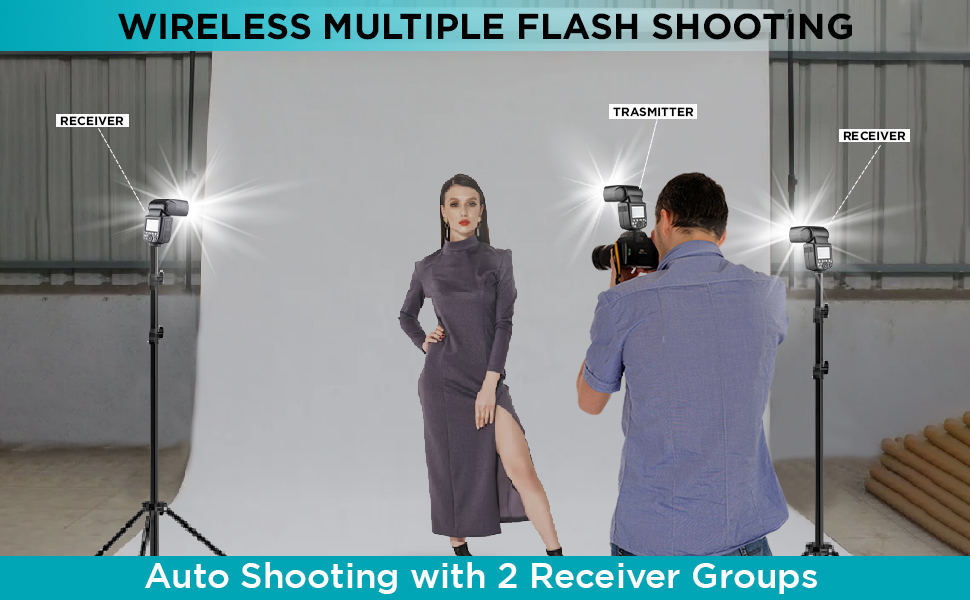
Image: Diagram illustrating the horizontal rotation (330 degrees) and vertical tilt (120 degrees) capabilities of the flash head.
6. Wireless Control (R2 System)
The Flashpoint Zoom Li-on III R2 features a built-in 2.4GHz R2 wireless system, allowing for reliable remote triggering and multi-flash setups.
6.1 Master and Slave Modes
- Мастер режими: The flash can act as a master unit to control other Fujifilm compatible flashes with built-in R2 receivers.
- Кул режими: The flash can be triggered wirelessly by a master unit or transmitter, allowing for off-camera lighting.

Image: Illustration of the flash operating in both Master and Slave modes for wireless multi-flash setups.
6.2 Зымсыз берүү
The 2.4GHz wireless transmission offers 32 channels and a range of up to 100 meters, providing robust connectivity for complex lighting arrangements.

Image: Diagram showing the 2.4GHz wireless transmission capabilities of the Flashpoint Zoom Li-on III R2, including channel and range information.
7. Техникалык тейлөө
- Clean the flash unit regularly with a soft, dry cloth. Do not use solvents or abrasive cleaners.
- Ensure the hot shoe contacts are clean and free of debris for proper communication with the camera.
- Чаңдын жана бузулуунун алдын алуу үчүн, колдонулбай турган учурда жаркылдаткычты коргоочу кутучасында сактаңыз.
- If storing for extended periods, remove the battery and store it separately in a cool, dry place.
8. Кыйынчылыктарды
| Көйгөй | Мүмкүн себеп | Чечим |
|---|---|---|
| Flash күйбөйт. | Battery low or depleted; incorrect mode; flash not securely mounted; camera settings incorrect. | Charge or replace battery; check flash mode (TTL/M); ensure flash is fully seated in hot shoe; verify camera flash settings. |
| Flash чыгаруу шайкеш келбейт. | Low battery; environmental interference (wireless); dirty contacts. | Ensure battery is fully charged; change wireless channel; clean hot shoe contacts. |
| Зымсыз ишке киргизүү ишке ашпай калды. | Incorrect channel/group settings; distance too far; obstructions; master/slave not properly set. | Verify matching channel and group settings on all units; reduce distance; ensure clear line of sight; confirm master/slave roles. |
| Flash кайра иштетүү убактысы жай. | Battery is low; high power output setting. | Recharge battery; use lower power settings if possible. |
9. Техникалык шарттар
| Өзгөчөлүк | Деталь |
|---|---|
| Гид саны | 197ft/60m @ISO 100 |
| Power Output | 76Ws |
| Flash режимдери | TTL, Кол менен башкарылуучу, Көп функциялуу (стробоскопиялык) |
| Жогорку ылдамдыктагы синхрондоштуруу (HSS) | 1/8000с чейин |
| Кайра иштетүү убактысы | Болжол менен 1.5 секунд |
| Толук кубаттуу жаркырап | Окутуу үчүн. 450 |
| Батарея | 7.2V/2600mAh Li-ion |
| Зымсыз тутум | 2.4GHz R2 Wireless |
| Зымсыз каналдар | 32 |
| Зымсыз диапазон | 100 метрге чейин |
| Flash баштын айлануусу | 0 to 330 degrees (horizontal) |
| Башты жаркылдатуу менен кыйшайтуу | -7 to 120 degrees (vertical) |
| Моделдөө Л.amp | 2W integrated |
| Өлчөмдөр | 9 x 8.3 x 4 дюйм |
10. Кепилдик жана колдоо
Flashpoint products are designed for reliability and performance. For warranty information and technical support, please refer to the official Flashpoint webсайтка же ыйгарым укуктуу дилериңизге кайрылыңыз. Сатып алуу квитанциясын кепилдик дооматтары үчүн сатып алуунун далили катары сактаңыз.
For further assistance, you may visit the Flashpoint store online: Flashpoint Store