
Walfront NF-308
Walfront NF-308 Cable Detector User Manual
Multifunction Cable Tester with LCD Display
1. Киришүү
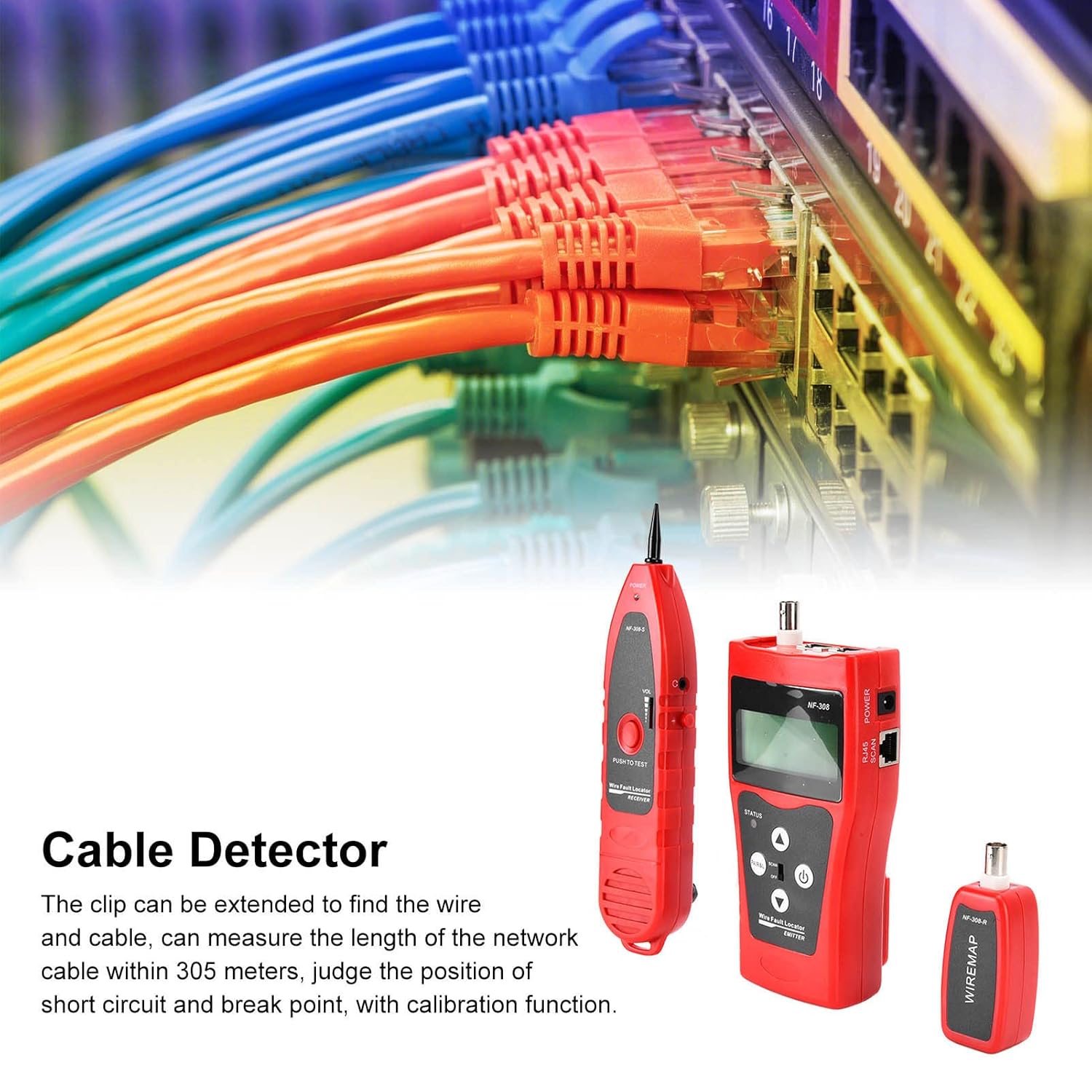
The Walfront NF-308 Cable Detector is a versatile handheld instrument designed for efficient line detection and inspection. It is an indispensable tool for professionals working with network cables, telephone lines, BNC coaxial cables, USB lines, and other metal cables. This device is ideal for integrated wiring projects, maintenance, and troubleshooting in communication systems, computer networks, and information systems.
The NF-308 features an LCD display, allowing for clear readings and includes functions such as cable length measurement, continuity testing, and live line finding with strong anti-interference capabilities.
2. Коопсуздук маалыматы
- Аппаратты оңдоого же өзгөртүүгө аракет кылбаңыз. Бардык тейлөөлөрдү квалификациялуу кызматкерлерге тапшырыңыз.
- Ensure the correct battery type (6F22 9V) is used and inserted with correct polarity.
- Аппаратты экстремалдык температурага, нымдуулукка же түз күн нуруна калтырбаңыз.
- Avoid using the device in environments with strong electromagnetic interference.
- Always disconnect the device from any live circuits before performing tests, unless specifically instructed otherwise for live line finding functions.
- Аппаратты таза жана кургак кармаңыз.
3. Пакеттин мазмуну
Сураныч, бардык буюмдар бар экенин текшерүү үчүн алгандан кийин пакеттин мазмунун текшериңиз:
- 1 x Receiver (NF-308-S)
- 1 x Transmitter (NF-308)
- 1 x Remote Terminal (NF-308-R)
- 1 х Наушник
- 1 x Alligator Clip Cable
- 2 x Network Cables (RJ45)
- 1 x User Manual
- 1 x Ташуу сумкасы

4. Продукт бүтүп калдыview
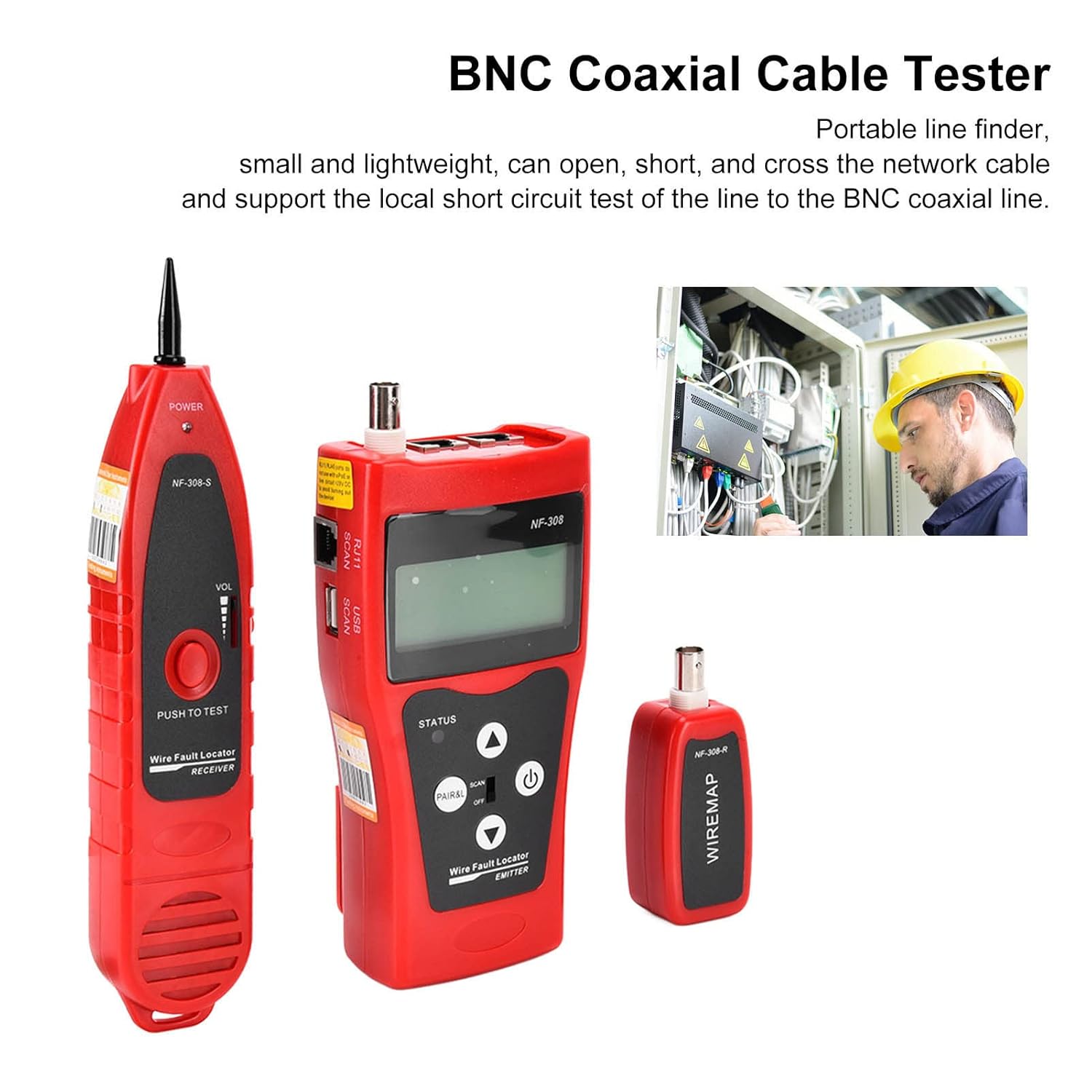
The NF-308 system consists of three main units: the Transmitter, the Receiver, and the Remote Terminal.

4.1. Transmitter (NF-308)
The main unit with an LCD display for showing test results and settings.

- LCD дисплей: Shows test results, cable length, voltagе., жана башка маалыматтар.
- PAIR&L Button: Used for pair testing and length measurement.
- SCAN Switch: Toggles between SCAN mode (for tracing) and OFF.
- Кубат баскычы: Аппаратты КҮЙГҮЗҮП/ӨЧҮРӨТ.
- Өйдө/төмөн жебелер: Меню жана орнотуулар үчүн навигация баскычтары.

- MAIN (RJ45): Primary port for network cable testing.
- PORT FLASH (RJ45): Used for identifying switch port connections.
- BNC: Port for coaxial cable testing.
4.2. Receiver (NF-308-S)
Used for tracing cables and detecting signals from the transmitter.

- Текшерүү: For sensing the signal emitted by the transmitter.
- Үндү көзөмөлдөө: Adjusts the sound level of the detected signal.
- RJ45 SCAN Port: For direct connection to network cables for scanning.
- Гарнитура уячасы: For private listening of the signal.
4.3. Remote Terminal (NF-308-R)
A small, passive unit used in conjunction with the transmitter for continuity and length testing of cables.
- RJ45 Порт: For connecting the remote end of a network cable.
- BNC Port: For connecting the remote end of a coaxial cable.
5. Орнотуу
5.1. Батареяны орнотуу
The NF-308 Transmitter and Receiver each require one 6F22 9V battery (not included). To install:
- Locate the battery compartment on the back of the Transmitter and Receiver units.
- Батареянын капкагын ачыңыз.
- Insert a 6F22 9V battery, ensuring correct polarity (+/-).
- Батареянын капкагын бекем жабыңыз.
5.2. Баштапкы күйгүзүү
Press the power button on the Transmitter unit to turn it on. The LCD display should light up. The device has an automatic delay shutdown function to conserve battery life.
6. Иштөө нускамалары
6.1. Cable Tracing / Line Finding
This function is used to locate a specific cable among a bundle or to trace its path.
- Connect one end of the cable to be traced to the appropriate port (RJ45, RJ11, or BNC) on the Transmitter unit.
- Turn on the Transmitter and set the SCAN switch to 'SCAN'.
- Turn on the Receiver unit.
- Use the Receiver's probe to scan along the cable path or through the bundle of cables.
- When the Receiver detects the signal from the Transmitter, it will emit an audible tone. The tone will be strongest when the probe is directly over the target cable. Adjust the volume on the Receiver as needed.
- For noisy environments, use the provided headphones with the Receiver.

6.2. Тармак кабелинин узундугун өлчөө
The NF-308 can measure the length of network cables up to 1000 meters with an accuracy of ±3%.
- Ensure the cable is not connected to any active network devices.
- Connect one end of the network cable to the 'MAIN' RJ45 port on the Transmitter.
- Connect the other end of the network cable to the RJ45 port on the Remote Terminal.
- On the Transmitter, select the length measurement function (refer to the on-screen menu if applicable, or press 'PAIR&L' button).
- The LCD will display the measured cable length.
6.2.1. Length Calibration
For accurate length measurements, especially for cables shorter than 10 meters, calibration is recommended. The calibration cable length should be greater than 10 meters.
- Connect a known length of network cable (greater than 10 meters) to the Transmitter and Remote Terminal.
- Access the calibration menu on the Transmitter (refer to the manual's specific menu navigation).
- Follow the on-screen prompts to perform calibration.
6.3. Continuity Test (Wiremap)
This function checks for open circuits, short circuits, and cross-connections in network (RJ45) and BNC coaxial cables.
- Connect one end of the cable to the appropriate port on the Transmitter.
- Connect the other end of the cable to the corresponding port on the Remote Terminal.
- On the Transmitter, select the continuity test or wiremap function (often labeled 'PAIR&L' or similar).
- The LCD will display the wiremap, indicating the connection status of each wire pair.
- Common indications:
- Ачык: A break in the wire.
- Кыскача: Эки же андан көп зымдар бири-бирине тийишип турат.
- кайчылаш: Wires are connected to the wrong pins at the other end.
- Жакшы: Бардык зымдар туура туташтырылган.
6.4. Port Flash Function
This function helps identify the corresponding port on a network switch or router.
- Connect one end of the network cable to the 'PORT FLASH' RJ45 port on the Transmitter.
- Connect the other end of the network cable to an unknown port on a network switch or router.
- Activate the Port Flash function on the Transmitter.
- The corresponding port LED on the switch/router will flash, allowing you to identify it.
6.5. Томtage Өлчөө
The NF-308 can measure voltagд 0-60В чейин.
- Connect the alligator clip cable to the appropriate input on the Transmitter.
- Connect the clips to the voltagөлчөө үчүн булагы.
- Томtage reading will be displayed on the LCD screen.
7. Техникалык тейлөө
- Тазалоо: Жарнама менен үзгүлтүксүз сүртүңүзamp кездеме жана жумшак жуучу каражат. Абразивдүү заттарды же эриткичтерди колдонбоңуз, анткени алар териге зыян келтириши мүмкүн.asing же экран.
- Сактагыч: When not in use for extended periods, remove the batteries to prevent leakage. Store the device in its carrying bag in a cool, dry place, away from direct sunlight and extreme temperatures.
- Батареяны алмаштыруу: Replace batteries when the low battery indicator appears on the LCD or when the device's performance degrades.
8. Кыйынчылыктарды
| Көйгөй | Мүмкүн себеп | Чечим |
|---|---|---|
| Түзмөк күйбөйт. | Батареянын заряды аз же түгөндү; Батарея туура эмес орнотулган. | Replace battery; Check battery polarity. |
| No signal detected during tracing. | Transmitter not in SCAN mode; Cable not properly connected; Receiver volume too low; Interference. | Ensure Transmitter is in SCAN mode; Reconnect cable securely; Increase Receiver volume; Move away from strong electromagnetic fields. |
| Узундукту өлчөө туура эмес. | Cable not properly connected; Cable too short for accurate measurement; Device needs calibration. | Ensure secure connections; Use a cable longer than 10m for calibration; Perform calibration as per instructions. |
| Wiremap shows errors (Open/Short/Cross). | Actual cable fault; Poor connection at connector; Incorrect cable type selected. | Inspect cable and connectors for damage; Re-crimp connectors if necessary; Ensure correct cable type is being tested. |
| LCD дисплей күңүрт же жыпылыктап жатат. | Батарея аз. | Батареяны алмаштырыңыз. |
9. Техникалык шарттар
| Өзгөчөлүк | Спецификация |
|---|---|
| Модел | NF-308 |
| Материал | ABS |
| Батарея түрү | 6F22 9V x 1 (Not Included) |
| Колдонмо чөйрөсү | Network cable, telephone, video, same line, USB line, other metal cables |
| Number of Remote Ends | 1 |
| Length Test Cable Type | Network Cable |
| Узундукту өлчөө диапазону | ≤1000 метр |
| Length Test Accuracy | ±3% |
| Finding Test Cable Type | Network Cable, Telephone Cable, BNC Coaxial Cable, Other Metal Cables |
| Continuity Test Line Type | Network Cable, BNC Coaxial Cable |
| Main Tester Interface | RJ45 SCAN, RJ11 SCAM, BNC, USB SCAN |
| Алыс Интерфейс | RJ45, BNC |
| Узундукту калибрлөө | Calibration cable length > 10 meters |
| Сезүү диапазону | Adjustable Between 0-30mm / 0.0-1.2in |
| Тил | Англисче |
| Power Source | Батарея менен иштейт |
| Пакеттин өлчөмдөрү | 10.63 x 5.51 x 3.15 дюйм; 1.21 фунт |
10. Колдоо
For technical assistance, troubleshooting beyond this manual, or inquiries regarding your Walfront NF-308 Cable Detector, please contact Walfront customer support through the retailer's platform or the official Walfront website. Please have your product model number (NF-308) and purchase details ready when contacting support.
Ask a question about this manual
Ask about setup, troubleshooting, compatibility, parts, safety, or missing instructions. Manuals+ will review the question and use this page’s manual context to help answer it.