
1. Киришүү
Сатып алганыңыз үчүн рахматasing the Audizio Monza DAB+ FM Radio with Bluetooth. This manual provides essential information for the safe and correct operation of your device. Please read it thoroughly before use and retain it for future reference.
The Audizio Monza is a versatile portable radio offering DAB+ digital radio, FM radio, and Bluetooth connectivity for wireless audio streaming. It features a 2.4-inch full-color display, alarm functions, and a universal headphone output.
2. Коопсуздук нускамалары
- Do not expose the unit to rain or moisture to avoid electric shock.
- Do not open the housing; there are no user-serviceable parts inside.
- Берилген кубат адаптерин гана колдонуңуз.
- Аппаратты жылуулук булактарынан жана түз күн нурунан алыс кармаңыз.
- Агрегаттын айланасында жетиштүү желдетүүнү камсыз кылыңыз.
- Кургак чүпүрөк менен гана тазалаңыз.
3. Пакеттин мазмуну
- Audizio Monza DAB+ FM Radio
- Кубаттуу адаптер
- Колдонуучунун Колдонмосу (бул документ)
4. Продукт бүтүп калдыview
4.1 Алдыңкы панелдин башкаруу элементтери
The front panel features a 2.4-inch full-color display, control buttons, and a central rotary knob for navigation and volume control.

Ачык фронт view of the Audizio Monza radio, showing the digital radio display tuned to 'NPO Radio 2' with current time and signal strength indicator. The control knobs and buttons are visible.
4.2 Арткы панелдин туташуулары
The rear panel includes the power input and a headphone jack.

The back panel of the Audizio Monza radio, indicating the DC 9V power input and a 3.5mm headphone jack. This illustrates the universal headphone output feature, which mutes the speakers when headphones are connected.
5. Орнотуу
5.1 Кубат туташтыруу
- Connect the supplied power adapter to the DC 9V input on the rear of the radio.
- Кубат адаптерин ылайыктуу розеткага сайыңыз.
5.2 Баштапкы күйгүзүү жана тилди тандоо
- Кубат баскычын басыңыз (U) to turn on the radio.
- The display will prompt you to select a language. Use the rotary knob to navigate and press OK тандооңузду ырастоо үчүн.
5.3 Антеннаны тууралоо
DAB+ жана FM радиолорун оптималдуу кабыл алуу үчүн телескопиялык антеннаны толугу менен сунуңуз. Эң жакшы сигнал сапаты үчүн анын абалын тууралаңыз.
6. Иштөө нускамалары
6.1 Режимди тандоо
басыңыз РЕЖИМ button to switch between DAB+ Radio, FM Radio, and Bluetooth modes.
6.2 DAB+ Радио операциясы
- Select DAB+ Radio mode using the РЕЖИМ баскычы.
- The radio will automatically perform a full scan for available DAB+ stations upon first use or if no stations are found. To initiate a scan manually, press the SCAN баскычы.
- Use the rotary knob to browse through the list of available stations. Press OK бекет тандоо.
- Станцияны алдын ала коюлган катары сактоо үчүн, баскычын басып, кармап туруңуз АЛДЫН АЛА button. Use the rotary knob to select a preset number (1-10) and press OK ырастоо үчүн.
- Алдын ала коюлган станцияны кайра чакырып алуу үчүн, баскычын кыска басыңыз АЛДЫН АЛА баскычын басыңыз, андан кийин керектүү алдын ала орнотууну тандоо үчүн айланма баскычты колдонуңуз жана басыңыз OK.
6.3 FM радиосунун иштеши
- FM радио режимин тандаңыз, РЕЖИМ баскычы.
- To automatically scan for the next available station, press the SCAN баскычы.
- To manually tune, rotate the rotary knob.
- Saving and recalling FM presets follows the same procedure as DAB+ presets (see 6.2).
6.4 Bluetooth операциясы
- колдонуп, Bluetooth режимин тандаңыз РЕЖИМ button. The display will show "Bluetooth Connected" or "Bluetooth Pairing".
- On your Bluetooth-enabled device (e.g., smartphone, MP3 player, laptop), enable Bluetooth and search for available devices.
- Select "Audizio Monza" from the list of devices.
- Жупташтырылгандан кийин, түзмөгүңүздөн аудиону радиого агылта аласыз.
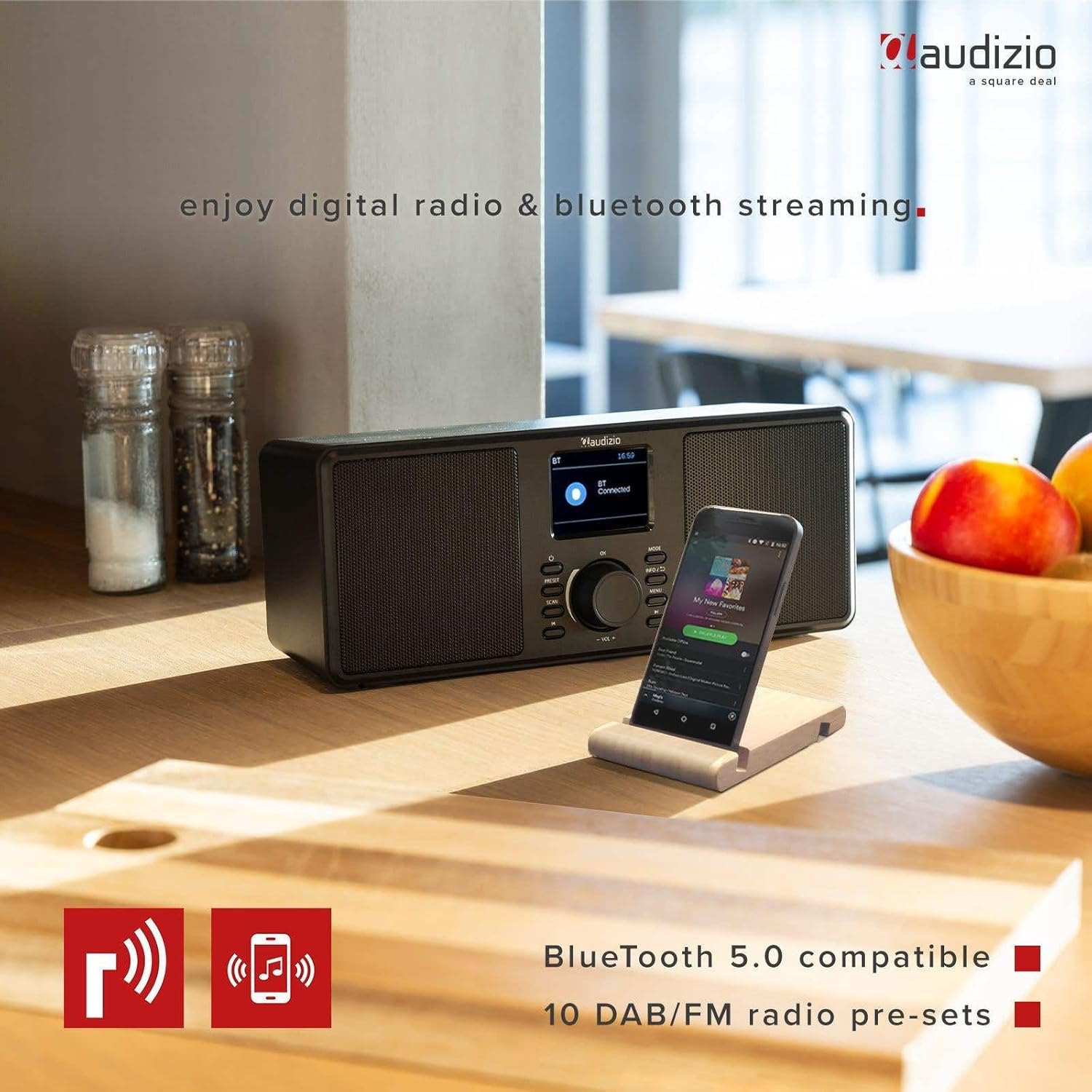
The Audizio Monza radio shown next to a smartphone, illustrating its Bluetooth streaming capability for playing music from mobile devices. The image highlights Bluetooth 5.0 compatibility and 10 DAB/FM radio pre-sets.
6.5 Ойготкуч жана тындыруу функциясы
The radio includes an alarm function with DAB/FM/buzzer wake-up options.

A close-up of the radio's screen displaying detailed alarm settings, including Alarm 2 status (Off), frequency (Daily), wake-up time (06:00), source (Digital Radio), preset (Last Listened), and duration (60 minutes).
- басыңыз МЕНЮ button and navigate to the Alarm settings.
- Follow the on-screen prompts to set the alarm time, source (DAB, FM, or Buzzer), frequency (Daily, Weekdays, Weekends, Once), and duration.
- Ойготкуч басылганда, басыңыз СОЮЗ button (often integrated with the OK баскычын же атайын баскычты) убактылуу өчүрүү үчүн басыңыз.
- Ойготкучту өчүрүү үчүн басыңыз КҮЧ баскычы.
6.6 Headphone Usage
Connect 3.5mm headphones to the headphone jack on the rear panel. The radio's speakers will automatically mute when headphones are connected.
7. Техникалык тейлөө
7.1 Тазалоо
Wipe the radio's surface with a soft, dry, lint-free cloth. Do not use abrasive cleaners, waxes, or solvents as they may damage the finish.
7.2 Сактоо
If storing the radio for an extended period, disconnect it from the power outlet and store it in a cool, dry place away from direct sunlight and extreme temperatures.
8. Кыйынчылыктарды
| Көйгөй | Мүмкүн себеп | Чечим |
|---|---|---|
| Күч жок | Кубат адаптери туташкан эмес же туура эмес. | Кубат адаптери радиого жана иштеп жаткан розеткага бекем туташтырылганын текшериңиз. |
| Радио кабыл алуу жок / Үн сапаты начар | Antenna not extended or poorly positioned. Weak signal. | Fully extend and adjust the telescopic antenna. Try moving the radio to a different location. Perform a new station scan. |
| Bluetooth туташпай жатат | Radio not in Bluetooth mode. Device not in pairing mode or out of range. | Ensure the radio is in Bluetooth mode. Make sure your device's Bluetooth is on and in pairing mode. Move your device closer to the radio. |
| Динамиктерден үн жок | Volume too low. Headphones connected. | Increase the volume. Disconnect headphones if not in use. |
| Radio presets not saving | Туура эмес сактоо процедурасы. | Ensure you press and hold the АЛДЫН АЛА button to save, and then press OK to confirm the preset number. |
9. Техникалык шарттар
| Өзгөчөлүк | Спецификация |
|---|---|
| Бренд | Аудизио |
| Модел | Monza (102.420) |
| Өлчөмдөрү (L x W x Y) | 36 x 14.5 x 15.5 см |
| Салмагы | 1.4 кг |
| Дисплей өлчөмү | 2.4 дюйм |
| Tuner Technology | DAB+, FM |
| Колдоого алынган радио тилкелери | VHF II (87.5-108 MHz), VHF III (174-240 MHz) |
| Байланыш технологиясы | Bluetooth |
| Аппараттык интерфейс | 3.5мм аудио |
| Speaker Output Power (Max) | 50 Ватт |
| Power Source | Battery (external power adapter required) |
| Жыштык | 60 Гц |
| Өзгөчө өзгөчөлүк | Portable |
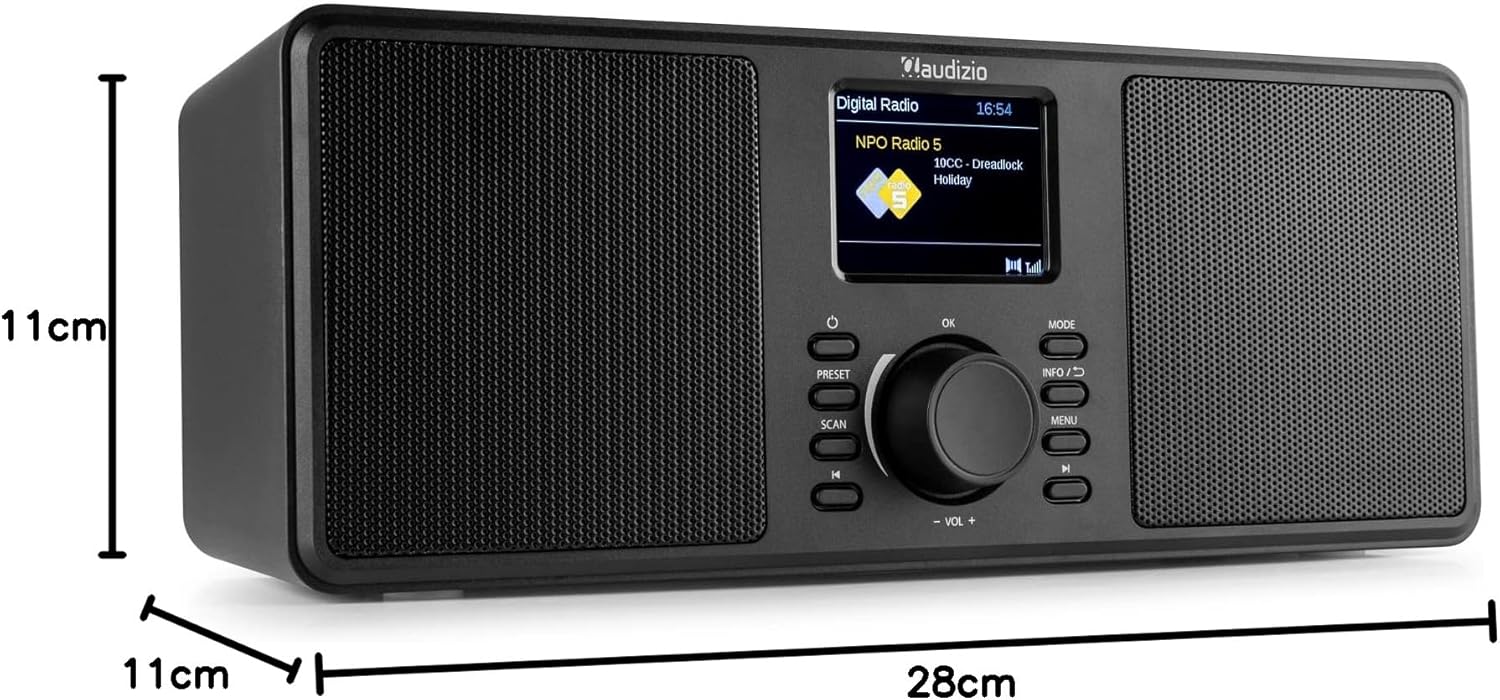
An image illustrating the physical dimensions of the Audizio Monza radio: 28cm width, 11cm height, and 11cm depth.
10. Кепилдик жана колдоо
10.1 Кепилдик маалыматы
Warranty terms and conditions are typically provided with your purchase documentation or can be found on the official Audizio webсайт. Сураныч, кепилдик дооматтар үчүн сатып алуу далилиңизди сактап коюңуз.
10.2 Кардарларды колдоо
For technical support or service inquiries, please refer to the contact information provided in your purchase documentation or visit the official Audizio webалардын кардарларды тейлөө чоо-жайы үчүн сайт.