
1. Киришүү
Сатып алганыңыз үчүн рахматasing the TURBOX Giantpeak Mechanical Feel RGB Gaming Keyboard. This manual provides essential information for setting up, operating, and maintaining your new keyboard. Please read this manual carefully before use to ensure optimal performance and longevity of your device.
2. Коопсуздук маалыматы
- Keep the keyboard away from excessive heat, direct sunlight, and moisture.
- Although the keyboard is spill-resistant, avoid intentionally exposing it to large amounts of liquid. In case of spills, disconnect the keyboard immediately and allow it to dry completely before reconnecting.
- Do not attempt to disassemble or modify the keyboard. This will void the warranty and may cause damage.
- Use only with compatible devices and power sources as specified.
- Балдар жетпеген жерде сактаңыз.
3. Пакеттин мазмуну
Сураныч, пакетте төмөнкү нерселерди текшериңиз:
- TURBOX Giantpeak Mechanical Feel RGB Gaming Keyboard
- Колдонуучунун Колдонмосу (бул документ)
4. Продукт бүтүп калдыview
The TURBOX Giantpeak keyboard is designed for gaming, featuring a mechanical feel, customizable RGB lighting, and macro capabilities. It also includes a convenient mobile device holder.
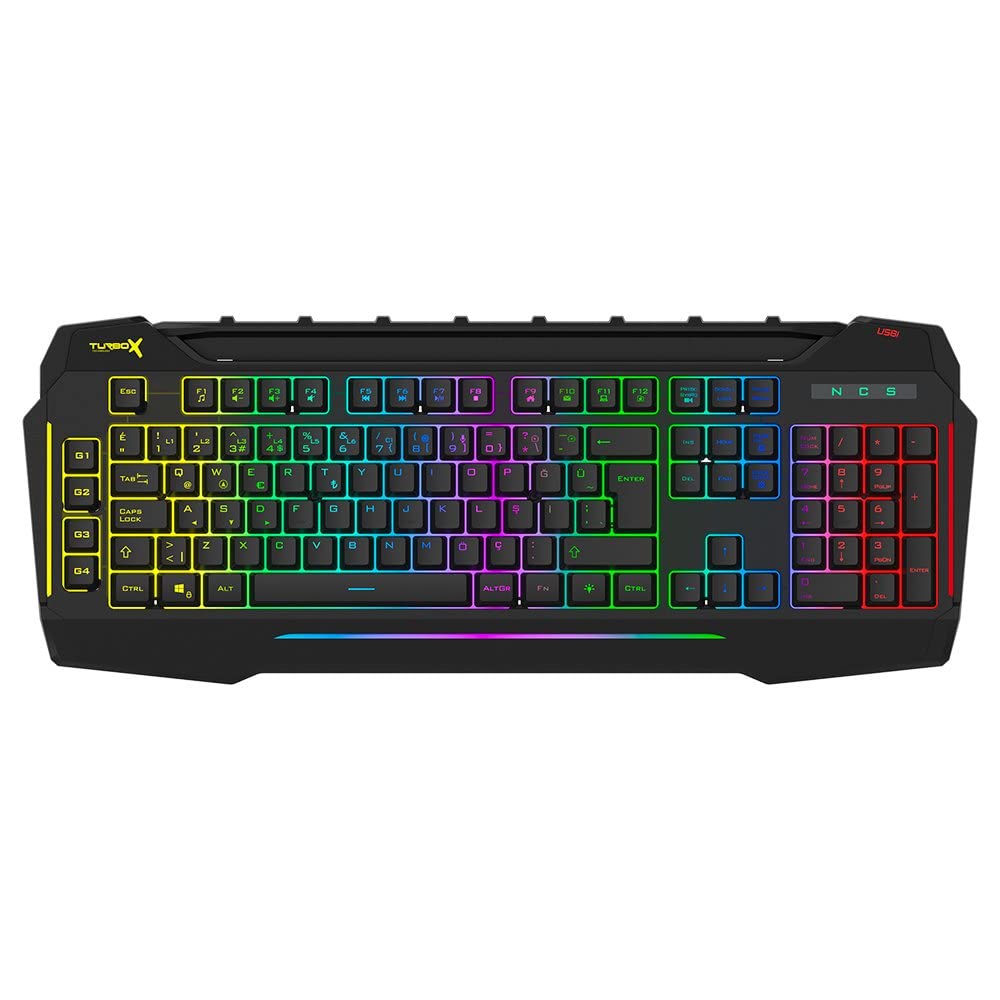
Figure 4.1: TURBOX Giantpeak keyboard with integrated mobile device stand.
This full-size keyboard offers a standard Q layout, providing a comfortable and responsive typing experience for both gaming and general use.

4.2-сүрөт: Жогорку view of the TURBOX Giantpeak keyboard.
The keyboard features vibrant RGB backlighting that can be customized to various effects, including sound-sensitive modes. Its spill-resistant design provides added durability.

4.3-сүрөт: Бурчтуу view showing RGB lighting.
Dedicated macro keys (G1-G4) are located on the left side, allowing for quick execution of complex commands or sequences.

Figure 4.4: Close-up of programmable G-keys.
The keyboard also includes a full numeric keypad for data entry and additional functions.

Figure 4.5: Numeric keypad detail.
Connectivity is provided via a durable USB cable, ensuring a stable and responsive connection to your computer.

4.6-сүрөт: Каптал view USB кабели менен.
5. Орнотуу
Follow these steps to set up your TURBOX Giantpeak keyboard:
- Баскычтопту таңгактан чыгаруу: Кутучадан клавиатураны жана башка таңгактоочу материалдарды этияттык менен алып чыгыңыз.
- Компьютерге туташуу: Plug the USB connector of the keyboard into an available USB port on your desktop or laptop computer.
- Драйверди орнотуу: Your operating system (Windows, macOS, etc.) should automatically detect and install the necessary drivers. This process may take a few moments.
- Функционалдуулугун текшерүү: Once drivers are installed, test the keyboard by typing in a text editor or browser to ensure all keys are functioning correctly. The RGB lighting should also illuminate.
6. Иштөө нускамалары
6.1 Негизги баскычтоп функциялары
The TURBOX Giantpeak keyboard operates like a standard Q-layout keyboard. All standard keys (alphanumeric, function keys, numeric keypad, navigation keys) function as expected.
6.2 RGB жарыкты башкаруу
The keyboard features customizable RGB backlighting with 7 different color options and sound-sensitive modes. Specific key combinations are used to cycle through lighting effects and adjust brightness:
- Жарыктандыруу режимин өзгөртүү: колдонуу Fn + Scroll Lock keys to cycle through various lighting effects.
- Жарыктыкты жөндөө: колдонуу Fn + Page Up (көбөйтүү) же Fn + Page Down (decrease) keys to adjust the brightness level of the backlighting.
- Sound-Sensitive Mode: The keyboard supports sound-sensitive lighting. Refer to specific software or key combinations (if available) for activation. (Note: Specific key combinations for sound-sensitive mode may vary or require software.)
6.3 Macro Programming (G1-G4 Keys)
The TURBOX Giantpeak keyboard includes 4 programmable macro keys (G1, G2, G3, G4) for executing custom commands or sequences. Follow these general steps for macro recording:
- Enter Macro Recording Mode: басыңыз MR key (Macro Record, usually near the G-keys). The keyboard's indicator light may flash to indicate recording mode.
- Select Macro Key: Press one of the G-keys (G1, G2, G3, or G4) where you want to save the macro.
- Жазуу ырааттуулугу: Type the sequence of keys you wish to record. This can include multiple keystrokes, delays, and modifier keys.
- Exit Macro Recording Mode: басыңыз MR key again to save the macro and exit recording mode. The indicator light should stop flashing.
- Execute Macro: To use the recorded macro, simply press the assigned G-key.
Note: For advanced macro settings or specific software-based macro management, please check the manufacturer's website for any available utility software.
6.4 Mobile Device Holder
The integrated slot at the top of the keyboard is designed to hold smartphones or small tablets, providing a convenient viewing angle while gaming or working.
7. Техникалык тейлөө
Клавиатураңыздын узак жана жакшы иштешин камсыз кылуу үчүн, төмөнкү техникалык тейлөө көрсөтмөлөрүн аткарыңыз:
- Тазалоо: Баскычтоптун бетин сүртүү үчүн жумшак, кургак чүпүрөктү колдонуңуз. өжөр кир үчүн, бир аз гampчүпүрөктү суу же жумшак тазалоо эритмеси менен жууп салыңыз. Катуу химиялык заттардан же абразивдүү материалдардан алыс болуңуз.
- Чаңды тазалоо: Баскыч капкактарынын ортосундагы чаңды жана калдыктарды тазалоо үчүн кысылган абаны колдонуңуз.
- төгүлүүчү башкаруу: In case of liquid spills, immediately disconnect the keyboard from your computer. Turn it upside down to drain any liquid and allow it to air dry completely for at least 24-48 hours before reconnecting.
- Сактагыч: Клавиатураны көпкө чейин колдонбогон учурда, аны таза, кургак жерде сактаңыз.
8. Кыйынчылыктарды
If you encounter issues with your TURBOX Giantpeak keyboard, refer to the following common problems and solutions:
| Көйгөй | Мүмкүн чечим |
|---|---|
| Клавиатура жооп бербей жатат. |
|
| RGB жарыктандыруу иштебей жатат же тыгылып калган. |
|
| Macro keys (G1-G4) are not working. |
|
| Ачкычтар жабышчаак же жооп бербейт. |
|
9. Техникалык шарттар
| Өзгөчөлүк | Деталь |
|---|---|
| Модель аты | Giantpeak |
| Бөлүмдүн номери | ID9923266 |
| Бренд | TURBOX |
| Байланыш технологиясы | USB Wired |
| Шайкеш түзмөктөр | Ноутбук, компьютер |
| Ачкыч түрү | Mechanical Feel (Membrane) |
| Өзгөчөлүктөр | RGB Lighting, Macro Keys (4), Sound-Sensitive Lighting, Spill-Resistant, Mobile Device Holder |
| Ачкычтардын саны | 87 (Note: Visuals suggest a full-size layout, this number may refer to a specific key group or variant.) |
| Аппараттык интерфейс | USB |
| Пакеттин өлчөмдөрү | 51.2 x 22.2 x 5.2 см |
| Элемент Салмагы | 1 килограмм |
10. Кепилдик жана колдоо
For warranty information and technical support, please refer to the warranty card included with your product or visit the official TURBOX webсайт. Ар кандай кепилдик дооматтары үчүн сатып алганыңыздын далилин сактаңыз.
If you require further assistance, please contact TURBOX customer support through their official channels.