
1. Киришүү
This manual provides comprehensive instructions for the proper setup, operation, maintenance, and troubleshooting of the WitMotion WT901C-485+USB 9-Axis IMU Sensor. Please read this manual thoroughly before using the device to ensure optimal performance and safety.
2. Продукт бүтүп калдыview
The WitMotion WT901C-485+USB is a high-performance 9-axis Inertial Measurement Unit (IMU) sensor. It integrates a gyroscope, accelerometer, and magnetometer to provide precise measurements of Pitch, Roll, Yaw angles, acceleration, angular velocity, and magnetic field data. Utilizing Kalman Filtering, the sensor ensures stable and accurate data output, making it suitable for various applications including attitude measurement for PC, Arduino, and Raspberry Pi systems. The device communicates via RS485 Modbus protocol and includes a USB to RS485 converter cable for convenient PC connectivity.
3. Негизги өзгөчөлүктөрү
- High Performance Data Output: Provides Pitch, Roll, Yaw (X, Y, Z axis) Acceleration, Angular Velocity, Angle, and Magnetic Field data via RS485 Modbus.
- Күчтүү дизайн: Offers high static (0.05°) and dynamic (0.1°) accuracy for X, Y-axis angles, suitable for long-term measurements.
- Multi-Connection Support: Capable of connecting up to 128 units simultaneously via WitMotion PC software or other Microcontroller Units (MCUs).
- Өркүндөтүлгөн чыпкалоо: Integrates R&D dynamic fusion algorithm and Kalman Filtering for stable data output, excellent bias stability, and low noise levels, enhancing measurement accuracy.
4. Пакеттин мазмуну
Төмөндө тизмеленген нерселердин баары пакетиңизге камтылганын текшериңиз:
- 1 x WitMotion WT901C-RS485 Modbus Accelerometer Sensor
- 1 x 4-PIN Dupont cable
- 1 x Welcome guide
- 1 x 1M USB to RS485 Converter Cable
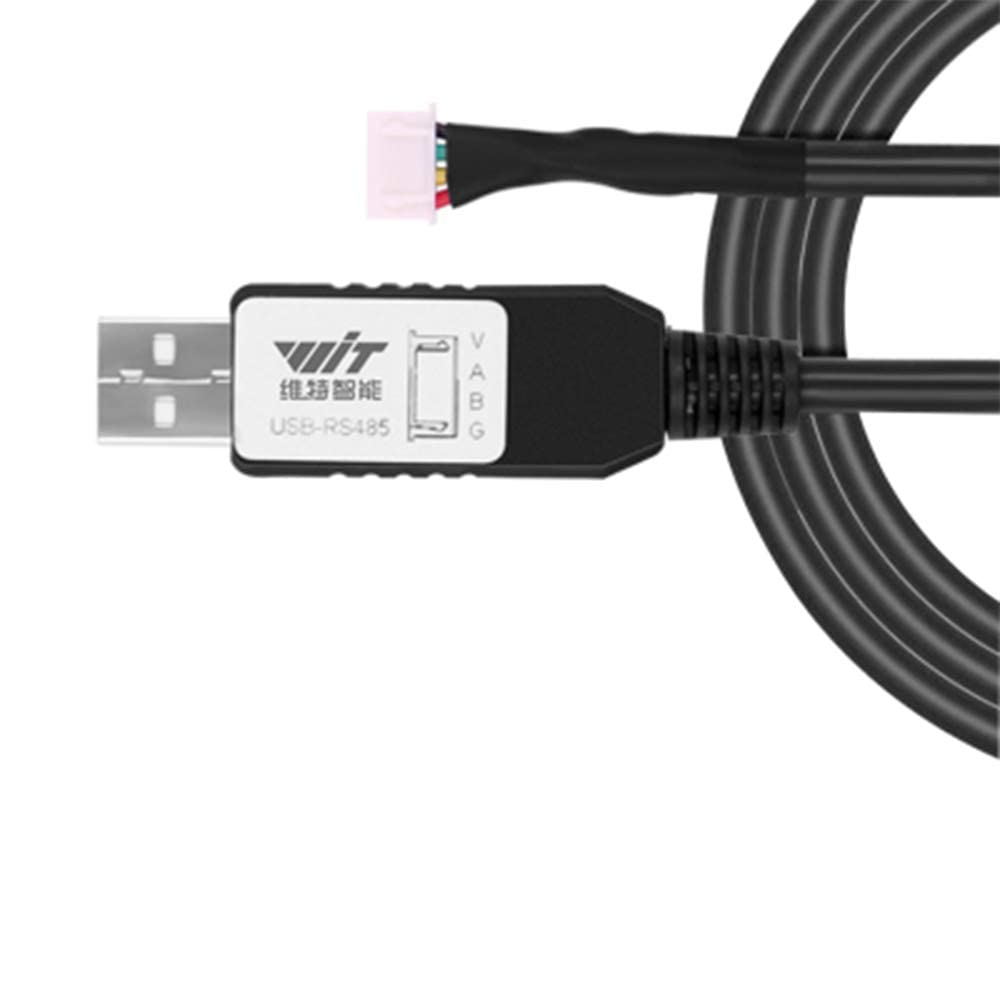
Figure 4.1: The included USB to RS485 converter cable, essential for connecting the sensor to a computer.
5. Physical Description and Dimensions
The WT901C-485+USB sensor features a compact design, making it easy to integrate into various projects and setups. Its small form factor allows for flexible mounting options.

Figure 5.1: Physical dimensions (36.1mm x 51.5mm x 15mm) and pinout diagram (GND, B, A, VCC) of the WT901C-485+USB sensor, highlighting its mini size and mounting points.
6. Орнотуу
6.1 Аппараттык туташуу
- Connect the WT901C-485+USB sensor to the provided USB to RS485 converter cable using the 4-PIN Dupont cable. Ensure correct pin alignment (VCC to VCC, GND to GND, A to A, B to B).
- Plug the USB end of the converter cable into an available USB port on your computer.
6.2 Программалык камсыздоону орнотуу
- Visit the official WitMotion website (wit-motion.com) to download the latest PC software for the WT901C-485+USB sensor.
- Install the software by following the on-screen instructions. Driver installation for the USB to RS485 converter may be required and is typically included with the software package or available on the WitMotion webсайт.

Figure 6.1: The WitMotion PC software interface displaying real-time sensor data and a 3D model for visualization.
7. Иштөө нускамалары
7.1 Data Acquisition with PC Software
- Launch the WitMotion PC software.
- In the software, select the correct COM port corresponding to your connected USB to RS485 converter. The baud rate should typically be set to 9600 or 115200, depending on your sensor's configuration.
- Click 'Open' or 'Connect' to establish communication with the sensor.
- Real-time data for acceleration, angular velocity, angles (Pitch, Roll, Yaw), magnetic field, and other parameters will be displayed on the interface. A 3D model may also visualize the sensor's orientation.
7.2 Data Output Parameters
The sensor provides the following key data outputs:
- Ылдамдатуу: Linear acceleration along X, Y, and Z axes.
- Angular Velocity: Rotational speed around X, Y, and Z axes.
- Angles (Pitch, Roll, Yaw): Orientation angles relative to a reference frame.
- Магниттик талаа: Magnetic field strength along X, Y, and Z axes, used for heading determination.

Figure 7.1: The WitMotion PC software interface showing various data displays, calibration options, and a 3D demonstration of sensor orientation.
7.3 Kalman Filtering
The WT901C-485+USB sensor incorporates an advanced Kalman Filtering algorithm. This algorithm fuses data from the accelerometer, gyroscope, and magnetometer to provide highly stable and accurate orientation data, minimizing noise and drift over time. This results in more reliable measurements, especially in dynamic environments.

Figure 7.2: A graph illustrating the effect of Kalman Filtering, showing how the dynamic fusion algorithm smooths raw sensor data to produce more stable and accurate output.
8. RS485 Data Protocol
The sensor communicates using a specific RS485 data protocol. Understanding this protocol is crucial for integrating the sensor with custom MCU applications. Each data package follows a defined structure:

Figure 8.1: Table detailing the RS485 data protocol, showing the data content and its meaning for each byte in a data package.
| ЖОК. | Маалыматтын мазмуну | Мааниси |
|---|---|---|
| 0 | 0x55 | Heading of data package |
| 1 | 0x53 | Data package as angle |
| 2 | RollL | X-axis angle low bit |
| 3 | RollH | X-axis angle high bit |
| 4 | PitchL | Y-axis angle low bit |
| 5 | PitchH | Y-axis angle high bit |
| 6 | YawL | Z-axis angle low bit |
| 7 | YawH | Z-axis angle high bit |
| 8 | TL | Temperature low bit |
| 9 | TH | Temperature high bit |
| 10 | Сум | Текшерүү суммасы |
9. Modbus Multi-Unit Connection
The WT901C-485+USB sensor supports multi-connection, allowing up to 128 units to be connected simultaneously to a single MCU or PC via the Modbus protocol. This feature is ideal for applications requiring extensive data collection from multiple points.

Figure 9.1: Diagram illustrating how multiple WT901C-485+USB sensors can be connected in a Modbus network to a single MCU or PC, supporting up to 128 units.
10. Сенсор калибрлөө
10.1 Magnetic and Acceleration Calibration
For optimal accuracy, especially in environments with varying magnetic fields, it is recommended to perform magnetic and acceleration calibration before initial use and periodically thereafter. The WitMotion PC software provides dedicated tools for these calibration procedures. Refer to the software's calibration section for detailed steps, which typically involve specific movements of the sensor to map its response.
Эскертүү: The calibration interface is visible in Figure 7.1, showing options for magnetic and acceleration calibration methods and parameters.
11. Техникалык тейлөө
- Тазалоо: Use a soft, dry cloth to clean the sensor. Avoid using harsh chemicals or abrasive materials.
- Сактагыч: Store the sensor in a dry, dust-free environment away from extreme temperatures and direct sunlight.
- Экологиялык шарттар: Avoid exposing the sensor to excessive moisture, strong electromagnetic fields, or mechanical shock, as these can affect performance and longevity.
12. Кыйынчылыктарды
If you encounter issues with your WT901C-485+USB sensor, consider the following troubleshooting steps:
- Маалыматтар чыгарылбайт:
- Verify all cable connections are secure and correctly wired (VCC, GND, A, B).
- Ensure the USB to RS485 converter is properly installed and its drivers are up to date.
- Check if the correct COM port and baud rate are selected in the PC software.
- Confirm the sensor is receiving power.
- Туура эмес окуулар:
- Perform magnetic and acceleration calibration as described in Section 10.
- Ensure the sensor is mounted securely and not subject to vibrations or external magnetic interference.
- Check for any nearby strong magnetic fields or electrical noise sources.
- Программалык камсыздоого туташуу маселелери:
- Restart the PC software and reconnect the sensor.
- Компьютериңиздеги башка USB портун колдонуп көрүңүз.
- Reinstall the PC software and drivers.
13. Техникалык шарттар
- Өлчөө параметрлери: Pitch, Roll, Yaw (X, Y, Z axis) Acceleration, Angular Velocity, Angle, Magnetic Field
- Angle Accuracy (Static): X, Y-axis: 0.05°
- Angle Accuracy (Dynamic): X, Y-axis: 0.1°
- Чыпкалоо: Kalman Filtering, Dynamic Fusion Algorithm
- Интерфейс: RS485 Modbus
- Көп байланыш: Up to 128 units simultaneously
- Өлчөмдөрү: Approximately 36.1mm x 51.5mm x 15mm (refer to Figure 5.1)
- Биринчи жеткиликтүү болгон күнү: 26-ноябрь, 2021-жыл
14. Кепилдик жана Кардарларды колдоо
WitMotion provides a 12-month warranty for the WT901C-485+USB sensor. For any technical assistance, troubleshooting, or warranty claims, please contact the WitMotion support team. You can find detailed tutorials and support resources on the official WitMotion website (wit-motion.com).
Байланыш маалыматы:
- Webсайт: wit-motion.com (for tutorials and downloads)
- Электрондук почта колдоо: support (at) wit-motion (dot) com