
Introduction
Thank you for choosing the Mcdodo MC-7050 20W PD GoPower MagSafe 5000mAh Power Bank. This portable charger is designed to provide convenient and efficient power to your devices, featuring both wired USB-C Power Delivery and MagSafe-compatible wireless charging. Please read this manual carefully before use to ensure proper operation and to maximize the lifespan of your device.
Коопсуздук маалыматы
- Кубат банкын экстремалдык температурага, тике күн нуруна же отко чыгарбаңыз.
- Аппаратты түшүрүүдөн, тийүүдөн же ажыратуудан качыңыз.
- Суу жана башка суюктуктардан алыс кармаңыз.
- Эгерде Power Bank бузулган же шишип кеткен болсо, колдонбоңуз.
- Балдар жетпеген жерде сактаңыз.
- Тастыкталган заряддоо кабелдерин жана адаптерлерин гана колдонуңуз.
- Жергиликтүү эрежелерге ылайык кубат банкын жоопкерчилик менен жок кылыңыз.
Пакеттин мазмуну
Сураныч, пакетте төмөнкү нерселерди текшериңиз:
- Mcdodo MC-7050 20W PD GoPower MagSafe 5000mAh Power Bank
- USB-Cден USB-Cге чейин кубаттоочу кабель
- User Manual
Продукт бүттүview
Familiarize yourself with the components of your Mcdodo MC-7050 Power Bank:

Image: Mcdodo MC-7050 Power Bank shown with its integrated kickstand extended, displaying the MagSafe charging area on the front. This view highlights the compact design and the stand feature for convenient use.
- MagSafe Wireless Charging Area: Central circular area for magnetic wireless charging.
- Кубат баскычы: Powerbankты иштетип, батареянын кубаттуулугун текшерет.
- LED көрсөткүчтөрү: Батареянын калган кубаттуулугун көрсөтүңүз.
- USB-C порту: Used for both charging the power bank and charging other devices.
- Integrated Kickstand: Allows the power bank to stand upright, useful for viewing content while charging wirelessly.

Сүрөт: бурчтуу view of the Mcdodo MC-7050 Power Bank, clearly showing the USB-C input/output port on the side and the power button located near the top edge. The kickstand is also visible in this perspective.
Жайгашуу
Power банктын алгачкы заряддоо
- Берилген USB-C кабелин кубат банкындагы USB-C портуна туташтырыңыз.
- Connect the other end of the USB-C cable to a compatible USB power adapter (not included). For optimal charging speed, use a Power Delivery (PD) compatible adapter.
- The LED indicators will illuminate to show the charging status. All LEDs will be solid when fully charged.
- Power банкты биринчи жолу колдонуудан мурун толук заряддоо сунушталат.
Иштөө нускамалары
Батарея деңгээлин текшерүү
Press the power button once to check the remaining battery capacity. The LED indicators will light up to show the current charge level.
Wired Charging (USB-C Output)
- Connect your device's charging cable to the USB-C port on the power bank.
- Кабелдин экинчи учун шайманга туташтырыңыз.
- Power банк түзмөгүңүздү автоматтык түрдө кубаттай баштайт. Болбосо, кубат баскычын бир жолу басыңыз.
Зымсыз кубаттоо (MagSafe менен шайкеш)
- Ensure your device is compatible with MagSafe or Qi wireless charging.
- Align your MagSafe-compatible device (e.g., iPhone 12 series or newer) with the circular MagSafe charging area on the power bank. The magnets will help align it correctly.
- The power bank will automatically begin wireless charging. If not, press the power button once.
- The integrated kickstand can be used to prop up your phone while wirelessly charging.
Техникалык тейлөө
- Тазалоо: Power bankтин бетин тазалоо үчүн жумшак, кургак чүпүрөктү колдонуңуз. Катуу химиялык заттарды же абразивдүү материалдарды колдонбоңуз.
- Сактагыч: Power банкты күн тийбеген жана экстремалдык температурадан алыс, салкын, кургак жерде сактаңыз.
- Батареянын ден соолугу: To maintain battery health, fully charge and discharge the power bank at least once every three months if not in regular use.
Проблемаларды чечүү
- Power банк кубатталбай жатат:
- Кубаттоочу кабелдин кубат банкына жана кубат адаптерине бекем туташтырылганын текшериңиз.
- Башка USB-C кабелин же кубат адаптерин колдонуп көрүңүз.
- Кубат адаптери туура иштеп жатканын текшериңиз.
- Түзмөк кубат банкынан кубатталбай жатат:
- Электр банкында жетиштүү заряд бар экенин текшериңиз.
- Press the power button to activate charging.
- Түзмөгүңүз үчүн башка кубаттоочу кабелди колдонуп көрүңүз.
- Ensure your device is properly aligned for wireless charging.
- Зымсыз кубаттоого тоскоол боло турган калың телефон каптарын алып салыңыз.
- Жай кубаттоо:
- Powerbank жана түзмөгүңүз үчүн тез кубаттоочу шайкеш келген кабель жана адаптер колдонуп жатканыңызды текшериңиз.
- Some devices may limit charging speed when using wireless charging.
Техникалык шарттар
| Өзгөчөлүк | Спецификация |
|---|---|
| Модель аты | MC-7050 |
| Батарея сыйымдуулугу | 5000 мАч |
| Туташтыргыч түрү | USB Type-C |
| Негизги өзгөчөлүктөрү | Fast Charging, Wireless Charging (MagSafe compatible) |
| Power Output | 20 Вт кубаттуулукту жеткирүү (PD) |
| Power Source | Батарея менен иштейт |
| Порттардын саны | 1 (USB-C for input/output, plus wireless charging) |
| Шайкеш телефон моделдери | Compatible with all phones (wired), MagSafe compatible phones (wireless) |
| Кайра колдонууга жарамдуу | Зарядкалуу |
| Продукт Салмагы | 0.18 килограмм |
| Продукциянын өлчөмдөрү (L x W x Y) | 10.7 см х 6.7 см х 1.7 см |
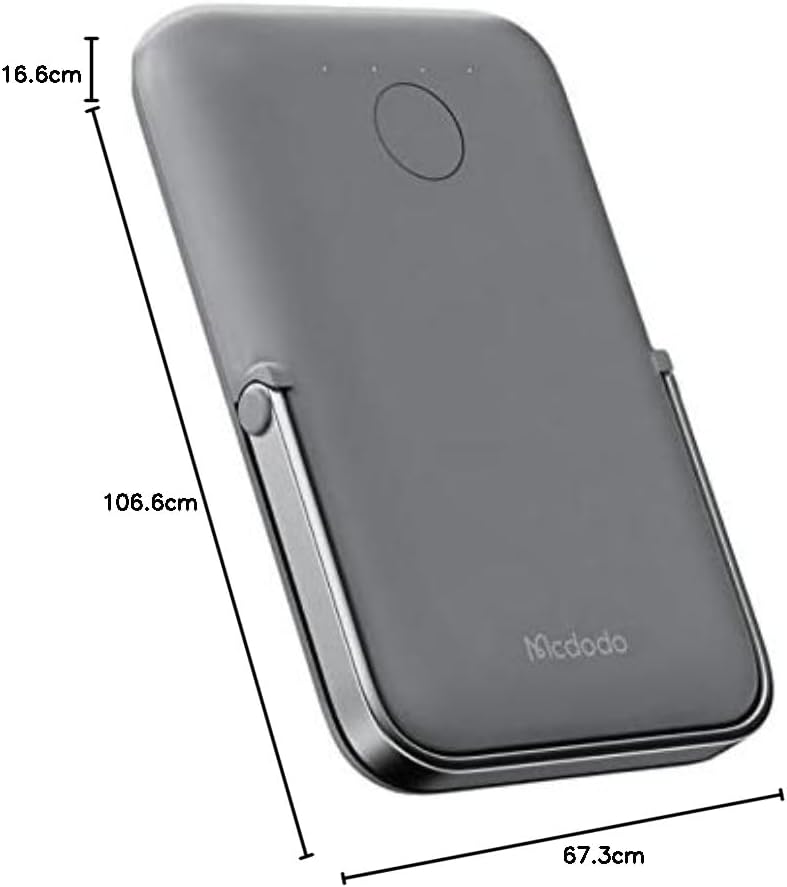
Сүрөт: жогорудан төмөнгө view of the Mcdodo MC-7050 Power Bank illustrating its compact dimensions, approximately 10.7 cm in length, 6.7 cm in width, and 1.7 cm in thickness.
Кепилдик жана колдоо
For warranty information and technical support, please refer to the warranty card included in your product packaging or visit the official Mcdodo webсайт. Сатып алганыңыздын далили катары сатып алуу дүмүрчөгүңүздү сактаңыз.
Mcdodo Official Webсайт: www.mcdodo.com