
cellularline BTKEENTWSK
Cellularline Keen TWS Earbuds User Manual
Model: BTKEENTWSK
Introduction
The Cellularline Keen True Wireless Stereo (TWS) earbuds are designed for an optimal audio experience, whether for calls or music. Featuring a soft-touch finish and intuitive touch controls, these earbuds offer convenience and high-quality sound for everyday use. The Keen earbuds provide up to 6 hours of playback on a single charge, with the included charging case extending total battery life to over 24 hours.

This image shows the Cellularline Keen True Wireless Stereo (TWS) earbuds. The earbuds are black with a soft-touch finish, and one earbud is visible resting in its open charging case. The charging case is also black with a silver interior, designed to store and charge the earbuds.
Пакеттин мазмуну
Баштоодон мурун, пакетте бардык элементтер бар экенин текшериңиз:
- Cellularline Keen TWS Earbuds (Left and Right)
- Заряддоо кутусу
- Заряддоо кабели
- Eartips in 3 Sizes (Small, Medium, Large)
- User Manual
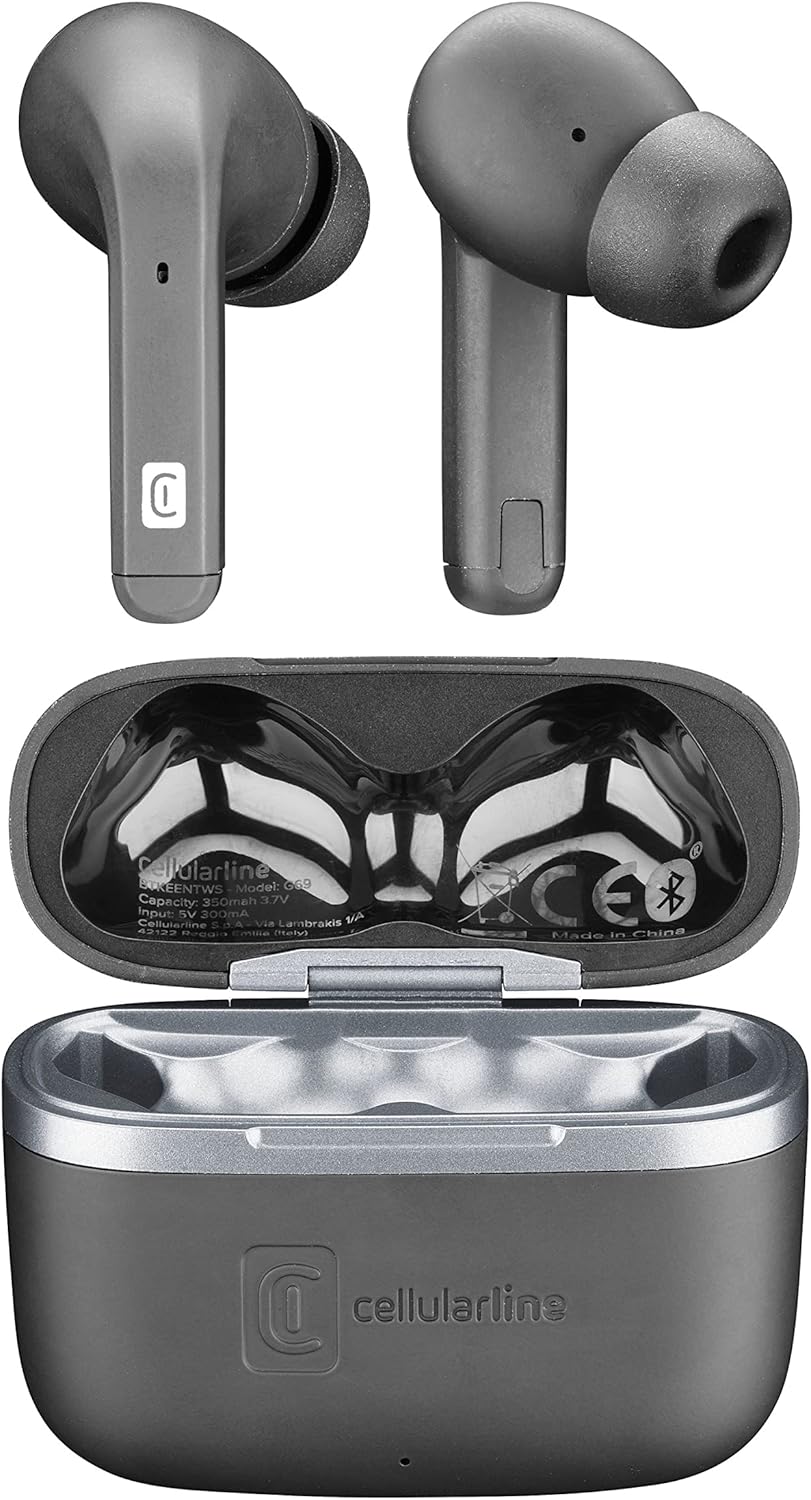
Бул сүрөт жогорудан ылдый карай берет view of the Cellularline Keen earbuds and their charging case. Both earbuds are shown outside the case, highlighting their design. The open charging case reveals the charging cradles and internal markings, including the Cellularline logo and regulatory information.
Жайгашуу
1. Баштапкы заряддоо
Before first use, it is recommended to fully charge the earbuds and the charging case. Connect the provided charging cable to the charging case and a compatible USB power source. The charging indicators on the case will show the charging status. A full charge provides up to 6 hours of earbud playtime, with the case offering an additional 24 hours of battery life.
2. Түзмөгүңүз менен жупташтыруу
The Cellularline Keen earbuds are designed for easy pairing with any Bluetooth-enabled device (smartphones, tablets, laptops, etc.).
- Кулакчындардын заряддоо кутучасында жана корпустун капкагы ачык экенин текшериңиз.
- Түзмөгүңүздө Bluetooth жөндөөлөрүнө өтүңүз.
- Activate Bluetooth if it is not already enabled.
- Издөө new devices. You should see "Cellularline Keen" or a similar name appear in the list of available devices.
- Select "Cellularline Keen" to initiate the pairing process.
- Once paired, your device will confirm the connection, and the earbuds are ready for use.
The earbuds will automatically connect to the last paired device when removed from the case, provided Bluetooth is active on the device.
Иштөө нускамалары
The Keen earbuds feature intuitive touch controls for managing audio playback and calls.
Музыканы ойнотуу
- Ойнотуу/тындыруу: Кулакчындарды бир жолу таптаңыз.
- Кийинки трек: Оң кулакчынды эки жолу таптаңыз.
- Мурунку трек: Сол кулакчынды эки жолу таптаңыз.
- Көлөмү: Оң кулакчынды үч жолу таптаңыз.
- Үнүн азайтуу: Сол кулакчынды үч жолу таптаңыз.
Чалууларды башкаруу
- Чалууга жооп берүү/аяктоо: Кулакчындарды бир жолу таптаңыз.
- Чакырууну четке кагуу: Кулакчындардын бирин 2 секунд басып туруңуз.
Үн жардамчысы
- Үн Жардамчысын жандыруу: Кулакчындардын бирин (мисалы, Siri, Google Жардамчысы) 3 секунд басып туруңуз.
Техникалык тейлөө
Proper maintenance ensures the longevity and optimal performance of your Cellularline Keen earbuds.
- Тазалоо: Regularly clean the earbuds and charging case with a soft, dry, lint-free cloth. Do not use abrasive cleaners or solvents. For eartips, remove them and clean with a damp чүпүрөк, алар кайра кийер алдында толугу менен кургап камсыз кылуу.
- Суу каршылык: The earbuds are rated as waterproof. However, this does not mean they are suitable for prolonged submersion or use during swimming. Avoid exposing them to strong jets of water or saltwater. Always ensure the charging port is dry before charging.
- Сактагыч: Колдонулбаганда, кулакчындарды чаңдан жана бузулуудан коргоо үчүн кубаттоочу кутуга салып сактаңыз. Күн нурунан жана экстремалдык температурадан алыс салкын, кургак жерде сактаңыз.
- Батареяга кам көрүү: Батареянын кубатын сактоо үчүн, кулакчындарды жана кутучаны тез-тез толук зарядсыздандырбаңыз. Аларды үзгүлтүксүз колдонбосоңуз да, үзгүлтүксүз кубаттап туруңуз.
Проблемаларды чечүү
If you encounter any issues with your Cellularline Keen earbuds, refer to the following common solutions:
| Көйгөй | Мүмкүн чечим |
|---|---|
| Кулакчындар жупташтырылбай жатат/туташтырылбай жатат |
|
| Бир же эки кулакчындан үн чыкпайт |
|
| Заряддоо куту заряддалбай жатат |
|
| Сенсордук башкаруу жооп бербей жатат |
|
Техникалык шарттар
| Өзгөчөлүк | Деталь |
|---|---|
| Модель аты | BTKEENTWSK |
| Бренд | уюлдук линия |
| Байланыш технологиясы | Зымсыз (Bluetooth) |
| Форма фактору | In-Ear |
| Башкаруу түрү | Touch Control |
| Earbud Playtime | 6 саатка чейин |
| Жалпы ойноо убактысы (капка менен) | Over 24 hours (up to 30 hours) |
| Батареянын курамы | Литий-полимер (2 камтылган) |
| Өзгөчөлүктөр | Fast Charging, Wireless |
| Сууга туруктуулук деңгээли | Суу өткөрбөйт |
| Жыштык диапазону | 20 Гц - 20 000 Гц |
| Материал | Пластик |
| Элемент Салмагы | 40 грамм |
| Түс | Кара |
Кепилдик жана колдоо
For warranty information, technical support, or service inquiries regarding your Cellularline Keen earbuds, please refer to the warranty card included in your package or visit the official Cellularline website. Information regarding spare parts availability and software updates is not provided in this manual.
You can also contact Cellularline customer support directly for assistance.
Ask a question about this manual
Ask about setup, troubleshooting, compatibility, parts, safety, or missing instructions. Manuals+ will review the question and use this page’s manual context to help answer it.