
1. Киришүү
This manual provides detailed instructions for the BoxWave SlimKeys Bluetooth Keyboard with Trackpad, designed for use with the Apple iPhone 13 mini. Please read this manual thoroughly before using the product to ensure proper operation and to maximize its lifespan.
The SlimKeys Bluetooth Keyboard integrates responsive chiclet-style keys and a full-functioning trackpad, transforming your iPhone 13 mini into a portable workstation. Its ultra-thin and lightweight design makes it an ideal travel companion.
2. Пакеттин мазмуну
- BoxWave SlimKeys Bluetooth Keyboard with Trackpad
- USB заряддоо кабели
- User Manual
3. Продукциянын өзгөчөлүктөрү
- Integrated Keyboard and Trackpad: Combines a full QWERTY keyboard with a responsive trackpad for enhanced navigation.
- Ичке жана жеңил дизайн: At approximately 3/16 inch thick, it is highly portable without compromising key size for comfortable typing.
- Bluetooth Version 3.0: Ensures fast pairing and seamless wireless communication with your device.
- Батареяны үнөмдөө: Features an on/off switch to extend battery life when not in use.
- Портативдик: Designed for easy transport in bags or luggage.

3.1-сүрөт: жогорудан ылдыйга view of the SlimKeys Bluetooth Keyboard, showing the full keyboard layout and integrated trackpad.
4. Орнотуу
4.1 Баскычтопту заряддоо
- Locate the charging port on the side of the keyboard.
- Connect the small end of the provided USB charging cable to the keyboard's charging port.
- USB кабелинин чоңураак учун USB кубат булагына туташтырыңыз (мисалы, компьютердин USB порту, USB дубал адаптери).
- The charging indicator light will illuminate. Once fully charged, the light will typically change color or turn off.
4.2 Күйгүзүү/өчүрүү
- To power on the keyboard, slide the 'ON/OFF' switch, usually located on the side or back, to the 'ON' position. A power indicator light will briefly illuminate.
- To power off the keyboard, slide the 'ON/OFF' switch to the 'OFF' position. This conserves battery life when the keyboard is not in use.
4.3 Bluetooth жупташтыруу
Follow these steps to pair your BoxWave SlimKeys Bluetooth Keyboard with your Apple iPhone 13 mini:
- Клавиатура толугу менен заряддалганын жана күйүп турганын текшериңиз.
- On your iPhone 13 mini, go to Орнотуулар > Bluetooth.
- Turn on Bluetooth. Your iPhone will begin searching for nearby Bluetooth devices.
- On the keyboard, press the Bluetooth pairing button (often labeled 'Connect' or with a Bluetooth symbol). The Bluetooth indicator light on the keyboard will start blinking, indicating it is in pairing mode.
- On your iPhone, locate 'BoxWave Keyboard' or a similar name in the list of 'Other Devices' and tap on it.
- If prompted, enter the pairing code displayed on your iPhone screen using the keyboard, then press Enter.
- Once paired, the Bluetooth indicator light on the keyboard will stop blinking and remain solid or turn off, and your iPhone will show the keyboard as 'Connected'.

Figure 4.1: Keyboard with highlighted power switch and Bluetooth pairing button locations.
5. Иштөө нускамалары
5.1 Баскычтопту колдонуу
Once paired, the keyboard functions like a standard computer keyboard. Simply open any application on your iPhone that requires text input (e.g., Messages, Notes, Safari) and begin typing. The on-screen keyboard will automatically disappear, allowing you to use the physical keyboard.
5.2 Trackpad колдонуу
The integrated trackpad allows for precise cursor control and navigation on your iPhone 13 mini. Basic gestures include:
- Бир манжа менен таптоо: Functions as a left-click to select items or activate buttons.
- Эки манжа менен жылдыруу: Drag two fingers up or down on the trackpad to scroll through content.
- Курсордун кыймылы: Move a single finger across the trackpad to move the cursor on your iPhone screen.
5.3 Атайын функция баскычтары
The keyboard may include function keys (F1-F12) or dedicated media control keys. These keys often require pressing the 'Fn' key simultaneously with the desired function key to activate their secondary functions (e.g., volume control, play/pause, screen lock).
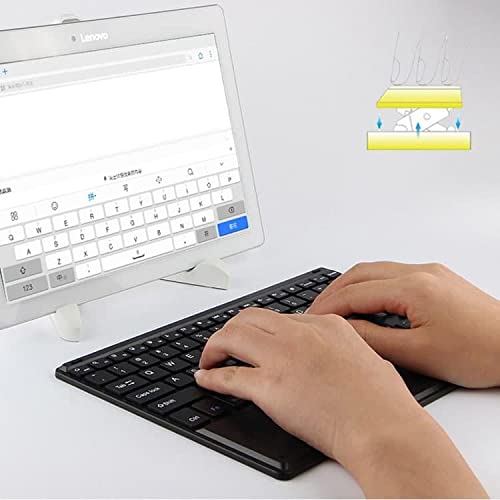
Figure 5.1: User demonstrating typing on the SlimKeys Bluetooth Keyboard.
6. Техникалык тейлөө
6.1 Тазалоо
- Тазалоодон мурун, клавиатуранын өчүк экенин текшериңиз.
- Бир аз жумшак, түксүз кездемени колдонуңуз dampened with water or a mild electronics cleaner to wipe the surface.
- Клавиатурага зыян келтириши мүмкүн болгондуктан, катуу химиялык заттарды, абразивдүү тазалоочу каражаттарды же ашыкча нымдуулукту колдонуудан алыс болуңуз.
- For dust or debris between keys, use compressed air.
6.2 Батареяга кам көрүү
- To prolong battery life, power off the keyboard when not in use.
- Батареяны бат-баттан толук кубаттап калуудан алыс болуңуз. Батарея аз индикатор пайда болгондо кайра заряддаңыз.
- Клавиатураны узак убакыт бою колдонбосо, салкын, кургак жерде сактаңыз.
7. Кыйынчылыктарды
If you encounter issues with your BoxWave SlimKeys Bluetooth Keyboard, refer to the following common solutions:
- Keyboard not powering on: Ensure the battery is charged. Connect the charging cable and allow it to charge for at least 30 minutes before attempting to power on again.
- Клавиатура жупташпай жатат:
- Ensure the keyboard is in pairing mode (Bluetooth indicator blinking).
- Make sure Bluetooth is enabled on your iPhone 13 mini.
- Move the keyboard closer to your iPhone.
- Forget the device from your iPhone's Bluetooth settings and attempt to pair again.
- Restart both the keyboard and your iPhone.
- Ачкычтар жооп бербейт:
- Check if the keyboard is still connected via Bluetooth.
- Батареянын заряды өтө төмөн эмес экенин текшериңиз.
- Try reconnecting the keyboard by turning it off and on, or by re-pairing.
- Trackpad иштебей жатат:
- Баскычтоптун туташып турганын текшериңиз.
- Check for any settings on your iPhone that might disable external trackpads.
- Clean the trackpad surface to remove any debris.
8. Техникалык шарттар
| Өзгөчөлүк | Спецификация |
|---|---|
| Бренд | BoxWave |
| Модель номери | bw-1977-29861-11782 |
| Аппараттык интерфейс | Bluetooth |
| Bluetooth версиясы | 3.0 |
| Шайкеш түзмөктөр | Apple iPhone 13 mini, Smartphones, Laptops |
| Keyboard Description | Зымсыз |
| Өзгөчөлүктөр | Portable, Integrated Trackpad |
| Power Source | Батарея менен иштейт |
| Өлчөмдөрү (болжол менен) | 257мм x 172мм x 5мм |

Figure 8.1: Dimensions and operating system compatibility of the SlimKeys Bluetooth Keyboard.
9. Кепилдик жана колдоо
9.1 Кепилдик маалыматы
For specific warranty details, please refer to the warranty card included with your product or visit the official BoxWave webсайт. Ар кандай кепилдик дооматтары үчүн сатып алганыңыздын далилин сактаңыз.
9.2 Кардарларды колдоо
If you require further assistance or have questions not covered in this manual, please contact BoxWave customer support through their official webсайт же сатып алуу документтери менен камсыз байланыш маалыматы.