
1. Продукт бүтүп калдыview
The Vonets VAP11G-300 is a professional 300Mbps WiFi repeater designed for stable and reliable network connectivity. It supports WiFi to wired and wired to WiFi functions, making it suitable for various applications.
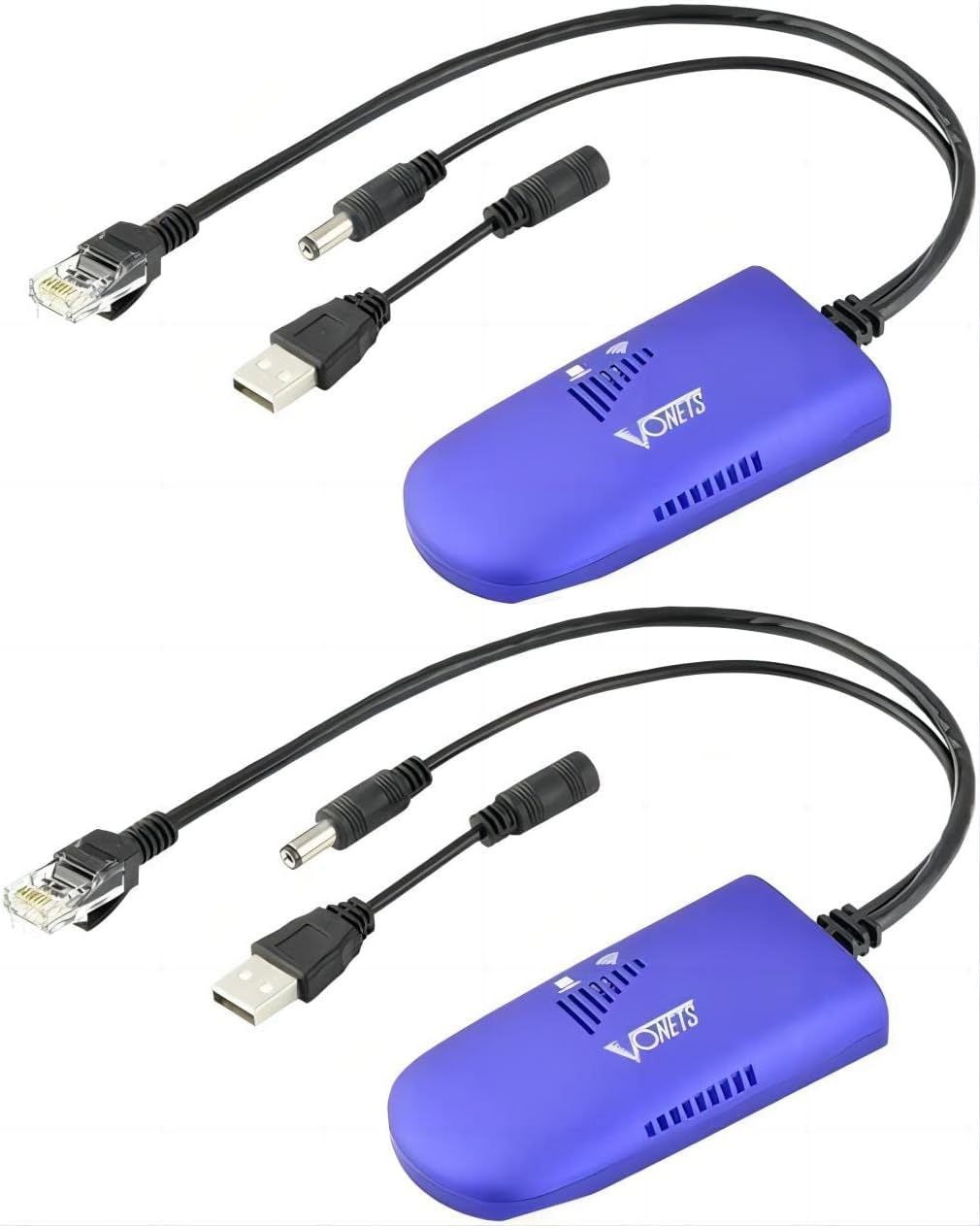
Image: Two Vonets VAP11G-300 WiFi bridges, showcasing their compact design and included cables.
2. Продукциянын өзгөчөлүктөрү
- 2025 Жаңы жаңыртуу: Features a new process design for super stability. Functions as an Industrial Mini WiFi Bridge/Repeater/AP, supporting both WiFi to wired and wired to WiFi connectivity.
- Параметрлер: Offers a 2.4GHz WiFi rate of 300Mbps, adhering to 802.11b/g/n WiFi protocol. Point-to-point transmission distance is up to 100 meters without obstacles for small data, and less than 80 meters for video transmission.
- Электр камсыздоо: Includes a two-in-one dedicated power cord, offering USB and DC power supply options. USB supports 5V/1A power, while the DC2.0 power hole supports wide voltage DC5-15V. Comes with a 10/100M adaptive Ethernet cable.
- Компакт өлчөмү: The card-sized device is easy to carry and integrate, measuring 3.62 x 1.85 x 0.83 inches.
- Continuous Update Service: Software is continuously optimized, allowing online upgrades for optimal device function.

Image: The compact size of the VAP11G-300 compared to a credit card, highlighting its portability and the high-performance Mediatek chip.
3. Продукциянын схемасы жана компоненттери
The VAP11G-300 features essential components for its operation:
- USB порт: For power supply (5V/1A recommended).
- DC Power Supply Hole: Кеңири томду колдойтtage DC5-15V power supply.
- LAN порту (RJ45): For Ethernet cable connection.
- Hotspot Connection Status Light: Indicates the status of the WiFi hotspot connection.
- Ethernet Cable Connection Light: Ethernet байланышынын абалын көрсөтөт.
- Калыбына келтирүү баскычы: Аппаратты заводдук жөндөөлөргө кайтаруу үчүн колдонулат.
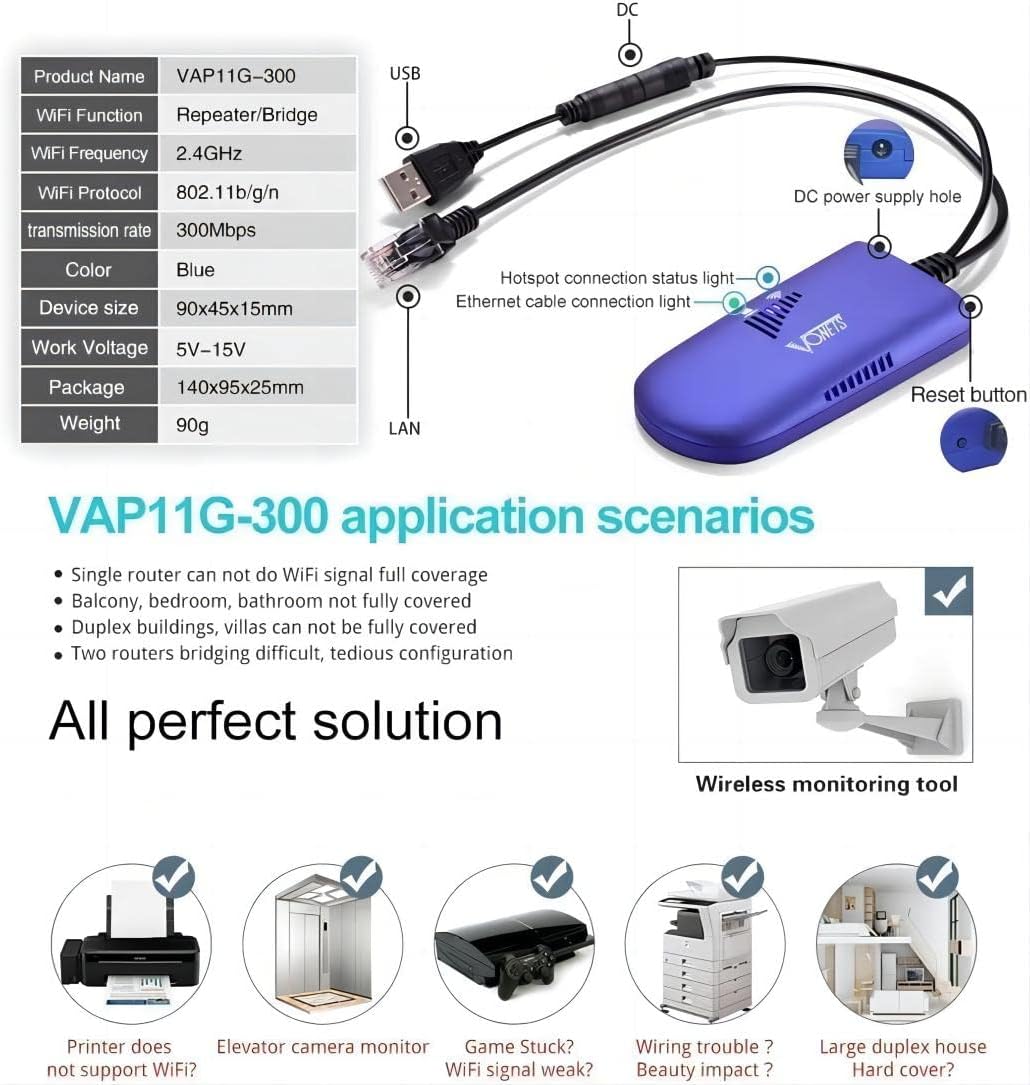
Image: Detailed diagram illustrating the various ports and indicator lights on the VAP11G-300 device.
4. Орнотуу жана конфигурациялоо
4.1 Аппаратты күйгүзүү
Connect the VAP11G-300 to a power source using the provided two-in-one dedicated power cord. A 5V/2A typical power supply is recommended for optimal performance. The device will power on, and indicator lights will illuminate.
4.2 Configuration via Computer
To configure the device using a computer, follow these steps:
- Connect the VAP11G-300 to your computer via an Ethernet cable.
- ачуу а web browser and enter the configured domain (http://vonets.cfg) or the IP address (192.168.254.254) in the address bar.
- Enter the User ID and password. Both are typically "admin". Click "Login".
- Navigate to the WiFi Hotspots section. The device will search for available WiFi hotspots.
- Select your desired WiFi hotspot from the list and click "Next".
- Enter the password for your selected WiFi hotspot.
- Click "Apply" and then "Reboot" or power off the device. The device will reboot, which may take about 1 minute. Wait until the LED light flashes normally.
Video: A step-by-step guide on how to configure the Vonets VAP11G-300 using a computer, demonstrating the web interface and settings.
4.3 Configuration via Smartphone
To configure the device using a smartphone, follow these steps:
- Find the MAC address of the VAP11G-300, which is located on the back of the device.
- Connect your smartphone to the WiFi SSID of the VAP11G-300 (the SSID is VONETS_2.4G_XXXX, where XXXX is the last four digits of the MAC address). The default password is 12345678.
- ачуу а web browser on your smartphone and enter the configured domain (http://vonets.cfg) or the IP address (192.168.254.254) in the address bar.
- Enter the User ID and password. Both are typically "admin". Click "Login".
- Navigate to the WiFi Hotspots section. The device will search for available WiFi hotspots.
- Select your desired WiFi hotspot from the list and click "Next".
- Enter the password for your selected WiFi hotspot.
- Click "Apply" and then "Reboot" or power off the device. The device will reboot, which may take about 1 minute. Wait until the LED light flashes normally.
Video: A step-by-step guide on how to configure the Vonets VAP11G-300 using a smartphone, demonstrating the mobile web interface and settings.
5. Иштөө режимдери
The Vonets VAP11G-300 supports two primary operating modes:
- AP режими: In Access Point (AP) mode, the device converts wired networks to wireless access. This is suitable for scenarios where an Ethernet cable provides internet access to a computer without requiring dialing.
- Кайталоо режими: In Repeater mode, the device extends the existing network, facilitating easy network expansion. It can also convert WiFi to an RJ45 network, allowing a computer to access the internet via a network cable.

Image: Visual representation of the VAP11G-300 operating in AP Mode (wired to wireless) and Repeater Mode (extending wireless network).
6. Колдонуу сценарийлери
The VAP11G-300 is a versatile device suitable for various network applications, including:
- Surveillance systems (e.g., IP cameras, DVRs)
- Электрондук тараза
- Медициналык жабдуулар
- Internet of Things (IoT) equipment
- Видео өткөрүү
- Industrial PLC (Programmable Logic Controller)
- Gaming consoles (e.g., PS3)
- Принтерлер
- Роботтор
- Extending WiFi coverage in areas with weak signals (e.g., single rooms, balconies, duplex buildings).

Image: Wireless monitoring application diagram, illustrating how the VAP11G-300 can be used for remote video surveillance in various setups.

Image: A visual guide to various devices and systems that can benefit from the VAP11G-300's connectivity features.
7. Техникалык шарттар
| Спецификация | Нарк |
|---|---|
| Продукциянын өлчөмдөрү | 3.62 x 1.85 x 0.83 дюйм |
| Элемент Салмагы | 5.8 унция |
| Элемент моделинин номери | VAP11G-300 |
| Зымсыз байланыш стандарты | 802.11bgn |
| Маалыматтарды өткөрүү ылдамдыгы | секундасына 300 мегабайт |
| Жыштык тилкесинин классы | Кош тилкелүү |
| Туташтыргыч түрү | RJ45, USB |
| Өндүрүүчү | Shenzhen Houtian Network Communication Technology Co.,Ltd |
| Дата биринчи жеткиликтүү | 15-декабрь, 2021-жыл |
8. Кыйынчылыктарды
If you encounter issues with your Vonets VAP11G-300, consider the following common troubleshooting steps:
- Кубат текшерүү: Ensure the device is properly powered on with the recommended 5V/2A power supply. Check if the indicator lights are active.
- Тармак кабели: Verify that all Ethernet cables are securely connected.
- IP дареги чатак: If you experience connectivity issues after configuration, ensure there are no IP address conflicts on your network. The manual recommends disabling the DHCP server if conflicts occur.
- Кайрадан: A simple reboot can often resolve temporary connectivity problems. Power off the device, wait a few seconds, and then power it back on.
- Заводдун баштапкы абалга келтирүү: If problems persist, use the reset button to restore the device to its factory default settings. This will clear all custom configurations.
- Check WiFi Hotspot Password: Double-check that the WiFi hotspot password entered during configuration is correct.
- Сигнал күчү: Ensure the device is within adequate range of the source WiFi hotspot. Weak signals can affect performance.
9. Техникалык тейлөө
To ensure the longevity and optimal performance of your Vonets VAP11G-300:
- Keep the device in a cool, dry place, away from direct sunlight and moisture.
- Түзмөктү күчтүү электромагниттик тоскоолдук булактарына жакын жайгаштырбаңыз.
- Regularly check for and install software updates to benefit from performance optimizations and new features.
- Clean the device periodically with a soft, dry cloth to prevent dust buildup.
10. Кепилдик жана колдоо
For warranty information, technical support, or further assistance, please refer to the official Vonets website or contact their customer service. Details regarding specific warranty periods and service terms may vary by region and purchase location.
кире аласыз Vonets Store on Amazon көбүрөөк маалымат алуу үчүн.