
1. Продукт бүтүп калдыview
The LENRUE TouchGo F4 is a compact, portable Bluetooth speaker designed for clear audio and ease of use. It features touch controls, Bluetooth 5.0 connectivity, and supports TWS (True Wireless Stereo) pairing for an enhanced audio experience. The speaker comes with a hard EVA travel case for protection and portability.

Figure 1: LENRUE TouchGo F4 Bluetooth Speaker.
2. Пакеттин мазмуну
Сураныч, пакетте төмөнкү нерселерди текшериңиз:
- LENRUE TouchGo F4 Bluetooth Speaker
- Hard EVA Travel Case
- TYPE-C заряддоо кабели
- User Manual
3. Орнотуу
3.1 Алгачкы заряддоо
Before first use, fully charge the speaker. Connect the provided TYPE-C charging cable to the speaker's charging port and a compatible USB power adapter (not included). The charging indicator light will show the charging status. A full charge typically takes approximately 4 hours.
3.2 Күйгүзүү/өчүрүү
- Күйгүзүү үчүн: Press and hold the power button (usually the central play/pause button) for a few seconds until you hear an audible prompt and the indicator light illuminates.
- Өчүрүү үчүн: Press and hold the power button again for a few seconds until you hear an audible prompt and the indicator light turns off.
3.3 Bluetooth жупташтыруу
To connect the speaker to your device:
- Динамиктин күйүп турганын жана жупташтыруу режиминде экенин текшериңиз (индикатордун жарыгы, адатта, көк түстө күйүп-өчөт).
- Түзмөгүңүздө (смартфон, планшет ж.б.) Bluetooth иштетиңиз жана жеткиликтүү түзмөктөрдү издеңиз.
- Select "ToughGo" or "LENRUE TouchGo" from the list of devices.
- Туташтырылгандан кийин, сиз ырастоо үнүн угасыз жана индикатордун жарыгы көк түскө айланат.
Эгерде түзмөк байланыштын алкагында болсо жана Bluetooth иштетилген болсо, динамик күйүп турганда акыркы жупташтырылган түзмөккө автоматтык түрдө кайра туташат.

Figure 2: Speaker with touch controls for sensitive and elegant operation.
3.4 TWS Wireless Pairing (Connect Two Speakers)
To achieve dual-channel stereo sound, you can pair two TouchGo F4 speakers together:
- Power on both TouchGo F4 speakers.
- Ensure both speakers are disconnected from any other Bluetooth devices.
- On бир of the speakers, press and hold the "+" button until you hear a prompt indicating TWS pairing mode.
- The two speakers will automatically pair with each other. You will hear a "beep" sound upon successful TWS pairing.
- Now, connect your device's Bluetooth to the device name "ToughGo". Both speakers will play audio in stereo.
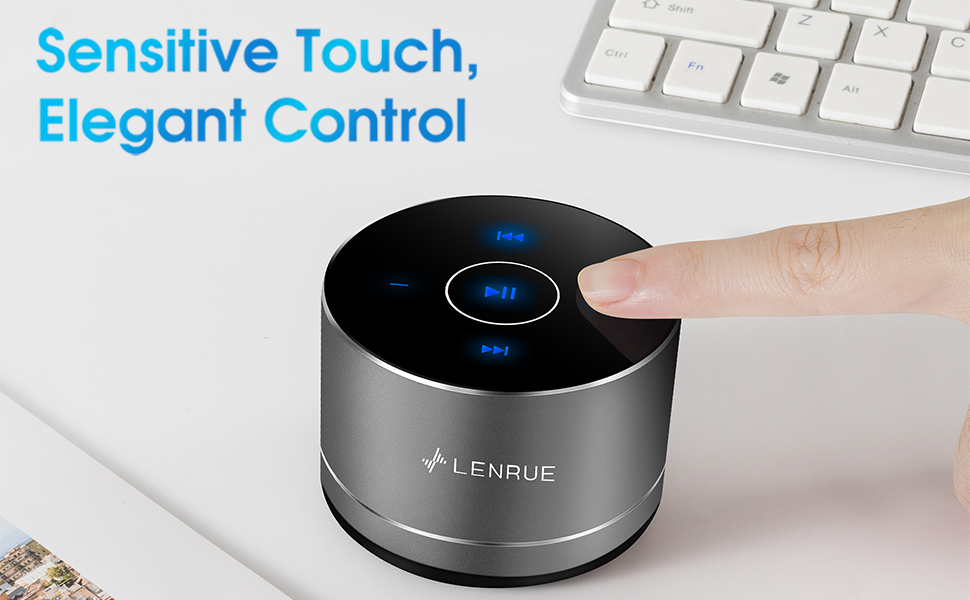
Figure 3: Two speakers connected for TWS wireless stereo pairing.
4. Иштөө нускамалары
4.1 Сенсордук башкаруу
The speaker features intuitive touch controls located on the top surface:
- Ойнотуу/тындыруу: Tap the central button once to play or pause music.
- Көлөмү: Tap the "+" button to increase volume.
- Үнүн азайтуу: Tap the "-" button to decrease volume.
- Кийинки трек: Tap the ">>" button to skip to the next song.
- Мурунку трек: Tap the "<<" button to go to the previous song.
4.2 Hands-Free чалуу
The speaker includes a built-in microphone for hands-free calls:
- Чакырууга жооп берүү: When a call comes in, tap the central button once to answer.
- Чакырууну аяктоо: During a call, tap the central button once to end the call.
- Чакырууну четке кагуу: Кирүүчү чалууну четке кагуу үчүн борбордук баскычты болжол менен 2 секунд басып туруңуз.

Figure 4: Speaker with hands-free calling capability.
4.3 Battery Life and Power Saving
The speaker is equipped with a 1200mAh lithium-ion battery, providing 6-15 hours of music playback at 2/3 volume. To conserve power, the speaker will automatically shut down if Bluetooth is disconnected for 30 minutes.
5. Техникалык тейлөө
5.1 Тазалоо
To clean the speaker, use a soft, dry cloth. Do not use abrasive cleaners, solvents, or immerse the speaker in water.
5.2 Сактоо
When not in use for extended periods, store the speaker in its hard EVA travel case in a cool, dry place. Avoid extreme temperatures and direct sunlight.
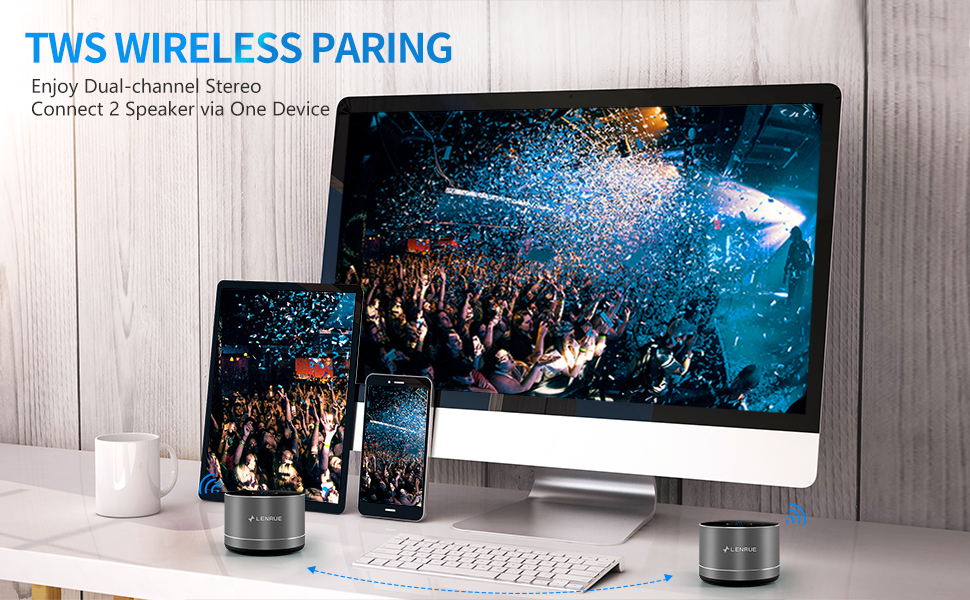
Figure 5: Speaker with its protective hard EVA travel case.
6. Кыйынчылыктарды
| Көйгөй | Мүмкүн себеп | Чечим |
|---|---|---|
| Динамик күйбөйт. | Батареянын аздыгы; Кубат баскычы туура басылган жок. | Динамикти толугу менен кубаттаңыз; Кубат баскычын бир нече секунд басып туруңуз. |
| Bluetooth түзмөгү менен жупташтыруу мүмкүн эмес. | Динамик жупташтыруу режиминде эмес; Түзмөктүн Bluetooth функциясы өчүк; Динамик башка түзмөккө туташып турат. | Ensure speaker is in pairing mode (flashing blue light); Turn on Bluetooth on your device; Disconnect from other devices and try again. |
| Poor sound quality / Muffled sound. | Speaker placement; Obstructions; Low volume. | Ensure the speaker is placed on a flat, open surface, ideally not directly on its bottom where the speaker grille is located. Try placing it on its side for clearer sound. Remove any obstructions; Adjust volume on both speaker and device. |
| TWS жупташтыруу ишке ашпай калды. | Speakers already paired to a device; Incorrect pairing procedure. | Ensure both speakers are disconnected from any Bluetooth devices before initiating TWS pairing. Follow the TWS pairing steps precisely. |
| Үн жок. | Volume too low; Paused playback; Device not connected. | Increase volume on both speaker and device; Press play; Verify Bluetooth connection. |
7. Техникалык шарттар
| Өзгөчөлүк | Деталь |
|---|---|
| Модель номери | F4 |
| Байланыш технологиясы | Bluetooth 5.0 |
| Динамиктин максималдуу чыгаруу күчү | 5 Ватт |
| Power Source | Батарея менен иштейт (1 литий-иондук батарейка камтылган) |
| Батарея сыйымдуулугу | 1200mAh |
| Оюн убактысы | 6-15 hours (at 2/3 volume) |
| Заряддоо убактысы | Болжол менен 4 саат |
| Башкаруу ыкмасы | тийүү |
| Продукциянын өлчөмдөрү | 3.15 x 3.15 x 1.18 дюйм |
| Элемент Салмагы | 9 унция |
| Өзгөчө өзгөчөлүк | Portable, Hands-Free Calling, TWS Pairing |
8. Кепилдик жана колдоо
For warranty information and customer support, please refer to the documentation included with your purchase or contact LENRUE customer service directly. Contact details can typically be found on the official LENRUE webсайт же сатуучу аркылуу.