
1. Продукт бүтүп калдыview
The CREWORKS 30 x 38CM Heat Press Machine is a versatile tool designed for transferring images onto various materials. Its 360-degree swing-away design allows for easy placement and removal of items, enhancing operational efficiency. The machine features precise temperature and time controls, ensuring consistent and high-quality transfers.
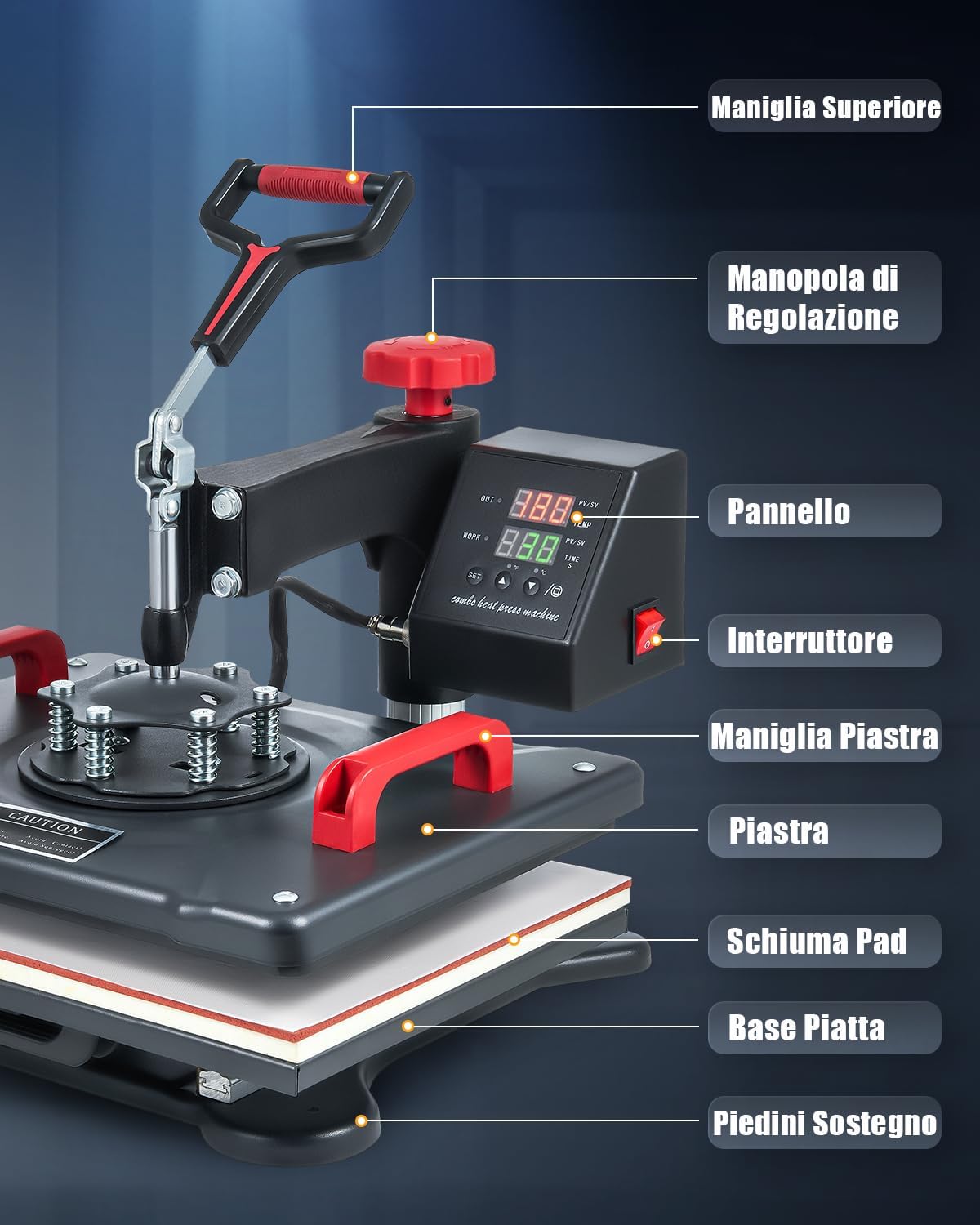
Figure 1: Key components of the CREWORKS 30 x 38CM Heat Press Machine, including the top handle, adjustment knob, control panel, power switch, platen handle, heating platen, foam pad, flat base, and support feet.

Figure 2: The heat press machine demonstrating its versatile application across various items such as t-shirts, cushions, mouse pads, bags, masks, and backpacks.
2. Коопсуздук нускамалары
Please read all safety instructions carefully before operating the heat press machine to prevent injury or damage.
- Машинаны ар дайым туруктуу, ысыкка чыдамдуу бетте иштетиңиз.
- Иштеп жатканда колуңузду жана денеңизди жылыткыч тактадан алыс кармаңыз, анткени беттер өтө ысып кетет.
- Use the heat-resistant handle for safe operation.
- Иш зонасында шайкеш желдетүүнү камсыз кылыңыз.
- Do not leave the machine unattended while it is powered on.
- Машинаны колдонбогондо же тазалоодон мурун электр розеткасынан сууруп алыңыз.
- The machine features an automatic shut-off function after 30 minutes of inactivity for enhanced safety.
3. Орнотуу
- Пакеттен чыгаруу жана текшерүү: Таңгактан бардык компоненттерди кылдаттык менен алып салыңыз. Ташуу учурунда машинанын бузулуу белгилерин текшериңиз.
- Машинаны жайгаштырыңыз: Place the heat press on a sturdy, level, and heat-resistant workbench. Ensure there is sufficient space around the machine for safe operation and heat dissipation.
- Башкаруу блогун туташтыруу: Attach the dual display control unit to the main body of the heat press. Secure the power cord connection to the display unit.
- Кубат туташуу: Plug the machine's power cord into a grounded electrical outlet.
Video 1: Demonstrates the installation of the dual display screen and connecting the power cord to the display unit for the CREWORKS 30 x 38 cm Heat Press.
4. Иштөө нускамалары
4.1 Жалпы операция
- Күйгүзүү: Flip the red power switch on the control unit to the 'ON' position.
- Температураны коюу: Press the 'SET' button once. Use the '▲' or '▼' arrows to adjust the desired temperature (up to 250°C / 480°F). Press 'SET' again to confirm.
- Убакытты коюу: Press the 'SET' button twice. Use the '▲' or '▼' arrows to adjust the desired heating duration (up to 999 seconds). Press 'SET' again to confirm.
- басымды жөндөө: Use the red adjustment knob on top of the machine to increase or decrease pressure. Turn clockwise for more pressure, counter-clockwise for less.
- 360° Swing-Away Feature: The heating platen can rotate 360 degrees, allowing you to safely prepare your item on the lower platen without direct contact with the heat.

Figure 3: The intelligent LED control box for precise temperature and time adjustments.

Figure 4: The 360-degree swing-away design and pressure adjustment knob for ease of use.
4.2 T-Shirt Pressing
- Даярдоо: Place the t-shirt flat on the lower platen. Pre-press for 5-10 seconds to remove moisture and wrinkles.
- Жайгашкан жери: Position your transfer design onto the t-shirt. Cover with a Teflon sheet or parchment paper.
- Басуу: Swing the heating platen over the t-shirt and lower the handle to apply pressure. The timer will start automatically.
- Аяктоо: Once the timer sounds, lift the handle and swing the heating platen away. Carefully remove the transfer paper (hot or cold peel as per transfer instructions).

Figure 5: Applying a design to a t-shirt using the heat press.
4.3 Hat Pressing
To press hats, replace the flat platen with the hat press attachment.
- Attach Hat Platen: Securely attach the hat platen to the machine.
- Даярдоо: Place the hat onto the hat platen. Position your transfer design.
- Басуу: Lower the heating element onto the hat and apply pressure.
- Аяктоо: After the set time, release the pressure and remove the hat.
4.4 Mug Pressing
To press mugs, replace the flat platen with the mug press attachment.
- Attach Mug Platen: Securely attach the mug press attachment.
- Даярдоо: Wrap your transfer design around the mug and secure it with heat-resistant tape. Insert the mug into the mug press.
- Басуу: Close the mug press to apply heat and pressure.
- Аяктоо: After the set time, open the press and carefully remove the hot mug. Allow it to cool before peeling the transfer.
4.5 Plate Pressing
To press plates, replace the flat platen with the plate press attachment.
- Attach Plate Platen: Securely attach the plate press attachment.
- Даярдоо: Place the plate onto the plate platen. Position your transfer design.
- Басуу: Lower the heating element onto the plate and apply pressure.
- Аяктоо: After the set time, release the pressure and remove the plate.
Video 2: A comprehensive demonstration of the CREWORKS 30 x 38 cm Heat Press, showcasing its use for t-shirts, plates, hats, and mugs.
5. Техникалык тейлөө
- Тазалоо: Ensure the machine is unplugged and completely cool before cleaning. Wipe the heating platen with a soft, damp кездеме. Өтө катуу калдыктар үчүн абразивдүү эмес тазалоочу каражатты колдонуңуз.
- Үзгүлтүксүз текшерүүлөр: Бардык бурамалар менен туташуулардын бекем экенине ынануу үчүн мезгил-мезгили менен текшерип туруңуз.
- Сактагыч: Жылуулук прессти колдонбогондо кургак, чаңсыз чөйрөдө сактаңыз.
6. Кыйынчылыктарды
| Көйгөй | Мүмкүн себеп | Чечим |
|---|---|---|
| Uneven Heat Transfer | Incorrect pressure, faulty heating element, uneven surface. | Adjust pressure, ensure even placement, contact support if heating element is suspected. |
| Машина күйбөй жатат | Power cord not connected, power switch off, circuit breaker tripped. | Check power connections, ensure switch is on, reset circuit breaker. |
| Трансфер сапаты начар | Incorrect temperature/time, wrong transfer paper, material incompatibility. | Verify settings with transfer paper manufacturer's recommendations, use appropriate materials. |
7. Техникалык шарттар
| Өзгөчөлүк | Деталь |
|---|---|
| Модел | 30 x 38CM |
| Placen Size | 30 x 38 см |
| Номиналдуу температура | 250°C (480°F) чейин |
| Power Wattage | 1250 Ватт |
| Продукциянын өлчөмдөрү | 38 x 30 x 38.1 см |
| Элемент Салмагы | 10 кг |
| Жылытуу элементи | Double tube heating |
| Коопсуздук өзгөчөлүктөрү | Automatic shut-off after 30 mins, heat-resistant handle |
8. Кепилдик жана колдоо
This CREWORKS Heat Press Machine comes with a standard manufacturer's warranty. For detailed warranty information, product support, or service inquiries, please refer to the warranty card included in your product packaging or contact CREWORKS customer service directly. Keep your purchase receipt as proof of purchase.