
KOFIRE UT-01
KOFIRE UT-01 зымсыз оюн гарнитурасы
User Manual
1. Киришүү
Thank you for choosing the KOFIRE UT-01 Wireless Gaming Headset. This headset is designed to provide an immersive audio experience with ultra-low latency, 3D surround sound, and vibration feedback, making it ideal for gaming across multiple platforms including Nintendo Switch, PS4, PS5, PC, and mobile devices. This manual will guide you through the setup, operation, and maintenance of your new headset.

Image: The KOFIRE UT-01 Wireless Gaming Headset, showcasing its blue and red earcups, detachable microphone, and included USB-C and USB-A wireless adapters.
2. Пакеттин мазмуну
Пакетиңизде бардык буюмдар бар экенин текшериңиз:
- KOFIRE UT-01 зымсыз оюн гарнитурасы
- Detachable Noise Reduction Microphone
- USB-C Wireless Dongle
- USB-Aдан USB-C адаптерге чейин
- 3.5 мм аудио кабель
- USB заряддоо кабели
- Колдонуучунун Колдонмосу (бул документ)
3. Продукциянын өзгөчөлүктөрү
- Specially Designed for Nintendo Switch: Equipped with a dedicated USB-C adapter for seamless connectivity in handheld or docked mode. Includes a USB-A to USB-C adapter for versatile compatibility.
- 3D Surround and Vibration Sound Quality: Dual 40mm dynamic EQ driver units deliver immersive 3D stereo surround sound. Physical vibration enhances low-frequency effects, providing tactile feedback for in-game actions.
- Ergonomic Design, Comfortable Fit: Features soft memory protein earmuffs, an adjustable headband, and a lightweight 250g build for extended comfort. Foldable design for portability.
- Detachable Noise Reduction Microphone & Mute Function: The microphone reduces up to 80% of background noise for clear communication. A convenient mute button is included.
- Көп платформа шайкештиги: Works with Nintendo Switch (Lite/OLED), PS4/5, PCs via USB dongle, and tablets/smartphones via Bluetooth. Also supports wired connection via 3.5mm audio cable.
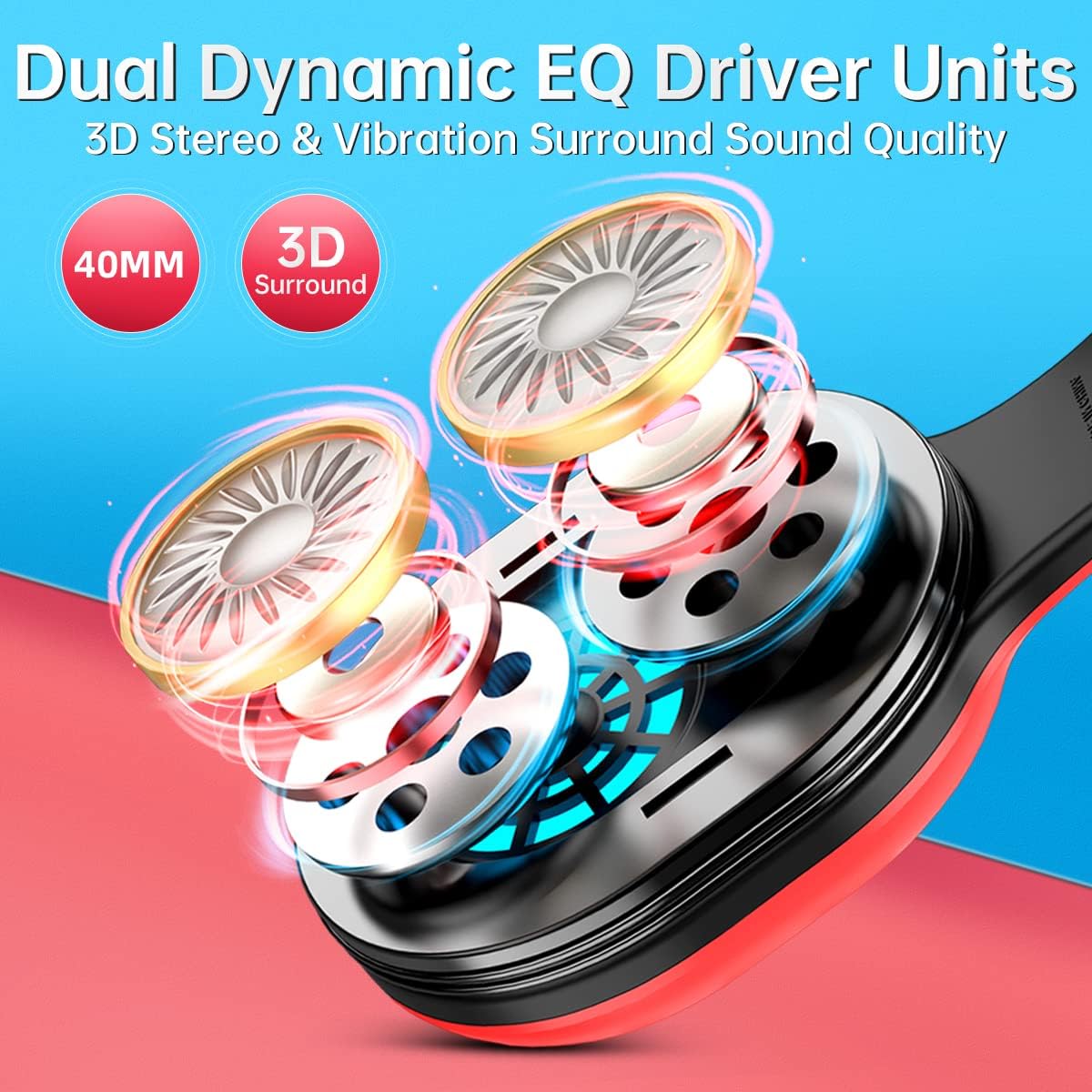
Сүрөт: жарылган view of the headset's earcup, highlighting the dual 40mm dynamic EQ driver units responsible for 3D stereo and vibration surround sound.

Image: Two individuals wearing the KOFIRE UT-01 headset while gaming, demonstrating the comfortable fit with soft earmuffs, adjustable headband, and foldable design.
4. Башкаруу каражаттары жана көрсөткүчтөр
Гарнитурада оңой иштөө үчүн интуитивдик башкаруу элементтери бар:
- Кубат/Көп функция баскычы: Located on the earcup, used for powering on/off and other functions.
- Volume Up/Next Track Button (Vol+): Increases volume, or skips to the next track in media playback.
- Volume Down/Previous Track Button (Vol-): Decreases volume, or goes to the previous track in media playback.
- Үнсүз баскычы: On the detachable microphone, allows quick muting/unmuting of the microphone.
- Vibrating Gaming Mode Button: Activates or deactivates the vibration feedback feature.
- RGB жарыктары: The headset features glowing colorful LED lights. To turn on or off the RGB lights, press the Vol+ and Vol- buttons simultaneously. Note: This function only works when connected via Bluetooth.

Image: A visual guide to the headset's control buttons, including Power/Multifunction, Volume Up/Next, Volume Down/Previous, and Vibrating Gaming Mode.

Сүрөт: деталдуу view of the detachable noise-cancelling microphone, highlighting the integrated mute button for easy control during gameplay.
5. Орнотуу
5.1 Алгачкы заряддоо
Before first use, fully charge the headset using the provided USB charging cable. Connect the cable to the headset's charging port and a USB power source. The LED indicator will show charging status and turn off when fully charged. A full charge provides up to 30 hours of playtime.

Image: The KOFIRE UT-01 headset with an overlay indicating its impressive battery life of up to 30 hours on a single charge.
5.2 Зымсыз байланыш (2.4 ГГц)
For Nintendo Switch, PS4/PS5, and PC:
- Insert the USB-C wireless dongle directly into the USB-C port of your Nintendo Switch (handheld mode) or use the included USB-A to USB-C adapter for the Nintendo Switch docking station, PS4/PS5, or PC's USB-A port.
- Power on the headset by pressing and holding the Power/Multifunction button.
- The headset will automatically pair with the dongle. A stable LED indicator on the headset signifies a successful connection.

Image: A diagram illustrating how the KOFIRE UT-01 headset connects wirelessly to both the Nintendo Switch console in handheld mode and the Nintendo Switch docking station using the appropriate USB adapters.
5.3 Bluetooth байланышы
For tablets and smartphones:
- Гарнитура өчүрүлгөнүн текшериңиз.
- Press and hold the Power/Multifunction button until the LED indicator flashes, indicating pairing mode.
- On your device, enable Bluetooth and select "KOFIRE UT-01" from the list of available devices.
- Once connected, the LED indicator on the headset will become stable.
5.4 Зымдуу туташуу
For devices supporting 3.5mm audio:
- 3.5 мм аудио кабелдин бир учун гарнитуранын аудио уячасына туташтырыңыз.
- Экинчи учун түзмөгүңүздөгү 3.5 мм аудио портко туташтырыңыз.
- Note: Microphone functionality may vary or be unavailable in wired mode depending on the device.
6. Иштөө нускамалары
6.1 Күйгүзүү/өчүрүү
- Күйгүзүү: Press and hold the Power/Multifunction button for 3 seconds.
- Өчүрүү: Press and hold the Power/Multifunction button for 5 seconds.
6.2 Үндү тууралоо
- Үнүн жогорулатуу үчүн Vol+ баскычын басыңыз.
- Press the Vol- button to decrease volume.
6.3 Микрофонду колдонуу
- Ажыратылуучу микрофонду гарнитурадагы белгиленген портко туташтырыңыз.
- Press the Mute button on the microphone to toggle mute on/off.
- Маанилүү эскертүү: The microphone may not work when connected to the Nintendo Switch via Bluetooth. For full mic functionality on Nintendo Switch, please use the USB adapter (2.4GHz wireless connection).
6.4 Vibration Gaming Mode
Press the Vibrating Gaming Mode button to activate or deactivate the physical vibration feedback. This feature enhances immersion by providing tactile responses to in-game sounds like explosions and gunfire.

Image: A visual representation of the vibration feedback feature on the headset, showing sound waves emanating from the earcups to illustrate the immersive gaming experience.
7. Техникалык тейлөө
- Тазалоо: Гарнитураны тазалоо үчүн жумшак, кургак чүпүрөктү колдонуңуз. Абразивдүү тазалагычтарды же эриткичтерди колдонбоңуз.
- Сактагыч: Гарнитураны салкын, кургак жерде, күндүн түз нурунан жана өтө жогорку температурадан алыс сактаңыз. Бүктөлүүчү дизайны аны компакттуу сактоого мүмкүндүк берет.
- Батареяга кам көрүү: Батареянын иштөө мөөнөтүн узартуу үчүн, гарнитураны бат-баттан толук зарядсыздандырбаңыз. Узак мөөнөткө колдонулбаса да, аны үзгүлтүксүз заряддаңыз.
8. Кыйынчылыктарды
| Көйгөй | Мүмкүн себеп | Чечим |
|---|---|---|
| Үн жок же үнү төмөн | Headset not powered on; Volume too low; Incorrect audio output selected on device; Headset not paired. | Ensure headset is powered on; Increase headset and device volume; Check device's audio settings; Re-pair the headset. |
| Микрофон иштебей жатат | Microphone muted; Microphone not properly attached; Incorrect input device selected; Bluetooth connection on Switch. | Unmute microphone; Re-attach microphone firmly; Check device's audio input settings; For Switch, use 2.4GHz USB adapter for mic functionality. |
| Connectivity issues (disconnections, lag) | диапазондон тышкары; кийлигишүү; Батарея аз. | Move closer to the device; Avoid strong electromagnetic interference; Charge the headset. |
| Гарнитура заряддалбай жатат | Charging cable or port issue; Power source issue. | Ensure charging cable is securely connected; Try a different USB port or power adapter; Check for debris in charging port. |
9. Техникалык шарттар
| Өзгөчөлүк | Деталь |
|---|---|
| Модель аты | УТ-01 |
| Байланыш технологиясы | Wireless (2.4GHz, Bluetooth), Wired (3.5mm Jack) |
| Зымсыз байланыш технологиясы | Bluetooth |
| Аудио драйверинин өлчөмү | 40 миллиметр |
| Frequency Response | 20-40000 Гц |
| Аудио кечигүү | 1 Millisecond (2.4GHz) |
| Bluetooth диапазону | 10 метр |
| Батареянын иштөө мөөнөтү | 30 саатка чейин |
| Заряддоо убактысы | Болжол менен 3 саат |
| Элемент Салмагы | 14.9 унция (болжол менен 422 г) |
| Материал | Булгаары (кулак жапкычтар) |
| Өзгөчөлүктөр | Foldable, Detachable Microphone, Surround Sound, Vibration Feedback |
10. Шайкештиктин жогору болушуview
The KOFIRE UT-01 headset offers broad compatibility across various devices and connection types:
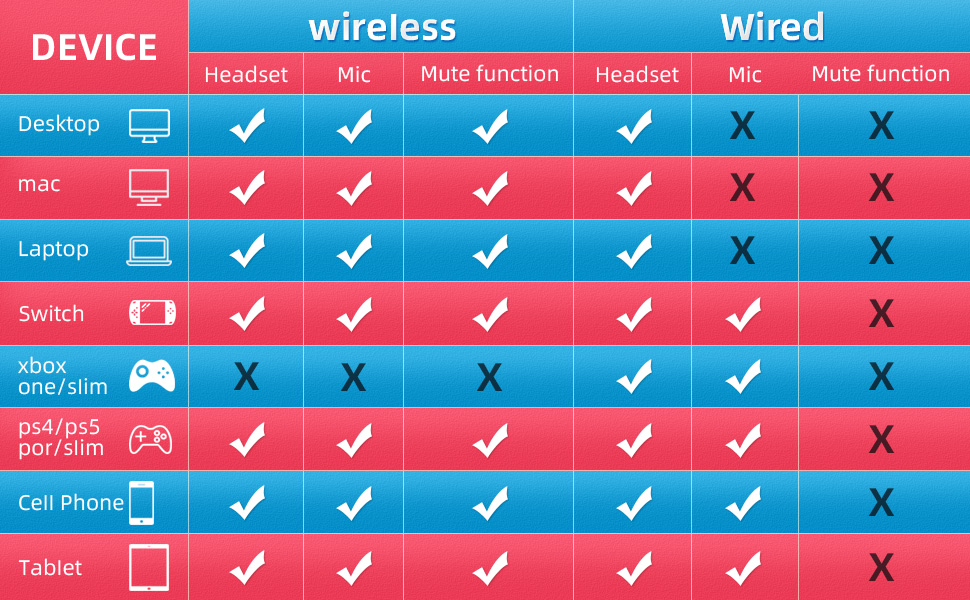
Image: A detailed compatibility chart indicating headset, microphone, and mute function support for various devices (Desktop, Mac, Laptop, Switch, Xbox One/Slim, PS4/PS5, Cell Phone, Tablet) in both wireless and wired modes.
| Түзмөк | Wireless (Headset) | Wireless (Mic) | Wireless (Mute) | Зымдуу (гарнитура) | Зымдуу (Микрофон) | Wired (Mute) |
|---|---|---|---|---|---|---|
| Иш такта | ✓ | ✓ | ✓ | ✓ | ✗ | ✗ |
| Mac | ✓ | ✓ | ✓ | ✓ | ✗ | ✗ |
| Ноутбук | ✓ | ✓ | ✓ | ✓ | ✗ | ✗ |
| Nintendo Switch | ✓ | ✓ | ✓ | ✓ | ✗ | ✗ |
| Xbox One/Slim | ✗ | ✗ | ✗ | ✓ | ✗ | ✗ |
| PS4/PS5 | ✓ | ✓ | ✓ | ✓ | ✗ | ✗ |
| Уюлдук телефон | ✓ | ✓ | ✓ | ✓ | ✗ | ✗ |
| Планшет | ✓ | ✓ | ✓ | ✓ | ✗ | ✗ |
11. Кепилдик жана колдоо
KOFIRE products are manufactured to the highest quality standards. For warranty information or technical support, please refer to the contact details provided on the product packaging or visit the official KOFIRE webсайт. Кепилдик дооматтары үчүн сатып алганыңыздын далилин сактап коюңуз.
Ask a question about this manual
Ask about setup, troubleshooting, compatibility, parts, safety, or missing instructions. Manuals+ will review the question and use this page’s manual context to help answer it.