
1. Киришүү
Thank you for choosing the LEICKE DJ Roxxx Portable Bluetooth Speaker. This manual provides essential information for setting up, operating, and maintaining your speaker. Please read it carefully before use to ensure optimal performance and longevity of your device.
2. Коопсуздук нускамалары
- Динамикти экстремалдык температурага, түз күндүн нуруна же жогорку нымдуулукка дуушар кылбаңыз.
- Спикерди түшүрүүдөн же катуу таасирлерге дуушар кылуудан качыңыз.
- Динамикти өз алдынча ажыратпаңыз же оңдоого аракет кылбаңыз. Бул кепилдикти жокко чыгарат.
- Keep the speaker away from water and liquids. While splashproof, it is not waterproof and should not be submerged.
- Берилген заряддоо кабелин же тастыкталган эквивалентти гана колдонуңуз.
3. Пакеттин мазмуну
Сураныч, пакетте төмөнкү нерселерди текшериңиз:
- LEICKE DJ Roxxx Portable Bluetooth Speaker
- USB заряддоо кабели
- Auxiliary Audio Cable (3.5mm Stereo Plug)
- Карабин
- Instruction Manual
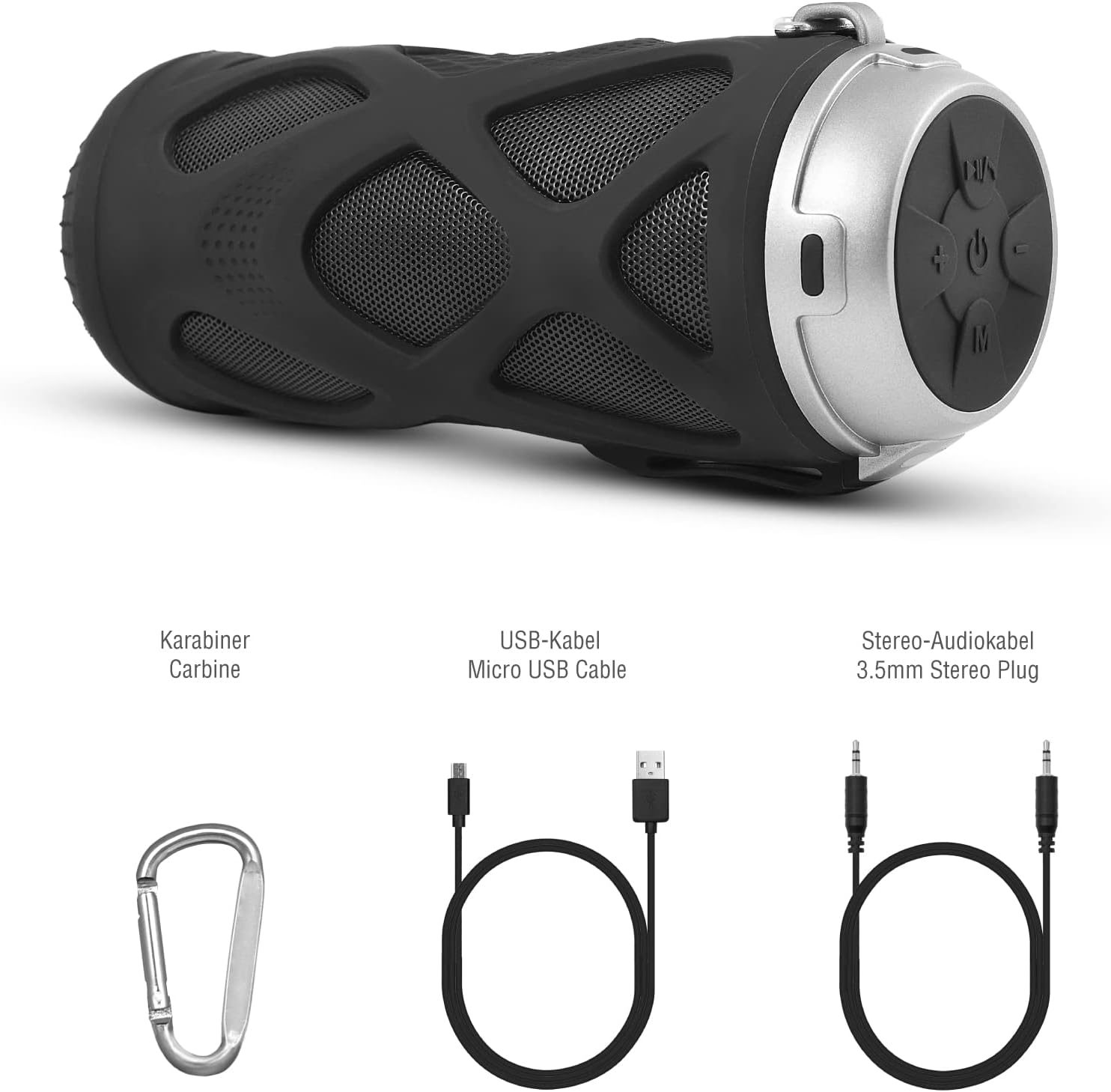
3.1-сүрөт: Камтылган аксессуарлар
4. Продукт бүтүп калдыview
4.1 Башкаруу панели

4.1-сүрөт: Башкаруу панелинин макети
- Күйгүзүү/өчүрүү баскычы: Динамикти күйгүзөт же өчүрөт.
- Play/Pause/Call/Voice Assistant Button: Controls music playback, answers/ends calls, and activates voice assistant (Siri/Google Assistant).
- Үндү азайтуу / Мурунку трек баскычы: Үндү азайтат же мурунку трекке өткөрүп жиберет.
- Үндү катуулатуу / Кийинки трек баскычы: Үндүн көлөмүн жогорулатат же кийинки трекке өткөрүп жиберет.
- Режим баскычы: Switches between Bluetooth, MicroSD/TF, Aux, and FM Radio modes.
4.2 Порттор жана көрсөткүчтөр
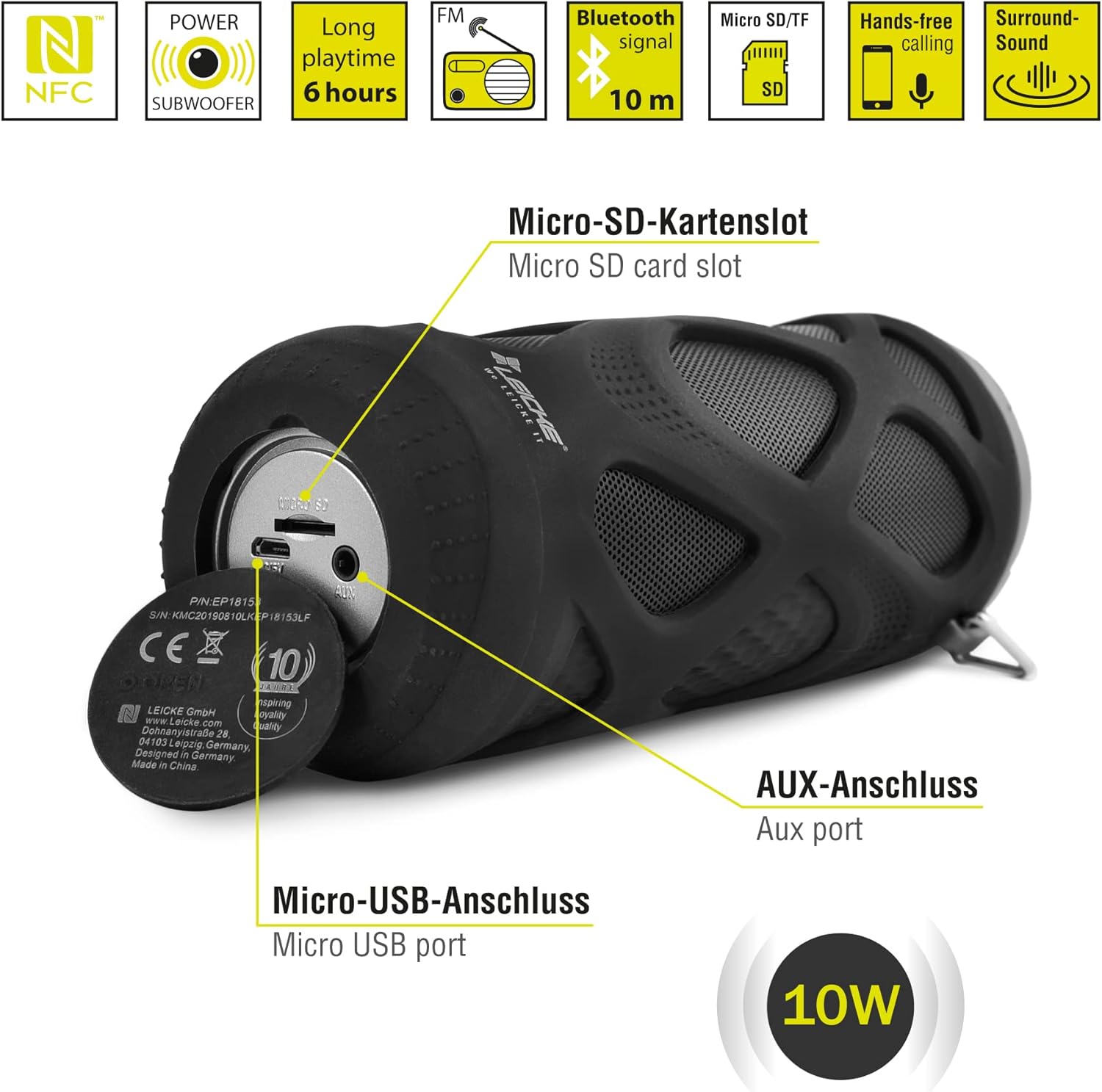
4.2-сүрөт: Ports Overview
- Micro SD/TF карта уячасы: Insert a Micro SD or TF card for MP3 playback.
- AUX порту: Connect external audio devices using the 3.5mm auxiliary cable.
- Микро USB порту: Динамикти заряддоо үчүн колдонулат.
- LED көрсөткүчү: (Typically near the charging port or control panel) Indicates power status, charging status, and Bluetooth pairing status.
5. Орнотуу жана иштетүү
5.1 Динамикти заряддоо
- Кубаттоочу кабелдин Micro USB учун динамиктин Micro USB портуна туташтырыңыз.
- USB-A учун USB кубат адаптерине (кошулмага кирбейт) же компьютердин USB портуна туташтырыңыз.
- The LED indicator will typically show red while charging and turn off or change color when fully charged.
- Толук кубаттоо болжол менен 2-3 саатты талап кылат жана 6 саатка чейин ойноо убактысын камсыздайт.
5.2 Күйгүзүү/өчүрүү
- Күйгүзүү үчүн: басып, кармап туруңуз Күйгүзүү/өчүрүү баскычы for a few seconds until you hear an audible prompt and the LED indicator lights up.
- Өчүрүү үчүн: басып, кармап туруңуз Күйгүзүү/өчүрүү баскычы again for a few seconds until you hear an audible prompt and the LED indicator turns off.
5.3 Bluetooth жупташтыруу
- Ensure the speaker is powered on and in Bluetooth mode (the LED indicator will typically flash blue). If not, press the Режим баскычы Bluetooth режимине өтүү үчүн.
- Смартфонуңузда, планшетиңизде же башка Bluetooth иштетилген түзмөгүңүздө Bluetooth жөндөөлөрүнө өтүңүз.
- Издөө жеткиликтүү түзмөктөрдү тандап, тизмеден "LEICKE DJ Roxxx" тандаңыз.
- Once paired, the LED indicator will stop flashing and remain solid blue, and you will hear a confirmation sound.
- Эгерде түзмөк байланыштын алкагында болсо жана Bluetooth иштетилген болсо, динамик күйүп турганда акыркы жупташтырылган түзмөккө автоматтык түрдө кайра туташат.
5.4 MicroSD/TF картасын ойнотуу
- Insert a Micro SD or TF card (pre-loaded with MP3 audio files) into the Micro SD/TF card slot.
- The speaker will automatically switch to MicroSD/TF mode and begin playing music. If not, press the Режим баскычы to select MicroSD/TF mode.
- колдонуу Ойнотуу/Тыныгуу, Көлөмдү жогорулатуу/Кийинки трек, жана Көлөмдү төмөндөтүү/Мурунку трек ойнотууну башкаруу үчүн баскычтар.
5.5 AUX киргизүү
- Connect one end of the 3.5mm auxiliary cable to the speaker's AUX port.
- Connect the other end to the headphone jack of your audio device (e.g., MP3 player, laptop).
- Динамик автоматтык түрдө AUX режимине өтөт. Эгер андай болбосо, баскычын басыңыз Режим баскычы AUX режимин тандоо үчүн.
- Volume can be controlled via the speaker or your connected device. Track control must be done from the connected device.
5.6 FM радиосунун иштеши
- басыңыз Режим баскычы repeatedly until you enter FM Radio mode.
- FM режиминде, басыңыз Ойнотуу/тындыруу баскычы once to automatically scan and save available FM stations. The speaker will then play the first saved station.
- колдонуу Көлөмдү жогорулатуу/Кийинки трек жана Көлөмдү төмөндөтүү/Мурунку трек Сакталган станциялардын ортосунда которулуу үчүн баскычтарды басыңыз.
5.7 Чыныгы зымсыз стерео (TWS) функциясы
The LEICKE DJ Roxxx speaker supports TWS pairing, allowing you to connect two DJ Roxxx speakers for a stereo sound experience (20W total output).

5.1-сүрөт: Чыныгы Wireless Stereo (TWS) жупташтыруу
- Ensure both DJ Roxxx speakers are powered on and in Bluetooth pairing mode (LED flashing blue).
- Динамиктердин биринде баскычын басып, кармап туруңуз Режим баскычы for a few seconds until you hear a pairing tone. The speakers will attempt to connect to each other.
- Once successfully paired, you will hear a confirmation sound, and the LED indicator on one speaker will flash blue (master), while the other will be solid blue (slave).
- Now, connect your device to the master speaker via Bluetooth as described in section 5.3. Both speakers will play audio in stereo.
6. Иштөө нускамалары
6.1 Музыканы ойнотуу
- Ойнотуу/тындыруу: басыңыз Ойнотуу/тындыруу баскычы бир жолу.
- Кийинки трек: басып, кармап туруңуз Үндү көтөрүү / Кийинки трек баскычы.
- Мурунку трек: басып, кармап туруңуз Үндү азайтуу / Мурунку трек баскычы.
- Көлөмү: басыңыз Үндү көтөрүү / Кийинки трек баскычы кыскача.
- Үнүн азайтуу: басыңыз Үндү азайтуу / Мурунку трек баскычы кыскача.
6.2 Hands-Free чалуу
- Чакырууга жооп берүү: Чалуу келгенде, басыңыз Ойнотуу/тындыруу/чалуу баскычы бир жолу.
- Чакырууну аяктоо: Чалуу учурунда, басыңыз Ойнотуу/тындыруу/чалуу баскычы бир жолу.
- Чакырууну четке кагуу: When a call comes in, press and hold the Ойнотуу/тындыруу/чалуу баскычы 2 секундга.
- Акыркы номерди кайра терүү: In standby mode, double-press the Ойнотуу/тындыруу/чалуу баскычы.
6.3 Үн жардамчысын жандыруу
- With one click, you can activate Siri (iOS) or Google Assistant (Android) on your connected smartphone. Press the Play/Pause/Call/Voice Assistant button жандандыруу үчүн бир жолу.
7. Техникалык тейлөө
7.1 Тазалоо
- Динамикти жумшак, кургак же бир аз кургак чүпүрөк менен сүртүңүзamp кездеме.
- Абразивдүү тазалоочу каражаттарды, спиртти же химиялык эриткичтерди колдонбоңуз, анткени алар бетке зыян келтириши мүмкүн.
- Башка түзмөктөрдү заряддоо же туташтыруудан мурун бардык порттор кургак экенин текшериңиз.
7.2 Сактоо
- Динамикти түз күн нурунан жана өтө температурадан алыс салкын, кургак жерде сактаңыз.
- Эгер батарейканы узак убакытка сактасаңыз, анын иштөө мөөнөтүн сактоо үчүн аны бир нече ай сайын 50% га чейин кубаттап туруңуз.
7.3 Сууга туруктуулук
The LEICKE DJ Roxxx speaker is designed to be splashproof, offering protection against light rain or splashes. It is суу өткөрбөйт and should not be submerged in water or exposed to heavy rain. Ensure the port cover is securely closed to maintain splash resistance.

7.1-сүрөт: Splashproof Design for Outdoor Use
8. Кыйынчылыктарды
| Көйгөй | Мүмкүн себеп | Чечим |
|---|---|---|
| Динамик күйбөйт. | Батарея аз. | Динамикти кеминде 30 мүнөткө заряддаңыз. |
| Bluetooth аркылуу жупташтыруу мүмкүн эмес. | Динамик жупташтыруу режиминде эмес; түзмөк Bluetooth өчүк; аппараттан өтө алыс. | Ensure speaker is in Bluetooth mode (flashing blue LED). Turn on Bluetooth on your device. Move speaker closer to device (within 10m). Forget previous pairings on your device and try again. |
| Үн жок. | Үнү өтө төмөн; туура эмес режим; түзмөк ойнотулбай жатат. | Increase speaker and device volume. Ensure correct mode (Bluetooth, AUX, MicroSD). Check if audio is playing on your source device. |
| FM радиосун кабыл алуу начар. | Алсыз сигнал; тоскоолдук. | Move the speaker to a different location. Re-scan for stations. |
| MicroSD картасы таанылган жок. | Card not inserted correctly; unsupported format; corrupted files. | Reinsert the card. Ensure files are in MP3 format. Try a different MicroSD card. |
9. Техникалык шарттар
| Модель аты | DJ Roxxx |
| Модель номери | B09P4Z5MN5 |
| Бренд | ЛЕЙК |
| Байланыш технологиясы | Bluetooth |
| Зымсыз байланыш технологиясы | Bluetooth |
| Динамик түрү | Портативдик Bluetooth динамиги |
| Динамиктердин максималдуу чыгаруу күчү | 10 Ватт |
| Башкаруу ыкмасы | Tactile Buttons |
| Өзгөчөлүктөр | Integrated Microphone, Portable Wireless, MicroSD/TF Player, Aux Input, FM Radio, Hands-Free Calling, Voice Assistant Support, TWS Function, Splashproof |
| Power Source | Cable Electric (Rechargeable Battery) |
| Продукциянын өлчөмдөрү (L x W x Y) | 7 x 7 x 18 см |
| Элемент Салмагы | 400 грамм |
| Сунушталган Колдонуулар | Смартфон же планшет үчүн |
| Шайкеш түзмөктөр | Ноутбук, смартфон |
| Суу өткөрбөйт | False (Splashproof only) |
10. Кепилдик жана колдоо
LEICKE products come with a standard manufacturer's warranty. For detailed warranty information, please refer to the warranty card included in your package or visit the official LEICKE webсайт.
If you encounter any issues or have questions regarding your LEICKE DJ Roxxx speaker, please contact LEICKE customer support:
- Өндүрүүчү: ЛЕЙК
- Сатуучу: LEICKE - Leipzig (as per Amazon listing)
- Колдоо: Refer to the official LEICKE website or contact information provided with your purchase for the most up-to-date support channels.