
Introduction
The MIFA WildBox is a portable Bluetooth speaker designed for robust outdoor and indoor use. It features powerful audio output, dynamic LED lighting, and a durable waterproof and dustproof design. This manual provides essential information for setting up, operating, maintaining, and troubleshooting your MIFA WildBox speaker to ensure optimal performance and longevity.

Figure 1: MIFA WildBox Bluetooth Speaker showcasing its waterproof design and power bank feature.
Кутуда эмне бар
Upon unboxing your MIFA WildBox, please ensure all the following items are present:
- 1 x MIFA WildBox Bluetooth Speaker
- 1 х USB-C кубаттоо кабели
- 1 x User Guide Manual
Өзгөчөлүктөрү
- Күчтүү аудио чыгаруу: 60W total output with 2x20W RMS woofers and 2x10W RMS tweeters for loud sound and deep bass.
- IP67 Суу жана чаң өткөрбөйт: Designed to withstand immersion in water up to 1 meter for 30 minutes and fully protected against dust ingress. The speaker is also floatable.
- Динамикалык LED жарыктары: Features 16 million dynamic LED lights with multiple modes to enhance your listening experience.
- TWS & Partyadd Function: Allows pairing of two MIFA WildBox speakers for true stereo sound, or connecting over 100 MIFA WildBox speakers for a synchronized party experience.
- Ар тараптуу байланыш: Supports Bluetooth 5.3 for stable wireless connection up to 197ft, Aux input, and Micro SD card slot for various audio sources.
- Камтылган Power Bank: Equipped with a 10000mAh battery that can charge external devices via its USB-A output port.
- Узак ойноо убактысы: Бир кубаттоо менен 24 саатка чейин үзгүлтүксүз музыка ойнотуу.
- Портативдик дизайн: Integrated carrying handle for easy transport.

Figure 2: ашыкview of MIFA WildBox key features.
Жайгашуу
1. Баштапкы заряддоо
Before first use, fully charge your MIFA WildBox speaker. Connect the provided USB-C cable to the speaker's USB-C input port (labeled 'IN') and the other end to a compatible USB power adapter (not included). The charging indicator will show the charging status. A full charge takes approximately 4 hours.
2. Күйгүзүү / Өчүрүү
- Күйгүзүү үчүн: басып, кармап туруңуз Кубат баскычы (
 ) for 2-3 seconds until you hear an audible prompt and the LED lights activate.
 - Өчүрүү үчүн: басып, кармап туруңуз Кубат баскычы кайрадан 2-3 секунд.
3. Bluetooth Жупташтыруу
- Power on the MIFA WildBox speaker. It will automatically enter Bluetooth pairing mode, indicated by a flashing blue LED.
- Мобилдик түзмөгүңүздө (смартфон, планшет ж.б.) Bluetooth иштетип, жеткиликтүү түзмөктөрдү издеңиз.
- Select "MIFA WildBox" from the list of devices.
- Once successfully paired, the blue LED will remain solid, and you will hear a confirmation tone.
4. TWS (True Wireless Stereo) жупташтыруу
To pair two MIFA WildBox speakers for a stereo experience:
- Ensure both MIFA WildBox speakers are powered on and not connected to any Bluetooth device.
- Бир динамикте баскычын басыңыз TWS баскычы (
 ). It will search for the second speaker.
 - The speakers will automatically connect to each other. Once connected, the main speaker's LED will flash blue (ready to pair with a device), and the secondary speaker's LED will be solid blue.
- Connect your mobile device to the main speaker via Bluetooth as described in step 3. Audio will now play in stereo through both speakers.

Figure 3: Multiple speakers connected via Partyadd for an immersive audio experience.
5. Aux Input & Micro SD Card Usage
The MIFA WildBox supports audio playback via a 3.5mm AUX cable and a Micro SD card.
- Aux Киргизүү: Connect a 3.5mm audio cable (not included) from your audio source to the AUX-in port on the speaker. The speaker will automatically switch to AUX mode.
- Micro SD картасы: Insert a Micro SD card (up to 32GB, not included) with your music files into the Micro SD card slot. The speaker will automatically switch to Micro SD mode and begin playback.

Figure 4: Connectivity options including Bluetooth, Micro SD, and AUX.
Иштөө нускамалары
1. Баскыч функциялары
The control panel on top of the speaker provides easy access to various functions:
- Кубат баскычы (): Күйгүзүү/өчүрүү үчүн басып туруңуз.
- Режим баскычы (M): Short press to switch between Bluetooth, AUX, and Micro SD card modes.
- Үнүн төмөндөтүү (-): Үндү азайтуу үчүн кыска басыңыз.
- Ойнотуу/тындыруу баскычы (
 ): Short press to play or pause music. Long press for next track.
 - Үнүн жогорулатуу (+): Үнүн жогорулатуу үчүн кыска басыңыз.
- Жарык баскычы (
 ): Short press to cycle through different LED light modes. Long press to turn lights off/on.
 - Басс баскычы: Press to activate or deactivate the extra bass effect.
- TWS Button (): Press to initiate TWS or Partyadd pairing.
2. LED жарык режимдери
The MIFA WildBox features 6 distinct RGB light modes. Use the Light button to switch between them or turn the lights off completely.
3. Power Bank функциясы
To use the speaker as a power bank:
- Open the rubber flap on the back of the speaker to access the ports.
- Connect your device's charging cable to the USB-A output port (labeled 'OUT') on the MIFA WildBox.
- Заряддоо автоматтык түрдө башталат.

Figure 5: The MIFA WildBox functioning as a power bank.
Техникалык тейлөө
- Waterproof & Dustproof Care: Ensure the rubber flap covering the ports is securely closed before exposing the speaker to water or dust. While IP67 rated, avoid prolonged submersion or exposure to high-pressure water jets.
- Тазалоо: жумшак колдонуу, damp спикердин сыртын тазалоо үчүн кездеме. Катуу химиялык заттарды же абразивдүү тазалагычтарды колдонбоңуз.
- Сактагыч: Динамикти узак убакыт бою колдонбогондо, түз күн тийбеген, кургак, салкын жерде сактаңыз.
- Батареяга кам көрүү: Батареянын иштөө мөөнөтүн узартуу үчүн, динамикти тез-тез толук зарядсыздандырбаңыз. Аны үзгүлтүксүз колдонбосоңуз да, үзгүлтүксүз кубаттап туруңуз.

Figure 6: The MIFA WildBox is designed to be waterproof and floatable.
Проблемаларды чечүү
| Көйгөй | Мүмкүн себеп | Чечим |
|---|---|---|
| Динамик күйбөйт. | Батарея аз. | Charge the speaker fully (approx. 4 hours). |
| Bluetooth аркылуу жупташтыруу мүмкүн эмес. | Speaker is already connected to another device or out of range. | Ensure the speaker is in pairing mode (flashing blue LED). Disconnect from other devices. Move speaker closer to your device. |
| Динамиктен үн жок. | Volume too low, incorrect mode, or audio source issue. | Increase speaker and device volume. Check if the correct input mode (Bluetooth, AUX, SD card) is selected. Ensure audio source is playing. |
| TWS жупташтыруу ишке ашпай калды. | Динамиктер бири-биринен өтө алыс же башка түзмөктөргө туташып турат. | Ensure both speakers are disconnected from other devices. Place them close to each other during TWS pairing. |
| LED жарыктары иштебейт. | Жарыктар өчүрүлгөн же статикалык режимде. | Short press the Light button to cycle modes. Long press to turn lights on/off. |
Техникалык шарттар
| Өзгөчөлүк | Деталь |
|---|---|
| Модель аты | MIFA WildBox |
| Динамик түрү | Outdoor / Portable Bluetooth Speaker |
| Динамиктин максималдуу чыгаруу күчү | 60 Ватт |
| Вуфердин диаметри | 2.75 Inches (70mm) x 2 |
| Tweeter диаметри | 0.79 Inches (20mm) x 2 |
| Пассивдүү радиаторлор | 85mm х 2 |
| Байланыш технологиясы | Bluetooth 5.3, Көмөкчү (3.5 мм), USB (Power Bank үчүн) |
| Зымсыз диапазон | 197 фут (60 метр) чейин |
| Сууга туруктуулук деңгээли | IP67 (Суу өткөрбөйт жана чаң өткөрбөйт) |
| Батарея сыйымдуулугу | 10000 мАч |
| Оюн убактысы | 24 саатка чейин |
| Заряддоо убактысы | Болжол менен 4 саат |
| Продукциянын өлчөмдөрү (L x W x Y) | 12" x 7" x 5" |
| Элемент Салмагы | 4 фунт |
| Материал | Пластик |
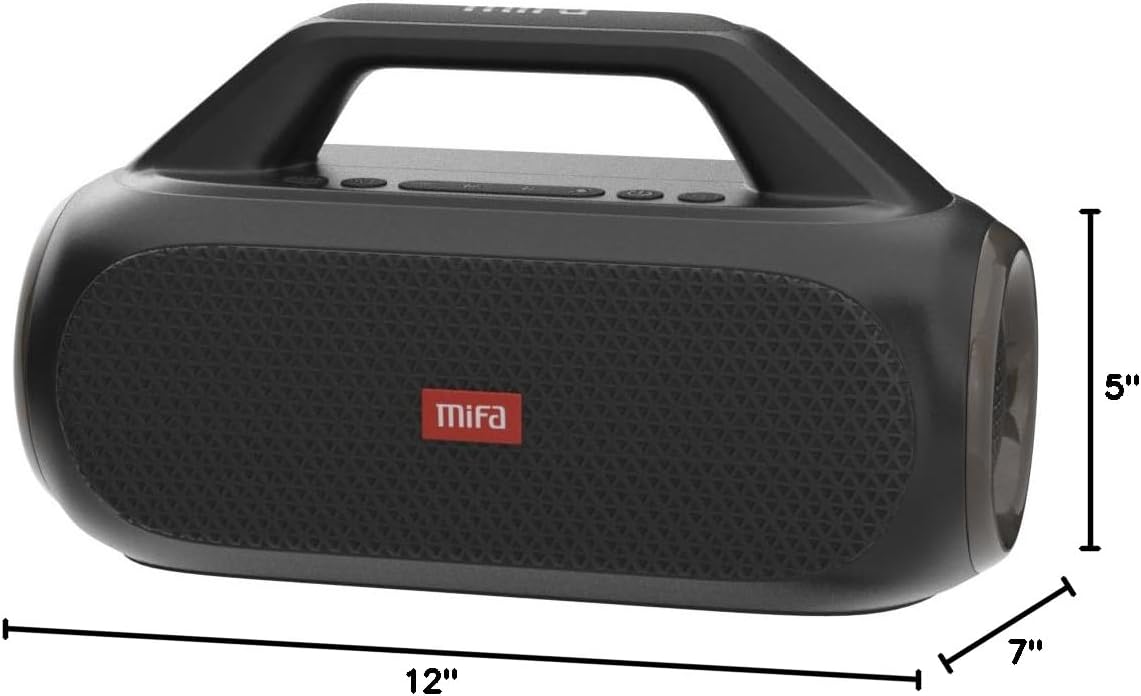
Figure 7: MIFA WildBox dimensions.
Кепилдик жана колдоо
The MIFA WildBox Bluetooth Speaker comes with a limited warranty. For specific details regarding warranty coverage, duration, and terms, please refer to the warranty information provided in the packaging or contact MIFA customer support directly.
For technical assistance, troubleshooting beyond this manual, or warranty claims, please visit the official MIFA website or contact their customer service team. Contact information can typically be found on the product packaging or the MIFA brand store on Amazon.