
aurora OZ-DRL
Ozone Smart Rim Lock User Manual
Model: OZ-DRL
Бренд: Озон
Introduction
This manual provides comprehensive instructions for the installation, operation, and maintenance of your Ozone Smart Rim Lock, Model OZ-DRL. This advanced security device offers multiple access methods for enhanced convenience and protection.
Негизги өзгөчөлүктөрү
- Wi-Fi Connectivity for Smart Control
- Multiple Access Modes: Fingerprint, User Password, OzoLife Mobile App, RFID Card, Emergency Key
- High Fingerprint Capacity (100 fingerprints)
- Durable Stainless Steel and Alloy Steel Construction
- Оңой орнотуу
Компоненттер бүттүview
The Ozone Smart Rim Lock system consists of the main lock unit and the external keypad/reader. Familiarize yourself with the key parts:
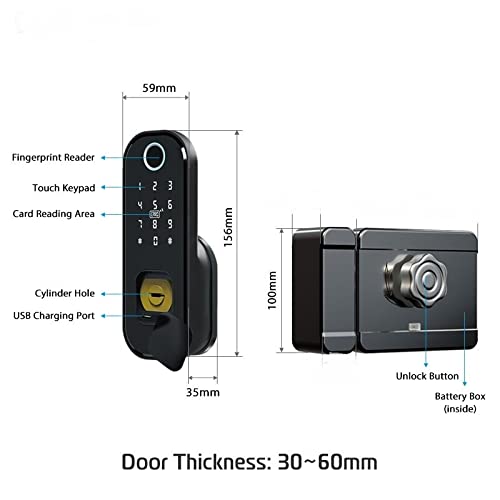
Figure 1: Smart Rim Lock Components and Dimensions
This diagram illustrates the main components of the lock. The external unit features a Fingerprint Reader, Touch Keypad, Card Reading Area, Cylinder Hole for emergency key access, and a USB Charging Port. The internal unit includes an Unlock Button and a Battery Box. The lock is designed for door thicknesses between 30mm and 60mm.
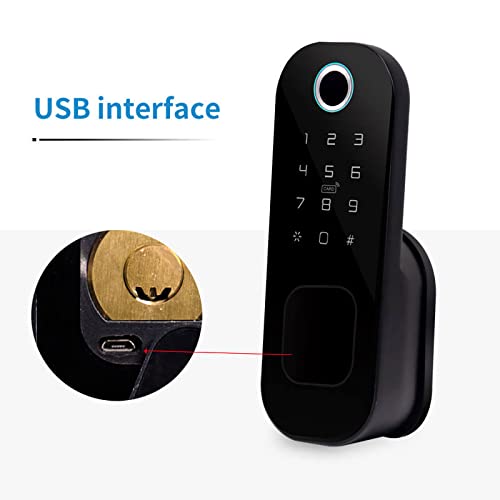
Figure 2: USB Charging Port Detail
А деталдуу view of the USB interface, located near the cylinder hole, used for emergency power or charging.
Пакеттин мазмуну
- Ozone Smart Rim Lock Unit (External and Internal)
- Монтаждоочу жабдык
- Шашылыш ачкычтар
- RFID Cards (Quantity may vary)
- Колдонуучунун колдонмосу (бул документ)
Техникалык мүнөздөмөлөр

Figure 3: Technical Parameters and Specifications
Бул сүрөт ар тараптуу камсыз кылатview of the lock's technical parameters and detailed specifications.
| Өзгөчөлүк | Деталь |
|---|---|
| Модел | OZ-DRL |
| Материал | Дат баспас болот, эритме болот |
| Түс | Кара |
| Өлчөмдөрү (L x W x Y) | 25.4 x 20.3 x 10.2 см |
| Кулпу түрү | Key Lock (with smart features) |
| Байланыш | Wi-Fi |
| Башкаруу ыкмасы | App, Fingerprint, Keypad, RFID Card, Emergency Key |
| Манжа изинин сыйымдуулугу | 100 |
| Password Length | 4-8 сан |
| Виртуалдык сырсөз | 32 санга чейин |
| Эшиктин калыңдыгы | 30-60 мм |
| Күч | DC 6V |
| Өзгөчө кырдаалдардын күчү | DC 5V (via Micro USB) |
| Иштөө температурасы | -25°Cден 60°Cге чейин |
| Жумушчу Салыштырмалуу Нымдуулук | 20%-90% RH |
Орнотуу боюнча колдонмо
The Ozone Smart Rim Lock is designed for easy installation, retrofitting with regular rim locks without additional cutouts.
Орнотуудан мурун
- Эшигиңиздин калыңдыгы 30 мм жана 60 мм ортосунда болушун камсыз кылыңыз.
- Verify all components are present as listed in the "Package Contents" section.
- Prepare necessary tools (screwdriver, drill if required for new installations).
Орнотуу кадамдары (Жалпы)
- эшикти даярдоо: Remove any existing rim lock. Ensure the door frame and door edge are clean and clear.
- Mount the External Unit: Position the external keypad/reader unit on the outside of the door. Secure it using the provided mounting hardware.
- Install the Internal Unit: Align the internal lock unit with the external unit, ensuring the spindle and wiring (if any) connect properly. Secure the internal unit to the door.
- Туташуу кубаты: Insert the required batteries into the battery box within the internal unit.
- Сыноо операциясы: After installation, test the mechanical lock function with the emergency key.
Эскертүү: For detailed, step-by-step installation instructions, please refer to the specific installation diagram or video provided with your product packaging, or consult a professional installer.
Operating Your Smart Rim Lock
Your Ozone Smart Rim Lock offers multiple convenient ways to unlock your door.
Initial Setup and Administrator
Upon first power-up, you will need to set up an administrator. This is typically the first fingerprint or password registered. Refer to the lock's voice prompts or the OzoLife App for guided setup.
Кирүү режимдери

Figure 4: Available Access Modes
This image highlights the five primary methods for unlocking the Ozone Smart Rim Lock.
1. Fingerprint Access
- Каттоо: As an administrator, follow the voice prompts or app instructions to enroll new fingerprints. Place the finger firmly on the fingerprint reader until successful registration is confirmed.
- Кулпуну ачуу: Катталган манжаңызды манжа изин окугучка коюңуз. Манжа изи таанылса, кулпу ачылат.
2. User Password Access
- Сырсөздөрдү орнотуу: Administrators can set or modify user passwords (4-8 digits) via the keypad or OzoLife App.
- Кулпуну ачуу: Enter your registered password on the touch keypad, followed by the '#' key.
- Виртуалдык сырсөз: To prevent peeping, you can enter random digits before or after your actual password (e.g.,
XXXXкупуя сөзYYYY).
3. OzoLife Mobile App Control
- Жүктөп алуу жана туташуу: Download the "OzoLife" app from your smartphone's app store. Follow the in-app instructions to connect your lock to your home Wi-Fi network and pair it with the app.
- Алыстан кулпуну ачуу: Once connected, you can remotely unlock the door, manage users, view access logs, and receive notifications through the app.
4. RFID Card Access
- Каттоо: Register RFID cards through the administrator mode or OzoLife App.
- Кулпуну ачуу: Present a registered RFID card to the card reading area on the external unit. The lock will unlock upon recognition.
5. Шашылыш ачкычка кирүү
In case of battery depletion or electronic malfunction, the emergency key provides mechanical access.
- Insert the emergency key into the cylinder hole.
- Эшикти ачуу үчүн ачкычты буруңуз.
Батарея башкаруу
The lock will provide a low power warning when batteries are running low. Replace batteries promptly to ensure continuous operation. In an emergency, the USB charging port can be used for temporary power.
Техникалык тейлөө
- Тазалоо: Кулпунун бетин жумшак, кургак чүпүрөк менен сүртүңүз. Абразивдүү тазалоочу каражаттарды же эриткичтерди колдонбоңуз.
- Батареяны алмаштыруу: Replace all batteries with new ones when the low power warning is activated. Use high-quality alkaline batteries.
- Манжа изинин сенсоруна кам көрүү: Оптималдуу иштеши үчүн манжа изинин сенсорун таза жана кургак кармаңыз.
- Программалык камсыздоо жаңыртуулары: Regularly check the OzoLife App for firmware updates to ensure your lock has the latest features and security enhancements.
Проблемаларды чечүү
If you encounter issues with your Ozone Smart Rim Lock, refer to the following common problems and solutions:
- Lock is not responding.
- Батареянын деңгээлин текшерип, керек болсо алмаштырыңыз.
- Use the emergency key to open the door.
- Try connecting a power bank to the USB charging port for temporary power.
- Манжа изи таанылган жок.
- Манжаңыздын таза жана кургак экенине ынаныңыз.
- Place your finger firmly and completely on the sensor.
- Re-enroll your fingerprint if the issue persists.
- Колдонмого туташуу маселелери.
- Ensure your Wi-Fi network is stable and the lock is within range.
- Restart your router and the lock.
- Re-pair the lock with the OzoLife App.
- Ариптакта жооп бербей жатат.
- Check for low battery warning.
- Ensure no foreign objects are obstructing the keypad.
Кепилдик маалымат
The Ozone Smart Rim Lock (Model OZ-DRL) comes with a 12 айлык кепилдик сатып алынган күндөн тартып. Бул кепилдик өндүрүштүк кемчиликтерди жана нормалдуу колдонуудагы бузулууларды камтыйт.
Кепилдик төмөнкүлөрдү камтыбайт:
- Damage caused by improper installation or unauthorized repairs.
- Туура эмес пайдалануудан, кыянаттык менен пайдалануудан же кайдыгерликтен улам келтирилген зыян.
- Кадимки эскирүү.
- Табигый кырсыктардан же кырсыктардан келтирилген зыян.
Кепилдик дооматтары үчүн сатып алуунун далили катары сатып алуу дүмүрчөгүңүздү сактап коюңуз.
Кардарларды колдоо
For further assistance, technical support, or warranty claims, please contact Ozone customer service:
- Телефон: +91-9310012300
- Webсайт: www.ozonesecutech.com
- Электрондук почта: info@ozonesecutech.com
When contacting support, please have your product model (OZ-DRL) and purchase details ready.
Ask a question about this manual
Ask about setup, troubleshooting, compatibility, parts, safety, or missing instructions. Manuals+ will review the question and use this page’s manual context to help answer it.