Introduction
Thank you for choosing the X7 Pro Smart Watch. This manual provides essential information for setting up, operating, and maintaining your device. The X7 Pro Smart Watch is designed to enhance your daily life with features such as Bluetooth calling, health monitoring, fitness tracking, and smart notifications. It supports both Android and iPhone devices and features a 1.78-inch IPS full touch screen.
Пакеттин мазмуну
Сураныч, төмөнкү нерселер үчүн кутучаны белгилеңиз:
- X7 Pro Smart Watch (Black)
- Silicone Band (44mm)
- Зымсыз заряддоо кабели
- User Manual

Image: The X7 Pro Smart Watch in black, featuring a sleek design and a clear digital display showing the date and time.
Продукт бүттүview
Familiarize yourself with the main components of your X7 Pro Smart Watch:
- 1.78-inch IPS Full Touch Screen: For interactive navigation and display.
- Айлануучу таажы: Used for navigating menus, zooming, and scrolling.
- Каптал баскычы: Typically for power on/off or returning to the home screen.
- Жүрөктүн кагышын көзөмөлдөөчү: Ден соолукка көз салуу үчүн арткы жагында жайгашкан.
- Зымсыз заряддоо аянтчасы: On the back for convenient charging.
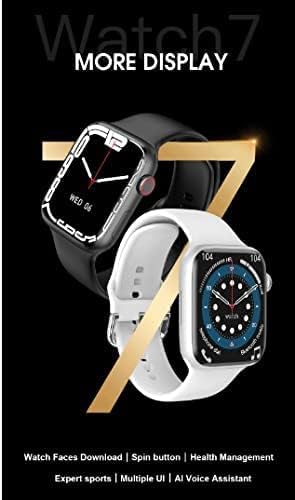
Image: A close-up of the X7 Pro Smart Watch, highlighting the rotating crown on the side, which is used for navigation.
Жайгашуу
1. Аппаратты заряддоо
Before first use, fully charge your X7 Pro Smart Watch. Place the watch on the wireless charging pad. A built-in magnetic module ensures correct alignment. A full charge takes approximately 2 hours.
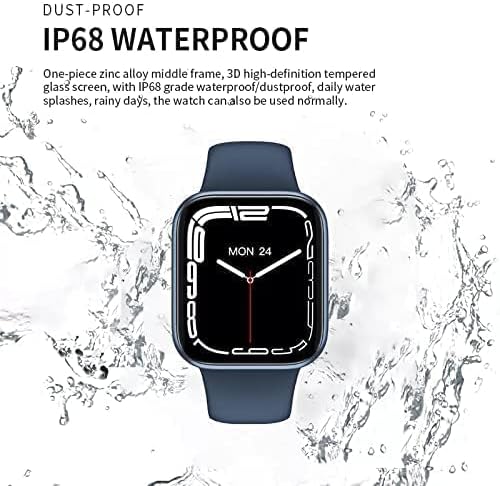
Image: The X7 Pro Smart Watch positioned on its wireless charging base, illustrating the charging process. The image also notes the 200mAh battery and 2-hour charging time.
2. Күйгүзүү / Өчүрүү
- Күйгүзүү: Экран күйгөнгө чейин каптал баскычты басып, кармап туруңуз.
- Өчүрүү: Press and hold the side button, then select "Power Off" on the screen.
3. Смартфон менен жупташтыруу
- жүктөп алыңыз Wearfit Pro application from your smartphone's app store (compatible with Android and iPhone).
- Смартфонуңузда Bluetooth иштетилгенин текшериңиз.
- Open the Wearfit Pro app and follow the on-screen instructions to search for and connect to your X7 Pro Smart Watch. The watch uses Bluetooth 5.2 for stable connectivity.
- Жупташуу өтүнүчүн саатыңызда жана смартфонуңузда ырастаңыз.
Иштөө нускамалары
Негизги навигация
- Сенсордук экран: Менюларда жана эскертмелерде чабыттоо үчүн өйдө, ылдый, солго же оңго сүрүңүз. Нерселерди тандоо үчүн таптаңыз.
- Айлануучу таажы: Rotate to scroll through lists, zoom in/out, or change watch faces. Press to return to the home screen or confirm selections.
Bluetooth чалуу функциясы
Once paired with your smartphone, you can make and answer calls directly from your X7 Pro Smart Watch. Ensure the Bluetooth call feature is enabled in the Wearfit Pro app.
Эскертмелер
Receive notifications for SMS, Facebook, Twitter, Line, WhatsApp, and other applications directly on your watch. Configure notification settings within the Wearfit Pro app.
Health Monitoring & Fitness Tracking
- Жүрөктүн кагышын көзөмөлдөөчү: Саат жүрөктүн кагышын тынымсыз көзөмөлдөйт. View your data in real-time on the watch or in the Wearfit Pro app.
- Фитнес трекер: Track your steps, distance, calories burned, and various sports activities.
Саат жүздөрүн ыңгайлаштыруу
The X7 Pro Smart Watch offers a variety of built-in watch faces and allows for custom watch faces. Access the "Dial Market" within the Wearfit Pro app to download more options and personalize your watch's appearance.

Image: A display showcasing various dynamic watch faces available for the X7 Pro Smart Watch, emphasizing personalization options.
PIN Lock Feature
For enhanced security, you can set a PIN lock on your watch. This feature helps keep your data safe and provides peace of mind.
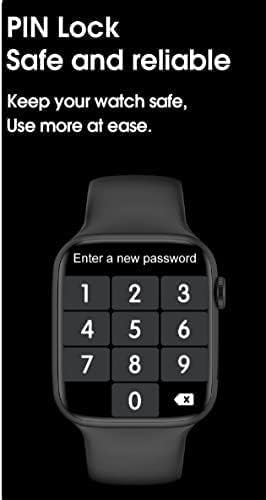
Image: The X7 Pro Smart Watch screen showing the PIN lock interface, prompting the user to enter a new password for security.
Башка өзгөчөлүктөр
- Жайгашкан жерди бөлүшүү: Utilize location sharing features through the connected app.
- QR Code Support: For quick access to certain functions or information.
- PayPal & Alipay: Support for mobile payment functionalities.
- Wake Up Gesture: Экранды ойготуу үчүн билегиңизди көтөрүңүз.
- Ойготкуч: Ойготкучтарды түз саатыңыздан коюңуз.
- Watch Watch: Иш-аракеттердин убактысын эсептөө үчүн орнотулган секундомер.
Техникалык тейлөө
Саатыңызды тазалоо
Саатты жана боону жумшак менен дайыма сүртүп туруңуз, damp кездеме. Катуу химиялык заттарды же абразивдүү материалдарды колдонуудан алыс болуңуз.
Сууга туруктуулук (IP68)
The X7 Pro Smart Watch is IP68 waterproof and dustproof. This means it can withstand daily water splashes, rain, and can be used normally in such conditions. Avoid prolonged submersion or hot water exposure.

Image: The X7 Pro Smart Watch shown with water droplets, illustrating its IP68 dustproof and waterproof capabilities, suitable for daily use and splashes.
Батареяга кам көрүү
To prolong battery life, avoid extreme temperatures and fully discharging the battery frequently. The 200mAh lithium polymer battery provides more than 4 days of typical use.
Проблемаларды чечүү
If you encounter issues with your X7 Pro Smart Watch, try the following common solutions:
- Күйгүзүлбөй жаткан саат: Саат толук заряддалганын текшериңиз.
- Телефон менен жупташтыруу мүмкүн эмес: Make sure Bluetooth is enabled on both devices and the Wearfit Pro app is open. Try restarting both the watch and phone.
- Эскертмелер көрүнбөй жатат: Check notification permissions in the Wearfit Pro app and your phone's settings.
- Туура эмес ден соолук маалыматтары: Ensure the watch is worn snugly on your wrist and the sensors are clean.
For persistent issues, refer to the Wearfit Pro app's help section or contact customer support.
Техникалык шарттар
| Өзгөчөлүк | Спецификация |
|---|---|
| Модель номери | X7 Pro |
| Screen Size | 1.78 inches IPS Full Touch Screen |
| Bluetooth версиясы | 5.2 |
| Батарея сыйымдуулугу | 200 мАч литий полимери |
| Заряддоо ыкмасы | Зымсыз заряддоо |
| Боо материалы | Silicone (44MM) |
| Суу каршылык | IP68 чаң жана суу өткөрбөйт |
| Операциялык системанын шайкештиги | Android, iOS |
| Эстутум сактоо сыйымдуулугу | 128 MB |
| Продукциянын өлчөмдөрү | 0.43 x 0.38 x 0.13 см; 190 г |
| Өндүрүүчү | HW |
| Биринчи жеткиликтүү күн | 1 январь 2022 жыл |
Кепилдик жана колдоо
For warranty information and customer support, please refer to the documentation included with your purchase or contact the retailer. Keep your purchase receipt as proof of purchase.


