
EKSA EM100
EKSA EM100 оюн чычканынын колдонуучу колдонмосу
Модел: EM100
1. Киришүү
The EKSA EM100 Gaming Mouse is a high-performance wired ergonomic gaming mouse designed for PC gamers. It features 7 programmable buttons, customizable Chroma RGB lighting, and an adjustable optical sensor with up to 8000 DPI. This manual provides detailed instructions for setting up, operating, and maintaining your EM100 Gaming Mouse to ensure optimal performance and longevity.
2. Пакеттин мазмуну
Пакетте бардык буюмдар бар экенин текшериңиз:
- 1 x EKSA EM100 оюн чычканы
- 1 x User Manual
- 1 x Белек кутусу (пакет)
- 1 x 1.5 м/59 дюймдук кабель (интеграцияланган)

Figure 2.1: Contents of the EKSA EM100 Gaming Mouse package, including the mouse, user manual, and gift box.
3. Продукциянын өзгөчөлүктөрү
- 7 Программалануучу баскычтар: Customize functions for Left, Right, Scroll, DPI, Forward, Backward, and RGB Light buttons.
- Жөнгө салынуучу DPI: 6-level DPI settings (800/1600/2400/3200/4800/8000) for precise control.
- Chroma RGB Backlighting: 6 backlight modes with 16 million customizable colors, including "Breathing and Streamer" effects.
- Эргономикалык дизайн: Shaped for comfort during extended use, with non-slip sides to reduce hand sweat and improve grip.
- Туруктуу кабель: 5-inch flexible braided cable designed to minimize drag and interference.
- Кеңири шайкештик: Supports Windows 2000/XP/Vista/7/8/10/11 for programmable features and macOS for normal use. Compatible with Laptops, PCs, and MacBooks.

Figure 3.1: ашыкview of key features including 7 functional buttons, RGB lighting, ergonomic design, 8000 DPI, and parachute cord.
4. Орнотуу
- Чычканды таңгактан чыгаруу: Carefully remove the EKSA EM100 Gaming Mouse and its accessories from the packaging.
- Компьютерге туташуу: Insert the USB plug of the mouse cable into an available USB port on your computer (PC, Laptop, or MacBook).

Figure 4.1: The USB plug and braided cable of the EKSA EM100 Gaming Mouse.
- Driver Installation (Windows): For programmable features and advanced customization on Windows operating systems, it is recommended to download and install the official EKSA EM100 driver. Refer to the official EKSA website for the latest driver software. For macOS, the mouse functions normally without additional drivers, but programmable features are not available.

4.2-сүрөт: Мисample of the programmable software interface for the EKSA EM100 Gaming Mouse.
- Жайгашкан жери: Place the mouse on a flat, clean surface, preferably a mouse pad, for optimal tracking performance.
5. Иштөө нускамалары
5.1 Баскыч функциялары
The EKSA EM100 Gaming Mouse features 7 buttons, each with a default function. These can be customized via the driver software on Windows.
- Сол баскыч: Негизги чыкылдатуу функциясы.
- Оң баскыч: Экинчи чыкылдатуу функциясы (контексттик меню).
- Scroll Button (Middle Click): Activates middle click, often used for opening links in new tabs or auto-scrolling.
- DPI баскычы: DPI жөндөөлөрү аркылуу айланышат.
- Алга баскычы: Алга карай жылдырат web браузерлер же file изилдөөчүлөр.
- Артка баскычы: Артка карай багыт алат web браузерлер же file изилдөөчүлөр.
- Жарык баскычы: RGB жарыктандыруу режимдери аркылуу айланып өтөт же жарыктарды өчүрөт.

Figure 5.1: Diagram illustrating the location and default function of each button on the EKSA EM100 Gaming Mouse.
5.2 DPI жөндөөлөрүн тууралоо
The mouse offers 6 adjustable DPI levels, allowing you to change cursor sensitivity on the fly. Press the DPI баскычы located behind the scroll wheel to cycle through the following settings:
- 800 DPI (Жашыл)
- 1600 DPI (Кызгылт көк)
- 2400 DPI (Көк)
- 3200 DPI (Кызыл)
- 4800 DPI (көгүлтүр)
- 8000 DPI (Сары)
Each DPI level is indicated by a specific color on the mouse's lighting, providing visual feedback for your current setting.
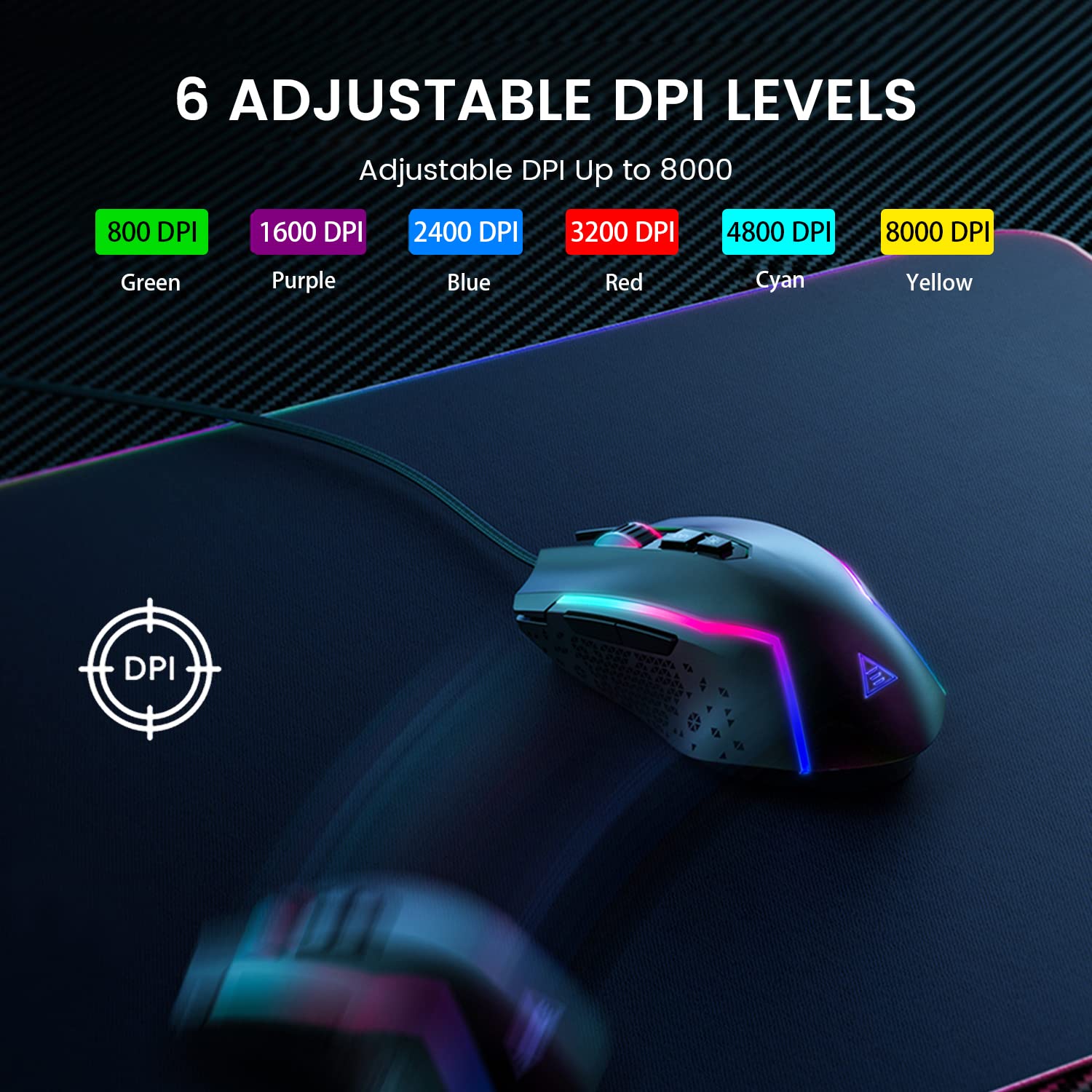
Figure 5.2: Visual representation of the 6 adjustable DPI levels and their corresponding indicator colors.
5.3 Customizing RGB Backlighting
The EKSA EM100 features dynamic Chroma RGB backlighting with 6 distinct modes and 16 million color options. Press the Жарыктар баскычы (located near the DPI button) to cycle through the available lighting effects, including "Breathing" and "Streamer" modes, or to turn the lights off.

Figure 5.3: The EKSA EM100 Gaming Mouse showcasing its vibrant RGB backlight effects.
6. Техникалык тейлөө
Туура тейлөө EKSA EM100 оюн чычканыңыздын узак мөөнөттүү иштешин жана оптималдуу иштешин камсыз кылат.
- Тазалоо: Чычкандын бетин сүртүү үчүн жумшак, кургак чүпүрөктү колдонуңуз. өжөр кир үчүн, бир аз гampчүпүрөктү суу же жумшак тазалоо эритмеси менен жууп салыңыз. Катуу химиялык заттарды же абразивдүү материалдарды колдонуудан алыс болуңуз.
- Сенсорго кам көрүү: Чычкандын астындагы оптикалык сенсорду чаңдан же таштандыдан таза кармаңыз. Керек болсо кебез тампонду же кысылган абаны колдонуңуз.
- Кабелдик башкаруу: Ички зыян келтирбөө үчүн өрүлгөн кабельди кескин ийүүдөн же ашыкча тартуудан алыс болуңуз.
- Сактагыч: Узак мөөнөткө колдонулбаганда чычканды күн нурунан жана экстремалдык температурадан алыс, таза, кургак чөйрөдө сактаңыз.
7. Кыйынчылыктарды
| Көйгөй | Мүмкүн себеп | Чечим |
|---|---|---|
| Чычкан жооп бербей жатат. | Бош USB туташуу, туура эмес USB порт, драйвер маселеси. |
|
| Курсордун кыймылы туруксуз же секирик. | Dirty optical sensor, unsuitable surface, software interference. |
|
| RGB lights are not working or stuck. | Software glitch, light mode setting. |
|
| Programmable buttons not working (Windows). | Driver not installed or corrupted, incorrect software settings. |
|
8. Техникалык шарттар
| Өзгөчөлүк | Деталь |
|---|---|
| Бренд | EKSA |
| Модел | EM100 |
| Байланыш | Зымдуу (USB) |
| Сенсор түрү | Оптикалык |
| DPI деңгээли | 800 / 1600 / 2400 / 3200 / 4800 / 8000 |
| Программалануучу баскычтар | 7 |
| Арткы жарыктандыруу | Хрома RGB (6 режим, 16 миллион түс) |
| Кабелдин узундугу | 1.5 метр (59 дюйм) |
| Кабель түрү | Өрүлгөн |
| Колдун багыты | Эки тараптуу |
| Продукциянын өлчөмдөрү (L x W x Y) | 11.5 x 5.5 x 17.5 см |
| Элемент Салмагы | 150 г |
| Шайкеш операциялык системалар | Windows 2000/XP/Vista/7/8/10/11, macOS (normal use) |
| Аппараттык платформа | PC/Mac/Linux/Unix |
| Келип чыккан өлкө | Кытай |
9. Кепилдик жана колдоо
EKSA products are designed for reliability and performance. For warranty information, technical support, or to download the latest drivers and software for your EM100 Gaming Mouse, please visit the official EKSA webсайт:
Please retain your proof of purchase for any warranty claims. For specific regional support or inquiries, refer to the contact information provided on the EKSA webсайт.
Ask a question about this manual
Ask about setup, troubleshooting, compatibility, parts, safety, or missing instructions. Manuals+ will review the question and use this page’s manual context to help answer it.