
EVGA 12G-P5-4877-KL
EVGA GeForce RTX 3080 FTW3 Ultra оюн графикалык картасынын колдонуучу колдонмосу
Model: 12G-P5-4877-KL
1. Продукт бүтүп калдыview
The EVGA GeForce RTX 3080 FTW3 Ultra Gaming graphics card is engineered for high-performance computing and gaming. It features advanced NVIDIA Ampere architecture, offering significant improvements in graphics processing and efficiency.
Негизги өзгөчөлүктөрү:
- Digital Max Resolution: 7680 x 4320 pixels, supporting high-fidelity visual experiences.
- Real Boost Clock: 1800 MHz, providing enhanced clock speeds for demanding applications.
- Memory Detail: 12288 MB GDDR6X, ensuring ample memory for complex textures and high-resolution gaming.
- Real-Time RAY TRACING: Delivers cutting-edge, hyper-realistic graphics in supported games.
- iCX3 Technology: Features triple fans and 9 iCX3 thermal sensors for superior cooling performance and reduced acoustic noise.
- All-Metal Backplate: Provides structural rigidity and aids in heat dissipation.
- Adjustable ARGB LED: Customizable lighting to match your system's aesthetic.
- PCI Express® Gen 4: High-speed interface for optimal data transfer.
- Microsoft DirectX® 12 Ultimate: Supports the latest graphics APIs for advanced rendering.
- NVIDIA DLSS: AI-powered rendering that boosts frame rates with uncompromised image quality.
- NVIDIA® GeForce Experience™: Optimizes game settings and provides driver updates.
- NVIDIA G-SYNC™: Delivers smooth, tear-free gameplay at refresh rates up to 360 Hz.
- NVIDIA GPU Boost™: Dynamically maximizes clock speeds based on workload and temperature.
- VR даяр: Optimized for virtual reality experiences.
- Дисплейди колдоо: Supports 4K 120Hz HDR, 8K 60Hz HDR, and Variable Refresh Rate as specified in HDMI 2.1.
2. Орнотуу жана орнотуу
Proper installation of your EVGA GeForce RTX 3080 FTW3 Ultra Gaming graphics card is crucial for optimal performance and system stability. Always ensure your system is powered off and unplugged before beginning installation.
Орнотуу кадамдары:
- Системаңызды даярдаңыз: Компьютериңизди өчүрүп, бардык кабелдерди сууруп алыңыз. Компьютериңиздин корпусун ачыңыз.
- PCIe уячасын табыңыз: Сиздин энелик платада жеткиликтүү PCI Express x16 уячасын аныктаңыз.
- Slot капкактарын алып салуу: Remove the necessary expansion slot covers from your PC case.
- Графикалык картаны салыңыз: Графикалык картаны PCIe уячасына кылдаттык менен тегиздеп, аны бекем орнотулганга чейин катуу басыңыз. Кармап туруучу клиптин ордуна бекитилишин камсыз кылыңыз.
- Коопсуз карта: Use screws to secure the graphics card to the PC case.
- Туташуу кубаты: Connect three 8-pin PCIe power connectors from your power supply to the corresponding ports on the graphics card. Ensure all connections are firm.
- Ишти жабуу: Close your PC case, reconnect all cables, and power on your system.
- Драйверлерди орнотуу: Once your operating system loads, install the latest NVIDIA drivers from the official NVIDIA website or via NVIDIA GeForce Experience.

Image: General diagram illustrating the steps for graphics card installation into a PC case.
3. Иштөө нускамалары
After successful installation, your EVGA GeForce RTX 3080 FTW3 Ultra Gaming graphics card is ready for operation. To maximize its potential, follow these guidelines:
Driver and Software Management:
- NVIDIA GeForce тажрыйбасы: Install NVIDIA GeForce Experience to automatically optimize game settings, record gameplay, and keep your drivers up-to-date.
- EVGA Precision X1: Download and install EVGA Precision X1 software for advanced monitoring, fan control, and customizable ARGB LED lighting effects. This software allows fine-tuning of performance parameters.
Колдонуу боюнча сунуштар:
- Оюн: For optimal gaming performance, ensure your display is connected to one of the graphics card's output ports (DisplayPort or HDMI). Adjust in-game settings to balance visual quality and frame rate according to your preference.
- Мазмун түзүү: Leverage the GPU's power for tasks such as video editing, 3D rendering, and graphic design. Ensure your software is configured to utilize the NVIDIA GPU for accelerated processing.
- Көп мониторду орнотуу: The card supports multiple displays. Connect additional monitors to the available DisplayPort or HDMI outputs. Configure display settings within your operating system.
4. Техникалык тейлөө
Regular maintenance helps prolong the lifespan and maintain the performance of your graphics card.
Тазалоо:
- Чаңды тазалоо: Periodically clean dust from the fans and heatsink using compressed air. Ensure the system is powered off and unplugged before cleaning. Hold the fan blades gently to prevent them from spinning too fast during cleaning.
- Иштин аба агымы: Ensure your PC case has adequate airflow to prevent heat buildup. Clean case fans and filters regularly.
Программалык камсыздоону тейлөө:
- Драйвер жаңыртуулары: Regularly update your graphics drivers through NVIDIA GeForce Experience or the NVIDIA website. Driver updates often include performance optimizations and bug fixes.
- Программалык камсыздоонун жаңыртуулары: Check the EVGA website for any available firmware updates for your specific graphics card model.
5. Кыйынчылыктарды
Эгер графикалык картаңызда көйгөйлөргө туш болсоңуз, төмөнкү жалпы көйгөйлөрдү чечүү кадамдарын караңыз:
Жалпы маселелер жана чечимдер:
- Дисплей жок/Кара экран:
- Монитордун кабели графикалык картага жана мониторго бекем туташтырылганын текшериңиз.
- Графикалык карта PCIe уячасына толугу менен орнотулганын текшериңиз.
- Check that all three 8-pin PCIe power connectors are securely attached to the graphics card.
- Мүмкүн болсо, башка дисплей кабели же монитор менен сынап көрүңүз.
- Системанын туруксуздугу/бузуулар:
- Энергия менен камсыздоо блогуңуз (PSU) минималдуу ватка жооп берерин текшериңизtagсиздин системаңызга, анын ичинде графикалык картага талаптар.
- Графикалык драйверлериңизди эң акыркы версиясына жаңыртыңыз.
- Monitor GPU temperatures using EVGA Precision X1 or similar software. Excessive heat can cause instability.
- Check for any conflicting software or background applications.
- Poor Performance/Low Frame Rates:
- Verify that the latest graphics drivers are installed.
- Check in-game settings; reduce demanding options like ray tracing or resolution if necessary.
- Ensure your CPU and RAM are not bottlenecking the GPU.
- Monitor GPU utilization and temperatures to ensure the card is operating as expected.
- ARGB LED Not Working:
- Ensure EVGA Precision X1 software is installed and running.
- Check the ARGB settings within EVGA Precision X1.
6. Техникалык шарттар
Detailed technical specifications for the EVGA GeForce RTX 3080 FTW3 Ultra Gaming graphics card.
| Спецификация | Нарк |
|---|---|
| Max Screen Resolution | 7680x4320 пиксел |
| Memory Speed | 19000 МГц |
| Графикалык сопроцессор | NVIDIA GeForce RTX 3080 |
| Chipset маркасы | NVIDIA |
| Card Description | NVIDIA GeForce RTX 3080 |
| Графикалык картанын RAM өлчөмү | 12 ГБ |
| Бренд | EVGA |
| Сериялар | RTX 3080 12GB FTW3 |
| Элементтин моделинин номери | 12G-P5-4877-KL |
| Элемент Салмагы | 4.66 фунт |
| Продукциянын өлчөмдөрү | 11.81 x 2.75 x 5.38 дюйм |
| Элементтин өлчөмдөрү LxWxH | 11.81 x 2.75 x 5.38 дюйм |
| Өндүрүүчү | EVGA |
| ASIN | B09Q3DH7V3 |
| Дата биринчи жеткиликтүү | 11-январь, 2022-жыл |
| Видео чыгаруу интерфейси | HDMI |
| Графикалык процессор өндүрүүчүсү | NVIDIA |
7. Кепилдик жана колдоо
Your EVGA GeForce RTX 3080 FTW3 Ultra Gaming graphics card comes with comprehensive support and warranty coverage.
- Кепилдик: This product includes a 3-year warranty from EVGA. Please retain your proof of purchase for warranty claims.
- Техникалык колдоо: For technical assistance, driver downloads, or software inquiries, please visit the official EVGA website or contact EVGA's technical support team.
- Онлайн ресурстар: Additional resources, FAQs, and community forums can be found on the EVGA support pages.
8. Продукциянын визуалдык көрүнүштөрү

Image: The EVGA GeForce RTX 3080 FTW3 Ultra Gaming graphics card displayed alongside its retail packaging.

Сүрөт: алдыңкы view графикалык картанын, шоуasing its triple-fan design with the ARGB LEDs turned off.

Сүрөт: алдыңкы view of the graphics card, highlighting the customizable ARGB LED lighting in operation.

Сүрөт: Side profile of the graphics card, showing the heatsink and power connectors with LEDs off.

Сүрөт: Side profile of the graphics card, illustrating the illuminated ARGB LED strip.
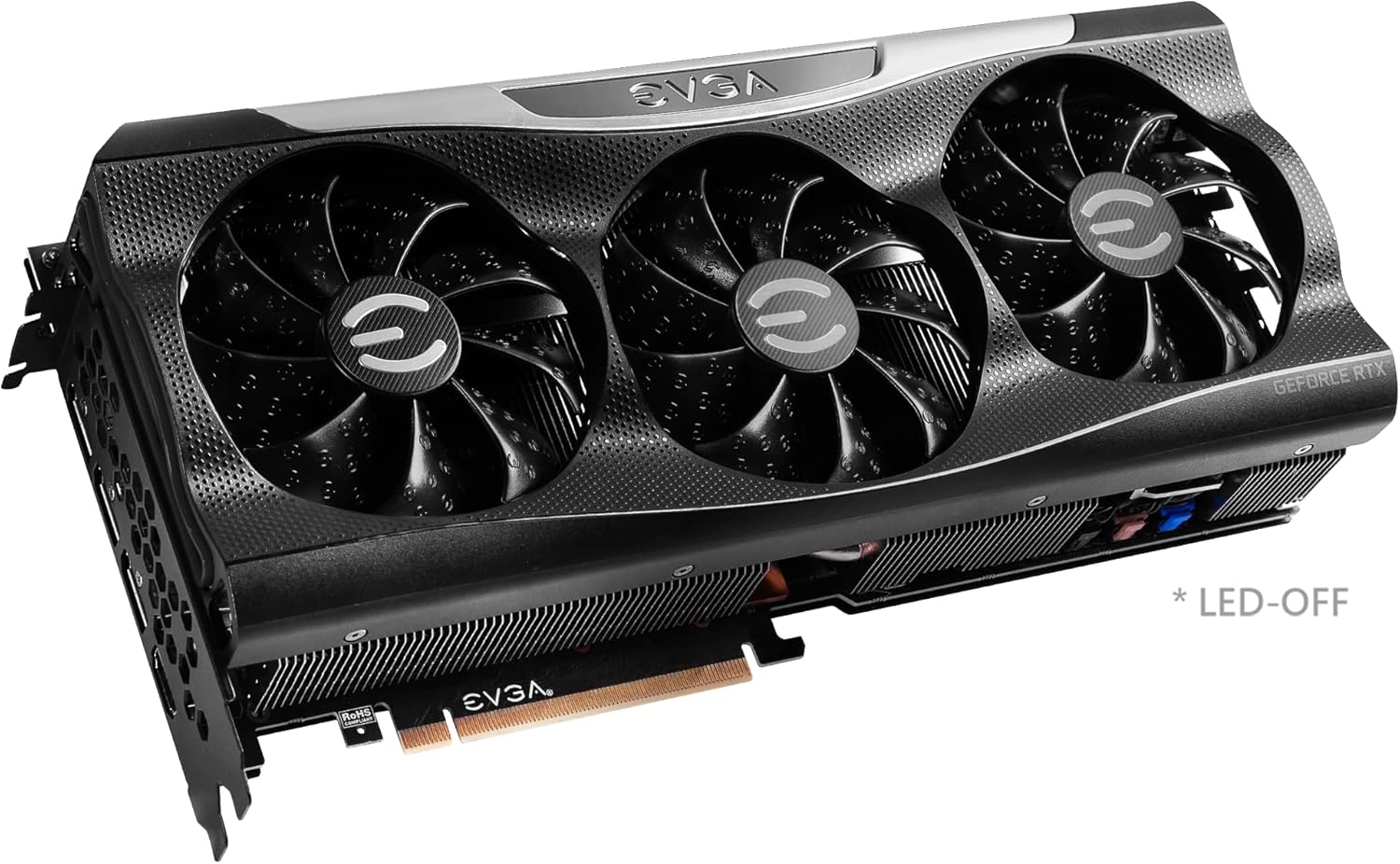
Image: Close-up of the graphics card's output ports, including DisplayPort and HDMI connectors.

Сүрөт: Арткы view of the graphics card, showing the metal backplate and illuminated EVGA logo.

Image: Branding for the EVGA GeForce RTX 3080 12GB FTW3 and XC3 Series.

Image: Visual representation of the 2nd Gen RT Cores, 3rd Gen Tensor Cores, and New Streaming Multiprocessors (SM) technology.

Image: A chart comparing the 12GB memory of the RTX 3080 to the 10GB memory of a previous model.

Image: Diagram detailing the iCX3 Interactive Cooling system, showing thermal contact surface, triple fans, and smart cut-outs for improved airflow.

Image: A comprehensive list of features and detailed specifications for the graphics card.
9. Расмий продукт Videos
Video: An unboxing and installation guide for the EVGA GeForce RTX 3080 FTW3 Ultra 12GB graphics card, provided by Systematic Hardware.
Ask a question about this manual
Ask about setup, troubleshooting, compatibility, parts, safety, or missing instructions. Manuals+ will review the question and use this page’s manual context to help answer it.