
1. Киришүү
Welcome to the user manual for your Infinix XE21 Wireless Earbuds. This guide provides essential information on how to set up, operate, maintain, and troubleshoot your earbuds to ensure an optimal audio experience. Please read this manual thoroughly before using your device.
2. Продукт бүтүп калдыview
The Infinix XE21 earbuds are designed to deliver a powerful and unique audio experience, especially for gaming. They feature a long-lasting battery, Bluetooth connectivity, and intuitive touch controls.

Image 2.1: Infinix XE21 Earbuds and Charging Case. The image highlights 'XE21' and '1 CHARGE FOR 35 HOURS MUSIC PLAYBACK'.
Негизги өзгөчөлүктөрү:
- Узартылган батареянын иштөө мөөнөтү: Up to 35 hours of continuous playback with the charging case.
- Жогорку сапаттагы аудио: Equipped with Graphene Speakers for great bass.
- Төмөн күтүү: 60ms Super-low Latency for an optimized gaming experience.
- Туруктуу туташуу: Steady Bluetooth connection.
- USB-C заряддоо: Тез жана ыңгайлуу кубаттоо.
- Сенсордук башкаруу каражаттары: Intuitive gesture controls for music and calls.

Image 2.2: Visual representation of Infinix XE21 key features including 35 hours battery life, Graphene Speaker, 60ms Super-low Latency, and Steady Bluetooth Connection.
3. Орнотуу
3.1 Кулакчындарды жана кутучаны заряддоо
Before first use, fully charge the earbuds and the charging case. Connect the provided USB-C cable to the charging port on the case and to a power source. The indicator lights on the case will show the charging status.
3.2 Баштапкы жупташтыруу
- Заряддоо кутучасын ачыңыз. Кулакчындар жупташтыруу режимине автоматтык түрдө кирет.
- Түзмөгүңүздө (смартфон, планшет, ноутбук) Bluetooth иштетиңиз.
- Издөө available Bluetooth devices and select "Infinix XE21" from the list.
- Туташкандан кийин, сиз ырастоо үнүн угасыз жана кулакчындар колдонууга даяр болот.
The Infinix XE21 is designed for automatic pairing after the initial setup, saving time and allowing for easy power consumption checks.

Image 3.1: Illustration of the automatic pairing process for Infinix XE21 earbuds with a smartphone, showing a 'Wireless device detected' prompt.
4. Иштөө нускамалары
4.1 Күйгүзүү/өчүрүү
- Күйгүзүү: Open the charging case, or long-press the touch area on both earbuds for 3 seconds if they are out of the case and off.
- Өчүрүү: Кулакчындарды кайра кубаттоочу кутуга салып, капкагын жабыңыз же эки кулакчындын тең тийүүчү жерин 5 секунд басып туруңуз.
4.2 Сенсордук башкаруу
The Infinix XE21 earbuds feature intuitive touch controls for various functions:
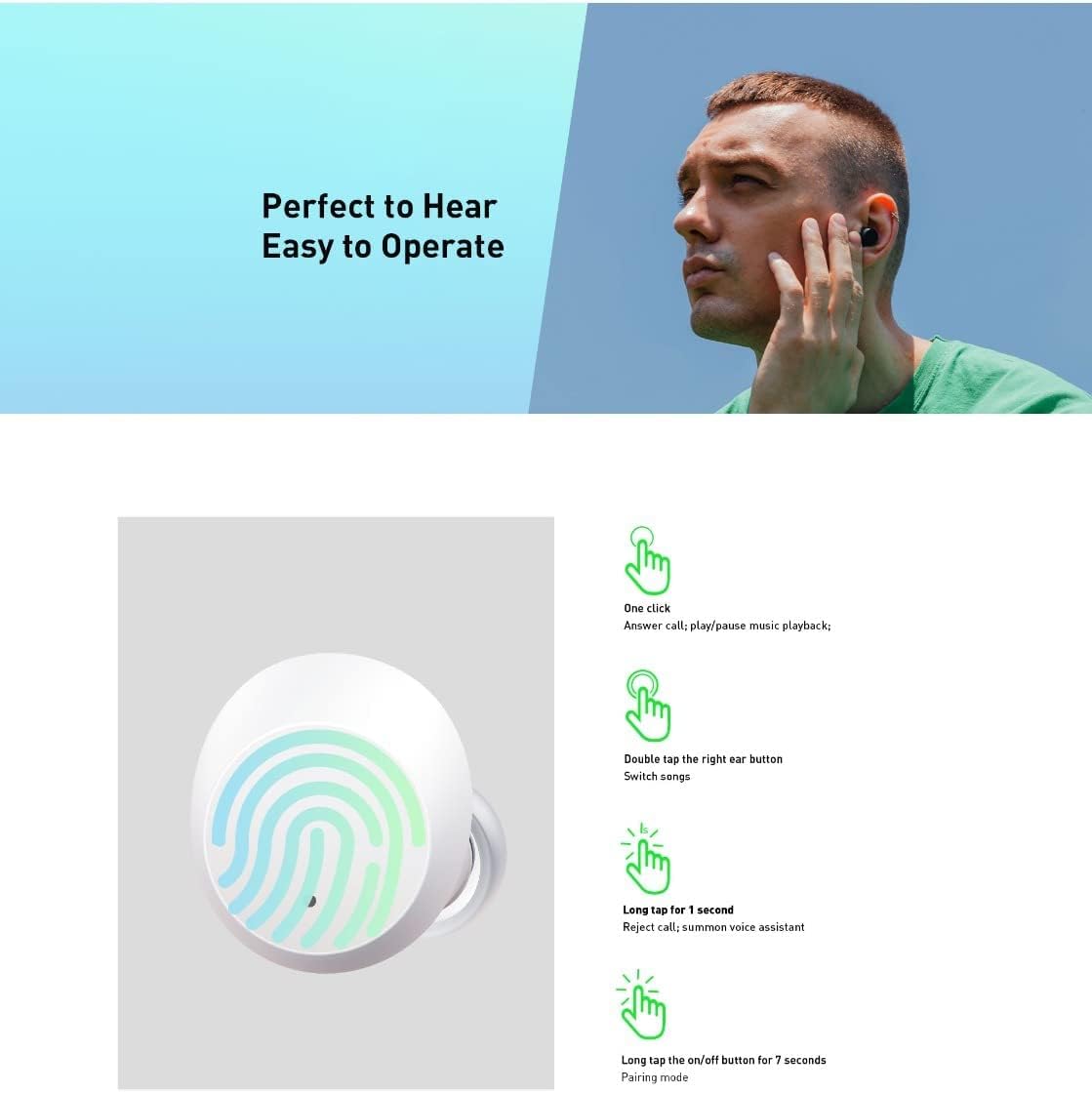
Image 4.1: Detailed guide to Infinix XE21 touch controls, showing different gestures and their corresponding functions.
- Бир чыкылдатуу: Answer call / Play / Pause music playback.
- Эки жолу таптаңыз (оң кулакчын): Switch songs (next track).
- Long Tap for 1 Second: Reject call / Summon voice assistant.
- Long Tap for 7 Seconds: Enter pairing mode (useful for re-pairing or connecting to a new device).
4.3 Оюн режими (аз кечигүү)
The XE21 earbuds offer a 60ms super-low latency mode, ideal for gaming and video playback, ensuring synchronized audio and visuals for a more immersive experience.

Image 4.2: A user enjoying a seamless gaming experience with Infinix XE21 earbuds, highlighting the 'Full Connection' and 'Almost No Latency' features.
5. Техникалык тейлөө
5.1 Тазалоо
- Кулакчындарды жана заряддоо кутусун жумшак, кургак, түксүз чүпүрөк менен дайыма тазалап туруңуз.
- Абразивдүү тазалагычтарды, эриткичтерди же аэрозолдук спрейлерди колдонбоңуз.
- Кичинекей, жумшак щетка же кебез тампонду колдонуп, кулактын учтары менен динамиктин торлорунан кандайдыр бир кулагын же калдыктарын акырын алып салыңыз.
5.2 Сактоо
Колдонбогондо, кулакчындарды чаңдан, бузулуудан жана кубатталган бойдон калуудан сактоо үчүн кубаттоочу кутучага салып сактаңыз. Салкын, кургак жерде, экстремалдык температурадан алыс сактаңыз.
5.3 Сууга туруктуулук
The Infinix XE21 earbuds are water-resistant. However, they are not waterproof. Avoid submerging them in water or exposing them to heavy rain. Dry them thoroughly if they get wet before placing them back in the charging case.
6. Кыйынчылыктарды
If you encounter any issues with your Infinix XE21 earbuds, please refer to the following common solutions:
| Көйгөй | Чечим |
|---|---|
| Кулакчындар жупташкан жок | Ensure earbuds are charged. Turn off and on your device's Bluetooth. Try long-tapping an earbud for 7 seconds to enter pairing mode. |
| Бир кулактын үнү чыкпайт | Check battery levels. Try re-pairing both earbuds. Clean the earbud's speaker mesh. |
| Заряддоо маселелери | Ensure the charging cable is securely connected. Clean the charging contacts on both earbuds and the case. Try a different USB-C cable or power adapter. |
| Үн жардамчысы жооп бербей жатат | Ensure your device's voice assistant is enabled. Check the touch control settings. |
6.1 Кулакчындарды баштапкы абалга келтирүү
If issues persist, you may need to reset your earbuds. Refer to the product's specific reset procedure, which typically involves placing both earbuds in the case, then pressing and holding a button on the case or earbuds for an extended period (e.g., 10-15 seconds) until indicator lights flash.
7. Техникалык шарттар
Below are the technical specifications for the Infinix XE21 Wireless Earbuds:
| Өзгөчөлүк | Деталь |
|---|---|
| Бренд | Infinix |
| Модель номери | XE21 |
| Түс | Кара (башка түстөр болушу мүмкүн) |
| Кулак жайгаштыруу | In-Ear |
| Форма фактору | In-Ear |
| Байланыш технологиясы | Зымсыз (Bluetooth) |
| Зымсыз байланыш технологиясы | Bluetooth |
| Батареянын иштөө мөөнөтү | 35 саатка чейин (кубаттоочу корпусу менен) |
| Башкаруу ыкмасы | тийүү |
| Аудио драйвер түрү | Динамикалык драйвер |
| Материал | Пластик |
| Сунушталган Колдонуулар | Оюн-зоок, Музыка |
| Шайкеш түзмөктөр | Smartphones, Tablets, Laptops, Desktop Computers, Digital Video Game Consoles |
| Сууга туруктуулук деңгээли | Сууга чыдамдуу |
| Өзгөчөлүктөр | Жеңил |
| Камтылган компоненттер | Кулак жаздыкчалары |

Image 7.1: Visualizing the 35 hours of battery life with the charging case and 7 hours of listening time on a single charge.

Image 7.2: Highlighting the AAC Codec Embedded technology for enhanced audio quality.
8. Кепилдик жана колдоо
8.1 Кепилдик маалыматы
Your Infinix XE21 Wireless Earbuds come with a standard manufacturer's warranty. Please refer to the warranty card included in your product packaging or visit the official Infinix webдеталдуу кепилдик шарттары жана шарттары үчүн сайт. Кепилдик дооматтар үчүн сатып алганыңыздын далилин сактаңыз.
8.2 Кардарларды колдоо
For further assistance, technical support, or service inquiries, please contact Infinix customer support through their official webсайт же продукт документациясында көрсөтүлгөн байланыш маалыматы. Сиз да зыярат кылсаңыз болот Infinix Brand Store on Amazon көбүрөөк продукт маалымат алуу үчүн.