
1. Киришүү
Thank you for choosing the BONTEC Dual Monitor Desk Mount. This manual provides detailed instructions for the safe and efficient installation, operation, and maintenance of your new monitor mount. Please read this manual thoroughly before beginning installation and retain it for future reference.
This desk mount is designed to support two monitors ranging from 13 to 27 inches, with VESA mounting patterns of 75x75mm or 100x100mm. Each arm can hold up to 22 lbs (10 kg). It offers full motion adjustability, including tilt, swivel, and rotation, to optimize your viewing experience and workspace ergonomics.
2. Коопсуздук маалыматы
- Бардык нускамаларды окуңуз: Ensure you understand all instructions and warnings before installation.
- Салмак сыйымдуулугу: Do not exceed the maximum weight capacity of 22 lbs (10 kg) per arm. Overloading can result in serious injury or product damage.
- Монитордун өлчөмү: This mount is suitable for monitors between 13 and 27 inches.
- VESA шайкештиги: Ensure your monitors have VESA 75x75mm or 100x100mm mounting holes.
- Desk Material: Do not install on desks made of particle board (PB), medium-density fiberboard (MDF), or glass, as these materials may not provide sufficient stability.
- Коопсуз орнотуу: Verify that the mount is securely fastened to the desk before attaching monitors.
- Ассамблея: Буюмду көрсөтмөлөргө ылайык чогултуңуз. Туура эмес чогултуу зыянга же олуттуу дене жаракатына алып келиши мүмкүн.
- Балдар: кичинекей бөлүктөрүн балдардан алыс кармаңыз.
3. Пакеттин мазмуну
Verify that all components are present and undamaged before proceeding with installation. If any parts are missing or damaged, please contact BONTEC customer support.

Figure 3.1: ашыкview of BONTEC Dual Monitor Desk Mount components.
- Central Pole (1)
- Монитор куралдары (2)
- VESA плиталары (2)
- C-Clamp Негизги (1)
- Grommet Base (1)
- Cable Management Clips (Set)
- Hardware Kit (Screws, Washers, Allen Keys)
4. Орнотуу жана орнотуу
The BONTEC Dual Monitor Desk Mount offers two installation methods: C-Clamp and Grommet Mounting. Choose the method best suited for your desk.
4.1. Choose Installation Method

4.1-сүрөт: C-Clamp and Grommet Mounting Options.
- C-Clamp Монтаждоо: Ideal for desks with a thickness between 0.39 inches (10mm) and 3.35 inches (85mm).
- Громмет орнотуу: Requires a desk hole with a diameter between 0.39 inches (10mm) and 3.35 inches (85mm), and a desk thickness between 0.39 inches (10mm) and 3.15 inches (80mm).
4.2. Assemble Base and Pole
- Attach the chosen base (C-Clamp or Grommet) to the central pole.
- Securely fasten the assembled base and pole to your desk. Ensure it is stable and does not wobble.
4.3. VESA пластинкаларын мониторлорго бекитиңиз

Figure 4.2: Attaching VESA Plate to Monitor.
- Мониторуңузду кылдаттык менен жумшак, таза бетке ылдый караңыз.
- Align the VESA plate with the mounting holes on the back of your monitor.
- Secure the VESA plate using the provided screws. Hand screws are included for easy, tool-free attachment.
4.4. Mount Monitors to Arms
- Slide the monitor arms onto the central pole at your desired height. Tighten the collar to secure.
- Carefully slide the VESA plate with the attached monitor onto the arm's mounting head until it clicks into place.
- Экинчи монитор үчүн кайталаңыз.
4.5. Кабелдик башкаруу

Figure 4.3: Integrated Cable Management.
Utilize the integrated cable management clips along the arms and the central pole to route your monitor cables neatly. This helps maintain a clean and organized workspace.
5. Иштөө жана тууралоо
The BONTEC Dual Monitor Desk Mount offers extensive adjustability to achieve optimal viewбурчтарды жана эргономикалык жайгаштыруу.

Figure 5.1: Full Motion Adjustability.
5.1. Бийиктигин тууралоо
To adjust the height of the monitors, loosen the collar on the central pole, slide the arms to the desired height, and then re-tighten the collar securely. The maximum height adjustment is approximately 17 inches (430mm).
5.2. жантайып тууралоо

Figure 5.2: Monitor Tilt Adjustment.
The monitor can be tilted +90 degrees (up) and -90 degrees (down) to reduce glare and optimize viewing comfort. Gently push or pull the top or bottom of your monitor to achieve the desired tilt angle.
5.3. Айлануучуну тууралоо
The monitor arms can swivel 180 degrees at the pole connection and at the monitor mounting point, allowing you to position your screens for collaborative work or individual viewing. Simply rotate the monitor or arm to the desired angle.
5.4. Rotation Adjustment

Figure 5.3: Monitor Rotation for Landscape or Portrait Viewing.
Each monitor can be rotated 360 degrees, allowing for quick and easy switching between landscape and portrait orientations without removing the monitor.
6. Техникалык тейлөө
- Тазалоо: Орноткучту жумшак, d менен тазалаңызamp кездеме. Абразивдүү тазалагычтардан же эриткичтерден качыңыз.
- Мезгилдүү текшерүүлөр: Мезгил-мезгили менен бардык бурамалар менен байланыштарды текшерип туруңуз, алар бекем жана бекем бойдон калууда. Керек болсо кайра тартыңыз.
- Майлоо: Кыймылдуу бөлүктөр үчүн майлоо талап кылынбайт.
7. Кыйынчылыктарды
| Көйгөй | Мүмкүн себеп | Чечим |
|---|---|---|
| Monitors are not stable or wobble. | Mount not securely fastened to desk; VESA screws loose; monitor weight exceeds capacity. | C-clamp or grommet base is tightened. Check VESA screws on monitors. Verify monitor weight is within 22 lbs (10 kg) per arm. |
| Difficulty adjusting monitor position (too stiff). | Муундар өтө катуу. | Loosen the adjustment screws on the arm joints slightly using the provided Allen keys. |
| Monitor sags or tilts downwards. | Tilt mechanism is loose. | Tighten the tilt adjustment screw located on the VESA plate connection point. |
| Cannot install mount on desk. | Desk thickness or material incompatible. | Check desk thickness against specifications (C-clamp: 0.39-3.35 inches; Grommet: 0.39-3.15 inches). Ensure desk is not made of PB, MDF, or glass. |
8. Техникалык шарттар
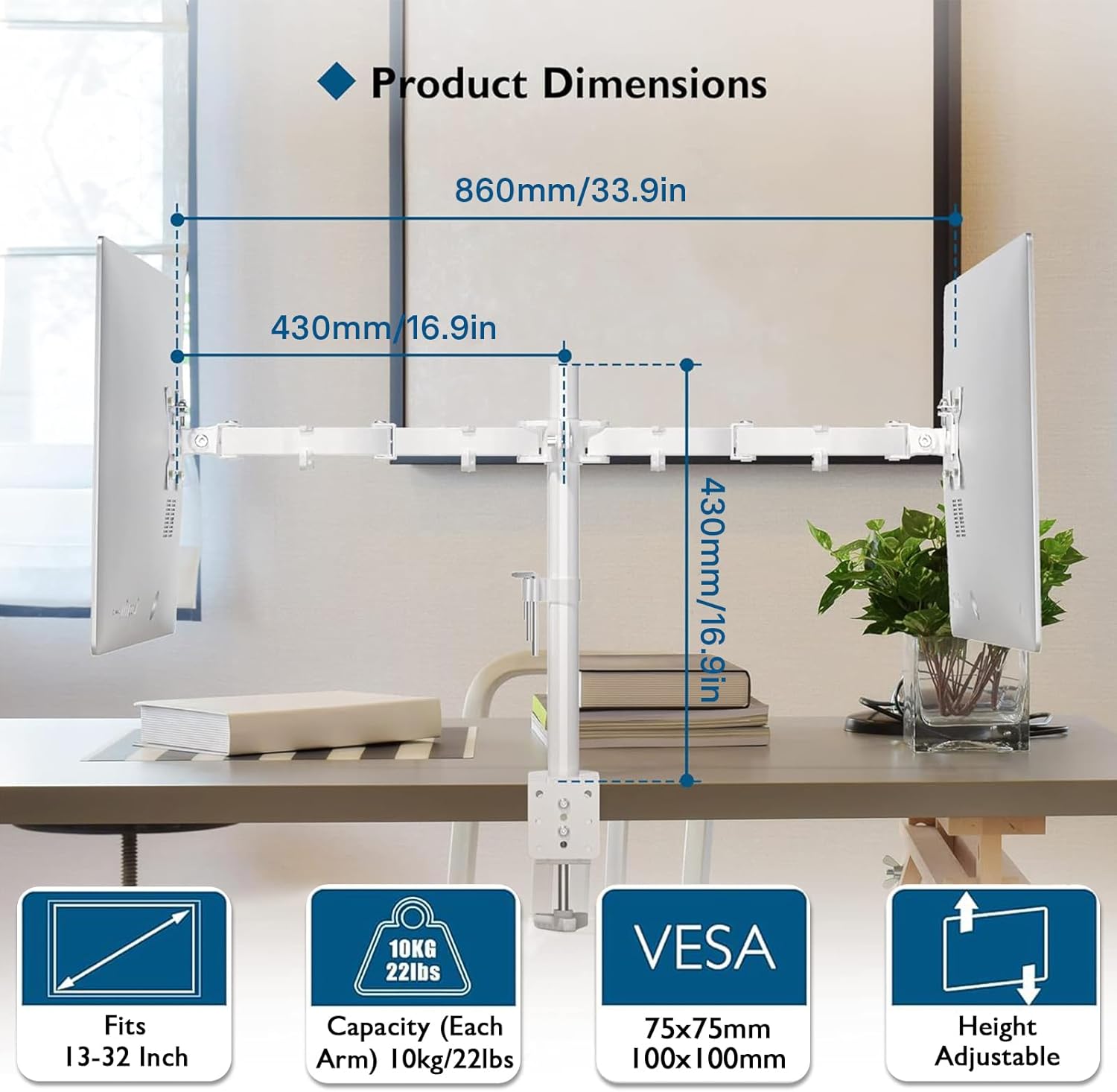
Figure 8.1: Product Dimensions and Key Specifications.
- Модел: MDM002-WH
- Материал: Эритме болот
- Түсү: Ак
- Экрандын өлчөмү шайкештиги: 13 - 27 дюйм
- Weight Capacity (Each Arm): 22 фунт (10 кг)
- VESA шайкештиги: 75x75мм, 100x100мм
- Жантайма диапазону: +90°тан -90°ка чейин
- Айлануу диапазону: 180°
- Айлануу: 360°
- Maximum Arm Extension: 17 дюйм (430мм)
- C-Clamp Үстөлдүн калыңдыгы: 0.39 - 3.35 дюйм (10 - 85 мм)
- Grommet Desk Thickness: 0.39 - 3.15 дюйм (10 - 80 мм)
- Громмет тешигинин диаметри: 0.39 - 3.35 дюйм (10 - 85 мм)
- Продукциянын өлчөмдөрү: 33.86 x 16.93 x 0.02 inches (860 x 430 x 0.5 mm) (approximate, as per image)
- Элемент Салмагы: 5.5 фунт (2.5 кг)
9. Кепилдик жана колдоо
BONTEC products are manufactured with high-quality materials and undergo strict quality control. This product is covered by a limited warranty against manufacturing defects. For detailed warranty information, please refer to the warranty card included with your purchase or visit the official BONTEC webсайт.
If you encounter any issues during installation or operation, or if you have any questions, please do not hesitate to contact BONTEC customer support. Our team is available to assist you.
Кардарларды колдоо кызматы менен байланыш:
Webсайт: www.bontec.com (Чыгample URL, please refer to actual product documentation for correct contact information)
Email: support@bontec.com (Example Email)