
Introduction
This manual provides comprehensive instructions for the safe and effective operation of your Simba Planet Fighter Robot, Model 108042509. Please read this manual thoroughly before use and retain it for future reference. This robot features infrared remote control, gesture control, light and sound effects, and a shooting function.
Маанилүү коопсуздук маалыматы
WARNING: Not suitable for children under 3 years due to small parts. Choking hazard.
- Оюн учурунда балдарды дайыма көзөмөлдөп туруңуз.
- Do not aim the shooting mechanism at eyes or face.
- Суудан жана нымдан алыс болуңуз.
- Do not attempt to disassemble or modify the robot or remote control.
- Батареялар туура полярдуулук менен салынганын текшериңиз.
- Эгерде продукт көпкө чейин колдонулбаса, батарейкаларды алып салыңыз.
Пакеттин мазмуну
Төмөндө тизмеленген нерселердин баары пакетиңизде бар экенин текшериңиз:
- Simba Planet Fighter Robot (Model 108042509)
- Infrared алыстан башкаруу
- USB Cable (for potential charging or data, specific function not detailed in specifications)
- Soft Darts/Arrows (for shooting function)
- Колдонуучунун Колдонмосу (бул документ)

Жайгашуу
1. Battery Installation (Robot)
The robot requires 3 AAA batteries (not included).
- Locate the battery compartment on the back or bottom of the robot.
- Open the battery compartment cover using a screwdriver if necessary.
- Полярдуулук белгилерине (+/-) ылайык 3 AAA батарейканы салыңыз.
- Батарея уясынын капкагын бекем жабыңыз.

2. Батареяны орнотуу (Алыстан башкаруу)
The remote control typically requires 2 AA batteries (not included). Please check the remote control's battery compartment for specific requirements.
- Пульттун артындагы батарея отсегин табыңыз.
- Батарея уясынын капкагын ачыңыз.
- Insert the required batteries according to the polarity markings (+/-).
- Батарея уясынын капкагын бекем жабыңыз.
3. Күйгүзүү
After installing batteries, turn on the robot using the power switch, usually located on its back or chest. Turn on the remote control using its power switch.
Иштөө нускамалары
Алыстан башкаруу функциялары
The infrared remote control allows you to command the robot's movements and actions. Ensure the remote is pointed towards the robot for optimal signal transmission.
- Кыймылды башкаруу: Use the directional buttons (Forward, Backward, Turn Left, Turn Right) to navigate the robot.
- Slide Movement: Specific buttons may allow the robot to slide forward or backward.
- Run/Dance: Activate pre-programmed running or dancing sequences.
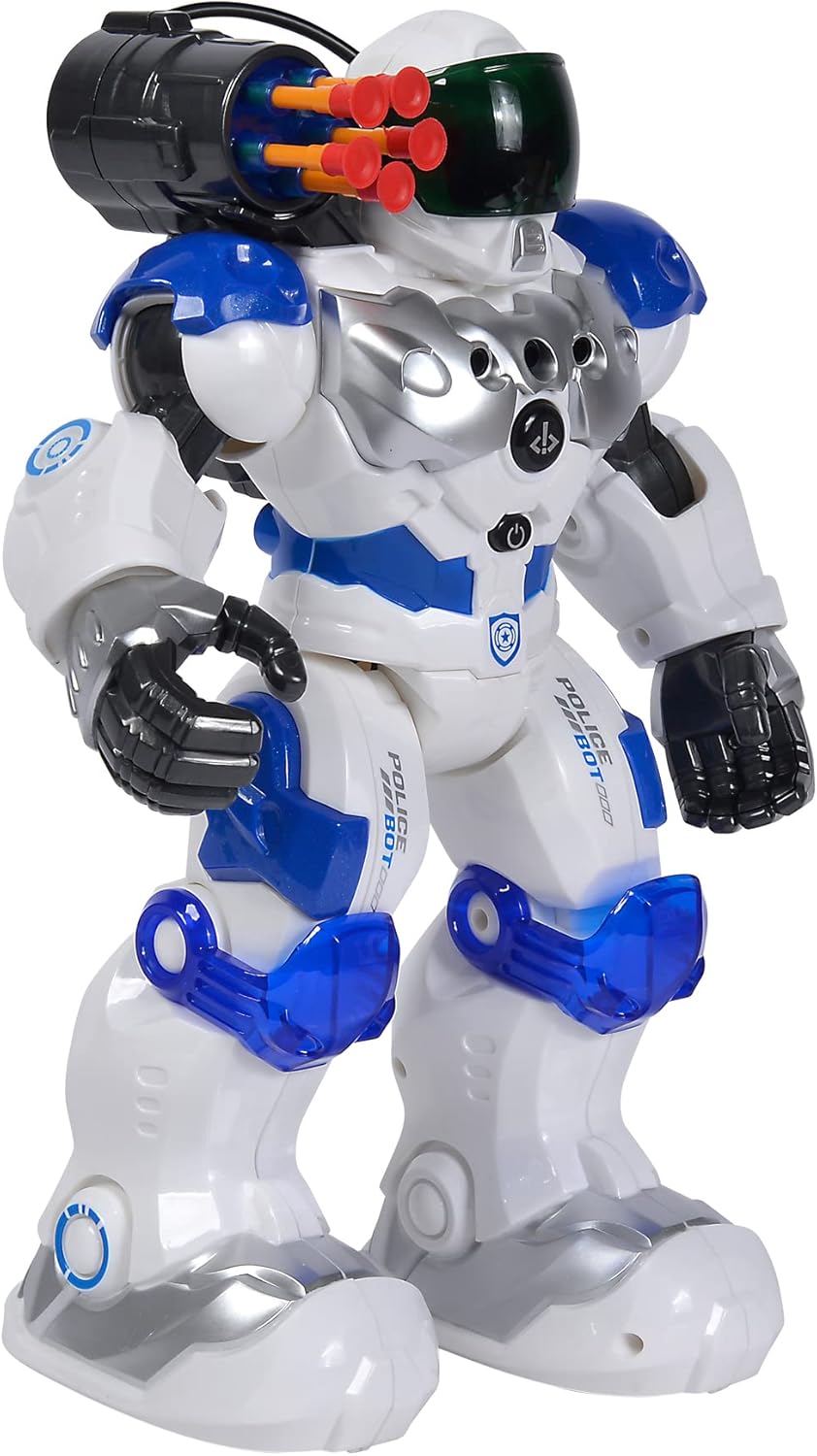
- Атуу функциясы: Press the "SHOOT" button to fire the soft darts from the robot's shoulder-mounted launcher. Ensure darts are loaded correctly.
- Жарык жана Үн: Buttons for activating or deactivating the robot's visor light and various sound effects.
- Программанын функциясы: Some models allow programming a sequence of movements. Refer to the remote's specific button layout for programming instructions.
- Үндү көзөмөлдөө: Adjust the robot's sound volume.
Жаңсоо башкаруу
The robot can respond to hand gestures. Specific sensors on the robot detect hand movements to initiate actions such as moving forward or turning. Experiment with different hand motions in front of the robot's sensors to discover its gesture-controlled responses.
Негизги өзгөчөлүктөрү
- Infrared алыстан башкаруу: Full control over movement and actions.
- Жаңсоо башкаруу: Responds to hand movements for interactive play.
- Атуу функциясы: Fires soft darts from a shoulder-mounted launcher.
- Жарык жана үн эффекттери: Features a light-up visor and various robotic sounds.
- Multiple Movement Modes: Capable of driving, running, and dancing.
- Туруктуу курулуш: Made from plastic, designed for active play.

Техникалык тейлөө
- Тазалоо: Wipe the robot and remote control with a soft, dry cloth. Do not use harsh chemicals or abrasive cleaners.
- Батареяга кам көрүү: Remove batteries from both the robot and remote control if they will not be used for an extended period to prevent leakage.
- Сактагыч: Store the robot and its accessories in a cool, dry place, away from direct sunlight and extreme temperatures.
Проблемаларды чечүү
| Көйгөй | Мүмкүн себеп | Чечим |
|---|---|---|
| Робот күйбөйт. | Батареялар өлүп калган же туура эмес орнотулган. | Батареянын полярдуулугун текшерип, жаңы батарейкаларга алмаштырыңыз. |
| Алыстан башкаруу жооп бербей жатат. | Remote batteries are dead or robot is out of range/line of sight. | Replace remote batteries. Ensure remote is pointed at the robot within effective range. |
| Shooting function not working. | Darts not loaded correctly or mechanism jammed. | Ensure darts are fully inserted. Check for any obstructions in the launcher. |
| Robot moves erratically or not as expected. | Батареялардын кубаты аз же тоскоолдуктар көп. | Replace batteries. Move away from other infrared or radio-controlled devices. |
Техникалык шарттар
| Өзгөчөлүк | Деталь |
|---|---|
| Модель номери | 108042509 |
| Бренд | Simba |
| Өлчөмдөрү (L x W x Y) | 11 x 21 x 31.5 см |
| Салмагы | 1.34 кг |
| Сунушталган Жаш | 5 жаш жана андан жогору |
| Robot Battery Type | 3 x AAA батарейкалар (киргизилген эмес) |
| Алыстан башкаруунун батарея түрү | 2 x AA batteries (not included, typical for similar remotes) |
| Негизги материал | Пластик |
| Башкаруу ыкмасы | Infrared Remote Control, Gesture Control |
| Өзгөчөлүктөрү | Light, Sound, Shooting Function, Various Movement Functions |
Кепилдик жана колдоо
For warranty information and customer support, please refer to the documentation provided at the time of purchase or contact your retailer. Simba products are designed for quality and durability, and support is available for manufacturing defects.
For further assistance, please visit the official Simba webсайтка же кардарларды тейлөө бөлүмүнө кайрылыңыз.