
Jadfezy J-03series
Jadfezy WiFi Action Camera User Manual
Model: J-03series
1. Киришүү
Thank you for choosing the Jadfezy WiFi Action Camera. This camera is designed to capture high-quality videos and photos of your adventures, whether on land or underwater. With its compact design, 1080P video recording, 12MP photo capabilities, and built-in WiFi, it is an ideal companion for sports enthusiasts and travelers. Please read this manual carefully before use to ensure proper operation and to maximize the camera's performance.
2. Коопсуздук маалыматы
- Камераны экстремалдык температурага же түз күн нуруна узак убакытка калтырбаңыз.
- Камераны сууга салуудан мурун, суу өткөрбөй турган корпус жакшы жабылганын текшериңиз.
- Use only specified batteries and chargers. Improper use may lead to fire, explosion, or other hazards.
- Камераны жана аксессуарларды балдар жетпеген жерде сактаңыз.
- Камераны жерге түшүрүүдөн же катуу таасирлерге дуушар кылуудан качыңыз.
- Камераны ажыратууга же өзгөртүүгө аракет кылбаңыз.
3. Пакеттин мазмуну
Стандарттык пакет төмөнкү элементтерди камтыйт:
- Jadfezy 1080P Action Camera
- Суу өткөрбөйт
- 2 x 1050mAh Rechargeable Lithium-Ion Batteries
- Helmet Mounting Kit
- Bicycle Mounting Kit
- USB заряддоо кабели
- Various Mounting Accessories and Straps

Image: Contents of the Jadfezy Action Camera accessories kit, including the camera, waterproof housing, two batteries, various mounts, and a USB cable.
4. Продукт бүтүп калдыview
The Jadfezy Action Camera features a compact design with a 2-inch LCD screen for easy viewing and navigation. It is capable of recording Ultra HD 1080P video at 30 frames per second and capturing 12-megapixel still photos. The camera comes with a durable waterproof case, allowing for underwater use up to 30 meters (98 feet).

Image: The Jadfezy WiFi Action Camera shown with its transparent waterproof case, two rechargeable batteries, and a display screen illustrating a skydiving scene.

Сүрөт: An overview of the Jadfezy Action Camera highlighting its key features: FHD 1080P/30FPS video, Wi-Fi connectivity, Time-lapse/Loop video modes, 2x 1050mAh batteries, 30m/98ft waterproof capability, and a wide-angle lens.
5. Орнотуу
5.1. Батареяны орнотуу жана заряддоо
The camera uses 1050mAh rechargeable Lithium-Ion batteries. Ensure batteries are fully charged before first use.
- Камеранын ылдый жагындагы батарея уясынын капкагын ачыңыз.
- Insert the battery according to the polarity indicators.
- Батарея уясынын капкагын бекем жабыңыз.
- Connect the camera to a USB power source using the provided USB cable to charge. The charging indicator will show the charging status.

Image: Two Jadfezy rechargeable Lithium-Ion batteries, highlighting their compact size and design.
5.2. Micro SD картаны киргизүү
A Micro SD card (not included) is required for storing videos and photos. The camera supports Micro SD cards up to 32GB (though some users report success with 64GB cards, 32GB is officially supported).
- Камераңыздын капталынан Micro SD карта уячасын табыңыз.
- Micro SD картаны алтын түстүү контакттары камеранын артына каратып, ордуна чыкылдаганча салыңыз.
- Чыгаруу үчүн картаны сыртка чыкканга чейин акырын түртүңүз.
5.3. Суу өткөрбөй турган корпусту колдонуу
The waterproof case allows the camera to be used underwater up to 30 meters (98 feet).
- Ensure the camera is dry before placing it inside the waterproof case.
- Place the camera firmly into the case.
- Суу өткөрбөй тургандыгын камсыз кылуу үчүн кулпуну бекем жабыңыз.
- Before first use in water, it is recommended to test the waterproof case without the camera inside to ensure no leaks are present.

Image: The Jadfezy Action Camera enclosed in its waterproof case, submerged in clear blue water with colorful fish and coral, demonstrating its 30m/98ft waterproof capability.
5.4. Attaching Mounting Accessories
The camera comes with various mounts for different activities, including helmet and bicycle mounting kits.
- Identify the appropriate mount for your intended use (e.g., helmet mount, bicycle mount).
- Attach the camera (with or without the waterproof case, depending on the activity) to the chosen mount using the provided screws and adapters.
- Securely fasten the mount to your helmet, bicycle, or other desired surface. Ensure all connections are tight to prevent the camera from falling during activity.
6. Камераны иштетүү
6.1. Күйгүзүү/өчүрүү
- To power on: Press and hold the Power/Mode button for a few seconds.
- To power off: Press and hold the Power/Mode button again until the screen turns off.
6.2. Режимди тандоо
Press the Power/Mode button repeatedly to cycle through different modes: Video Recording, Photo Mode, Playback Mode, and Settings.
6.3. Видео жаздыруу
- In Video Recording mode, press the OK button to start recording. A red indicator light will flash, and a timer will appear on the screen.
- Жазууну токтотуу үчүн OK баскычын кайра басыңыз.
6.4. Сүрөткө тартуу
- Сүрөт режиминде сүрөткө тартуу үчүн OK баскычын басыңыз.
6.5. Ойнотуу
- In Playback Mode, use the Up/Down buttons to navigate through your recorded videos and photos.
- Press the OK button to play a video or view a photo in full screen.
6.6. WiFi туташуусу жана колдонмолорду башкаруу
The built-in WiFi allows you to connect the camera to your smartphone for remote control, live view, жана file өткөрүп берүү.
- Download the designated app (refer to the camera's screen or packaging for the app name) from your smartphone's app store.
- On the camera, enter WiFi mode (usually by pressing a dedicated WiFi button or cycling through modes). The WiFi icon will appear on the screen.
- On your smartphone, go to WiFi settings and connect to the camera's WiFi network (SSID and password will be displayed on the camera screen).
- Open the app on your smartphone. You can now control the camera, view жаша фооtage, жана жүктөп алуу files. The WiFi signal range is up to 33 feet.

Image: A smartphone displaying a live view from the Jadfezy Action Camera, with a skier in the background, illustrating the camera's WiFi connectivity feature for remote control and sharing.
6.7. Special Features: Time-Lapse, Dash Cam, Burst Photo
The camera supports various shooting modes to enhance your recording experience.
- Убакыттын өтүшү: Убакыттын өтүшү менен тартылган видео түзүү үчүн белгиленген аралыктар менен бир катар сүрөттөрдү тартыңыз.
- Dash Cam: Functions as a car dashboard camera, often with loop recording.
- Burst Сүрөт: Take multiple photos in quick succession, ideal for fast-moving action.
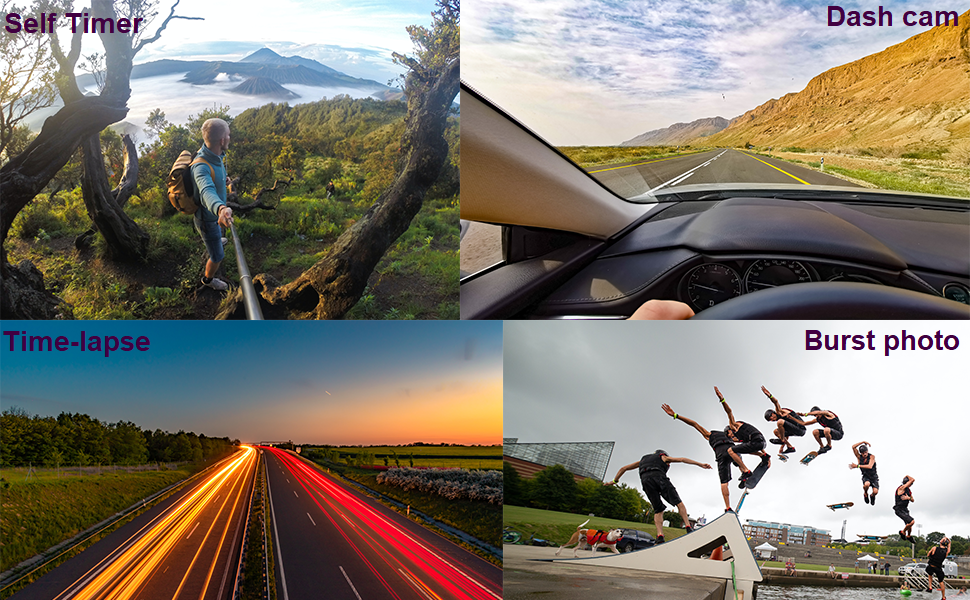
Image: Four panels demonstrating the camera's versatile features: a self-timer shot of a person on a mountain, a dash cam view from inside a car, a time-lapse image of city lights at night, and a burst photo sequence of a skateboarder.
7. Техникалык тейлөө
- Тазалоо: Камера линзасын жана экранын тазалоо үчүн жумшак, мамыксыз чүпүрөктү колдонуңуз. Суу өткөрбөй турган корпус үчүн, туздуу сууну колдонгондон кийин таза суу менен чайкап, абада кургатыңыз.
- Батареяга кам көрүү: Store batteries in a cool, dry place. If not using the camera for an extended period, remove the batteries.
- Сактагыч: Камераны кургак, чаңсыз чөйрөдө, түз күн нурунан жана өтө жогорку температурадан алыс сактаңыз.
8. Кыйынчылыктарды
If you encounter issues with your Jadfezy Action Camera, please refer to the following common solutions:
| Көйгөй | Мүмкүн чечим |
|---|---|
| Камера күйбөйт. | Батарея толук заряддалганын жана туура салынганын текшериңиз. Башка заряддалган батареяны колдонуп көрүңүз. |
| Видео жаздырууга же сүрөткө тартууга болбойт. | Check if a Micro SD card is inserted and has sufficient free space. Ensure the card is formatted correctly (FAT32 recommended). The camera may stop recording after 15-minute segments; ensure loop recording is enabled if continuous recording is desired. |
| Видео/сүрөттүн сапаты начар. | Ensure the lens is clean. Check the selected resolution settings in the camera menu. Ensure adequate lighting conditions. |
| WiFi туташуу маселелери. | Ensure the camera's WiFi is enabled. Restart both the camera and your smartphone. Ensure you are within the 33-foot WiFi range. Check that the correct app is installed and updated. |
| Суу өткөрбөгөн корпуста суу агып жатат. | Ensure the case is properly sealed and the latch is fully closed. Check the rubber gasket for any debris or damage. Replace the gasket if necessary. |
9. Техникалык шарттар
| Өзгөчөлүк | Деталь |
|---|---|
| Бренд | Jadfezy |
| Модель номери | J-03series |
| Video Resolution | Up to 1080P / 30fps |
| Сүрөттүн резолюциясы | 12MP |
| Screen Size | 2 дюйм |
| Суу өткөрбөйт | Up to 30m (98ft) with waterproof case |
| Батарея түрү | 2 x 1050mAh литий-ион (кошулган) |
| Сактагыч | Micro SD (up to 32GB recommended) |
| Байланыш | WiFi, USB |
| Өлчөмдөр | 2.35 x 1.55 x 1.2 дюйм |
| Элемент Салмагы | 12.3 унция |
10. Кепилдик жана колдоо
Кепилдик маалыматы жана техникалык колдоо үчүн, сатып алууда берилген документтерди караңыз же сатуучу менен түз байланышыңыз. Кепилдик дооматтар үчүн сатып алганыңыздын далилин сактаңыз.
Ask a question about this manual
Ask about setup, troubleshooting, compatibility, parts, safety, or missing instructions. Manuals+ will review the question and use this page’s manual context to help answer it.