
1. Киришүү
This manual provides essential information for the proper setup, operation, and maintenance of your Leica M11 Digital Rangefinder Camera. Please read this manual thoroughly before using your camera to ensure optimal performance and longevity. Keep this manual for future reference.
2. Продукт бүтүп калдыview
The Leica M11 is a high-performance digital rangefinder camera designed for discerning photographers. It features a full-frame BSI CMOS sensor with Triple Resolution Technology, allowing for versatile image capture at 60, 36, or 18 megapixels. The camera incorporates a special IR + UV cut filter for effective light correction and offers an ISO sensitivity range of 64 to 50,000.
Негизги өзгөчөлүктөрү:
- High-performing Processor: Full-frame BSI CMOS sensor with Triple Resolution Technology for 60, 36, or 18-megapixel DNG and JPEG files.
- Өркүндөтүлгөн чыпкалоо: Special IR + UV cut filter for effective correction of incident light.
- Ergonomic Controls: Intuitive layout next to a 2.3 million pixel high-resolution touchscreen.
- Кең ISO диапазону: ISO 64 to 50,000, with 14-bit color depth and up to 15 stops dynamic range.
- Туруктуу жана жеңил: Silver finish model features a brass top plate and high-quality aluminum construction with a scratch-resistant coating, weighing approximately 640 grams.
Камера Views:
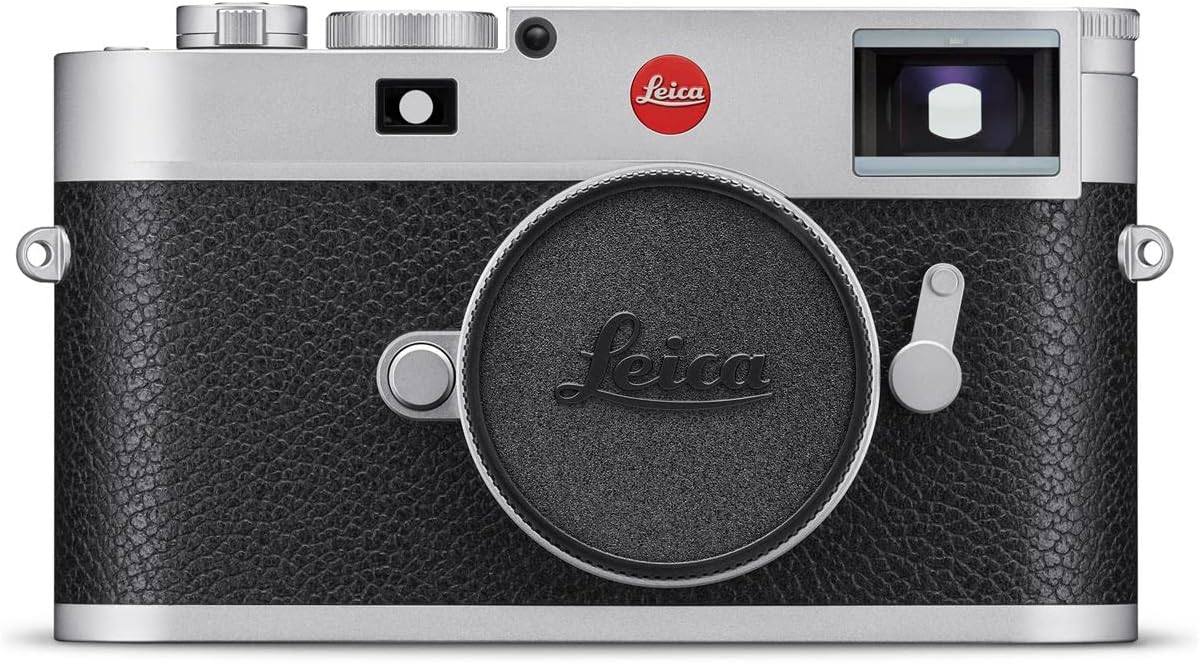
Фронт view of the Leica M11 camera, showcasing its classic rangefinder design with the lens cap attached, protecting the lens mount.

Арткы view of the Leica M11 camera, displaying the high-resolution touchscreen, and control buttons for playback, function, and menu access.

Жогорку view of the Leica M11 camera, featuring the shutter speed dial, ISO dial, hot shoe, and shutter release button, highlighting its ergonomic controls.

Фронт view of the Leica M11 camera with a Leica M-mount lens attached, illustrating the camera's compact form factor and lens compatibility.
3. Орнотуу
3.1. Батареяны орнотуу
- Камера өчүк экенин текшериңиз.
- Батарея бөлүмүн камеранын астыңкы жагына жайгаштырыңыз.
- Бөлүмдүн капкагын ачыңыз.
- Insert the supplied Lithium Ion battery, ensuring correct orientation according to the markings.
- Батарея уясынын капкагын бекем жабыңыз.
3.2. Эстутум картасын киргизүү
- The Leica M11 has 64GB of internal flash memory. For additional storage, insert a compatible SD card (UHS-II recommended) into the SD card slot.
- Камера өчүк экенин текшериңиз.
- Эстутум картасынын уячасынын капкагын ачыңыз.
- Insert the SD card with the contacts facing the correct direction until it clicks into place.
- Эстутум картасынын уячасынын капкагын жабыңыз.
3.3. Объективдин тиркемеси
- Align the red dot on the Leica M-mount lens with the red dot on the camera's lens mount.
- Gently insert the lens into the mount.
- Rotate the lens clockwise until it locks into position.
4. Иштөө нускамалары
4.1. Күйгүзүү/өчүрүү
To power on the camera, rotate the power switch located on the top plate. To power off, rotate the switch back to the 'OFF' position.
4.2. Атуу режимдери
The Leica M11 supports the following shooting modes:
- Диафрагма артыкчылыктуулугу (A): The camera automatically sets the shutter speed based on your chosen aperture.
- Кол менен (M): You have full control over both aperture and shutter speed settings.
4.3. Экспозицияны көзөмөлдөө
The camera features automatic exposure control. Metering methods include Center-Weighted Average, Multi-Zone, and Spot metering to ensure accurate exposure in various lighting conditions.
4.4. ISO сезгичтиги
Adjust the ISO sensitivity from 64 to 50,000 using the dedicated ISO dial or through the camera's menu system. Lower ISO values are suitable for bright conditions and minimal noise, while higher values are for low-light environments.
4.5. Фокустоо
The Leica M11 utilizes manual focus (MF). Use the rangefinder mechanism in the viewfinder to achieve precise focus. The camera also features contrast detection for focus assistance.
4.6. Сүрөт тартуу
Images can be captured in DNG (raw) and JPEG formats. The Triple Resolution Technology allows you to select between 60, 36, or 18-megapixel resolutions, utilizing the entire sensor area for each setting.
4.7. Дисплей жана навигация
The camera is equipped with a 2.3 million pixel high-resolution AMOLED touchscreen. Use the touchscreen for menu navigation, image review, and adjusting settings. Physical buttons for PLAY, FN (Function), and MENU are also provided for quick access to common operations.
4.8. Байланыш
The Leica M11 offers Bluetooth connectivity for wireless communication with compatible devices. It also features a USB Type-C (USB 3.1) port for data transfer and charging.
5. Техникалык тейлөө
5.1. Тазалоо
- Камеранын корпусун тазалоо үчүн жумшак, түксүз чүпүрөктү колдонуңуз.
- For the lens and sensor, use specialized cleaning tools and solutions designed for optical surfaces. Avoid touching the sensor directly.
- Keep the touchscreen clean with a microfiber cloth.
5.2. Батареяга кам көрүү
- Биринчи жолу колдонуудан мурун батарейканы толук кубаттаңыз.
- Батареяларды колдонбогондо салкын, кургак жерде сактаңыз.
- Батареяны экстремалдуу температурага тийгизүүдөн сактаңыз.
5.3. Сактоо
Колдонулбай турган учурда, камераны кургак, чаңсыз чөйрөдө, соккулардан жана айлана-чөйрөнүн таасиринен коргоо үчүн камера баштыгында же кутучада сактаңыз.
6. Кыйынчылыктарды
If you encounter issues with your Leica M11, consider the following general troubleshooting steps:
- Камера күйбөй жатат: Батарея заряддалганын жана туура салынганын текшериңиз.
- Сүрөттүн сапатындагы көйгөйлөр: Ensure the lens is clean, focus is accurate, and appropriate ISO and exposure settings are used for the lighting conditions.
- Эстутум картасындагы каталар: Reformat the memory card (this will erase all data) or try a different compatible SD card.
- Туташуу көйгөйлөрү: Ensure Bluetooth is enabled on both devices and that the USB cable is securely connected.
For persistent issues, please refer to the official Leica support resources or contact customer service.
7. Техникалык шарттар
| Өзгөчөлүк | Деталь |
|---|---|
| Сенсор түрү | Full-frame BSI CMOS |
| Сүрөт сенсорунун чечилиши | 60 Megapixels (with Triple Resolution Technology: 60, 36, 18 MP) |
| ISO диапазону | 64 - 50,000 |
| Image Stabilization | Digital, Dynamic |
| Колдоого алынган File Форматтар | DNG, JPEG |
| Дисплей түрү | AMOLED сенсордук экраны |
| Display Resolution | 2.3 миллион пиксел |
| Ички эс тутум | 64 ГБ |
| Тышкы эс | SD Card (UHS-II compatible) |
| Байланыш | Bluetooth, USB Type-C (USB 3.1) |
| Линза орнотуу | Лейка М |
| Салмагы | Болжол менен 640 грамм (16 унция) |
| Минималдуу жапкыч ылдамдыгы | 1/16000 секунд |
| Батарея түрү | Литий ион |
| Атуу режимдери | Aperture Priority, Manual |
| Фокус түрү | Кол менен фокустоо (MF) |
| Өлчөө ыкмалары | Center-Weighted Average, Multi-Zone, Spot |
8. Кепилдик жана колдоо
8.1. Кепилдик маалыматы
The Leica M11 Digital Rangefinder Camera is covered by a manufacturer's warranty. Please refer to the warranty documentation included with your product for specific terms and conditions.
8.2. Кардарларды колдоо кызматы
For technical assistance, service, or further information, please visit the official Leica website or contact Leica customer support. You can also find additional resources and accessories at the Leica Store on Amazon.