
Продукт бүттүview
The DIZO Watch 2 Sports Smart Watch (Model DW2121) is a versatile fitness tracker designed for Android and iOS phones. It features a 1.69-inch HD full touchscreen, comprehensive health monitoring capabilities including heart rate and blood oxygen, sleep tracking, and support for over 110 sports modes. The watch is 5ATM waterproof and offers extended battery life.
Орнотуу жана баштапкы колдонуу
Unboxing and First Charge
Upon unboxing your DIZO Watch 2 Sports, it is recommended to fully charge the device before its first use. Connect the magnetic charging cable to the charging points on the back of the watch and plug the USB end into a compatible power adapter (not included).

Image: The DIZO Watch 2 Sports Smart Watch connected to its magnetic charging cable, displaying a 100% charge indicator. The watch is pink with a rose gold frame.
The watch typically takes approximately 2 hours to fully charge. A full charge provides up to 10 days of working time with automatic heart rate monitoring and up to 30 days of standby time.
Колдонмону орнотуу жана жупташтыруу
To unlock the full potential of your DIZO Watch 2 Sports, download and install the official "DIZO" application on your smartphone. The app is available on both the App Store (for iOS devices) and Google Play (for Android devices).
- Колдонмону жүктөп алыңыз: Издөө "DIZO" in your phone's app store and install it. Alternatively, you can scan the QR code provided in the physical user manual to directly access the app download page.
- Bluetooth иштетүү: Смартфонуңузда Bluetooth иштетилгенин текшериңиз.
- Түзмөктү жупташтыруу: Open the DIZO app and follow the on-screen instructions to pair your DIZO Watch 2 Sports with your phone. The app will guide you through the pairing process.
Video: Guide to downloading the DIZO app and pairing the smartwatch with a smartphone.
Иштөө нускамалары
Экран Навигациясы
The DIZO Watch 2 Sports features a 1.69-inch HD full touchscreen for intuitive navigation.
- Төмөн сүрүү: From the home screen, swipe down to access the notification list interface.
- Өйдө серпүү: From the home screen, swipe up to enter the main menu, which includes various features like activity data, heart rate, SpO2, sleep, workout, alarm, and weather.
- Солго сүрүү: Үй экранынан солго серпип коюңуз view quick access data such as steps, sleep, and heart rate.
- Оңго сүрүү: From the home screen, swipe right to enter the shortcut interface, providing quick access to common settings and functions.
- Каптал баскычын басыңыз: Press the physical button on the side to return to the home screen or wake the display.
Video: Demonstrating screen navigation and power off function on the DIZO Watch 2 Sports.
Ден соолук мониторинги
The DIZO Watch 2 Sports is equipped with advanced sensors for continuous health tracking.
- Жүрөктүн кагышын көзөмөлдөөчү: The watch features a real-time heart rate monitor. You can enable 24-hour heart rate detection through the DIZO app for continuous tracking.
- Кандагы кычкылтек (SpO2) Монитор: Monitor your blood oxygen levels directly from your wrist.
- Уйку монитору: Automatic sleep tracking analyzes your sleep data, including deep sleep, light sleep, and awake times, to help you understand your sleep patterns.
- Активдүүлүккө көз салуу: Күн бою баскан кадамдарды, аралыкты жана күйгөн калорияларды көзөмөлдөйт.

Image: The DIZO Watch 2 Sports displaying heart rate data (75 bpm average) and a graph, alongside a visual representation of sleep tracking showing deep, light, and awake sleep durations.
Спорт режимдери жана GPS көзөмөлдөө
The watch supports over 110 sports modes to accurately track your workouts. Connect to your phone's GPS via the DIZO app to record activity routes and get detailed workout statistics.

Image: The DIZO Watch 2 Sports showing various sports mode icons, including running, cycling, and yoga, with a smartphone screen displaying GPS tracking for an outdoor run.
Notifications and Smart Features
Stay connected with call and message notifications directly on your wrist.
- Чалуулар жана билдирүүлөр жөнүндө эскертмелер: After connecting to Bluetooth, the watch will vibrate to alert you of incoming calls and messages from various apps like Facebook, LinkedIn, Instagram, Twitter, WhatsApp, and Line. Note: You cannot reply to messages directly from the watch.
- Музыкалык башкаруу: Control your smartphone's music player directly from the watch.
- Камераны башкаруу: Саатты телефонуңуздун камерасы үчүн алыстан жапкыч катары колдонуңуз.
- Аба ырайы: View local weather information.
- Эскерткичтер: Set up alarm clocks, drinking water reminders, sedentary reminders, and menstrual cycle reminders.
- Телефонду табуу: Locate your paired smartphone using the watch.
- Жарыктыкты жөндөө: Five levels of brightness options ensure readability in various lighting conditions.

Image: A DIZO Watch 2 Sports on a wrist, displaying a notification icon, with various social media and messaging app logos floating around it, indicating smart notification capabilities.
Ыңгайлаштыруу
Personalize your watch with a wide range of watch faces and interchangeable bands.
- Бетти көрүү: Choose from over 150 stylish watch faces available through the DIZO app. You can also customize the dial with your favorite pictures.
- Detachable Bands: The watch features detachable bands, allowing you to easily switch them to match your style.
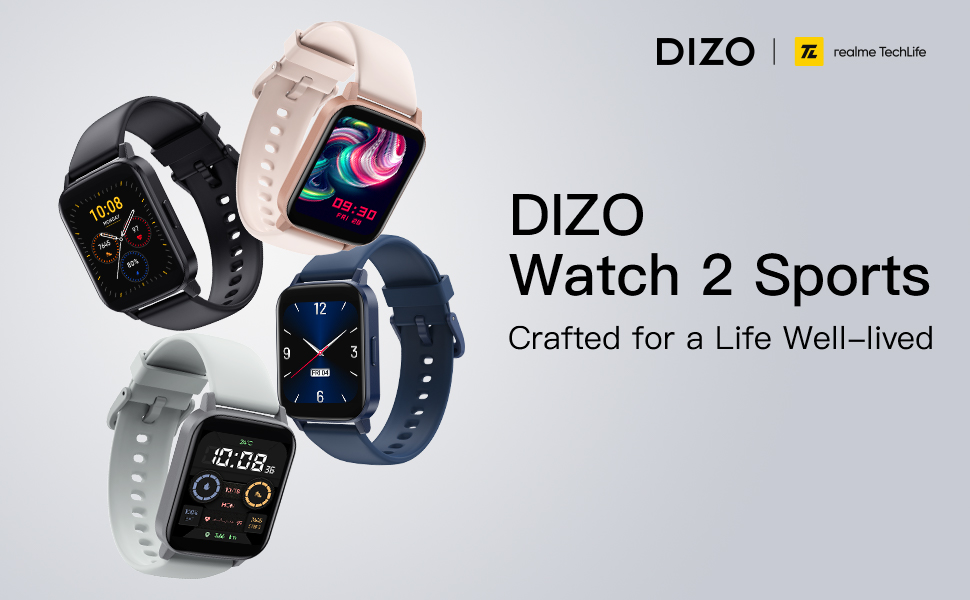
Image: A DIZO Watch 2 Sports displaying a custom watch face with a yellow cat-like character, alongside a smartphone screen showing options for customizing the watch dial, including text color, background picture, and time location.
Техникалык тейлөө жана кам көрүү
Суу каршылык
The DIZO Watch 2 Sports has a 5ATM waterproof rating, meaning it can withstand pressures equivalent to a depth of 50 meters. This makes it suitable for swimming and showering. However, it is not recommended for diving or high-pressure water activities.
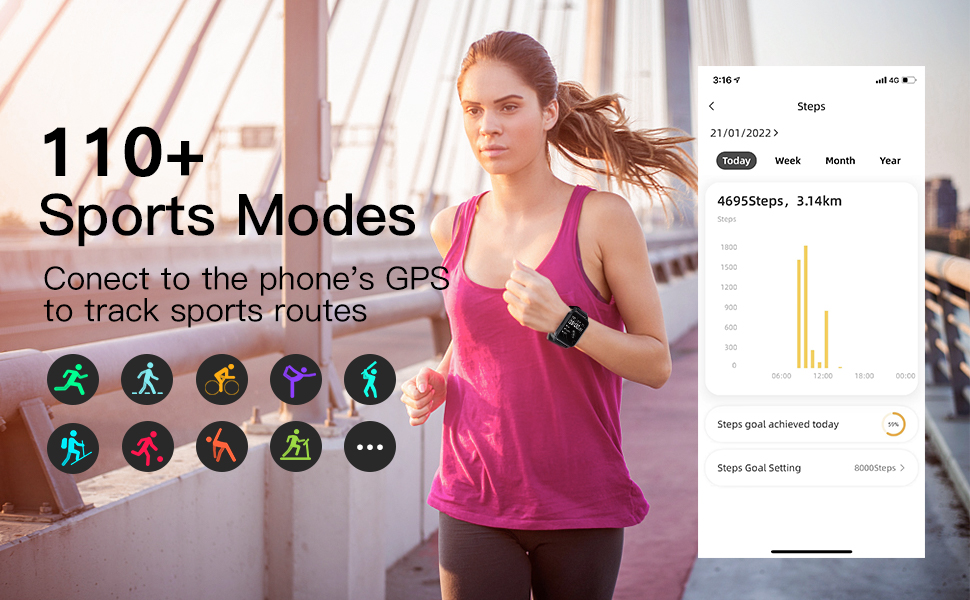
Image: A DIZO Watch 2 Sports being worn on a wrist underwater, with text indicating "5ATM (164 ft./50 meters) Waterproof".
Тазалоо
To maintain the watch's performance and appearance, regularly clean the device and its strap. Use a soft, damp экранды жана боону сүртүү үчүн чүпүрөк колдонуңуз. Катуу химиялык заттарды же абразивдүү материалдарды колдонуудан алыс болуңуз.
Техникалык шарттар
| Өзгөчөлүк | Деталь |
|---|---|
| Модель номери | DW2121 |
| Screen Size | 1.69 дюйм |
| Дисплей түрү | TFT HD Full Touch Screen |
| Резолюция | 240*280 |
| Суу өткөрбөйт рейтинги | 5ATM (50 метр) |
| Батарея сыйымдуулугу | 280mAh |
| Заряддоо убактысы | Болжол менен 2 саат |
| Батареянын иштөө мөөнөтү (Типтүү колдонуу) | 10 күнгө чейин |
| Күтүү убактысы | 30 күнгө чейин |
| Байланыш | Bluetooth 5.0, GPS (via phone) |
| Шайкештик | Android 5.0 жана андан жогору, iOS 9.0 жана андан жогору |
| Ден соолук мониторинги | Heart Rate, Blood Oxygen, Sleep Tracking |
| Спорт режимдери | 110+ |
| Элемент Салмагы | 4.2 унция |
| Пакеттин өлчөмдөрү | 6.26 x 3.86 x 1.26 дюйм |
Проблемаларды чечүү
- Күйгүзүлбөй жаткан саат: Сааттын толук заряддалганын текшериңиз. Аны күйгүзүүдөн мурун, аны кубаттагычка кеминде 10 мүнөт туташтырыңыз.
- Телефон менен жупташтыруу мүмкүн эмес:
- Телефонуңузда Bluetooth иштетилгенин текшериңиз.
- Make sure the DIZO app is installed and open.
- Bring the watch close to your phone during the pairing process.
- Телефонуңузду да, саатыңызды да өчүрүп күйгүзүңүз.
- Саат башка түзмөк менен жупташканын текшериңиз. Эгер ошондой болсо, адегенде аны ажыратыңыз.
- Эскертмелер көрүнбөй жатат:
- Verify that the watch is successfully paired with your phone via Bluetooth.
- Check notification settings within the DIZO app to ensure app notifications are enabled.
- Ensure your phone's notification settings allow the DIZO app to send notifications.
- Disable "Do Not Disturb" mode on both your watch and phone.
- Туура эмес ден соолук маалыматтары:
- Саат өтө тар же өтө бош эмес, билегиңизге бекем тагылганын текшериңиз.
- Сааттын арткы бетиндеги сенсорду үзгүлтүксүз тазалап туруңуз.
- Avoid excessive movement during measurements for more accurate readings.
- Батарейканын кыска мөөнөтү:
- Экран жарыктыгын азайтыңыз.
- Саатка эскертмелерди жөнөтүүчү колдонмолордун санын чектөө.
- Керек болбосо, 24/7 үзгүлтүксүз жүрөктүн кагышын көзөмөлдөөнү өчүрүңүз.
- Саат ар бир жолу толук кубатталганын текшериңиз.
Кепилдик жана колдоо
For warranty information and customer support, please refer to the official DIZO webсайтка же түздөн-түз кардарларды тейлөөгө кайрылыңыз. Сатып алуу квитанциясын кепилдик дооматтары үчүн сатып алуунун далили катары сактаңыз.