
Introduction
This manual provides detailed instructions for the VEDINDUST HDMI ARC Digital to Analog Audio Converter. This device is designed to extract audio from an HDMI ARC-enabled television and convert digital audio signals (Toslink/Coaxial) into analog L/R stereo or 3.5mm jack outputs. It supports various audio formats and offers multiple input options for versatile connectivity.
Please read this manual carefully before using the product to ensure proper operation and to maximize its performance.
Пакеттин мазмуну
Пакетте бардык буюмдар бар экенин текшериңиз:
- 1x VEDINDUST HDMI ARC Digital to Analog Audio Converter
- 1x USB кубат кабели
- 1x HDMI кабели
- 1x Колдонуучунун колдонмосу

Продукт бүттүview
The VEDINDUST HDMI ARC Digital to Analog Audio Converter is a compact device designed to manage various audio signals. It features multiple input and output ports for flexible audio routing.
Түзмөктүн жайгашуусу
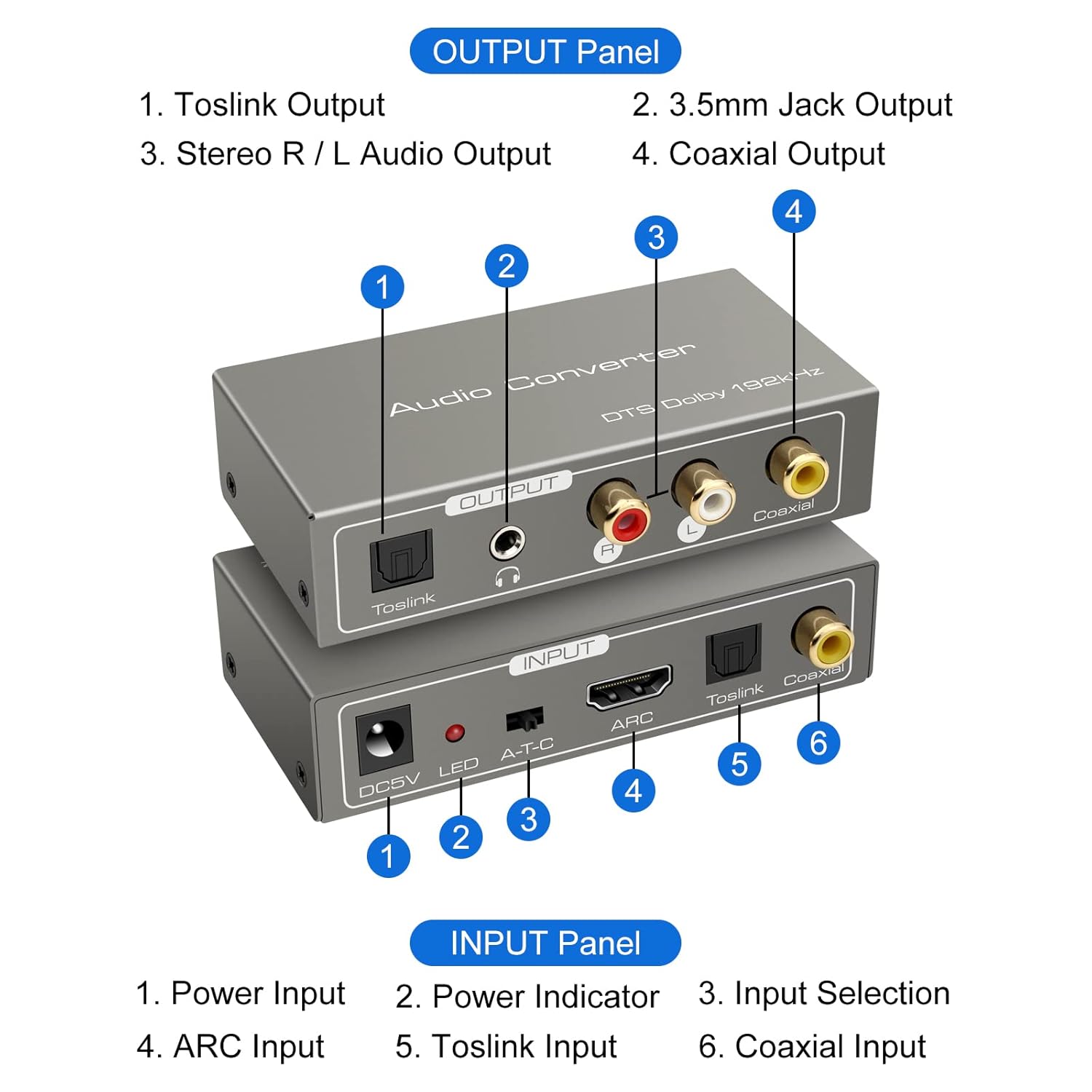
Киргизүү панели:
- DC5V кубат киргизүү: Connect the provided USB power cable here.
- LED көрсөткүчү: Түзмөк күйгүзүлгөндө жарык берет.
- A-T-C Input Selection Switch: Used to select the audio input mode (A for ARC, T for Toslink, C for Coaxial).
- ARC киргизүү: Connect an HDMI cable from an ARC-compatible TV's HDMI ARC port.
- Toslink киргизүү: Connect an optical fiber cable from your audio source.
- Коаксиалдуу киргизүү: Connect a coaxial cable from your audio source.
Output Panel:
- Toslink чыгаруу: Connect to an optical input on an ampкөтөргүч же үн системасы.
- 3.5 мм уяча чыгышы: Connect to headphones or an auxiliary input on an audio device.
- Stereo R/L Audio Output: Connect RCA cables to the L/R analog inputs of an ampжашоочу же спикерлер.
- Коаксиалдуу чыгаруу: Connect to a coaxial input on an ampкөтөргүч же үн системасы.
Орнотуу нускамалары
Follow these steps to correctly set up your VEDINDUST audio converter:
1. Power Connection
- Connect the provided USB power cable to the DC5V input port on the converter.
- Plug the other end of the USB power cable into a 5V USB power adapter (not included) or a USB port on your TV/device.
- Ensure the LED indicator on the converter illuminates, indicating it is powered on.
2. Audio Input Connection
Аудио булагыңызга жараша төмөнкү киргизүү ыкмаларынын бирин тандаңыз:

ARC Input Mode:
- Connect an HDMI cable from your ARC-compatible television's HDMI ARC output port to the ARC input port on the converter.
- Ensure your television's HDMI port supports ARC functionality.
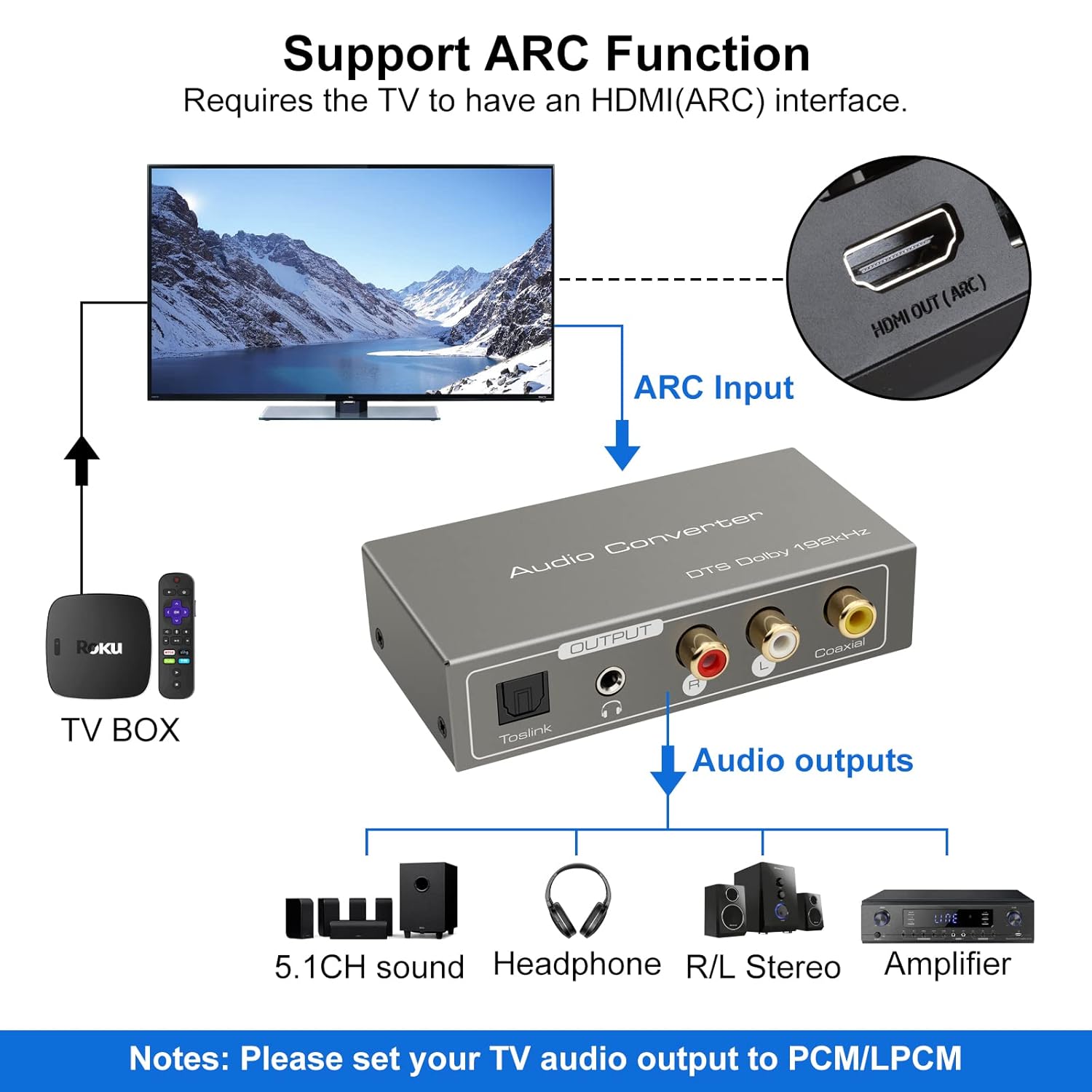

TOSLink Input Mode:
- Connect an optical fiber cable from your audio source (e.g., game console, Blu-ray player) to the Toslink input port on the converter.
Coaxial Input Mode:
- Connect a coaxial cable from your audio source to the Coaxial input port on the converter.
3. Audio Output Connection
Connect the converter's output ports to your desired audio receiving devices:
- For Digital Audio: Connect an optical fiber cable to the Toslink Output or a coaxial cable to the Coaxial Output, then connect to your amplifier, soundbar, or home cinema system.
- For Analog Audio: Connect RCA L/R cables to the Stereo R/L Audio Output, or a 3.5mm audio cable to the 3.5mm Jack Output. Connect these to your amplifier, speakers, or headphones.
Иштөө нускамалары
1. Киргизүү режимин тандоо
Use the A-T-C switch on the input panel to select the active audio input:
- Которуштурууну коюңуз 'А' for HDMI ARC input.
- Которуштурууну коюңуз 'Т' for TOSLink optical input.
- Которуштурууну коюңуз 'C' for Coaxial input.

2. Audio Format Configuration
For optimal performance and to ensure audio output, especially when using the R/L or 3.5mm jack outputs, it is crucial to configure the audio format on your source device (e.g., TV, game console).
- Маанилүү: If you experience no sound output, set the audio format of your signal source (e.g., TV audio settings) to PCM or LPCM.
- The converter supports DTS / DSD / LPCM formats for Toslink/Coaxial output. However, for R/L or 3.5mm jack outputs, only LPCM/PCM audio format input is supported.
Проблемаларды чечүү
If you encounter issues while using the VEDINDUST HDMI ARC Digital to Analog Audio Converter, please refer to the following common problems and solutions:
-
Үн чыгышы жок:
- Ensure the converter is properly powered via the DC5V input and the LED indicator is on.
- Verify that the A-T-C input selection switch is set to the correct input mode (A for ARC, T for Toslink, C for Coaxial).
- Check the audio settings on your source device (TV, game console, etc.). The audio output format must be set to PCM or LPCM, especially for analog (RCA L/R or 3.5mm) outputs.
- Confirm that all audio cables (HDMI, optical, coaxial, RCA, 3.5mm) are securely connected to both the converter and your audio devices.
- Test with different audio cables if possible, to rule out faulty cables.
-
ARC Function Not Working:
- Ensure your television's HDMI port specifically supports Audio Return Channel (ARC). Not all HDMI ports are ARC-enabled.
- Check your TV's audio settings to ensure ARC is enabled and configured correctly.
- Try restarting both your TV and the converter.
-
Начар аудио сапаты:
- Бардык туташуулардын бекем жана тоскоолдуксуз экенин текшериңиз.
- Verify that the audio format from your source is compatible with the converter's outputs (LPCM/PCM for analog outputs).
- Avoid using excessively long or low-quality cables, which can degrade signal integrity.
Техникалык мүнөздөмөлөр
| Продукциянын өлчөмдөрү (L x W x Y) | 9.8 x 5 x 0.1 см |
| Салмагы | 250 грамм |
| Өндүрүүчү | VEDINDUST |
| Модель номери | 20220119 |
| Келип чыккан өлкө | Кытай |
| Түс | Боз |
| Туташтыргыч түрү | HDMI, 3.5mm Jack, Toslink, Coaxial |
| Шайкеш түзмөктөр | Game Console, Blu-ray Player, Television, DVD Player, Satellite Receiver, Apple TV, HDTV, Soundbar, Amplifier, Speakers, Home Cinema System, AV Ampөмүрлүү |
| Кабель түрү | HDMI, Optical, Coaxial, Auxiliary |
| Порттардын саны | 5 |
| UPC | 798610310694 |
| Колдогон Сampлинг жыштыктары | 32 KHz, 44.1 KHz, 48 KHz, 96 KHz, 192 KHz (24-bit) |
| Supported Audio Formats (Digital Output) | DTS, Dolby-AC3, DSD, LPCM |
| Supported Audio Formats (Analog Output) | LPCM, PCM |
Кароо жана тейлөө
To ensure the longevity and optimal performance of your VEDINDUST audio converter, please follow these care guidelines:
- Тазалоо: Use a soft, dry cloth to clean the device. Do not use liquid cleaners or aerosol sprays, as they may damage the unit.
- Сактагыч: Аппаратты түз күн нурунан жана экстремалдык температурадан алыс салкын, кургак жерде сактаңыз.
- Колдонуу: Аппаратты түшүрүүдөн же катуу таасирлерден сактаныңыз.
- Курчап турган чөйрө: Түзмөктү суудан, нымдуулуктан жана жогорку нымдуулуктагы чөйрөлөрдөн алыс кармаңыз.
Кепилдик жана Кардарларды колдоо
For warranty information or if you require further assistance with your VEDINDUST HDMI ARC Digital to Analog Audio Converter, please contact VEDINDUST customer support through the retailer where you purchased the product or refer to the contact information provided with your purchase documentation.
Сураныч, кепилдик дооматтар үчүн сатып алуу далилиңизди сактап коюңуз.