
1. Киришүү
Thank you for choosing the InAndOn V3 Max All-in-One Karaoke Player. This device integrates a 15.6-inch touch screen, intelligent voice keying, real-time scoring, and extensive cloud song download capabilities to provide a comprehensive karaoke experience. This manual provides essential information for setting up, operating, maintaining, and troubleshooting your karaoke player.
2. Пакеттин мазмуну
Төмөндө тизмеленген нерселердин баары пакетиңизге камтылганын текшериңиз:
- InAndOn V3 Max All-in-One Karaoke Player (15.6" Touch Screen)
- 2 x UHF зымсыз микрофондору
- HDMI кабели
- Аудио/видео RCA кабели
- Кубаттуу адаптер
- Колдонуучунун Колдонмосу (бул документ)

Сүрөт 2.1: Алдыңкы view of the InAndOn V3 Max Karaoke Player.

Image 2.2: Included UHF Wireless Microphones.
3. Орнотуу
3.1 Кубатты туташтыруу
Connect the provided power adapter to the DC 12V input port on the back of the karaoke player, then plug the adapter into a standard electrical outlet.
3.2 Дисплейге туташуу (милдеттүү эмес)
To output video to an external display (TV, projector), use the supplied HDMI cable. Connect one end to the HDMI OUT port on the karaoke player and the other end to an HDMI input on your external display.
3.3 Connecting to an Audio System (Optional)
For enhanced audio output, connect the karaoke player to an external sound system or amplifier using one of the following methods:
- RCA аудио чыгышы: Use the supplied RCA cable to connect the AUDIO OUT ports (red and white) on the player to the corresponding audio input ports on your ampкөтөргүч же үн системасы.
- Оптикалык аудио чыгышы: For digital audio, connect an optical cable (not included) from the OPTICAL port on the player to an optical input on your sound system.
3.4 Микрофонду орнотуу
The InAndOn V3 Max includes two UHF wireless microphones. Insert batteries (not included) into each microphone. The microphones will automatically pair with the karaoke player when powered on. Ensure the MIC IN ports on the player are not used for wired microphones if using the wireless ones.
3.5 Тармактык туташуу
The player supports both wired and wireless network connections for cloud song downloads and online features:
- Зымдуу (LAN): Connect an Ethernet cable from your router to the LAN port on the back of the player.
- Зымсыз (Wi-Fi): Navigate to the system settings on the touch screen, select Wi-Fi, and connect to your preferred wireless network.

Image 3.1: Rear panel connections including HDMI, RCA, Optical, LAN, and power input.
4. Иштөө нускамалары
4.1 Күйгүзүү/өчүрүү
Press the POWER button located on the back panel to turn the unit on or off. The touch screen will illuminate upon startup.
4.2 Сенсордук экран интерфейси
The 15.6-inch capacitive touch screen is the primary interface for controlling the karaoke player. Navigate through menus, select songs, and adjust settings by touching the screen icons and options.
4.3 Song Selection and Cloud Downloads
The player offers a vast library of songs, including Mandarin, Cantonese, Taiwanese, and English tracks. Connect to the internet to access and download new songs from the cloud library. The system supports free, unlimited downloads of new songs.

Image 4.1: Cloud song library interface with various categories.
4.4 Үн менен башкаруу
The InAndOn V3 Max features intelligent voice keying. Use voice commands to select songs, adjust volume, or perform other functions without needing to touch the screen. Refer to the on-screen prompts for available voice commands.
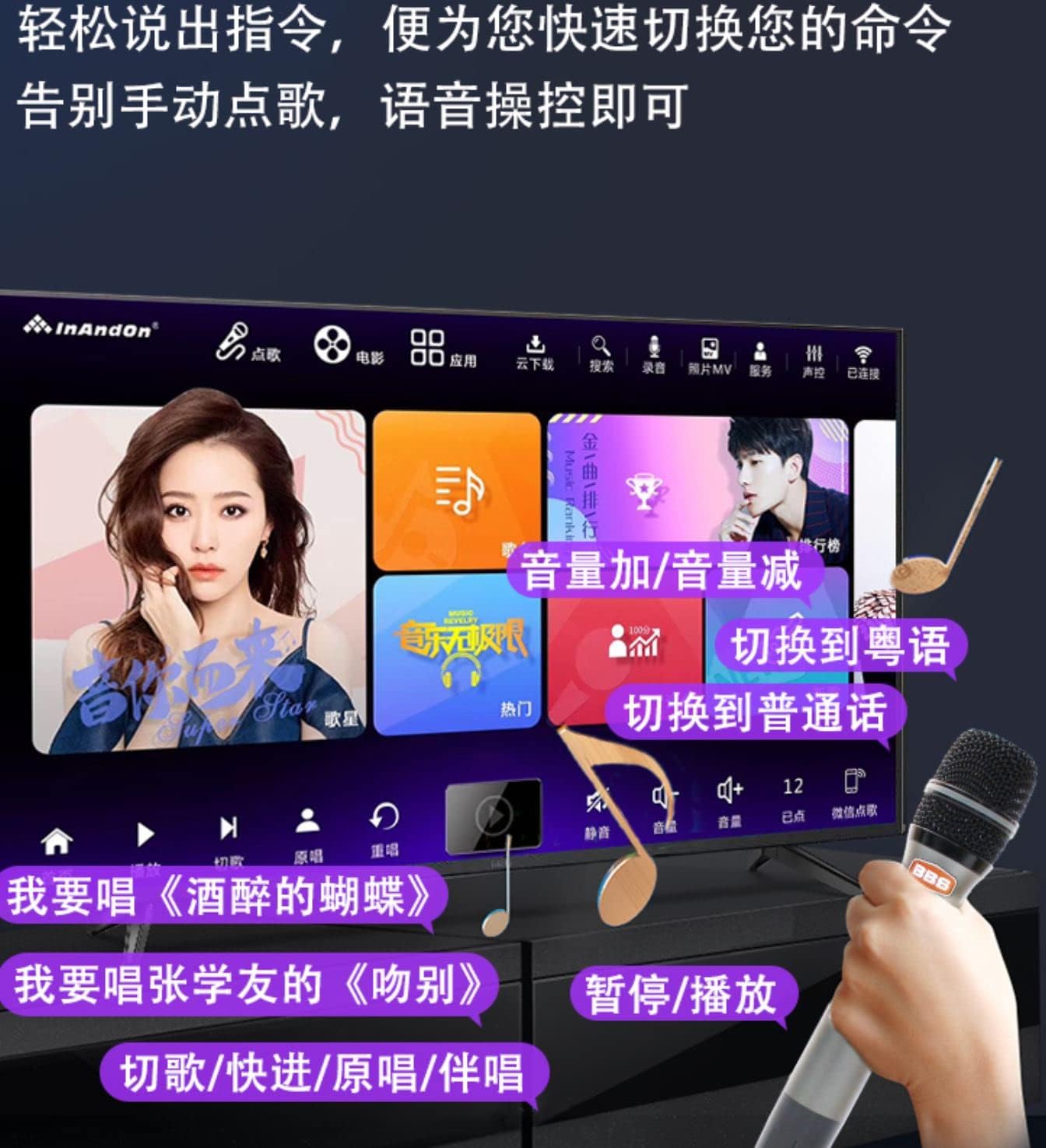
Image 4.2: Voice control interface for hands-free operation.
4.5 Жазуу функциясы
The player allows you to record your singing performances. Access the recording function through the main interface. Recorded tracks can be saved and shared.
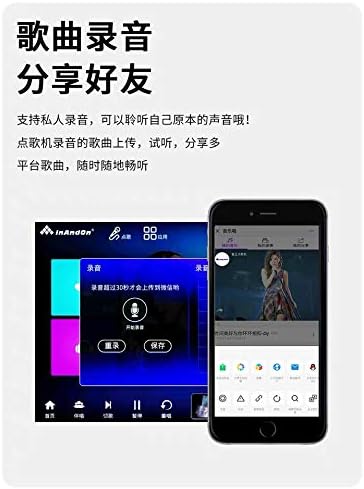
Image 4.3: Recording function interface.
4.6 Башка өзгөчөлүктөр
- Real-time Score: Receive instant feedback on your singing performance.
- YouTube колдонмосу: Access YouTube directly from the player for additional content.
- Үндү тууралоо: Adjust the song's pitch to match your vocal range.
- Тилди алмаштыруу: The system supports multiple languages, including Simplified Chinese, Traditional Chinese, and English. You can switch the interface language in the settings.
- Mobile Song Ordering: Use a smartphone or tablet to order songs by scanning a QR code.
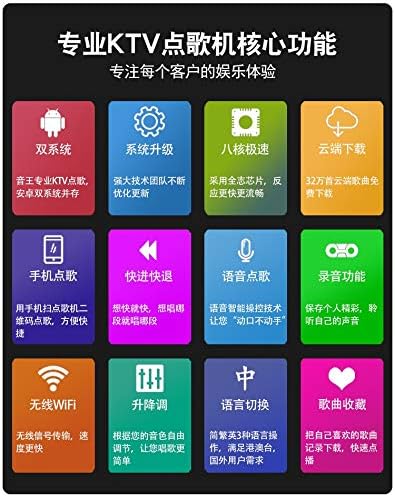
Сүрөт 4.4: Бүттүview of key features including dual system, cloud download, and voice control.
5. Техникалык тейлөө
5.1 Экранды тазалоо
Сенсордук экранды акырын сүртүү үчүн жумшак, түксүз чүпүрөктү колдонуңуз. өжөр тактар үчүн, бир аз гampчүпүрөктү суу же экранга коопсуз тазалоо эритмеси менен жабыңыз. Катуу химиялык заттардан же абразивдүү материалдардан алыс болуңуз.
5.2 Программалык камсыздоо жаңыртуулары
Periodically check for system software updates through the settings menu to ensure optimal performance and access to new features. Ensure a stable internet connection during updates.
5.3 Сактоо жана иштетүү
Store the karaoke player in a cool, dry place away from direct sunlight and extreme temperatures. Avoid dropping or subjecting the device to strong impacts.
6. Кыйынчылыктарды
If you encounter issues with your InAndOn V3 Max Karaoke Player, please refer to the following common problems and solutions:
| Көйгөй | Мүмкүн чечим |
|---|---|
| Күч жок | Ensure the power adapter is securely connected to the player and a working electrical outlet. Press the power button firmly. |
| Үн чыгышы жок | Check volume settings on the player and any connected external audio system. Verify audio cables (RCA, Optical) are correctly connected. |
| No display on external screen | Ensure the HDMI cable is securely connected to both the player and the external display. Select the correct HDMI input source on your TV/projector. |
| Микрофондор иштебейт | Check microphone batteries. Ensure microphones are powered on. Verify that the wireless microphones are paired correctly (usually automatic). |
| Wi-Fi'га туташпай жатат | Ensure your Wi-Fi router is on and within range. Double-check the Wi-Fi password. Try restarting the player and your router. |
| Interface language is incorrect | Navigate to the system settings and select your preferred language (e.g., English). |
Эгер көйгөй чечилбесе, кардарларды колдоо менен байланышыңыз.
7. Техникалык шарттар
- Модел: V3 Макс
- Экрандын өлчөмү: 15.6 дюйм
- Чыгуу чечими: 6K чейин
- Элемент Салмагы: 14.97 фунт
- Пакеттин өлчөмдөрү: 18.9 x 12.99 x 8.66 дюйм
- Түсү: Кара
- Шайкеш түзмөктөр: Smartphone, Tablet (for remote control/song ordering)
- Туташтыргычтын түрлөрү: HDMI, RCA, Optical, LAN, USB
- Спикерлердин саны: 1 (Internal)
- Кубат булагы: Battery Powered (Internal, for portability) / AC Adapter
- Өзгөчө өзгөчөлүгү: Wireless Microphones, Touch Screen, Voice Control, Cloud Download
- Биринчи жеткиликтүү: 22-январь, 2022-жыл
8. Кепилдик жана колдоо
The InAndOn V3 Max Karaoke Player comes with a manufacturer's warranty. Please refer to the warranty and return policy documentation provided with your purchase for specific terms and conditions.
For technical assistance, customer support is available via WeChat or LINE. Please contact inandonusa on either platform for prompt support.

Image 8.1: InAndOn offers global support and multi-language interfaces.