
1. Introduction and Overview
The Wemo Smart Video Doorbell is designed for seamless integration with Apple HomeKit Secure Video, providing a convenient and secure method to monitor your home and communicate with visitors. This device offers a wide field of view and high-definition video quality, ensuring comprehensive coverage of your doorstep. It leverages your existing iCloud subscription for secure storage of motion-based recordings within the Apple Home App.
Key features include face recognition, dual-band Wi-Fi connectivity for reliable performance, and infrared technology for clear night vision. This doorbell is compatible exclusively with wired 16-24V AC doorbell systems.
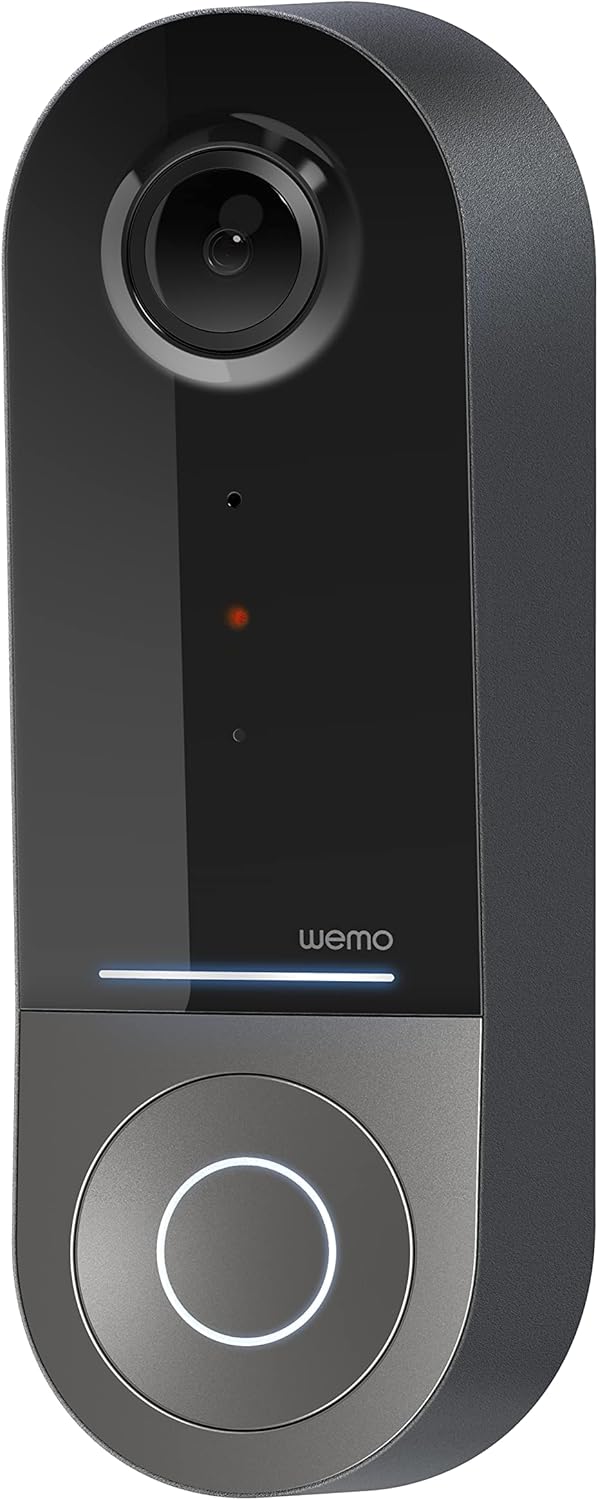
Figure 1: Wemo Smart Video Doorbell
2. Орнотуу жана орнотуу
2.1 Орнотууга чейинки текшерүү тизмеси
- Ensure you have a wired doorbell system with 16-24V AC power.
- Download the Apple Home App on your iOS device.
- Confirm strong 2.4GHz and 5GHz Wi-Fi signal at your doorbell location.
2.2 Физикалык орнотуу
- Электр кубатын өчүрүү: Before beginning installation, turn off power to your existing doorbell system at the circuit breaker.
- Эски коңгуроону алып салуу: Эшиктин коңгуроосунун баскычын этияттык менен алып салыңыз.
- Орнотуу кронштейнин орнотуу: Use the provided screws and screwdriver to securely attach the mounting bracket to your wall. If needed, use the left/right wedges to adjust the viewбурч.
- Connect power kit: Follow the instructions in the included Setup Guide to properly install the Power Kit with Connectors into your existing chime box. This is crucial for correct operation.
- Wire the Wemo Doorbell: Connect the existing doorbell wires to the terminals on the back of the Wemo Smart Video Doorbell.
- Коңгуроону орнотуңуз: Secure the Wemo Smart Video Doorbell onto the mounting bracket.
- Күчтү калыбына келтирүү: Электрди өчүргүчтөн кайра күйгүзүңүз.
2.3 Колдонмону орнотуу
- Open the Apple Home App on your iOS device.
- Tap the '+' icon to add a new accessory.
- Scan the HomeKit setup code provided with your Wemo Smart Video Doorbell.
- Follow the on-screen prompts to name your doorbell, assign it to a room, and configure HomeKit Secure Video settings, including motion detection and face recognition preferences.
3. Иштөө нускамалары
3.1 Live View жана Эскертмелер
- Access live video feed directly from the Apple Home App on your iPhone, iPad, or HomePod.
- Receive instant notifications on your iOS device when motion is detected or the doorbell is pressed.
- Utilize face recognition to receive specific alerts for known individuals.

Figure 2: Face Recognition with HomeKit Secure Video
3.2 Видеону жазуу жана сактоо
- HomeKit Secure Video stores 10 days of motion-based recording history in your iCloud account.
- Review recorded events directly within the Apple Home App.

Figure 3: iCloud Recording via Apple Home App
3.3 Эки тараптуу аудио
- Engage in real-time two-way conversations with visitors through the Apple Home App.
3.4 Advanced Video Features
- Кең талаа View: The camera offers a 178° vertical, 140° horizontal, and 223° diagonal field of view for extensive coverage.
- HD Resolution with HDR: Enjoy crystal clear 1200x1600 resolution video with HDR for optimal image quality in varying light conditions.
- Жакшыртылган түнкү көрүнүш: Infrared technology provides clear video even in low-light conditions.

4-сүрөт: Түнкү көрүүнү жакшыртуу
3.5 Эки тилкелүү Wi-Fi байланышы
- The doorbell utilizes both 2.4GHz and 5GHz Wi-Fi bands.
- The 2.4GHz band offers a longer range and better penetration through walls.
- The 5GHz band provides higher speeds for closer proximity connections.

5-сүрөт: Эки тилкелүү Wi-Fi байланышы
4. Техникалык тейлөө жана көйгөйлөрдү чечүү
4.1 Жалпы кам көрүү
- Дайыма камеранын линзасын жумшак, гamp cloth to ensure clear video quality.
- Ensure the doorbell is free from obstructions that might block its field of view or microphone.
4.2 Кыйынчылыктарды чечүү
- Туташуу маселелери: If the doorbell frequently disconnects, ensure your Wi-Fi signal is strong at the installation location. Consider adjusting your router's band (2.4GHz for range, 5GHz for speed) or adding a Wi-Fi extender.
- Кубат көйгөйлөрү: Verify that your wired doorbell system provides the required 16-24V AC. Insufficient voltage can lead to intermittent operation or device resets. Consult a qualified electrician if you suspect voltagд маселелер.
- Колдонмонун жооп берүүсү: If the Apple Home App is slow to connect or display the live feed, ensure your iOS device and HomeKit hub (e.g., Apple TV, HomePod) are updated and have a stable internet connection. Restarting the doorbell or your HomeKit hub may resolve temporary glitches.
5. Техникалык шарттар
| Ички/тышкы колдонуу | Сыртта |
| Шайкеш түзмөктөр | HomePod, iPad, iPhone |
| Power Source | Corded Electric (16-24V AC) |
| Connectivity Protocol | Wi-Fi (2.4 ГГц жана 5 ГГц) |
| Controller Type | Apple HomeKit |
| Монтаж түрү | Дубалга орнотуу |
| Видео тартуунун резолюциясы | 1200x1600 (HD, HDR-enabled) |
| Түс | Кара |
| Элементтин өлчөмдөрү L x W x H | 2.1 x 1.8 x 5 дюйм |
| Элемент Салмагы | 13.7 унция |
| Өзгөчөлүктөр | HD Resolution, Image Sensor, Night Vision, HDR |
6. Кутуда эмне бар
- Smart Video Doorbell
- Орнотуу колдонмосу
- Кронштейн орнотуу
- Left/Right Wedge
- Бурама жана бурагыч
- Power Kit with Connectors
7. Расмий продукт Video
Video 1: Official Wemo Video Doorbell overview, showcasing өзгөчөлүктөрү жана дизайн.
8. Кепилдик жана колдоо
For warranty information and technical support, please refer to the official WeMo webсайтка же түздөн-түз кардарларды тейлөөгө кайрылыңыз. Кепилдик дооматтар үчүн сатып алуу дүмүрчөгүңүздү сактаңыз.