
BEBEN 1
BEBEN Wireless Earbuds User Manual
Модель: 1
Brand: BEBEN
Introduction
Welcome to the user manual for your BEBEN Wireless Earbuds, Model 1. These earbuds are designed to provide a superior audio experience with features like 36 hours of playtime, smart touch controls, ergonomic design for sports, Hi-Fi sound, and active noise reduction for clear calls. This manual will guide you through the setup, operation, maintenance, and troubleshooting of your new earbuds.

Image: The BEBEN Wireless Earbuds, featuring the two earbuds with ear hooks and their compact charging case.
Эмне камтылган
- BEBEN Wireless Earbuds (Left and Right)
- Зымсыз кубаттоо кутусу
- USB Type-C кубаттоочу кабель
- Silicone Ear Tips (S/M/L sizes)
- Портативдик сактоо баштыгы
- User Manual
Техникалык шарттар
| Өзгөчөлүк | Деталь |
|---|---|
| Модель аты | 1 |
| Байланыш технологиясы | Bluetooth 5.0 |
| Жалпы ойноо убактысы | 36 саатка чейин (заряддоо кутусу менен) |
| Кулакчын ойнотуу убактысы (бир жолу кубаттоо менен) | 6 саатка чейин |
| Тез кубаттоо | 5 minutes charge for 2 hours standby |
| Башкаруу түрү | Smart Touch Control |
| Сууга туруктуулук деңгээли | Суу өткөрбөйт |
| Noise Control | Активдүү ызы-чууну жокко чыгаруу (чалуулар үчүн) |
| Наушник формасы | Кулак илгичтери |
| Шайкеш түзмөктөр | Multiple Bluetooth-enabled devices (smartphones, tablets, laptops, smart speakers) |
Жайгашуу
1. Баштапкы заряддоо
Биринчи колдонуудан мурун, кулакчындарды жана заряддоо кутучасын толук заряддаңыз.
- Кулакчындардын экөөнү тең зарядкага салыңыз.
- USB Type-C кубаттоочу кабелин кубаттоочу кутуга жана кубат булагына туташтырыңыз.
- The LED indicators on the case will show charging status. A full charge for the case takes approximately 6 hours.
- The earbuds themselves charge quickly, with 5 minutes of charging providing 2 hours of standby time.

Image: Earbuds inside the charging case, illustrating the Type-C charging port and battery life indicators.
2. Түзмөгүңүз менен жупташтыруу (бир кадамдуу автоматтык жупташтыруу)
The earbuds feature one-step auto pairing for convenience.
- Ensure Bluetooth is enabled on your smartphone, tablet, or other compatible device.
- Кубаттоочу кутучаны ачып, эки кулакчынды тең чыгарыңыз. Алар автоматтык түрдө күйүп, жупташтыруу режимине өтөт.
- On your device, search for Bluetooth devices and select "C3" from the list.
- Once connected, you will hear a confirmation prompt, and the earbuds are ready for use.

Image: A smartphone screen showing "C3" as a discoverable Bluetooth device, with the earbuds next to it, demonstrating the one-step auto pairing process.
Note: The earbuds support single or binaural mode, allowing you to use one earbud independently or both together.
Иштөө нускамалары
Touch Controls
The earbuds feature smart touch controls for easy management of music and calls. Please keep your hands dry when touching the controls for optimal sensitivity.
- Күйгүзүү/өчүрүү:
- Automatically power on when taken out of the charging case.
- Automatically power off when placed back into the charging case.
- Ойнотуу/тындыруу: Кулакчындарды бир жолу таптаңыз.
- Кийинки ыр: Оң кулакчынды эки жолу таптаңыз.
- Мурунку ыр: Сол кулакчынды эки жолу таптаңыз.
- Көлөмү: Оң кулакчынды көпкө басыңыз.
- Үнүн азайтуу: Сол кулакчынды көпкө басыңыз.
- Чалууга жооп берүү/аяктоо: Кулакчындарды бир жолу таптаңыз.
- Чакырууну четке кагуу: Кулакчындардын бирин 2 секунд басып туруңуз.
- Үн жардамчысын иштетүү (Siri/Google Жардамчысы): Кулакчындарды үч жолу таптаңыз.
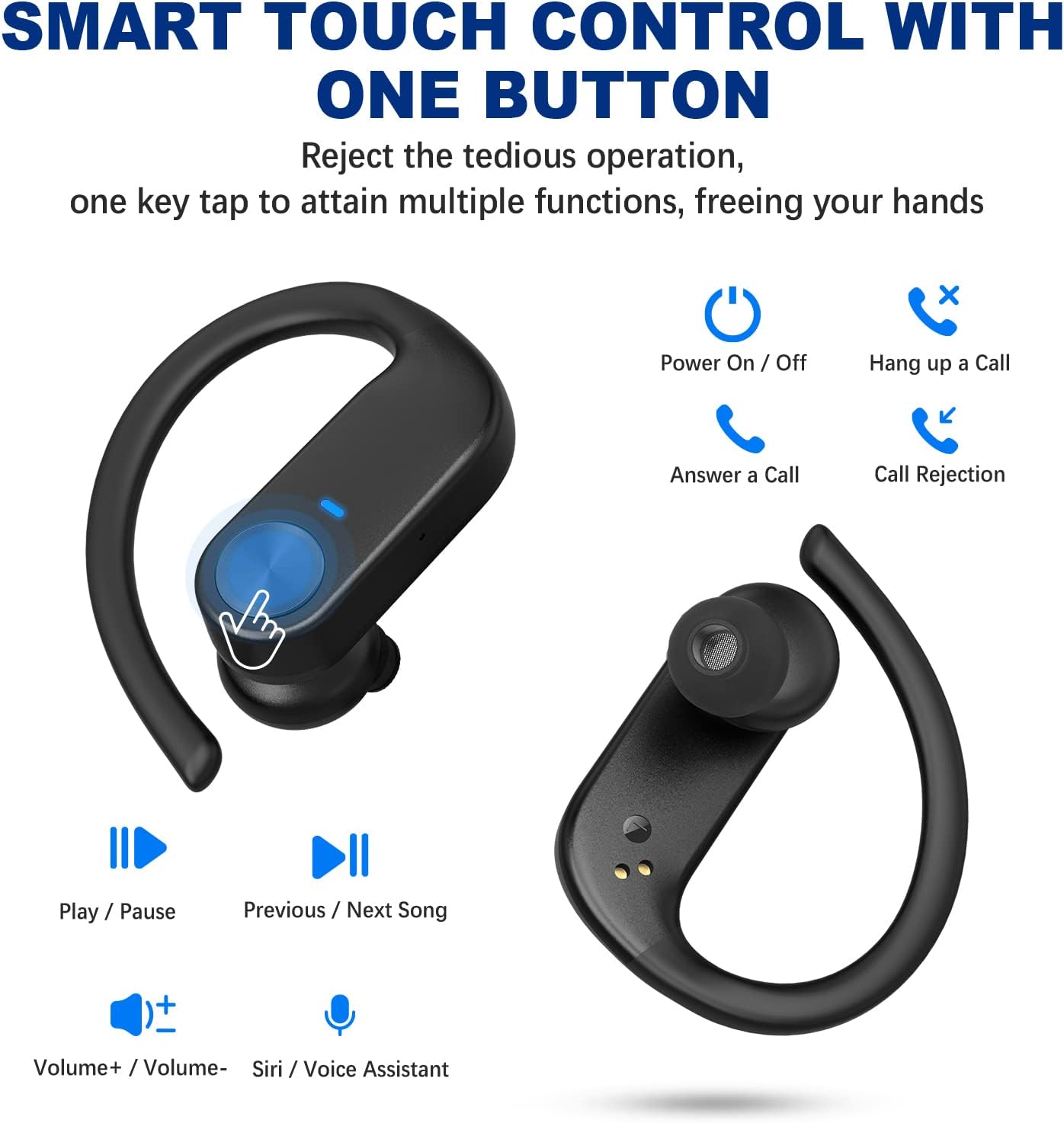
Image: Visual guide to the smart touch controls on the earbuds, showing functions like play/pause, volume, call management, and voice assistant activation.
Кулакчын тагынуу
For optimal comfort and sound quality, choose the correct ear tips and adjust the ear hooks.
- Select the silicone ear tips (S/M/L) that best fit your ear canal.
- Кулакчынды кулак каналына салыңыз.
- Place the ear hook over your ear and adjust it for a secure and comfortable fit. The ergonomic design ensures stability during activities like sports and workouts.

Image: Instructions on how to properly wear the earbuds, highlighting the soft ear tips and secure ear hooks for a comfortable and stable fit.
Техникалык тейлөө жана кам көрүү
- Regularly clean the earbuds, especially the ear tips and charging contacts, with a soft, dry cloth.
- Тазалоо үчүн катуу химиялык заттарды же абразивдүү материалдарды колдонуудан алыс болуңуз.
- Кулакчындарды колдонбогон учурда коргоо жана алардын кубатталган бойдон калышын камсыз кылуу үчүн кубаттоочу кутучасында сактаңыз.
- Keep the earbuds away from extreme temperatures, humidity, and dust.
- While waterproof, avoid prolonged submersion in water. Dry thoroughly if exposed to moisture.
Проблемаларды чечүү
| Көйгөй | Чечим |
|---|---|
| Кулакчындар жупташтырылбай жатат/туташтырылбай жатат. |
|
| Бир гана кулакчын иштейт. |
|
| Көлөмү төмөн же үн сапаты начар. |
|
| Кулакчындар заряддалбай жатат. |
|
Кепилдик жана колдоо
BEBEN products come with a standard manufacturer's warranty. For detailed warranty information, technical support, or customer service inquiries, please refer to the contact information provided on the product packaging or visit the official BEBEN webсайт.
Сиз да зыярат кылсаңыз болот BEBEN Store on Amazon көбүрөөк продукт маалымат жана колдоо ресурстар үчүн.
Ask a question about this manual
Ask about setup, troubleshooting, compatibility, parts, safety, or missing instructions. Manuals+ will review the question and use this page’s manual context to help answer it.