
1. Киришүү
This manual provides detailed instructions for the operation and maintenance of your Jectse Bluetooth Speaker Alarm Clock. Please read this manual thoroughly before using the product to ensure proper function and longevity.
The Jectse Bluetooth Speaker Alarm Clock is a multi-functional device featuring a digital clock, dual alarm capabilities, an LED mirror display, FM radio, and Bluetooth connectivity for audio playback. It also supports music playback via a memory card.
2. Продукт бүтүп калдыview
2.1. Негизги өзгөчөлүктөрү
- Bluetooth 5.0 туташуусу: Шайкеш түзмөктөрдөн зымсыз аудио агымын өткөрүңүз.
- Кош ойготкуч: Ар кандай ойгонуу убактысы үчүн эки көз карандысыз ойготкучту коюңуз.
- LED Mirror Display: Clear digital time display that also functions as a mirror.
- FM радиосу: Digitally tuned FM radio (87.5MHz-108MHz) for news, music, and weather.
- Эстутум картасын ойнотуу: Supports music playback from a memory card (up to 32GB, not included).
- Камтылган кайра заряддалуучу батарея: 1600mAh lithium battery for portable use.
- Компакт дизайн: Product dimensions are approximately 116 x 51 x 33mm (4.6 x 2 x 1.3 inches).
2.2. Пакеттин мазмуну
- 1 x Jectse Alarm Clock Speaker
- 1 x Micro USB заряддоо кабели
- 1 х Колдонуучунун колдонмосу (бул документ)
2.3. Продукциянын диаграммасы
Көбүрөөк маалымат алуу үчүн төмөндөгү сүрөттү караңызview of the device's components and controls.
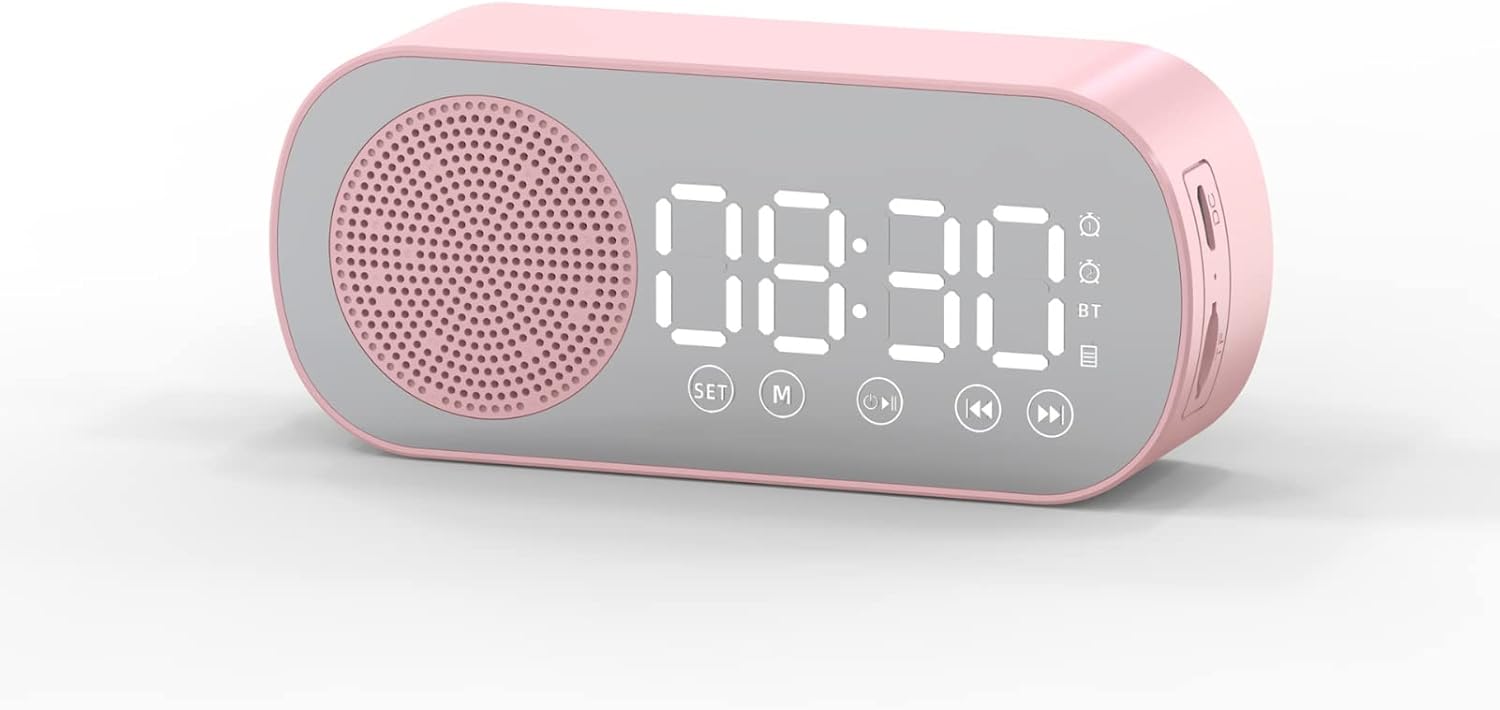
1-сүрөт: Фронт view of the Jectse Bluetooth Speaker Alarm Clock, showing the speaker grille, LED display, and control buttons (SET, M, Play/Pause, Previous, Next).

2-сүрөт: Side view of the alarm clock with dimensions: 116mm (4.6in) length, 51mm (2in) height, and 33mm (1.3in) depth.
3. Орнотуу
3.1. Баштапкы заряддоо
Before first use, fully charge the device. Connect the provided Micro USB charging cable to the charging port on the side of the alarm clock and the other end to a standard USB power adapter (not included).

3-сүрөт: The alarm clock and its Micro USB charging cable.
The battery indicator on the LED display will show charging status. A full charge typically takes a few hours.
4. Иштөө нускамалары
4.1. Күйгүзүү/өчүрүү
басып, кармап туруңуз Power/Mode (M) аппаратты күйгүзүү же өчүрүү үчүн баскыч.
4.2. Убакытты белгилөө
- Саат режиминде, басып туруңуз SET баскычын сааттын цифралары жаркылдай баштаганга чейин басыңыз.
- колдонуу Мурунку (◀◀) жана Кийинки (▶▶) саатты тууралоо үчүн баскычтар.
- басыңыз SET button again to switch to minute adjustment. Use the Мурунку (◀◀) жана Кийинки (▶▶) мүнөттөрдү тууралоо үчүн баскычтар.
- басыңыз SET Убакытты орнотуу режимин ырастоо жана чыгуу үчүн баскычты үчүнчү жолу басыңыз.
4.3. Setting Alarms (Dual Alarm Function)
The device supports two independent alarms. Follow these steps for each alarm:

4-сүрөт: The alarm clock illustrating the dual alarm feature with two distinct alarm settings.
- In clock mode, short press the SET button once to enter Alarm 1 setting mode. The alarm icon and hour digits will flash.
- колдонуу Мурунку (◀◀) жана Кийинки (▶▶) саатты тууралоо үчүн баскычтар.
- Басыңыз SET again to adjust minutes. Use Мурунку (◀◀) жана Кийинки (▶▶) тууралоо.
- Басыңыз SET a third time to select the alarm sound (e.g., buzzer, FM radio). Use Мурунку (◀◀) жана Кийинки (▶▶) опциялар аркылуу айлануу.
- Басыңыз SET a fourth time to confirm Alarm 1 settings.
- To set Alarm 2, repeat steps 1-5, but short press the SET button twice to enter Alarm 2 setting mode.
- To enable/disable an alarm, short press the SET button until the desired alarm icon flashes, then press the Play/Pause (▶▌▌) аны күйгүзүү же өчүрүү үчүн баскычты басыңыз.
Note: The alarm volume is independent of the main speaker volume and may be fixed or adjustable within the alarm settings. If the alarm sound is too loud, check if there's an option to adjust it during the alarm setup process.
4.4. Bluetooth режими
- басыңыз Power/Mode (M) button repeatedly until "BT" appears on the display, indicating Bluetooth mode.
- On your mobile device, enable Bluetooth and search for "Jectse Speaker" or a similar device name.
- Select the device to pair. A confirmation sound will indicate successful pairing.
- Эми түзмөгүңүздөн аудиону динамик аркылуу ойнотсоңуз болот. Колдонуңуз Play/Pause (▶▌▌), Мурунку (◀◀), жана Кийинки (▶▶) ойнотууну башкаруу үчүн баскычтар.
4.5. FM радио режими

5-сүрөт: The alarm clock functioning as an FM radio on a bedside table.
- басыңыз Power/Mode (M) баскычын дисплейде "FM" пайда болгонго чейин кайталап басыңыз.
- басыңыз Play/Pause (▶▌▌) жеткиликтүү FM станцияларын автоматтык түрдө сканерлөө жана сактоо үчүн баскыч.
- колдонуу Мурунку (◀◀) жана Кийинки (▶▶) Сакталган станциялардын ортосунда которулуу үчүн баскычтарды басыңыз.
- For better reception, ensure the device is not obstructed and try repositioning it.
4.6. Memory Card Playback
Insert a memory card (Micro SD card, up to 32GB, not included) into the designated slot on the device. The device will automatically switch to memory card mode and begin playing audio fileс. Колдонуу Play/Pause (▶▌▌), Мурунку (◀◀), жана Кийинки (▶▶) ойнотууну башкаруу үчүн баскычтар.
4.7. Үндү тууралоо
In any audio playback mode (Bluetooth, FM, Memory Card), press and hold the Мурунку (◀◀) Үндү азайтуу үчүн баскычты же Кийинки (▶▶) үнүн жогорулатуу үчүн баскыч.
4.8. LED Mirror Display

6-сүрөт: The alarm clock's LED display also functions as a mirror.
The front panel of the device features an LED display that shows the time and other information. When not actively displaying information, the surface can be used as a mirror.

7-сүрөт: The LED display showing multiple functions and indicators, including time, battery level, and Bluetooth status.
5. Техникалык тейлөө
- Тазалоо: Аппаратты тазалоо үчүн жумшак, кургак чүпүрөктү колдонуңуз. Абразивдүү тазалагычтарды же эриткичтерди колдонбоңуз.
- Сактагыч: Аппаратты түз күн нурунан жана экстремалдык температурадан алыс салкын, кургак жерде сактаңыз.
- Батареяга кам көрүү: Батареянын иштөө мөөнөтүн узартуу үчүн, бат-баттан батарейканы толук зарядсыздандырбаңыз. Аппаратты узак убакыт бою колдонбосо дагы, үзгүлтүксүз заряддаңыз.
- Суу таасири: Бул аппарат суу өткөрбөйт. Суунун же жогорку нымдуулуктун таасиринен алыс болуңуз.
6. Кыйынчылыктарды
| Көйгөй | Мүмкүн себеп | Чечим |
|---|---|---|
| Түзмөк күйбөйт. | Батарея аз. | Берилген USB кабели аркылуу аппаратты заряддаңыз. |
| Bluetooth аркылуу жупташтыруу мүмкүн эмес. | Bluetooth not enabled on device or phone; device not in pairing mode. | Ensure the alarm clock is in Bluetooth mode ("BT" displayed) and your phone's Bluetooth is on and searching. Move devices closer. |
| FM радиосун кабыл алуу начар. | Алсыз сигнал; тоскоолдук. | Reposition the device. Avoid placing near other electronic devices that may cause interference. |
| Alarm is too loud/quiet. | Alarm volume not adjusted during setup. | Re-enter alarm setting mode and check if there is an option to adjust alarm volume. Some models may have a fixed alarm volume. |
| Дисплей окуу кыйын. | Lighting conditions; display brightness setting. | Adjust ambient lighting. Check if there is a display brightness setting (refer to specific model instructions if available, not detailed in general description). |
7. Техникалык шарттар
| Өзгөчөлүк | Деталь |
|---|---|
| Модел | Jectsesb81t679n01182 |
| Материал | ABS (акрилонитрил бутадиен стирол) |
| Продукт өлчөмү | Болжол менен 116 x 51 x 33 мм (4.6 x 2 x 1.3 дюйм) |
| Батарея түрү | Литий батареясы (орнотулган) |
| Батарея сыйымдуулугу | 1600mAh |
| Bluetooth версиясы | 5.0 |
| Ойнотуу режимдери | Bluetooth, Memory Card (Max 32G, not included) |
| Саат режимдери | Digital Clock, Dual Alarm Clock, FM Radio |
| FM радиосунун жыштыгы | 87.5МГц-108МГц |
| Байланыш технологиясы | Bluetooth, USB |
| Элемент Салмагы | 5.3 унция |
8. Кепилдик жана колдоо
Кепилдик жөнүндө маалымат жана кардарларды колдоо кызматы үчүн, сатып алуу учурунда берилген документтерди караңыз же сатуучуга кайрылыңыз. Сатып алуунун далили катары сатып алуу дүмүрчөгүңүздү сактап коюңуз.