
1. Киришүү
This manual provides essential information for the safe and efficient use of your Getac V110 Rugged Convertible Laptop/Tablet PC. Please read this manual thoroughly before operating the device and retain it for future reference. The Getac V110 is designed for durability and performance in challenging environments, offering versatility as both a laptop and a tablet.
2. Коопсуздук маалыматы
Аппаратка зыян келтирбөө же өзүңүзгө зыян келтирбөө үчүн төмөнкү коопсуздук чараларын сактаңыз:
- Аппаратты экстремалдык температурага, тике күн нуруна же ашыкча нымдуулукка дуушар кылбаңыз.
- Use only Getac-approved power adapters and accessories.
- Катуу дизайнына карабастан, аппаратты кулап же катуу таасирлерге дуушар кылуудан качыңыз.
- Аппаратты өз алдынча бөлүүгө же оңдоого аракет кылбаңыз. Квалификациялуу тейлөө кызматкерлерине кайрылыңыз.
- Ашыкча ысып кетүүнүн алдын алуу үчүн желдетүү тешиктерин ачык кармаңыз.
3. Физикалык бүтүрүүview
The Getac V110 is a versatile device designed for rugged use. It features a convertible design, allowing it to function as both a traditional laptop and a tablet. Key components include a durable chassis, an 11.6-inch touchscreen display, a full-sized keyboard, and various ports for connectivity.

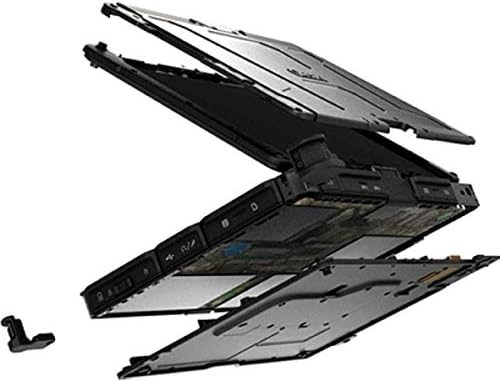
3.1-сүрөт: жарылган view illustrating the internal structure and ruggedized layers of the Getac V110.
3.1. Баскычтоп жана сенсордук такта
The device includes a backlit keyboard for typing in various lighting conditions and a precision touchpad for navigation.
3.2-сүрөт: жогорудан ылдыйга view of the Getac V110 keyboard and integrated touchpad.
3.2. Convertible Design
The V110 can be easily converted between laptop and tablet modes by rotating the screen. This flexibility allows for optimal use in different scenarios.

Figure 3.3: The Getac V110 configured in laptop mode, displaying the screen and keyboard.

Figure 3.4: The Getac V110 in tablet mode, showcasing the touchscreen interface.
4. Орнотуу
4.1. Баштапкы күйгүзүү
- Кубат адаптерин аппаратка жана розеткага туташтырыңыз.
- Press the power button located on the side or front of the device.
- Follow the on-screen prompts to complete the initial Windows 8.1 setup, including language, region, and user account creation.
4.2. Network Connectivity
The Getac V110 supports both Wi-Fi and Ethernet for internet access.
- Wi-Fi: Access the network settings in Windows 8.1, select your desired Wi-Fi network, and enter the password if required.
- Ethernet: Connect an Ethernet cable from your network router or switch to the Ethernet port on the device.
4.3. Bluetooth Жупташтыруу
Bluetooth түзмөктөрүн туташтыруу үчүн:
- Bluetooth түзмөгү жупташтыруу режиминде экенин текшериңиз.
- On the Getac V110, navigate to PC Settings > PC and devices > Bluetooth.
- Turn Bluetooth on and select the device from the list to pair.
5. Аппаратты иштетүү
5.1. Ноутбук жана планшет режимдеринин ортосунда которулуу
To convert the device:
- Gently rotate the screen 180 degrees clockwise or counter-clockwise.
- Fold the screen back over the keyboard to enter tablet mode.
- Unfold the screen and rotate it back to the original position for laptop mode.
5.2. Сенсордук экранды колдонуу
The 11.6-inch LED touchscreen supports multi-touch gestures. Use your fingers or a compatible stylus for navigation, selection, and input.
5.3. Электр энергиясын башкаруу
To conserve battery life, adjust power settings in Windows 8.1. You can configure sleep mode, display brightness, and other power-saving options.
- Уйку режими: Түзмөктү уйку режимине өткөрүү үчүн кубат баскычын кыскача басыңыз.
- Өчүрүү: Go to the Charms bar (swipe from right edge or move mouse to top-right corner), select Settings > Power > Shut down.
- Кайра баштоо: Go to the Charms bar, select Settings > Power > Restart.
6. Техникалык тейлөө
6.1. Аспапты тазалоо
Regular cleaning helps maintain performance and appearance.
- Бир аз жумшак, түксүз кездемени колдонуңуз dampened with water or a mild, non-abrasive cleaner for the screen and exterior.
- Суюктуктарды түз эле түзмөккө чачуудан алыс болуңуз.
- Катуу химиялык заттарды, эриткичтерди же абразивдүү материалдарды колдонбоңуз.
6.2. Батареяга кам көрүү
Батареянын иштөө мөөнөтүн көбөйтүү үчүн:
- Батареяны бат-баттан толук кубаттап калуудан алыс болуңуз.
- Эгерде түзмөк көпкө колдонулбаса, аны салкын, кургак жерде сактаңыз.
- If the device has removable batteries, ensure they are properly seated.
6.3. Программалык камсыздоону жаңыртуу
Regularly check for and install operating system and driver updates to ensure optimal performance and security. Access Windows Update through PC Settings.
7. Кыйынчылыктарды
This section addresses common issues you might encounter with your Getac V110.
7.1. Түзмөк күйбөйт
- Кубат адаптери бекем туташып турганын жана розетка иштеп турганын текшериңиз.
- Check if the battery is charged. If not, allow it to charge for at least 30 minutes before attempting to power on again.
- If the battery is removable, ensure it is correctly installed.
7.2. Wi-Fi туташуу маселелери
- Windows жөндөөлөрүндө Wi-Fi иштетилгенин текшериңиз.
- Restart your router and the Getac V110.
- Ensure you are within range of the Wi-Fi network and have the correct password.
- Жаңыртылган Wi-Fi драйверлерин текшериңиз.
7.3. Touchscreen Unresponsive
- Аппаратты кайра иштетиңиз.
- Экран таза жана таштандылардан таза экенин текшериңиз.
- Check for any recent software updates or driver issues.
7.4. Жай аткаруу
- Фондо иштеп жаткан керексиз тиркемелерди жабыңыз.
- Жеткиликтүү сактоо мейкиндигин текшериңиз.
- Вирусту сканерлеңиз.
- Windows жана драйверлер жаңыртылганын текшериңиз.
8. Техникалык шарттар
| Өзгөчөлүк | Деталь |
|---|---|
| Бренд | Getac |
| Модель номери | V110 |
| Процессор | Intel Core i5-6300U (2.6 ГГц) |
| RAM эс тутуму | 8 ГБ DDR4 SDRAM |
| Сактоо сыйымдуулугу | 128 ГБ |
| Screen Size | 11.6 дюйм |
| Display Resolution | 1366 x 768 пиксель |
| Дисплей түрү | LED |
| Адам-интерфейс киргизүү | Сенсордук экран |
| Операция системасы | Windows 8.1 |
| Графикалык сопроцессор | Intel HD Graphics 520 |
| Байланыш технологиясы | Bluetooth, Ethernet, HDMI, USB, Wi-Fi |
| Элемент Салмагы | 4.4 фунт |
| Item Dimensions (L x W x Th) | 11.99" x 18.9" x 3.9" |
| Батарея клеткасынын түрү | Lithium Ion (23 Watt Hours) |
9. Кепилдик маалыматы
The Getac V110 Rugged Convertible Laptop/Tablet PC comes with a 90 күндүк чектелген кепилдик. This warranty covers manufacturing defects and malfunctions under normal use. It does not cover damage caused by misuse, accidents, unauthorized repairs, or modifications. Please retain your proof of purchase for warranty claims.
For detailed terms and conditions, refer to the warranty documentation provided with your device or contact Getac customer support.
10. Колдоо
If you require further assistance or encounter issues not covered in this manual, please contact Getac customer support. You can typically find support contact information on the manufacturer's official website or within the device's pre-installed documentation.
When contacting support, please have your device's model number (V110) and serial number ready.