
This manual provides detailed instructions for the EKVANBEL Bluetooth Headset Model M102. Please read thoroughly before use to ensure proper operation and maintenance.
1. Пакеттин мазмуну
Пакетте бардык буюмдар бар экенин текшериңиз:
- Bluetooth Headphones (M102) x 1
- Type-C заряддоо кабели x 1
- Колдонуучунун колдонмосу x 1

Image: EKVANBEL M102 Headset package contents.
2. Продукт бүтүп калдыview
Familiarize yourself with the various components and controls of your EKVANBEL M102 Bluetooth Headset.

Image: EKVANBEL M102 Headset component diagram.
Компоненттердин сүрөттөлүшү:
- Көлөм + / Көлөм -: Аудионун үнүн тууралоо.
- MFB (көп функциялуу баскыч): Кубат берүүнү, жупташтырууну жана чалууларды башкарууну башкарат.
- Ызы-чууну жок кылуучу микрофон: Captures your voice while reducing background noise.
- Үнсүз баскычы: Mutes/unmutes the microphone (primarily for cell phones).
- Которгучтар: Күйгүзүү/өчүрүү.
- Индикатор жарыгы: Түзмөктүн абалын көрсөтөт (жупташтыруу, туташуу, кубаттоо).
- Type-C заряддоо интерфейси: Port for charging the headset.
3. Гарнитураны заряддоо
Before initial use, fully charge the headset. A full charge typically takes approximately 2 hours.
- Connect the provided Type-C charging cable to the headset's charging port.
- USB кабелинин экинчи учун шайкеш келген USB кубат булагына (мисалы, компьютердин USB портуна, USB дубал адаптерине) туташтырыңыз.
- The indicator light will show charging status and change once fully charged.
Image: Close-up of the Type-C Charging Interface.
The headset offers up to 45 hours of talk time and 400 hours of standby time on a single charge.

Image: Battery life indicators for the headset.
4. Bluetooth жупташтыруу жана туташуу
Follow these steps to pair your headset with a Bluetooth-enabled device:
- In the off state, switch the headset to the "ON" position. The red and blue lights will flash alternately, indicating pairing mode.
- On your device (cell phone, laptop, etc.), enable Bluetooth and search for new devices.
- Select "M102" from the list of available devices.
- Once connected, the LED will flash a blue light slowly, and you will hear a voice prompt stating, "Your headset is connected."
- The headset supports dual connections, allowing it to connect to two devices simultaneously for calls and music.

Image: Bluetooth 5.2 connectivity with multiple devices.
Video: Demonstration of connecting the headset to a mobile device for streaming and communication.
5. Гарнитураны иштетүү
The EKVANBEL M102 headset features intuitive controls for managing calls and audio.
5.1 Чалууларды башкаруу
- Чалууга жооп берүү/аяктоо: MFB баскычын бир жолу басыңыз.
- Чакырууну четке кагуу: MFB баскычын 2 секунд басып туруңуз.
- Микрофондун үнүн басуу: Press the Mute Button on the microphone arm. Note: The mute button functions only on cell phones. For PC applications like Skype, mute via the software.
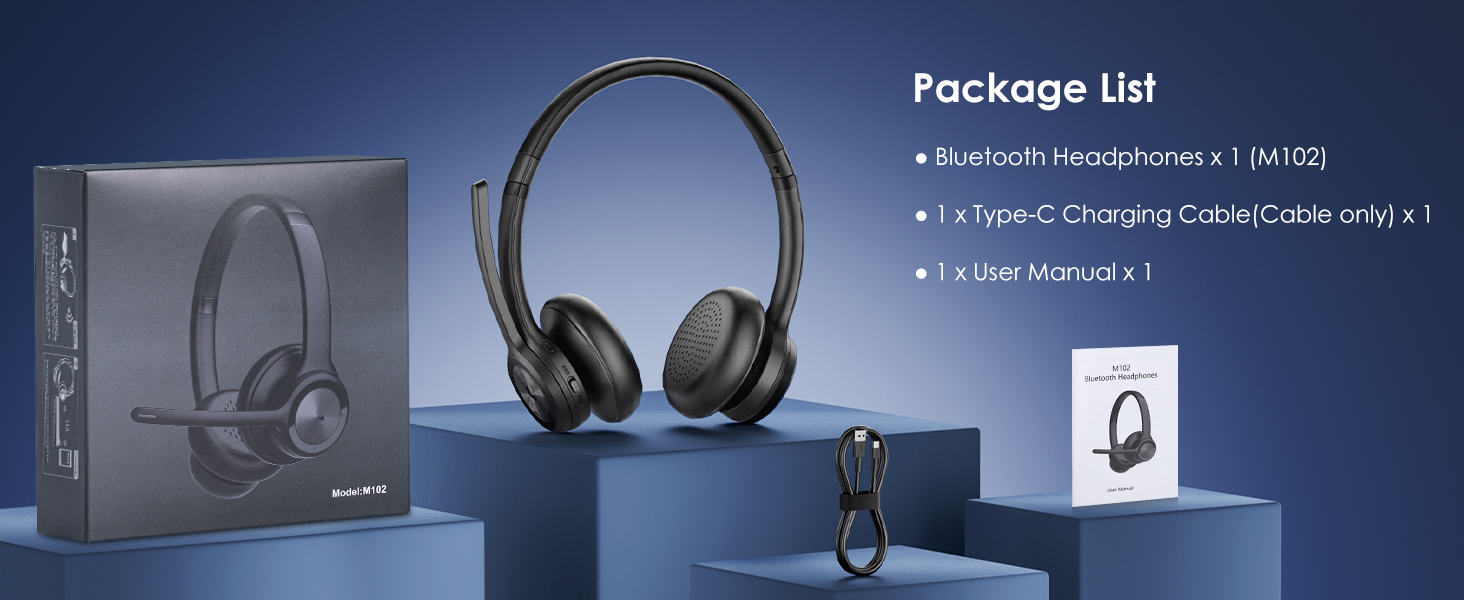
Image: Hands-Free Call functionality.

Image: Microphone mute function for privacy.
5.2 Аудио башкаруу
- Үнүн жогорулатуу/төмөндөтүү: Үн + жана Үн - баскычтарын колдонуңуз.
- Кийинки / Мурунку трек: Press and hold Volume + for next track, and Volume - for previous track.
- Үн жардамчысы: Triple-click the MFB button to activate your device's voice assistant.

Image: Noise-cancelling microphone in action.
6. Комфорт жана дизайн
The headset is designed for extended wear with comfort in mind.
- Жөнгө салынуучу баш боосу: Баш боосун ар кандай баш өлчөмдөрүнө тууралоого болот.
- Жумшак кулактыктар: High-quality soft earpads provide a comfortable seal and help block out ambient noise.
- Жеңил дизайн: Ensures comfort during long periods of use without burdening the head or ears.

Image: Comfortable wearing features.

Image: Comfort and convenience of the headset.
7. Техникалык шарттар
| Өзгөчөлүк | Деталь |
|---|---|
| Модель аты | M102 |
| Байланыш технологиясы | Bluetooth, зымсыз |
| Зымсыз байланыш технологиясы | Bluetooth |
| Bluetooth версиясы | 5.2 |
| Bluetooth диапазону | 33 Фут |
| Noise Control | Активдүү ызы-чууну жокко чыгаруу |
| Батареянын иштөө мөөнөтү | 45 саат (сүйлөшүү убактысы) |
| Күтүү убактысы | 400 саат |
| Заряддоо убактысы | 2 саат |
| Элемент Салмагы | 10.6 унция |
| Кулак жайгаштыруу | On Ear |
| Шайкеш түзмөктөр | Cellphones, Laptops, Tablets, Gaming Consoles |
8. Кыйынчылыктарды
If you encounter issues with your EKVANBEL M102 headset, refer to the following common solutions:
8.1 Жупташтыруу маселелери
- Ensure the headset is in pairing mode (red and blue lights flashing alternately).
- Make sure Bluetooth is enabled on your device and it is within 33 feet (10 meters) of the headset.
- Clear previous pairing records on your device and try pairing again.
8.2 Audio/Microphone Issues
- Гарнитурадагы жана туташкан түзмөгүңүздүн үнүнүн деңгээлин текшериңиз.
- Ensure the microphone is not muted. Remember, the mute button on the headset works primarily for cell phones; for PC applications, mute via the software.
- Verify that the headset is selected as the audio input/output device in your device's sound settings.
- If experiencing static or unclear audio, try moving closer to your connected device or away from potential interference sources.
8.3 Батарея көйгөйлөрү
- Ensure the headset is fully charged using the provided Type-C cable.
- If the headset is not charging, try a different USB port or power adapter.
9. Кепилдик жана колдоо
For warranty information or further assistance, please refer to the contact details provided with your purchase or visit the official EKVANBEL webсайт.
This user manual is included with your purchase for detailed guidance.