
1. Киришүү
This manual provides detailed instructions for the safe and effective operation of your Andoer 4K 48MP 60FPS WiFi Camcorder. Please read this manual thoroughly before using the device and retain it for future reference. This camcorder is designed for high-quality video recording and photography, featuring 4K Ultra HD resolution, 48-megapixel photos, a 3-inch IPS touchscreen, and infrared night vision capabilities. It is equipped with WiFi connectivity for easy file transfer and remote control, and comes with essential accessories such as an external microphone and a wide-angle macro lens.

Image 1.1: Andoer 4K Camcorder with included accessories.
2. Пакеттин мазмуну
Төмөндө тизмеленген нерселердин баары пакетиңизге камтылганын текшериңиз. Эгерде кандайдыр бир буюмдар жок же бузулуп калса, сатуучуга кайрылыңыз.

Сүрөт 2.1: Пакетке кирген бардык компоненттер.
- Видеокамера
- Микрофон
- Микрофон үчүн алдыңкы айнектер
- 3.5 мм TRS - TRS аудио кабели
- USB кабели
- Кол кармагыч
- Camera Lens (Wide-angle macro lens)
- Линзанын адаптер шакеги
- 2 x Lithium-polymer Batteries (2000mAh)
- Алыстан башкаруу
- Camcorder Storage Bag
- Линзаларды сактоочу баштык
- Camcorder User Manual
- Микрофонду колдонуу боюнча колдонмо
3. Продукт бүтүп калдыview
Familiarize yourself with the various parts and controls of your camcorder.
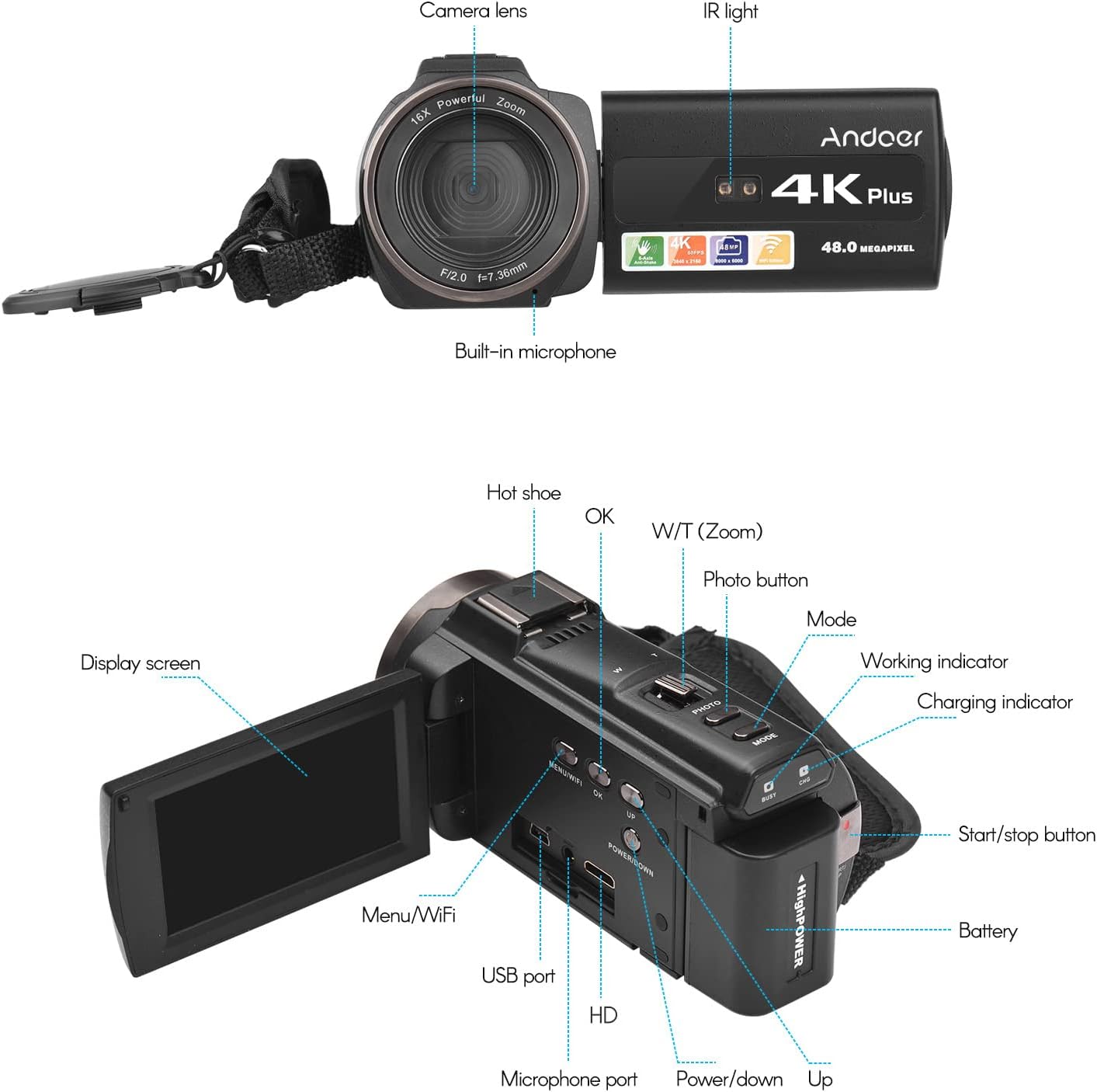
Сүрөт 3.1: Алдыңкы жана арткы View of the Camcorder with labeled components.
Негизги компоненттер:
- Камера линзасы: Main optical component for capturing images and videos.
- IR жарык: Emits infrared light for night vision recording.
- Камтылган микрофон: Captures audio. An external microphone can be connected for enhanced sound quality.
- Ысык бут кийим: Mount for external accessories like the included microphone or an LED video light.
- Display Screen (3" IPS Touch Screen): үчүн viewing live footage, playback, and navigating menus.
- Башкаруу баскычтары: Including Power, Mode, Photo, Zoom (W/T), OK, Menu/WiFi, Up/Down.
- Порттор: USB, HD (HDMI), Microphone port.
- Батарея бөлүмү: Кайра заряддоого болгон батарейканы камтыйт.
4. Орнотуу
4.1 Батареяны заряддоо
Before first use, fully charge the included lithium-polymer batteries. Insert one battery into the camcorder's battery compartment. Connect the camcorder to a power source using the provided USB cable. The charging indicator will illuminate during charging and turn off when fully charged. A full charge typically takes several hours.

Image 4.1: Battery installation and charging indication.
4.2 Эстутум картасын салуу
The camcorder supports TF (MicroSD) cards up to 128GB. Ensure the card is formatted before first use in the camcorder's settings. Insert the memory card into the designated slot until it clicks into place.
- Use a Class 10 or higher speed rating for optimal performance, especially for 4K video recording.
- The camcorder supports V60 video speed class.
4.3 Attaching the External Microphone
For improved audio quality, attach the external stereo microphone to the hot shoe mount on top of the camcorder. Connect the microphone's 3.5mm audio cable to the microphone input port on the camcorder.
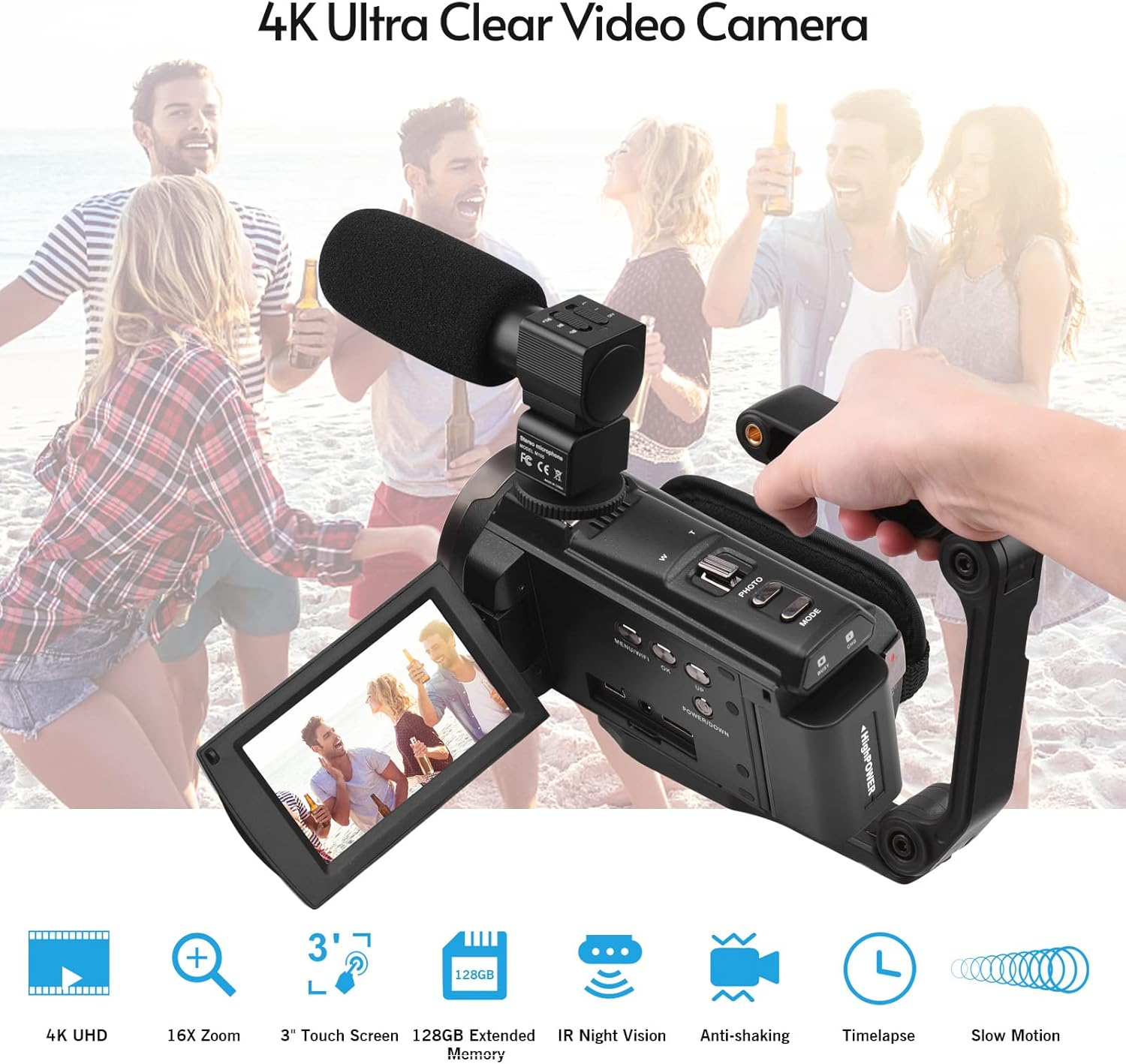
Image 4.2: External microphone attached to the camcorder.
4.4 Attaching the Wide-Angle Macro Lens
To use the wide-angle macro lens, first attach the lens adapter ring to the camcorder's main lens. Then, screw the wide-angle macro lens onto the adapter ring. This lens provides a broader perspective for your shots.

Image 4.3: Wide-angle macro lens for expanded field of view.
4.5 Attaching the Handgrip
The included handgrip can be attached to the bottom of the camcorder via the 1/4" screw hole for more stable handheld recording.
5. Иштөө нускамалары
5.1 Күйгүзүү/өчүрүү
To power on the camcorder, open the display screen and press the Power button. To power off, press and hold the Power button, or close the display screen.
5.2 Видеону жаздыруу
- Видеокамераны күйгүзүңүз.
- басыңыз Mode button to select video recording mode.
- басыңыз Start/Stop button to begin recording. The recording indicator will flash.
- басыңыз Start/Stop жазууну токтотуу үчүн кайра баскычын басыңыз.
The camcorder supports 4K/60FPS video resolution for clear and smooth footage.
5.3 Сүрөт тартуу
- Видеокамераны күйгүзүңүз.
- басыңыз Mode button to select photo mode.
- Дисплей экранын колдонуп кадрыңызды тартыңыз.
- басыңыз Сүрөт button to capture a 48-megapixel image.
5.4 Using the 3" IPS Touch Screen
The capacitive touchscreen allows for intuitive navigation of menus and settings. Tap to select options, swipe to scroll, and pinch to zoom (if supported in specific modes).
5.5 WiFi Function
The built-in WiFi allows for wireless transmission of files to a compatible smartphone or tablet via a dedicated app. It also enables remote control of the camcorder from your mobile device.
- Activate WiFi on the camcorder via the menu.
- Download and install the specified app on your mobile device.
- Connect your mobile device to the camcorder's WiFi network.
- Use the app to control recording, view жаша фооtage, жана которуу files.
5.6 IR Night Vision
For recording in low-light or dark conditions, activate the IR Night Vision feature. This utilizes infrared light to capture clear black and white footage.

Image 5.1: IR Night Vision in operation.
5.7 Санарип Zoom
Use the W/T (Wide/Telephoto) button to adjust the 16x digital zoom. Note that digital zoom can reduce image quality compared to optical zoom.
5.8 Сүрөттү турукташтыруу
The camcorder features 6-axis image stabilization to reduce blur and shakiness in your recordings, especially during handheld use.
5.9 Өзгөчөлүктөр
- Кыймылды аныктоо: The camcorder can be set to automatically start recording when motion is detected.
- Жүздү аныктоо/таануу: Optimizes focus and exposure for faces in the frame.
- Алыстан башкаруу: Use the included remote control to operate the camcorder from a distance, useful for self-recording or group shots.
- Авто таймер: Set a delay before capturing a photo or starting a video recording.

Image 5.2: Tripod mounting for self-timer and stable shots.
5.10 Тышкы түзмөктөргө туташуу
- USB: Компьютерге туташуу үчүн file өткөрүп берүү.
- HD (HDMI): Connect to a TV or monitor to view жаздырууларыңызды чоңураак экранда.
6. Техникалык тейлөө
- Тазалоо: Use a soft, dry cloth to clean the camcorder body. For the lens, use a specialized lens cleaning cloth and solution. Avoid harsh chemicals.
- Сактагыч: Видеокамераны салкын, кургак жерде, күндүн түз нурунан жана өтө жогорку температурадан алыс сактаңыз. Узак убакытка сактасаңыз, батареясын алып салыңыз.
- Батареяга кам көрүү: Do not expose batteries to high temperatures. Recharge regularly even if not in use to maintain battery health.
- Программалык камсыздоонун жаңыртуулары: Өндүрүүчүнү текшериңиз webоптималдуу иштешин жана жаңы мүмкүнчүлүктөрдү камсыз кылуу үчүн бардык жеткиликтүү микропрограммаларды жаңыртуу үчүн сайтка мезгил-мезгили менен.
7. Кыйынчылыктарды
| Көйгөй | Мүмкүн себеп | Чечим |
|---|---|---|
| Видеокамера күйбөйт. | Батарея түгөнүп калган же туура салынган эмес. | Ensure battery is fully charged and correctly inserted. Try the second battery. |
| Видео жаздыруу/сүрөткө тартуу мүмкүн эмес. | Memory card is full, not inserted, or corrupted. Incorrect mode selected. | Check memory card status, ensure it's inserted and has free space. Format if necessary (backup data first). Select the correct mode. |
| Сүрөт/видео сапаты начар. | Lens is dirty. Low light conditions without IR. Digital zoom used excessively. | Clean the lens. Activate IR Night Vision in dark environments. Avoid excessive digital zoom. Ensure sufficient lighting. |
| WiFi туташуу маселелери. | Incorrect WiFi settings. App not installed or updated. | Ensure WiFi is enabled on camcorder and mobile device. Re-establish connection. Update or reinstall the mobile app. |
| Микрофон аудио жаздырбай жатат. | Микрофон туура эмес туташкан же жөндөөлөрү туура эмес. | Check microphone cable connection. Verify audio input settings in the camcorder menu. |
8. Техникалык шарттар
| Өзгөчөлүк | Деталь |
|---|---|
| Модель номери | ZOH0150584179474NZ |
| Video Resolution | 60FPS ылдамдыкта 4K (3840x2160) |
| Сүрөттүн резолюциясы | 48 мегапиксел (8000x6000) |
| Image Stabilization | 6-ок |
| Экранды көрсөтүү | 3-inch IPS Capacitive Touch Screen |
| Digital Zoom | 16x |
| Байланыш | USB, Wi-Fi, HDMI |
| Эстутум картасын колдоо | TF (MicroSD) up to 128GB (Class 10, V60 recommended) |
| Өзгөчөлүктөр | IR Night Vision, Motion Detection, Face Detection, Remote Control |
| Батарея | 2 x 2000mAh Lithium-polymer |
| Объектив диафрагмасы | f/2.0 |
| Минималдуу фокус узундугу | 39мм |
| Шайкеш түзмөктөр | Tripod, Microphone, TV, Computer, Smartphone |
| Операциялык системанын шайкештиги | Windows |
| Өлчөмдөрү (пакет) | 18 x 15 x 11 см |
| Салмагы (пакет) | 1.01 кг |
9. Кепилдик жана колдоо
Andoer products are designed for reliability and performance. For any technical assistance, troubleshooting beyond this manual, or warranty inquiries, please contact Andoer customer support through their official webсайт же сатуучу.
Кепилдик дооматтары үчүн сатып алганыңыздын далилин сактап коюңуз.