
1. Продукт бүтүп калдыview
The Yamaha MG12X CV is a 12-input unpowered mixing console designed for professional audio applications. It features a rugged steel chassis, D-PRE discrete Class-A microphone preamplifiers, and built-in SPX digital effects with 24 programs. This mixer provides versatile channel options and pristine audio quality for various sound reinforcement and recording needs.
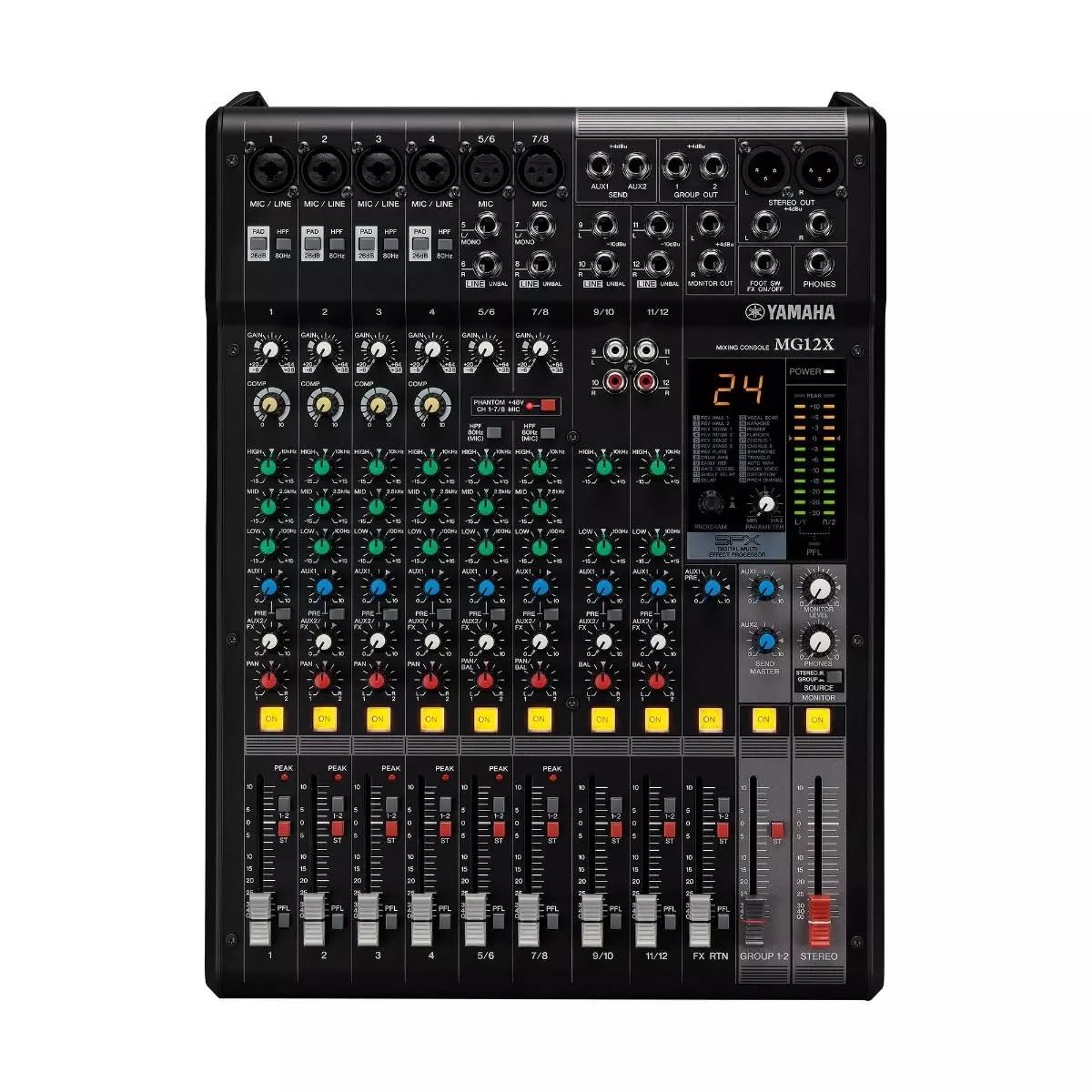
1-сүрөт: жогорудан ылдыйга view of the Yamaha MG12X CV 12-Input Mixer, showing all controls and input/output jacks.
Негизги өзгөчөлүктөрү:
- 12-Input, 2-Bus Plus Stereo Mixer with Effects
- Rugged, powder-coated steel chassis for superior durability
- Discrete Class-A microphone preamps
- Built-in SPX digital effects with 24 programs
- Switchable +48V Phantom power
2. Орнотуу колдонмосу
Follow these steps to set up your Yamaha MG12X CV mixer:
- Пакеттен чыгаруу: Carefully remove the mixer from its packaging. Retain all packaging materials for future transport or storage.
- Жайгашкан жери: Place the mixer on a stable, flat surface. Ensure adequate ventilation around the unit. The MG12X CV can also be rack-mounted using the optional RK-MG12 Rack Mount Kit.
- Кубат туташуу: Connect the supplied AC power cord to the mixer's AC IN jack on the rear panel and then to a suitable power outlet. Do not power on the unit yet.
- Киргизүү байланыштары: Connect your microphones, instruments, and other audio sources to the appropriate input jacks (XLR, 1/4" Phone, RCA) on the mixer.
- Чыгуу туташуулары: Connect your powered speakers, amplifiers, or recording devices to the mixer's XLR or Phone output jacks.
- Наушник: Көзөмөлдөө үчүн кулакчындарды PHONES уячасына туташтырыңыз.
- Баштапкы күйгүзүү: Ensure all volume controls (GAIN, LEVEL, MASTER) are set to their minimum positions before powering on the mixer. Power on the mixer, then power on any connected ampкөтөргүчтөр же кубаттуу динамиктер.

Figure 2: Rear panel of the Yamaha MG12X CV Mixer, highlighting the power input and output connections.
3. Иштөө нускамалары
This section provides basic operating guidelines for your MG12X CV mixer.
3.1. Gain Staging
- тууралаңыз АЛУУ knob for each input channel to achieve an optimal input level. The PEAK LED should flash only occasionally.
- For condenser microphones, activate the +48V PHANTOM power switch if required.
3.2. Теңдештирүү (EQ)
- колдонуу ЖОГОРКУ, MID, жана АЗ EQ knobs on each channel to shape the tone of your audio source.
3.3. Effects (SPX)
- The MG12X CV features 24 built-in SPX digital effects. Use the ПРОГРАММА knob to select an effect.
- тууралаңыз FX ЖӨНӨТҮҮ knob on each channel to send a desired amount of signal to the effects processor.
- The overall effect level is controlled by the FX RETURN level fader.
- A footswitch can be connected to the FOOT SW input for hands-free effect muting.
3.4. Компрессия
- Four channels are equipped with a single-knob compressor. Turn the КОМП knob clockwise to increase the compression amount.
3.5. Output Levels
- Adjust individual channel levels using the channel faders.
- Control the overall output level with the МАСТЕР stereo fader.
- Monitor output levels using the LED meters.
4. Функциялар жана башкаруу элементтери
The Yamaha MG12X CV mixer offers a comprehensive set of features and controls for precise audio mixing.
4.1. Input Channels
Each input channel (1-12) includes:
- XLR and 1/4" TRS inputs for microphones and line-level devices.
- GAIN control for input sensitivity adjustment.
- HIGH-PASS FILTER (HPF) switch to cut unwanted low frequencies.
- 3-band EQ (HIGH, MID, LOW) for tonal shaping.
- AUX send for external effects or monitoring.
- FX send for internal digital effects.
- PAN control for stereo positioning.
- Channel ON switch.
- PEAK LED indicator.
- Channel fader for level control.
Channels 1-4 also feature a КОМП (compressor) knob.
4.2. Master Section
The master section includes:
- MASTER stereo fader.
- PHONES level control.
- STEREO OUT (XLR/TRS) and MONITOR OUT (TRS) jacks.
- LED level meters.

3-сүрөт: Детальдуу view of the mixer's controls, including gain, EQ, and effects knobs.
5. Байланыштар
The MG12X CV offers a variety of input and output connectors to integrate with your audio system.
5.1. Input Connectors
- MIC/LINE (XLR/TRS Combo Jacks): Channels 1-4 for microphones and line-level signals.
- LINE (TRS Jacks): Channels 5/6, 7/8, 9/10, 11/12 for stereo line-level signals.
- RCA Pin Jacks: Channels 9/10, 11/12 for stereo line-level signals.
5.2. Output Connectors
- STEREO OUT (XLR/TRS): Main stereo output for connecting to power ampкөтөргүчтөр же жаздыруучу түзүлүштөр.
- MONITOR OUT (TRS): Output for connecting to monitor speakers.
- PHONES (Stereo Phone Jack): Наушниктерди туташтыруу үчүн.
- AUX SEND (TRS): Output for external effects or monitor mixes.
- FX SEND (TRS): Output for sending signal to external effects processors.

4-сүрөт: Каптал view of the mixer, illustrating its compact and durable construction.
6. Техникалык тейлөө
Туура тейлөө аралаштыргычыңыздын узак иштөөсүн жана оптималдуу иштешин камсыз кылат.
- Тазалоо: Миксердин сыртын тазалоо үчүн жумшак, кургак чүпүрөктү колдонуңуз. Абразивдүү тазалоочу каражаттарды же эриткичтерди колдонбоңуз.
- Чаңдан коргоо: Чаңдын топтолушуна жол бербөө үчүн, колдонбогондо аралаштыргычты жабык кармаңыз, өзгөчө фадерлерде жана баскычтарда.
- Вентиляция: Ensure ventilation openings are clear and unobstructed to prevent overheating.
- Кабелдик башкаруу: Туташтыргычтарга күч келүүнүн жана кокустан ажыратылып калуунун алдын алуу үчүн кабелдерди тыкан жайгаштырыңыз.
7. Кыйынчылыктарды
If you encounter issues with your MG12X CV, refer to the following common troubleshooting tips:
- Үн жок:
- Бардык электр туташууларын текшерип, миксердин күйүп турганын текшериңиз.
- Verify that input sources are connected correctly and active.
- Ensure channel GAIN, LEVEL faders, and MASTER fader are not at minimum.
- Check speaker/amplifier connections and power.
- Бурмаланган үн:
- Reduce input GAIN if the PEAK LED is constantly lit.
- Check for proper impedance matching between sources and inputs.
- Ensure connected devices are not overdriving the mixer's inputs or outputs.
- No Effects:
- Verify that an effect program is selected.
- Check the FX SEND knob on the channel and the FX RETURN fader are turned up.
- Ensure no footswitch is muting the effects.
8. Техникалык шарттар
| Модел | MG12X CV |
| Бренд | Yamaha |
| Каналдарды киргизүү | 12 |
| Микрофон Алдын алаamps | Discrete Class-A D-PRE |
| Камтылган Effects | SPX Digital Effects (24 Programs) |
| Компрессия | 4 channels with 1-knob compressor |
| фантомдук күч | +48V (которулуучу) |
| Output Connector Types | XLR, TRS |
| Power Source | Электр зымдары |
| Элемент Салмагы | 12.8 фунт |
| UPC | 889025142687 |
9. Кепилдик жана колдоо
The Yamaha MG12X CV comes with a 1 жылдык өндүрүүчү кепилдик. Yamaha Corporation of America is committed to the quality and craftsmanship of its products. The limited warranty applies only to products purchased from authorized Yamaha retailers within the fifty United States (including the District of Columbia) and used in this area.
For detailed warranty information and support, please refer to the official Yamaha website or contact an authorized Yamaha service center. Authorized retailers are equipped with sales and service support materials and training not readily available to non-authorized retailers.
10. Продукт видеолору
Watch the official product overview video for the Yamaha MG Series Mixing Consoles:
Video 1: Yamaha MG Mixing Console Series Overview. Бул видео жалпы маалымат беретview of the MG series, including key features and applications.