
Yard Force XPower 800
YARD FORCE XPower 800 Robotic Lawn Mower User Manual
Model: XPower 800 | Brand: Yard Force
Introduction
Welcome to the user manual for your YARD FORCE XPower 800 Robotic Lawn Mower. This guide provides essential information for the safe and efficient operation, setup, and maintenance of your robotic lawn mower. Please read this manual thoroughly before first use and keep it for future reference.
Продукт бүттүview
Негизги өзгөчөлүктөрү
- Lithium-ion battery: Powerful 20V, 2.5 Ah battery, compatible with all 20V Yard Force tools.
- Cutting Width: 160 mm.
- Cutting Height: Adjustable from 20 mm to 50 mm (3 levels).
- Edge Cutting Function: Ensures a clean and tidy garden perimeter.
- Brushless Motor: Provides quiet and powerful cutting performance.
- Mulching System: Grass clippings are finely cut and returned to the lawn as natural fertilizer.
- Spiral Cutting: Easily activated on the machine or via the app for dense areas.
- Bluetooth Control: Direct connection between the app and the mower for enhanced convenience.
- App Control: Operate the mower from up to 50 meters away.
- Rain Sensor: Automatically detects rain and returns to the charging station.
Компоненттер
The YARD FORCE XPower 800 Robotic Lawn Mower consists of the main mower unit, a charging station, boundary wire, fixing nails, power cable, and replacement blades.

Figure 1: ашыкview of the YARD FORCE XPower 800 Robotic Lawn Mower.

Figure 2: The battery compartment, showing the 20V Li-Ion battery.
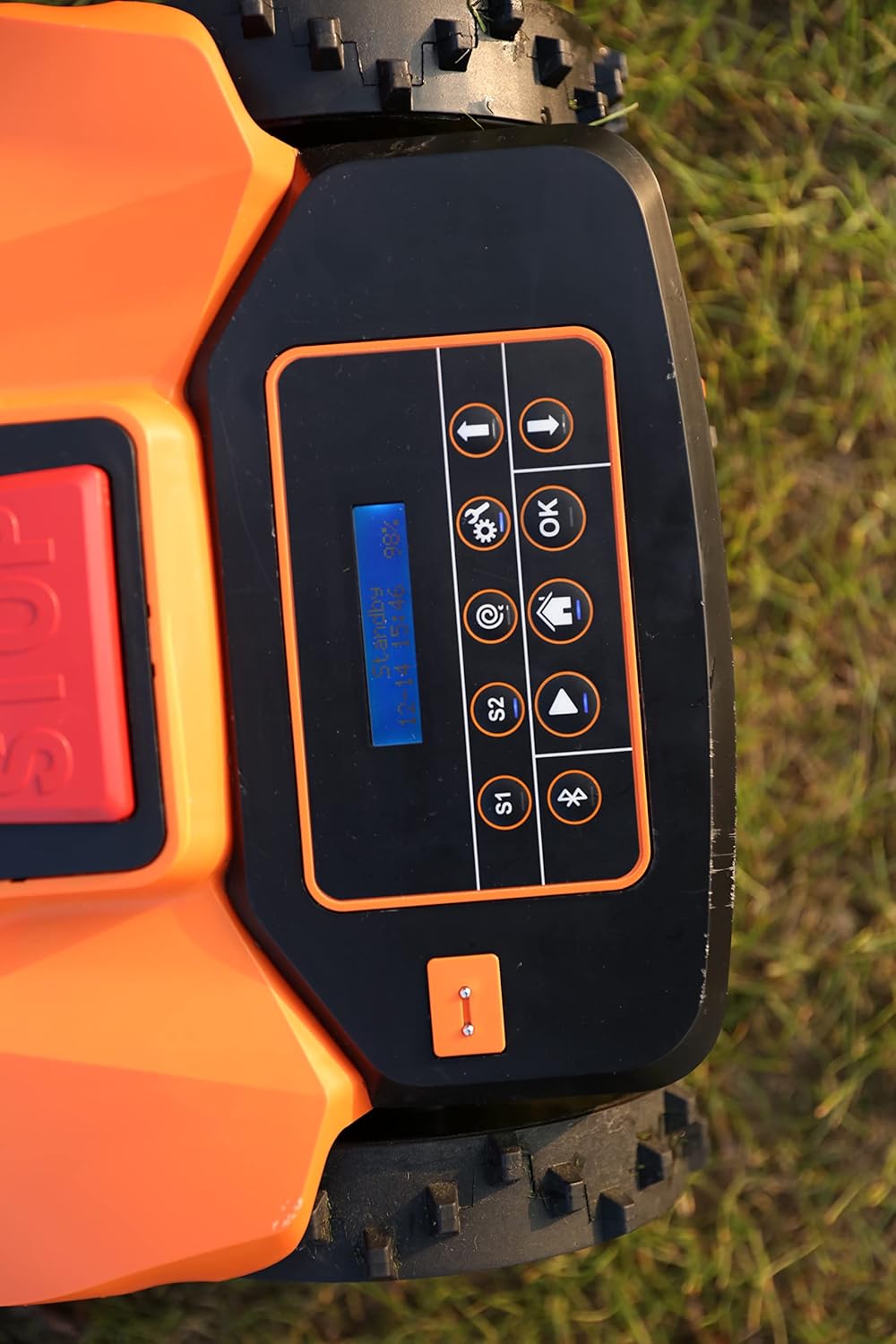
Figure 3: Close-up of the control panel with display and navigation buttons.

Figure 4: The dial for adjusting the cutting height.
Жайгашуу
1. Заряддоо станциясын жайгаштыруу
Place the charging station on a flat, level surface in an area with good access to a power outlet. Ensure it is not in direct sunlight or prone to water accumulation.
2. Чек ара зымдарын орнотуу
Lay the provided boundary wire around the perimeter of your mowing area. Use the fixing nails to secure the wire to the ground. Ensure the wire is taut and follows the recommended distances from obstacles. Connect the ends of the boundary wire to the charging station as per the detailed instructions in the full manual.
3. Баштапкы заряддоо
Place the robotic lawn mower onto the charging station. Ensure the charging contacts align. Allow the mower to fully charge before its first operation. The battery indicator on the mower or app will show the charging status.
4. Колдонмо туташуусу
Download the Yard Force app from your device's app store. Follow the in-app instructions to connect your XPower 800 via Bluetooth. This will allow for convenient control and scheduling.
Иштөө нускамалары
Чөп чапкычты ишке киргизүү
Press the 'Start' button on the control panel or initiate mowing via the Yard Force app. The mower will begin its programmed mowing cycle.
Кесүү бийиктигин тууралоо
Rotate the cutting height adjustment dial located on the top of the mower to select your desired grass length (20mm to 50mm).
Колдонмону колдонуу
Колдонмо сизге мүмкүнчүлүк берет:
- Start and stop mowing cycles.
- Set mowing schedules.
- Activate spiral cutting for dense areas.
- Чөп чапкычтын абалын жана батареясынын деңгээлин көзөмөлдөңүз.
- Control the mower manually (within Bluetooth range).
Жамгыр сенсору
The integrated rain sensor will detect precipitation and automatically instruct the mower to return to its charging station, protecting it from adverse weather conditions. Mowing will resume once the rain stops and the grass is dry.
Техникалык тейлөө
Чөп чапкычты тазалоо
Regular cleaning ensures optimal performance. Turn off the mower and disconnect it from the charging station before cleaning.
- Clean the underside of the mower, especially the cutting deck and blades, to remove grass clippings and debris. A hose can be used for this purpose, as shown in Figure 5.
- Wipe down the top surface and wheels with a damp кездеме.
- Ensure the charging contacts on both the mower and the station are clean.

Figure 5: Cleaning the underside of the mower with water.
Бычакты алмаштыруу
For best cutting results, regularly inspect and replace the blades. The package includes 6 replacement blades and 3 replacement screws. Always use genuine Yard Force replacement parts. Refer to the full manual for detailed instructions on safe blade replacement.
Кышкы сактоо
During winter months, clean the mower thoroughly, fully charge the battery, and store the unit in a dry, frost-free environment. Disconnect the boundary wire from the charging station.
Проблемаларды чечүү
If you encounter issues with your YARD FORCE XPower 800, please refer to the following common troubleshooting tips. For detailed error codes and solutions, consult the comprehensive user manual or the Yard Force app.
- Чапкыч иштебей жатат: Check battery charge, ensure the safety switch is engaged, and verify the boundary wire is properly connected.
- Mower not returning to charging station: Check the charging station's power supply and ensure the boundary wire is intact and correctly laid.
- Тегиз эмес кесүү: Inspect blades for damage or dullness and replace if necessary. Ensure the cutting height is set appropriately.
- Чөп чапкыч тыгылып калды: Check for obstacles in the mowing area. Ensure the boundary wire is laid correctly around flowerbeds or other features.
- Колдонмо туташуу көйгөйлөрү: Ensure Bluetooth is enabled on your device and the mower is within range. Restart both the app and the mower if necessary.
Техникалык шарттар
| Өзгөчөлүк | Деталь |
|---|---|
| Модель номери | XPower 800 |
| Бренд | Ярд Форс |
| Сунушталган газон аянты | 800 чарчы метрге чейин |
| Батарея түрү | 20V Li-Ion, 2.5 Ah |
| Кесүү туурасы | 160 мм |
| Кесүү бийиктиги | 20 mm - 50 mm (3 positions) |
| Мотор түрү | Brushless |
| Max. Жантаюу | 40% |
| Байланыш | Bluetooth, App Control |
| Өзгөчөлүктөр | Rain Sensor, Edge Cutting, Mulching System, Spiral Cutting |
| Продукциянын өлчөмдөрү | 54 x 38.1 x 23.3 см |
| Элемент Салмагы | 8.5 килограмм |
Кепилдик жана колдоо
Your YARD FORCE XPower 800 Robotic Lawn Mower comes with a manufacturer's warranty. Please refer to the warranty card included in your product packaging for specific terms and conditions.
For technical support, spare parts, or any inquiries not covered in this manual, please contact Yard Force customer service. You can find contact information on the official Yard Force webсайт же сатуучу аркылуу.
Официалдуу Webсайт: www.yardforce.eu
Ask a question about this manual
Ask about setup, troubleshooting, compatibility, parts, safety, or missing instructions. Manuals+ will review the question and use this page’s manual context to help answer it.