
1. Киришүү
The Perixx PERIMICE-819B is an ergonomic vertical mouse designed for comfort and versatility. It features 3-in-1 wireless connectivity, allowing connection via Bluetooth, 2.4 GHz USB-A receiver, or 2.4 GHz USB-C receiver. This mouse is equipped with silent-click buttons, adjustable DPI settings, and a built-in rechargeable battery, making it suitable for prolonged use across various devices.

Image: The ergonomic design promotes a natural handshake position, reducing wrist strain.

Image: The compact size of the PERIMICE-819B makes it highly portable for on-the-go use.
2. Пакеттин мазмуну
Пакетиңизде бардык буюмдар бар экенин текшериңиз:
- Perixx PERIMICE-819B Vertical Mouse
- USB-A кабылдагыч
- USB-C кабыл алгыч
- Заряддоо кабели
- User Manual
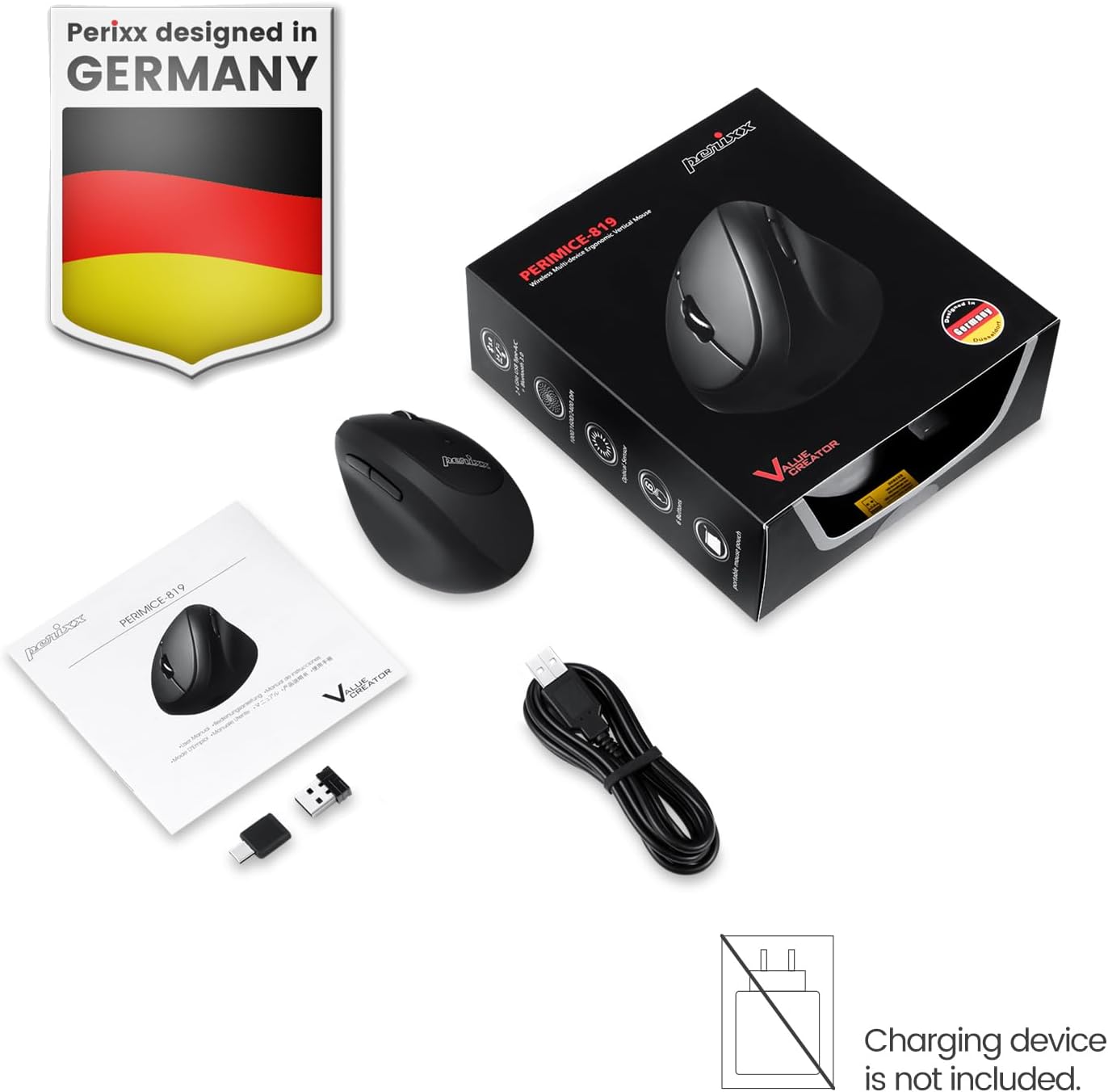
Image: The package includes the mouse, USB-A and USB-C receivers, a charging cable, and the user manual.
3. Орнотуу нускамалары
3.1 Чычканды заряддоо
Before initial use, fully charge the mouse. Connect the provided charging cable to the mouse's charging port and to a USB power source. The LED indicator will show charging status. A full charge can last up to 15 days with typical use (4 hours/day).

Image: Connect the mouse to a USB port using the charging cable to recharge its internal battery.
3.2 Чычканды туташтыруу
The PERIMICE-819B offers three wireless connection methods:

Image: The bottom of the mouse displays the connectivity switch and receiver storage.
- 2.4 GHz Wireless (USB-A or USB-C Receiver):
- Locate the USB-A or USB-C receiver stored in the mouse's bottom compartment.
- Plug the desired receiver into an available USB port on your computer.
- Төмөнкү жагында жайгашкан КҮЙГҮЗҮҮ/ӨЧҮРҮҮ баскычын колдонуп, чычканды күйгүзүңүз.
- Чычкан автоматтык түрдө туташышы керек.
- Bluetooth байланыш:
- КҮЙГҮЗҮҮ/ӨЧҮРҮҮ баскычын колдонуп, чычканды күйгүзүңүз.
- Press the 'Connect' button on the bottom of the mouse to enter Bluetooth pairing mode. The LED indicator will flash.
- Түзмөгүңүздө (компьютер, планшет, смартфон) Bluetooth жөндөөлөрүнө өтүп, жаңы түзмөктөрдү издеңиз.
- Select "PERIMICE-819B" from the list of available devices to pair.

Image: The mouse supports Bluetooth, 2.4 GHz USB-A, and 2.4 GHz USB-C wireless connections.
4. Иштөө нускамалары
4.1 DPI жөндөө
The PERIMICE-819B features an adjustable DPI (Dots Per Inch) switch, allowing you to change the mouse cursor speed and sensitivity. Press the DPI button, located behind the scroll wheel, to cycle through the available settings: 1000, 1600, and 2400 DPI. Choose the setting that best suits your task and preference.
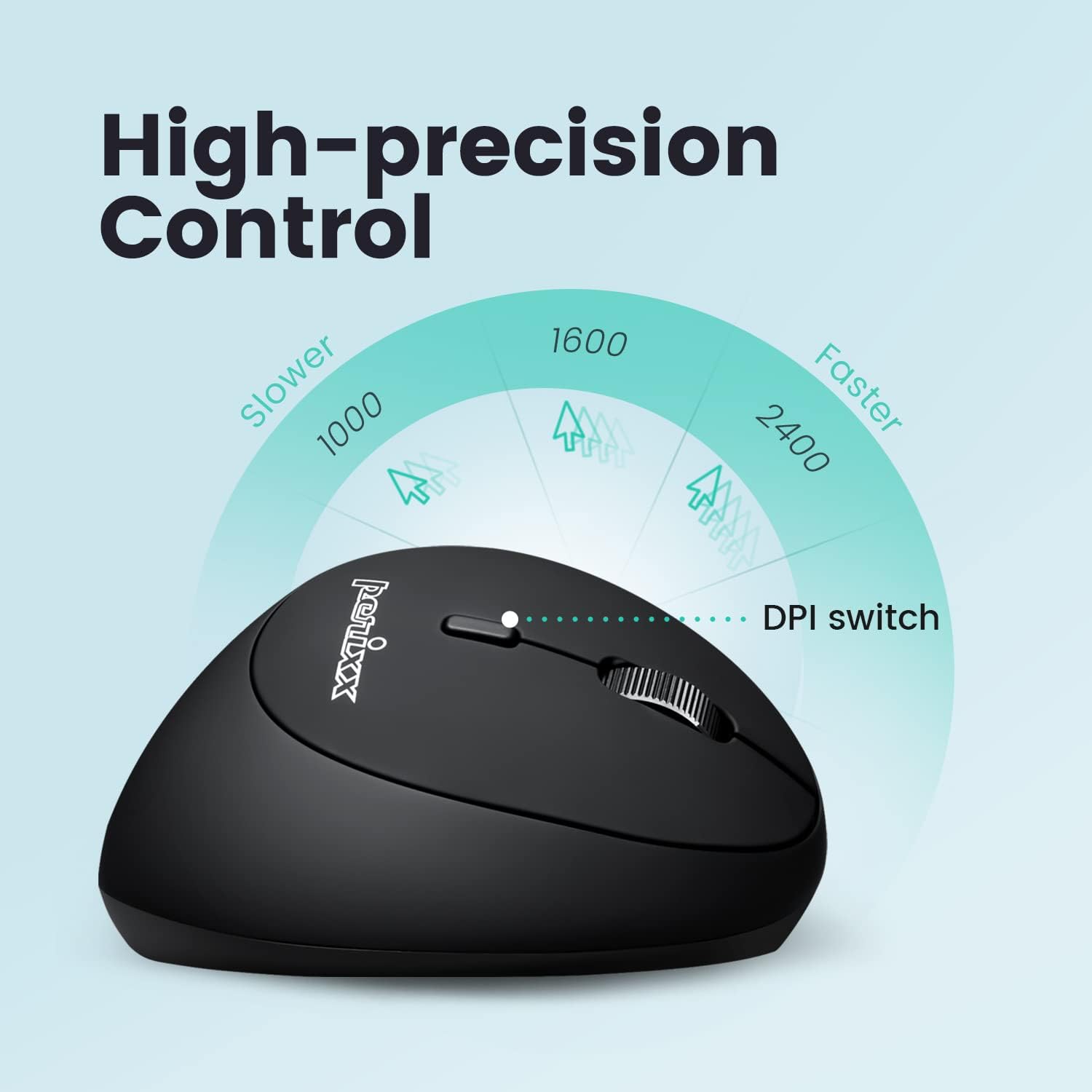
Image: Adjust the mouse sensitivity using the DPI switch for optimal control.
4.2 Silent Click Buttons
The left and right mouse buttons are designed for silent clicking, providing a quiet working environment.
4.3 Багыттоо баскычтары
The mouse includes convenient forward and backward buttons located on the side, typically operated by the thumb. These buttons allow for quick navigation in web браузерлер жана file изилдөөчүлөр. Note: Forward and backward buttons may not be fully functional on macOS.

Image: Use the side buttons for quick page navigation (backward and forward).
5. Техникалык тейлөө
5.1 Батареяны башкаруу
The PERIMICE-819B features a built-in rechargeable Li-Po 300mAh battery. To conserve power, the mouse will automatically enter sleep mode after a period of inactivity. Move the mouse or click a button to wake it up. Recharge the mouse when the battery indicator shows low power to ensure uninterrupted use.
5.2 Тазалоо
To clean the mouse, use a soft, dry cloth. Avoid using harsh chemicals or abrasive materials that could damage the surface.
6. Кыйынчылыктарды
- Чычкан жооп бербей жатат:
- Чычкандын күйүп турганын текшериңиз.
- Батареянын деңгээлин текшерип, керек болсо кайра заряддаңыз.
- For 2.4 GHz connection, ensure the receiver is securely plugged into a USB port. Try a different USB port.
- Bluetooth туташуусу үчүн, түзмөгүңүздө Bluetooth иштетилгенин жана чычкан туура жупташтырылганын текшериңиз. Кайра жупташтырып көрүңүз.
- Cursor movement is erratic or stops:
- Чычкан сенсорунун таза жана тоскоолдуксуз экенин текшериңиз.
- Чычканды ылайыктуу бетке (мисалы, чычкан жаздыгына) колдонуңуз.
- Батареянын заряды азбы же жокпу, текшериңиз.
- Interference from other wireless devices can affect performance. Try moving closer to the receiver or device.
- DPI жөндөөсү өзгөрбөйт:
- Туура DPI которгуч баскычын басып жатканыңызды текшериңиз.
- The change in cursor speed should be noticeable. If not, try restarting the mouse and your device.
7. Техникалык шарттар
| Өзгөчөлүк | Деталь |
|---|---|
| Модель номери | PERIMICE-819 (12013) |
| Байланыш технологиясы | Bluetooth, 2.4 GHz Radio Frequency (USB-A, USB-C) |
| Кыймылды аныктоо | Оптикалык |
| DPI орнотуулары | 1000 / 1600 / 2400 |
| Өзгөчөлүктөр | Ergonomic Design, Portable, Rechargeable, Silent-Click |
| Батарея түрү | Built-in Li-Po 300mAh |
| Батареянын орточо иштөө мөөнөтү | Up to 60 hours (approx. 15 days at 4 hours/day) |
| Элемент Салмагы | 2.93 унция |
| Продукциянын өлчөмдөрү (LxWxH) | 4.5 x 2.64 x 2.28 дюйм |
| Түс | Кара |
| Шайкештик | Windows OS, Linux Ubuntu 16.04, Chromebook, iPadOS, Android, Amazon Fire Tablet. Partial compatibility with macOS (forward/backward buttons not available). |
8. Кепилдик жана колдоо
Perixx products typically come with a manufacturer's warranty. For specific warranty details, please refer to the warranty information included with your purchase or visit the official Perixx website. For technical support, product inquiries, or assistance with troubleshooting, please contact Perixx customer service through their official channels.
Өндүрүүчү: Perixx Computer GmbH
Webсайт: www.perixx.com