
Introduction
Thank you for choosing the Hoco J41 Pro 10000mAh Fast Charging Power Bank. This manual provides essential information for the safe and efficient use of your device. Please read it thoroughly before operation and retain it for future reference.
Пакеттин мазмуну
- Hoco J41 Pro 10000mAh Power Bank
- USB заряддоо кабели (Type-C)
- User Manual
Note: The specific type of USB cable included may vary.
Продукт бүттүview
The Hoco J41 Pro is a portable power bank designed for fast charging of various electronic devices. It features multiple output ports and an LED digital display for battery status.

Сүрөт 1: Фронт view of the Hoco J41 Pro Power Bank, showcasing its sleek black design and the LED digital display indicating a 100% charge level. A wrist strap is visible on the left side.

Сүрөт 2: Бурчтуу view of the Hoco J41 Pro Power Bank, highlighting the USB-A output port (22.5W) and the USB-C input/output port (PD 20W). The LED display shows the current battery percentage.
Негизги өзгөчөлүктөрү:
- Жогорку кубаттуулугу: 10000mAh (37Wh) for extended use.
- Тез кубаттоо протоколдору: Supports PD20W, QC, FCP/SCP, AFC, VOOC, DASH for wide compatibility.
- Бир нече порттор: USB-A output (22.5W) and Type-C input/output (PD 20W).
- Санариптик дисплей: LED screen shows real-time battery percentage and fast charge indicator.
- Компакт дизайн: Портативдик жана алып жүрүүгө оңой.
Жайгашуу
Power Банктын алгачкы заряддоосу:
- Connect the provided USB charging cable (Type-C) to the Type-C input port on the Hoco J41 Pro power bank.
- Connect the other end of the cable to a compatible USB wall adapter (not included) or a computer's USB port. For fastest charging, use a PD-compatible wall adapter.
- The LED digital display will show the charging progress. When the display shows "100%", the power bank is fully charged.
- Заряддоо аяктагандан кийин кабелди ажыратыңыз.
Power банкты биринчи жолу колдонуудан мурун толук заряддоо сунушталат.
Иштөө нускамалары
Түзмөктөрүңүздү заряддоо:
- Ensure your Hoco J41 Pro power bank has sufficient charge. Check the LED display for the current battery percentage.
- Connect your device's charging cable to the appropriate output port on the power bank (USB-A or Type-C).
- Кабелдин экинчи учун электрондук түзүлүшкө туташтырыңыз (мисалы, смартфон, планшет).
- The power bank will automatically begin charging your device. The LED display may show a fast charge indicator if a compatible device and cable are used.
- Түзмөгүңүз толук кубатталгандан кийин, аны кубат банкынан ажыратыңыз.
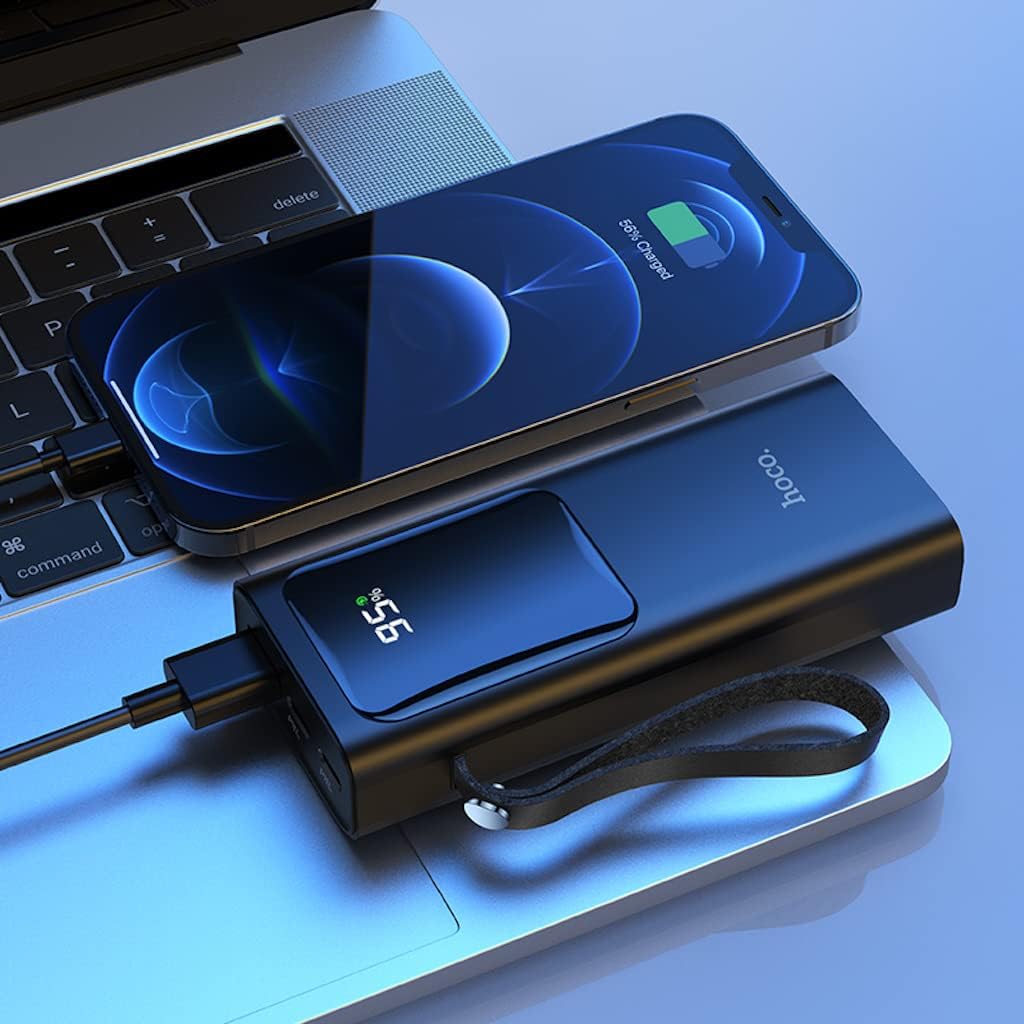
Сүрөт 3: The Hoco J41 Pro Power Bank actively charging an iPhone, positioned next to a laptop. The power bank's LED display shows a 95% charge, indicating its readiness for use.

Сүрөт 4: The Hoco J41 Pro Power Bank simultaneously charging two smartphones, demonstrating its multi-device charging capability. The power bank's display shows 100% charge.
Understanding the LED Digital Display:
- Дисплей батареянын калган пайызын көрсөтөтtagэлектр банкынын д.
- Заряддоо учурунда, пайызtagе көбөйөт.
- When a device is being fast-charged, a specific indicator (e.g., a lightning bolt icon or "PD" / "QC" text) may appear on the display.
Техникалык тейлөө
- Тазалоо: Power банкты тазалоо үчүн жумшак, кургак чүпүрөктү колдонуңуз. Суюк тазалагычтарды же аэрозолдорду колдонбоңуз.
- Сактагыч: Power банкты күн нурунан, өтө температурадан жана нымдуулуктан алыс, салкын, кургак жерде сактаңыз.
- Батареяга кам көрүү: Батареянын иштөө мөөнөтүн узартуу үчүн, үзгүлтүксүз колдонулбаса, кубат банкты жок дегенде үч айда бир жолу толук заряддап туруңуз.
- Тамчылардан качуу: Powerbankты түшүрүп албаңыз же катуу соккуга дуушар кылбаңыз.
Проблемаларды чечүү
| Көйгөй | Мүмкүн себеп | Чечим |
|---|---|---|
| Power банк заряддалбай жатат. |
|
|
| Түзмөк кубат банкынан кубатталбай жатат. |
|
|
| Жай кубаттоо. |
|
|
Техникалык шарттар
| Өзгөчөлүк | Деталь |
|---|---|
| Модель аты | J41 Pro |
| Бренд | HOCO |
| Батарея сыйымдуулугу | 10000mAh (37Wh) |
| Номиналдуу кубаттуулук | 5900mAh |
| Батарея клеткасынын курамы | Литий полимери |
| Input (Lightning/Type-C) | 18W (PD) |
| Чыгуу (Type-C) | PD 20W |
| Чыгуу (USB-A) | 22.5W (full compatible) |
| Total Output | 5V/3A |
| Колдоого алынган протоколдор | PD 20W, QC, FCP/SCP, AFC, VOOC, DASH |
| Дисплей | LED Digital Display (Power, Fast Charge Indicator) |
| Туташтыргыч түрү | Lightning, USB Type C |
| Тtage | 5 вольт |
| Өлчөмдөр | 21.8 x 14.5 x 4.4 см |
| Салмагы | 206 г |
| Түс | Кара |
Коопсуздук маалыматы
Please read and follow these safety guidelines to prevent damage to your device or personal injury:
- Power bankты сууга, нымдуулукка же өтө жогорку температурага дуушар кылбаңыз.
- Powerbankты бөлүктөргө бөлбөңүз, өзгөртпөңүз же оңдоого аракет кылбаңыз.
- Балдардан алыс болуңуз.
- Эгерде Power Bank бузулган, шишип кеткен же агып турган болсо, колдонбоңуз.
- Avoid dropping or subjecting the power bank to heavy impacts.
- Тастыкталган заряддоо кабелдерин жана адаптерлерин гана колдонуңуз.
- Do not place heavy objects on the power bank.
- Жергиликтүү эрежелерге ылайык кубат банкын жоопкерчилик менен жок кылыңыз.
Кепилдик жана колдоо
Hoco products are manufactured to high-quality standards. For warranty information or technical support, please refer to the warranty card included in your package or contact your local retailer or Hoco customer service. Please have your product model number (J41 Pro) and purchase details ready when seeking support.