
1. Киришүү
This manual provides detailed instructions for the installation, operation, and maintenance of your DEKCO Solar Security Camera and Wireless Doorbell Camera system. Please read this manual thoroughly before using the product to ensure proper function and safety. Keep this manual for future reference.
2. Пакеттин мазмуну
Таңгактан чыгарганда бардык компоненттер бар экенин жана жакшы абалда экендигин текшериңиз.
- DEKCO Solar Security Camera
- Зымсыз эшик коңгуроо камерасы
- Ички коңгуроо бирдиги
- Solar Panel (integrated with camera)
- Монтаждоо кронштейндери жана буроолор
- USB заряддоо кабели
- Колдонуучунун Колдонмосу (бул документ)
3. Продукт бүтүп калдыview
The DEKCO security system combines a solar-powered outdoor camera with a wireless doorbell camera to provide comprehensive home surveillance.
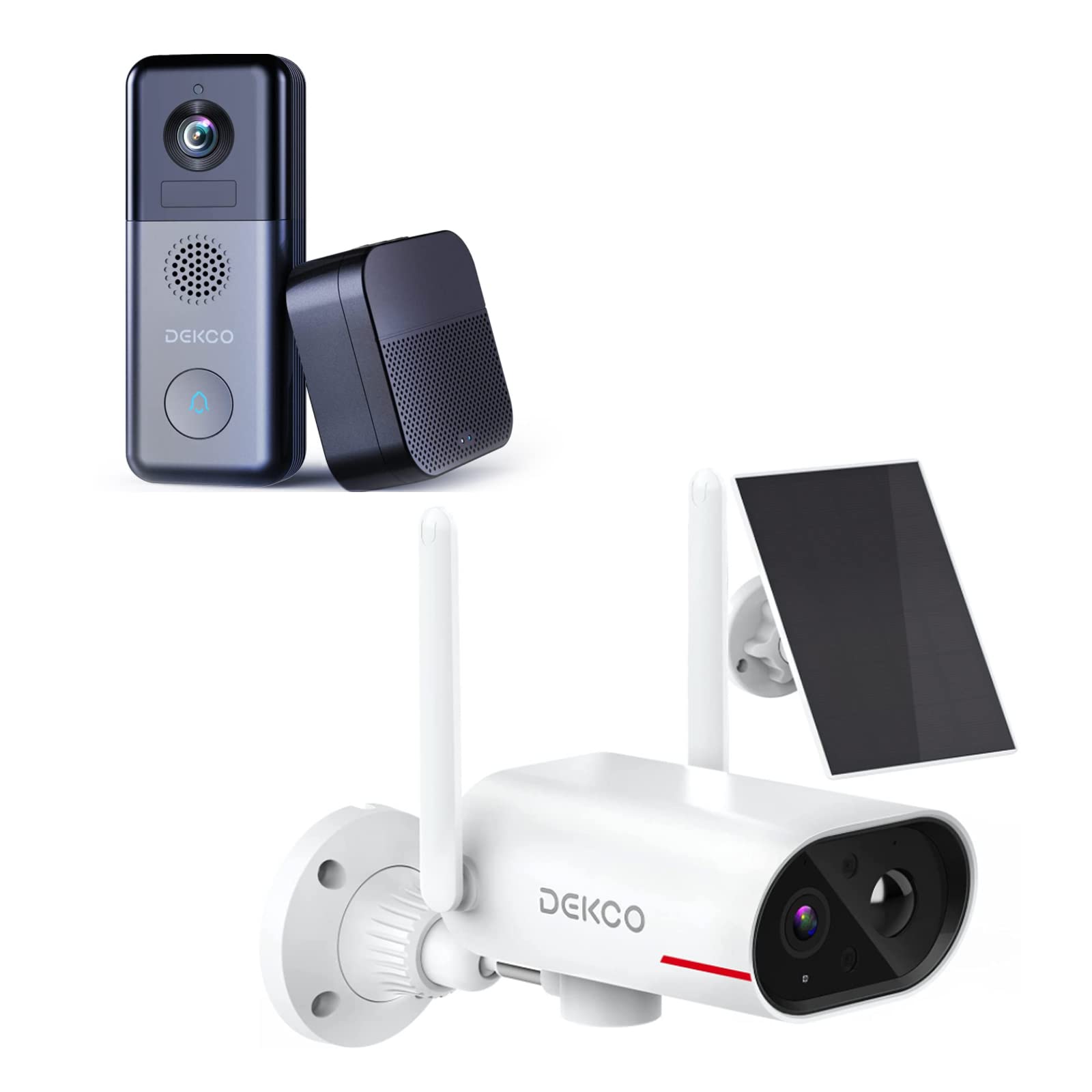
An image showing the DEKCO solar-powered security camera, the wireless doorbell camera, and its indoor chime unit. The security camera is white with two antennas and a solar panel, while the doorbell is dark grey with a camera lens and a call button. The chime is a compact black box.
3.1 Solar Security Camera Features
- 260° Viewдиапазону: Achieved through a 170° rotating design.
- 100% Wire-Free: Flexible installation without power cables.
- Күн энергиясы: Integrated solar panel for continuous power with adequate sunlight.
- Түнкү көрүнүш: Features color night vision for clear images in low light.
- Сактагыч: Supports Micro SD card and cloud storage (no monthly fees).
- Суу өткөрбөйт рейтинги: IP65 for outdoor use.
3.2 Wireless Doorbell Camera Features
- 180 күндүк батареянын иштөө мөөнөтү: Узак колдонуу үчүн орнотулган 10000mAh кайра заряддалуучу батарея.
- Эки тараптуу аудио: Communicate with visitors remotely.
- Кыймылды аныктоо: Receive alerts for activity at your door.
- Зымсыз коңгуроо: Connects to an indoor chime unit.
- Суу өткөрбөйт рейтинги: IP65 for outdoor use.
4. Орнотуу колдонмосу
Follow these steps to set up your DEKCO security system.
4.1 Колдонмону орнотуу
- Download the DEKCO app from your smartphone's app store (available for Android and iOS).
- Жаңы аккаунтка катталыңыз же сизде мурунтан эле бар болсо кириңиз.
4.2 Solar Security Camera Setup
- Баштапкы төлөм: Before installation, fully charge the camera using the provided USB cable.
- Монтаждоо: Choose a location with good Wi-Fi signal and direct sunlight exposure for the solar panel. Use the mounting bracket and screws to securely attach the camera to a wall. Ensure the camera has a clear view каалаган мониторинг аймагынын.
- Жупташтыруу: Open the DEKCO app, select 'Add Device', and follow the on-screen instructions to connect the camera to your Wi-Fi network.
4.3 Wireless Doorbell Camera Setup
- Баштапкы төлөм: Fully charge the doorbell camera using the provided USB cable.
- Монтаждоо: Install the doorbell camera at your desired location near your front door using the provided mounting hardware. Ensure it has a clear view жана жакшы Wi-Fi сигналы.
- Жупташтыруу: In the DEKCO app, select 'Add Device' and follow the instructions to connect the doorbell camera to your Wi-Fi network.
- Chime Setup: Plug the indoor chime unit into a power outlet. Follow the app's instructions to pair the chime with the doorbell camera. You can select different chime tones and adjust the volume through the app.
5. Иштөө нускамалары
Learn how to use the features of your DEKCO security system.
5.1 Solar Security Camera Operation
- Live View: Open the DEKCO app and select your camera to view жаша фооtage. You can manually pan/tilt the camera within its 260° range.
- Кыймылды аныктоо: The camera is configured for motion-only alerts. Adjust sensitivity settings in the app to optimize detection and minimize false alarms.
- Жаздыруу: Motion-triggered events are recorded and stored on the Micro SD card (if installed) or in the cloud. Access recordings via the app's playback feature.
- Түнкү көрүнүш: The camera automatically switches to color night vision in low-light conditions.
5.2 Wireless Doorbell Camera Operation
- Чалууларга жооп берүү: When a visitor presses the doorbell button, your smartphone will receive a notification. Tap the notification to answer and engage in two-way audio communication.
- Кыймылды аныктоо: The doorbell camera detects motion and sends alerts to your phone. Review motion events in the app.
- Live View: You can initiate a live view of your front door at any time through the DEKCO app.
- Коңгуроо функциясы: The indoor chime will sound when the doorbell button is pressed. Adjust settings in the app.
6. Техникалык тейлөө
Regular maintenance ensures optimal performance and longevity of your devices.
- Тазалоочу линзалар: Periodically wipe the camera lenses and solar panel with a soft, damp чаңды жана кирди кетирүү үчүн кездеме колдонуңуз. Абразивдүү тазалоочу каражаттардан алыс болуңуз.
- Күн панелинин эффективдүүлүгү: Ensure the solar panel is free from obstructions (leaves, snow, etc.) to maximize charging efficiency.
- Батареянын ден соолугу: While solar-powered, ensure the security camera receives sufficient sunlight. For the doorbell, monitor battery levels via the app and recharge when necessary.
- Программалык камсыздоонун жаңыртуулары: Check the DEKCO app regularly for firmware updates. Install updates to ensure your devices have the latest features and security enhancements.
7. Кыйынчылыктарды
Жалпы маселелерди чечүү үчүн бул бөлүмдү караңыз.
- Түзмөк Wi-Fi'га туташпай жатат:
- Wi-Fi тармагыңыз 2.4 ГГц экенин текшериңиз (5 ГГц колдоого алынбайт).
- Wi-Fi сырсөзүн туура коюуну текшериңиз.
- Түзмөктү Wi-Fi роутериңизге жакыныраак жылдырыңыз.
- Restart your router and the device.
- Кыймылды аныктоо эскертүүлөрү жок:
- Колдонмонун жөндөөлөрүндө кыймылды аныктоо иштетилгенин текшериңиз.
- Кыймыл сезгичтигин тууралаңыз.
- Аппараттын таза болушун текшериңиз view жана тоскоолдук кылбайт.
- Видеонун сапаты начар:
- Wi-Fi сигналыңыздын күчүн текшериңиз.
- Камера линзасын тазалаңыз.
- Doorbell Battery Drains Quickly:
- Кыймылды аныктоонун сезгичтигин же жыштыгын азайтыңыз.
- Колдонуудан мурун аппараттын толук заряддалганын текшериңиз.
- Solar Camera Not Charging:
- Ensure the solar panel receives at least 1 hour of direct sunlight daily.
- Күн панелинин бетин тазалаңыз.
8. Техникалык шарттар
| Өзгөчөлүк | Спецификация |
|---|---|
| Бренд | DEKCO |
| Модель номери | B09TF8K2W8 |
| Байланыш технологиясы | Зымсыз (Wi-Fi) |
| Power Source | Solar Powered (Camera), Battery (Doorbell) |
| Doorbell Battery Capacity | 10000 мАч |
| Viewкөрүү бурчу (камера) | 260° (170° rotating design) |
| Түнкү көрүнүш | Түнкү көрүнүш |
| Суу өткөрбөйт рейтинги | IP65 |
| Шайкеш түзмөктөр | Смартфон (Android) |
| Эскертүү түрү | Кыймыл гана |
| Тоо түрү | Дубалга орнотуу |
| Видео тартуу форматы | MPEG-4 |
9. Кепилдик жана колдоо
For warranty information, technical support, or further assistance, please refer to the DEKCO official website or contact DEKCO customer service directly. Keep your purchase receipt as proof of purchase.