
1. Киришүү
Сатып алганыңыз үчүн рахматasing the ENUOSUMA Bluetooth Desktop Soundbar. This manual provides essential information for setting up, operating, and maintaining your new speaker. Please read it thoroughly before use to ensure optimal performance and longevity of the product.
2. Коопсуздук маалыматы
- Аппаратты сууга же ашыкча нымдуулукка дуушар кылбаңыз.
- Динамикти жылуулук булактарынын жанына же күндүн түз тийген жерине койбоңуз.
- Динамикти өз алдынча ажыратууга же оңдоого аракет кылбаңыз. Бардык тейлөөлөрдү квалификациялуу кызматкерлерге тапшырыңыз.
- Кубат үчүн берилген USB кабелин гана колдонуңуз.
- Балдар жетпеген жерде сактаңыз.
3. Пакеттин мазмуну
Сураныч, пакетте төмөнкү нерселерди текшериңиз:
- ENUOSUMA Bluetooth Desktop Soundbar
- USB кубат кабели
- 3.5 мм AUX аудио кабели

4. Продукт бүтүп калдыview
4.1 Башкаруу

- Large Central Knob: Күйгүзүү/өчүрүү, үн катуулугун тууралоо.
- Ойнотуу/тындыруу баскычы: Play/pause audio, answer/reject calls.
- Мурунку ыр баскычы: Мурунку трекке өтүү.
- Кийинки ыр баскычы: Кийинки трекке өтүү.
- Режим баскычы: Switch between input modes (Bluetooth, AUX, FM Radio, USB Disk/TF Card). Double-press to turn RGB lights on/off.
4.2 порт

- USB кубат киргизүү: USB кубат кабелин туташтыруу үчүн.
- AUX киргизүү: Зымдуу аудио туташуу үчүн 3.5 мм уяча.
- USB диск уячасы: USB флэш-дискинен аудио ойнотуу үчүн.
- TF карта уячасы: TF (Micro SD) картасынан аудио ойнотуу үчүн.
5. Орнотуу
- Кубат туташуу: Connect the USB power cable to the speaker's USB power input and then to a USB power source (e.g., computer USB port, USB wall adapter).
- Күйгүзүү: Rotate the large central knob clockwise to turn on the speaker. The RGB lights will illuminate.
6. Иштөө нускамалары
6.1 Күйгүзүү/өчүрүү жана үндү тууралоо
- To turn on, rotate the large central knob clockwise.
- To turn off, rotate the large central knob counter-clockwise until it clicks.
- To adjust volume, rotate the large central knob clockwise to increase and counter-clockwise to decrease.
6.2 Bluetooth режими
- Динамикти күйгүзүңүз. Ал автоматтык түрдө Bluetooth жупташтыруу режимине кирет.
- On your device (phone, tablet, computer), enable Bluetooth and search for available devices.
- Select "ENUOSUMA Speaker" (or similar) from the list to pair.
- Once paired, you will hear a confirmation sound, and you can play audio wirelessly.
6.3 AUX Wired Mode
- Connect one end of the 3.5mm AUX audio cable to the speaker's AUX input.
- Connect the other end of the 3.5mm AUX audio cable to your audio source's headphone jack (e.g., computer, laptop, MP3 player).
- Press the "Mode" button on the speaker until it switches to AUX mode.
6.4 FM радио режими
- Ensure the USB power cable is connected, as it acts as the FM antenna.
- Press the "Mode" button repeatedly until the speaker enters FM Radio mode.
- Press and hold the "Play/Pause" button to automatically search for and save available FM stations.
- Use the "Previous Song" and "Next Song" buttons to navigate between saved stations.
6.5 USB Disk / TF Card Playback
- Insert a USB flash drive or TF (Micro SD) card containing audio files тиешелүү уячага.
- Press the "Mode" button until the speaker switches to USB Disk or TF Card mode.
- Динамик автоматтык түрдө аудио ойнотууну баштайт files. Use the "Play/Pause", "Previous Song", and "Next Song" buttons for control.
6.6 RGB жарыкты башкаруу

- The speaker features dynamic RGB lighting.
- To turn the RGB lights on or off, quickly double-press the "Mode" button.
7. Техникалык тейлөө
- Тазалоо: Динамиктин бетин тазалоо үчүн жумшак, кургак чүпүрөктү колдонуңуз. Суюк тазалоочу каражаттарды же абразивдүү материалдарды колдонбоңуз.
- Сактагыч: When not in use for extended periods, store the speaker in a cool, dry place away from direct sunlight.
8. Кыйынчылыктарды
| Көйгөй | Мүмкүн себеп | Чечим |
|---|---|---|
| Күч жок | USB cable not connected or power source faulty. | Ensure USB cable is securely connected to a working USB port. |
| Үн жок | Үнү өтө төмөн; туура эмес режим тандалды; түзмөк туташкан эмес. | Increase volume; press 'Mode' button to select correct input; ensure Bluetooth is paired or AUX cable is connected. |
| Bluetooth жупташтыруу ишке ашпай калды | Динамик жупташтыруу режиминде эмес; түзмөк Bluetooth өчүк; спикерден өтө алыс. | Ensure speaker is in Bluetooth mode; enable Bluetooth on your device; move device closer to speaker. |
| FM кабыл алуу начар | USB cable not connected (acting as antenna); weak signal. | Ensure USB cable is connected; try repositioning the speaker or the USB cable for better reception. |
9. Техникалык шарттар

| Өзгөчөлүк | Деталь |
|---|---|
| Бренд | ENUOSUMA |
| Модел | Bluetooth Desktop Soundbar |
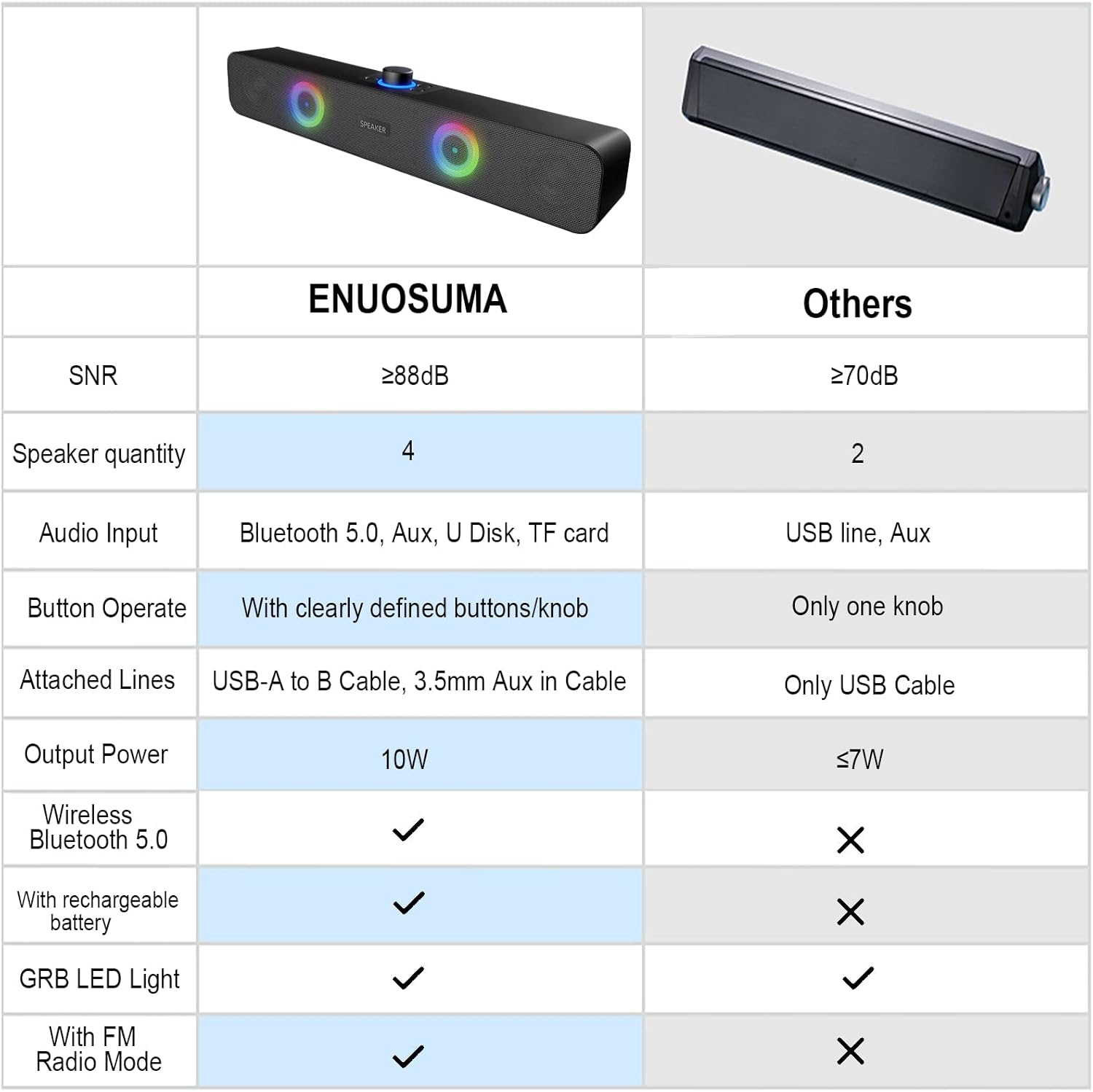
| Байланыш технологиясы | Bluetooth, Auxiliary (3.5mm), USB Disk, TF Card |
| Аудио чыгаруу режими | Стерео (2.0 канал) |
| Динамиктин максималдуу чыгаруу күчү | 10 Вт (2 x 5 Вт) |
| Өзгөчөлүктөр | RGB Lights, FM Radio |
| Power Source | Электр зымдары (USB менен) |
| Продукциянын өлчөмдөрү | 38 см (W) x 8 см (D) x 5 см (H) |
| Элемент Салмагы | 598.74 грамм |
| Материал | Металл |
| Түс | Кара |
| Сунушталган Колдонуулар | Gaming, Movies, Music |
| Шайкеш түзмөктөр | Laptop, Personal Computer, Projector, Tablet, Phone |
10. Кепилдик жана колдоо
This product comes with a standard manufacturer's warranty. For specific warranty details, technical support, or service inquiries, please refer to the documentation provided with your purchase or contact the retailer/manufacturer directly.