
1. Киришүү
The My Arcade Gamer V Classic is a portable gaming system designed for on-the-go entertainment. This device comes preloaded with 220 classic video games, offering a wide variety of genres including entertainment, sports, and adventure. Its compact size and 2.5-inch color display make it suitable for use at home, during travel, or at social gatherings. This manual provides essential information for setting up, operating, maintaining, and troubleshooting your Gamer V Classic.
2. Кутуда эмне бар
- Gamer V Classic Portable Gaming System
- Колдонуучунун колдонмосу (бул документ)
3. Продукциянын өзгөчөлүктөрү
- Балдарга ылайыктуу дизайн: No console or controllers required.
- Excellent Gaming Experience: Perfect for travel, birthday parties, gifts, and more.
- Rich Collection of Classic Games: Includes 220 preloaded video games including various types such as entertainment, sports, and adventure.
- Ыңгайлуу: 2.5" color display, suitable for playing portable games outdoors.
- Үндү көзөмөлдөө: Integrated volume control for adjustable audio.
- Чакан жана жеңил: Designed for easy portability.
- Кубат булагы: Powered by 3 AAA batteries (not included).
4. Орнотуу
4.1 Батареяны орнотуу
- Locate the battery compartment on the back of the Gamer V Classic unit.
- Батарея уясынын капкагын ачыңыз.
- Бөлүмдүн ичинде көрсөтүлгөндөй, туура полярдуулукту (+/-) текшерип, 3 жаңы AAA батарейкасын салыңыз.
- Батарея уясынын капкагын бекем жабыңыз.
Эскертүү: Batteries are not included. Alternatively, the unit can be powered via a USB-C cable (not included) connected to a 5V power source.
4.2 Күйгүзүү
Press and hold the power button (usually located on the top left of the device) for a few seconds until the screen illuminates and the My Arcade logo appears.

Image: The Gamer V Classic in use, showing its compact design and screen.
5. Иштөө нускамалары
5.1 Controls Overview
- D-Pad (багыттоочу такта): Located on the left, used for movement and menu navigation.
- A/B баскычтары: Action buttons located on the right, used for jumping, firing, selecting, etc.
- Баштоо баскычы: Initiates games and pauses gameplay.
- Калыбына келтирүү баскычы: Returns to the main menu or restarts the current game.
- Үй баскычы: Returns to the game selection screen.
- Үндү көзөмөлдөө: Adjusts the audio level of the device.
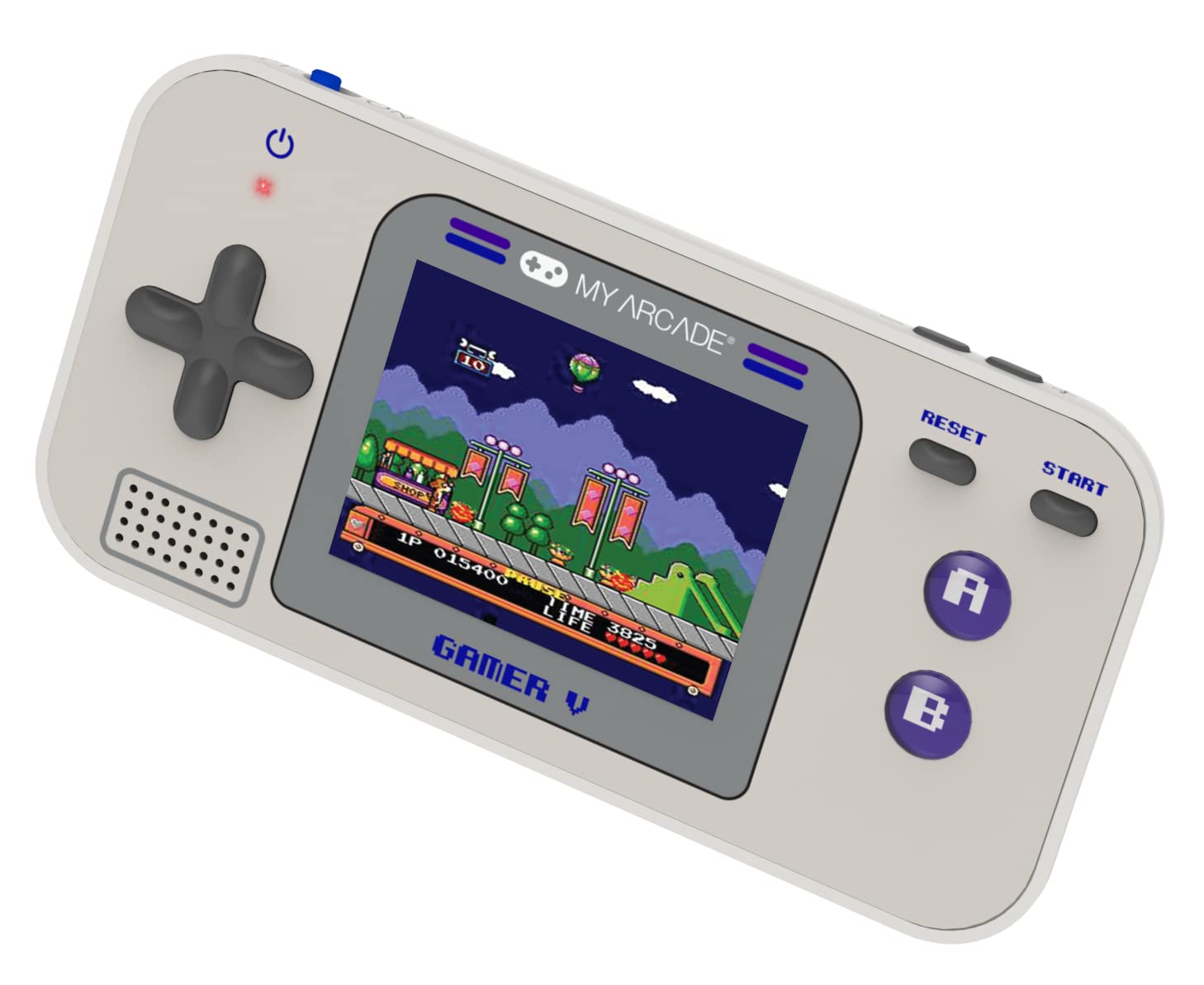
Сүрөт: деталдуу view of the Gamer V Classic controls.
5.2 Оюнду тандоо жана ойноо
- After powering on, the device will display the main game selection menu.
- Жеткиликтүү оюндардын тизмесин жылдыруу үчүн D-Pad колдонуңуз.
- Press the 'A' button or 'Start' button to select and launch a game.
- Follow on-screen instructions for specific game controls.
- To return to the game selection menu, press the 'Home' button.
5.3 Үндү тууралоо
Use the dedicated volume control buttons or switch (location may vary slightly by unit) to increase or decrease the sound output.
6. Техникалык тейлөө
- Тазалоо: Аппаратты тазалоо үчүн жумшак, кургак чүпүрөктү колдонуңуз. Суюк тазалагычтарды же аэрозолдорду колдонбоңуз.
- Сактагыч: Store the device in a cool, dry place away from direct sunlight and extreme temperatures. If storing for an extended period, remove the batteries.
- Батареяга кам көрүү: Replace all batteries at the same time. Do not mix old and new batteries or different types of batteries. Dispose of used batteries responsibly.
- Таасирден качуу: Do not drop or subject the device to strong impacts, as this may damage internal components or the screen.
7. Кыйынчылыктарды
| Көйгөй | Мүмкүн себеп | Чечим |
|---|---|---|
| Түзмөк күйбөй жатат. | Батареялар аз же түгөндү. Батарея туура эмес орнотулган. | Replace batteries with new ones, ensuring correct polarity. Try powering via USB-C cable. |
| Экран бош же бурмаланган. | Low battery power. Device malfunction. | Replace batteries or connect to USB-C power. If problem persists, contact customer support. |
| Үн жок же үнү төмөн. | Volume set too low. Mute function activated. | Adjust volume using the volume controls. Ensure no external headphones are connected if not intended. |
| Баскычтар жооп бербейт. | Device frozen. Low battery power. | Try pressing the 'Reset' button. Replace batteries. Power cycle the device (turn off and on). |
8. Техникалык шарттар
- Продукциянын өлчөмдөрү: 5"L x 2.5"W x 0.75"H
- Контроллердин түрү: Control Button
- Элемент Салмагы: 0.15 килограмм (5.3 унция)
- Экрандын өлчөмү: 2.5 дюйм
- Кубат булагы: Батарея менен иштейт (3 AAA батарейкасы керек, камтылган эмес)
- Аппараттык интерфейс: Алынуучу медиа менен ички
- Жаш аралыгы (Сүрөттөм): Kid, Teen
- Дисплей түрү: LCD же LED
- Материал: Пластик
- Форма фактору: Колдук
- Модель номери: DGUN-3920
- Өндүрүүчү: Менин аркада
9. Кепилдик жана колдоо
For warranty information and customer support, please refer to the official My Arcade webсайтка же кардарларды тейлөө бөлүмүнө кайрылыңыз. Сатып алганыңыздын далили катары сатып алуу дүмүрчөгүңүздү сактаңыз.