
PALOVUE iSound
PALOVUE Wireless Earbuds User Manual
Model: iSound
Your guide to setting up, operating, and maintaining your PALOVUE iSound Wireless Earbuds.
1. Киришүү
The PALOVUE iSound Wireless Earbuds are designed to provide a superior audio experience with advanced features for daily use. Equipped with Qualcomm CSR and Bluetooth 5.0 technology, these earbuds offer a stable and crystal-clear connection, supporting aptX HD sound quality. The CVC 8.0 Noise Cancelling technology with 4 built-in microphones ensures clear calls by effectively reducing ambient noise. Their ergonomic design and multiple ear-tip sizes provide a comfortable and secure fit for extended wear.
The iSound earbuds feature convenient one-step reconnection and intuitive one-touch operation. With up to 24 hours of playtime using the compact charging case, they are ideal for on-the-go listening. Further customization and control are available through the PALOVUE iSound APP.

Image: PALOVUE iSound Wireless Earbuds resting in their open charging case, showcasing алардын жаркыраган кара дизайны.
2. Кутуда эмне бар
Upon opening your PALOVUE iSound package, you will find the following components:
- Зымсыз кубаттоо кутусу
- PALOVUE iSound Earbuds (Left and Right)
- Ear Tips (multiple sizes for a customizable fit)
- Заряддоо кабели (USB-C)
- Lanyard
- Таңгактоочу куту
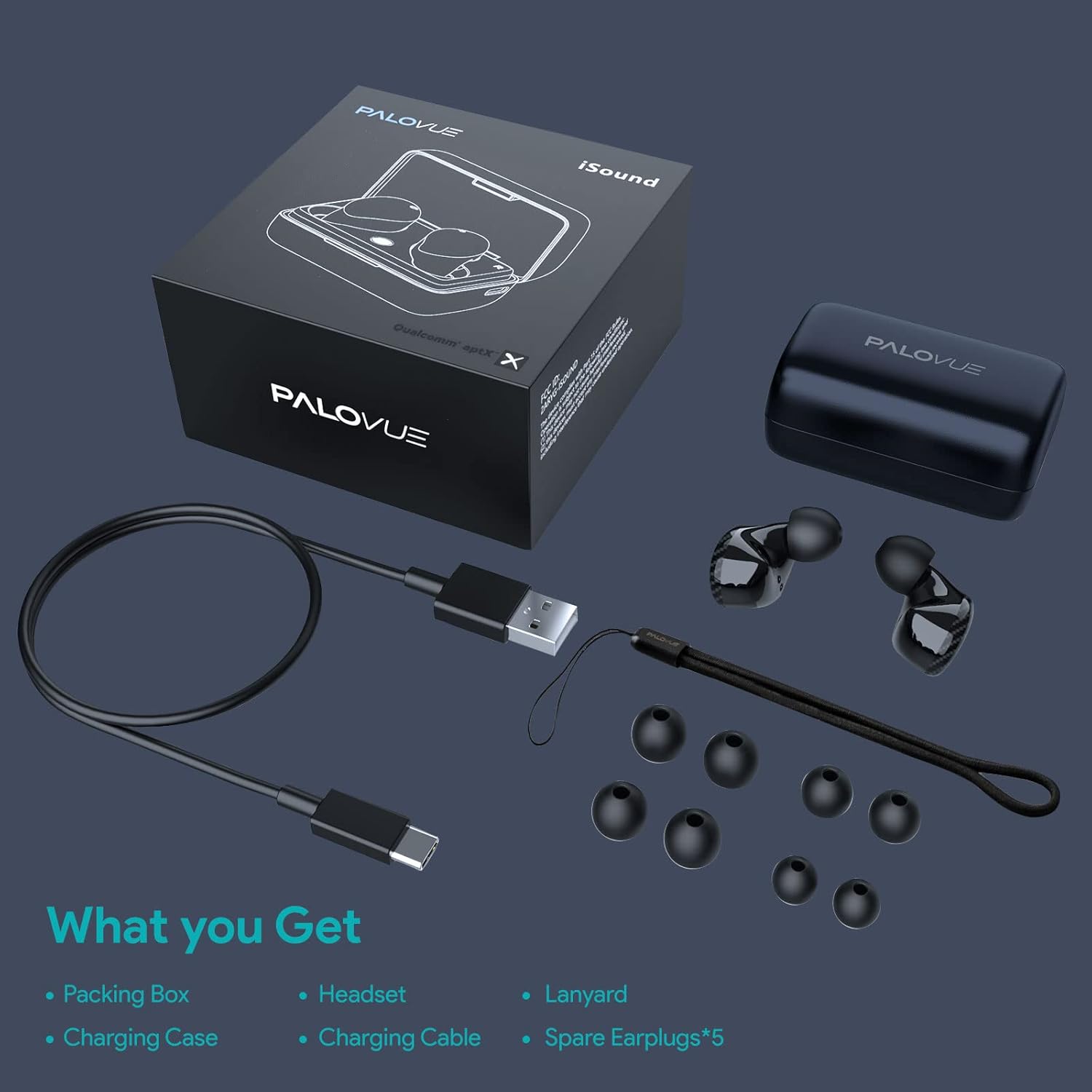
Image: A flat lay showing all items included in the PALOVUE iSound package: the packing box, charging case, earbuds, charging cable, lanyard, and five pairs of spare ear tips.
3. Орнотуу колдонмосу
3.1 Алгачкы заряддоо
Before first use, ensure both the earbuds and the charging case are fully charged. Place the earbuds into the charging case. Connect the provided USB-C cable to the charging case and a power source. The indicator lights on the case will show charging status. A full charge typically takes approximately 2 hours for the case.
3.2 Сиздин аппаратыңыз менен жупташуу
The PALOVUE iSound earbuds feature one-step reconnection for convenience.
- Заряддоо кутучасын ачыңыз. Кулакчындар автоматтык түрдө күйүп, жупташтыруу режимине өтөт.
- Смартфонуңузда же Bluetooth иштетилген түзмөгүңүздө Bluetooth жөндөөлөрүнө өтүңүз.
- Издөө "PALOVUE iSound" in the list of available devices and select it to connect.
- Туташкандан кийин, сиз үндүү ырастоону угасыз жана кулакчындар колдонууга даяр болот.
- Кийинки колдонуулар үчүн жөн гана кубаттоочу кутучаны ачсаңыз, кулакчындар автоматтык түрдө акыркы жупташтырылган түзмөккө туташат.
Video: A detailed guide demonstrating the connection and operation of the PALOVUE iSound earbuds, including initial pairing steps and touch control functions.
4. Кулакчындарды иштетүү
4.1 Сенсордук башкаруу
The PALOVUE iSound earbuds feature intuitive touch controls on each earbud. The specific functions can be customized via the PALOVUE iSound APP.
| Акция | Сол кулакчын | Оң кулак |
|---|---|---|
| Single Tap | Үндү төмөндөтүү | Үндү көтөрүү |
| Эки жолу таптаңыз | Музыка ойнотуу/тындыруу, Чалууга жооп берүү/аяктоо | Музыка ойнотуу/тындыруу, Чалууга жооп берүү/аяктоо |
| Узак басуу | Previous Song, Reject Call | Next Song, Reject Call |
Video: A short demonstration of the touch controls for the PALOVUE iSound earbuds, showing how to adjust volume, skip tracks, and manage calls.
4.2 Using the PALOVUE iSound APP
Enhance your experience by downloading the PALOVUE iSound APP. The app allows you to:
- Customize touch control functions (e.g., volume, track control, call management).
- Adjust equalizer (EQ) settings for personalized sound profiles (Male Vocals, Electronic, Jazz, Rock, Classical, Female Vocals, Original, Customize).
- Check battery levels of each earbud.
- Access device information and firmware updates.

Image: A woman wearing PALOVUE iSound earbuds, illustrating their comfortable fit and suitability for daily use.

Сүрөт: жарылган view diagram of the PALOVUE iSound earbud, detailing its internal structure and emphasizing Qualcomm AptX and Deep Bass sound capabilities.
5. Техникалык тейлөө
To ensure the longevity and optimal performance of your PALOVUE iSound Wireless Earbuds, follow these maintenance guidelines:
- Тазалоо: Кулакчындарды жана кубаттоочу кутучаны дайыма жумшак, кургак, түксүз чүпүрөк менен тазалап туруңуз. Абразивдүү тазалагычтарды же эриткичтерди колдонбоңуз. Кичинекей, жумшак щетка же кебез тампондун жардамы менен кулактын учтары менен динамик торчосунан ар кандай кулагын же калдыктарын акырын алып салыңыз.
- Сактагыч: Колдонулбаганда, кулакчындарды чаңдан, кирден жана физикалык зыяндан коргоо үчүн кубаттоо кутучасында сактаңыз.
- Батареяга кам көрүү: Avoid fully depleting the battery frequently. For long-term storage, charge the earbuds and case to about 50% to preserve battery health.
- Суу каршылык: The earbuds are rated IPX4 for water resistance, meaning they are protected against splashing water from any direction. They are designed for sports and can withstand sweat and light rain, but they are not suitable for swimming or submersion in water. Ensure the earbuds are dry before placing them back in the charging case.
Video: A short promotional video highlighting the compact size and powerful features of the iSound True Wireless Earbuds, including their IPX4 water resistance.
6. Кыйынчылыктарды
If you encounter issues with your PALOVUE iSound Wireless Earbuds, try the following solutions:
6.1 Жупташтыруу маселелери
- Кулакчындар туташпай жатат: Ensure Bluetooth is enabled on your device. Place earbuds back in the case, close it, wait a few seconds, then open it again to re-initiate pairing mode.
- Бир гана кулакчын иштейт: Эки кулакчынды тең кубаттоочу кутуга кайра салып, капкагын жаап, кайра ачып көрүңүз. Эки кулакчын тең жетиштүү кубатталганын текшериңиз.
- Кулакчындар Bluetooth тизмесинде көрүнбөйт: Turn off Bluetooth on your device, then turn it back on. Restart your device if necessary.
6.2 Үн сапаты маселелери
- Төмөн үн: Increase the volume on both your earbuds (via touch control) and your connected device.
- Бузулган үн: Ensure the earbuds are within Bluetooth range of your device. Check for obstructions between the earbuds and your device.
- Чалуу сапаты начар: Ensure the microphones are not obstructed. CVC 8.0 Noise Cancelling technology helps, but extreme noise environments can still affect clarity.
6.3 Battery and Charging Issues
- Кулакчындар кубатталбай жатат: Ensure the charging contacts on the earbuds and inside the case are clean and dry. Try a different charging cable or power adapter.
- Куту заряддалбай жатат: Кубаттоочу кабель жана кубат булагы туура иштеп жатканын текшериңиз.
6.4 How to Reset Your Earbuds
Эгерде сизде көйгөйлөр тынымсыз пайда болуп жатса, аларды заводдук баштапкы абалга келтирүү чечиши мүмкүн:
- Кулакчындардын экөөнү тең зарядкага салыңыз.
- Press and hold the reset button on the charging case (usually located inside or near the charging port) until the indicator lights on the earbuds flash red and green alternately.
- Release the button and wait until only the green light flashes, indicating the reset is complete.
- Кулакчындарды кутудан чыгарып, түзмөгүңүз менен кайра жупташтырып көрүңүз.
Refer to the "PALOVUE iSound Connection operation guide" video in the Setup section for a visual demonstration of the reset process.
7. Техникалык шарттар
| Өзгөчөлүк | Деталь |
|---|---|
| Бренд | ПАЛОВУЕ |
| Модель аты | iSound |
| Байланыш технологиясы | Зымсыз (Bluetooth 5.0) |
| Зымсыз байланыш технологиясы | Bluetooth |
| Чипсет | Qualcomm CSR QCC3020 |
| Noise Control | CVC 8.0 Noise Cancellation (for calls) |
| Микрофондор | 4 микрофон |
| Башкаруу түрү | Touch Control |
| Кулак жайгаштыруу | Кулакта |
| Форма фактору | Кулакта |
| Батареянын иштөө мөөнөтү (наушник) | 6 саатка чейин (болжол менен) |
| Жалпы ойноо убактысы (капка менен) | 24 саатка чейин |
| Заряддоо убактысы (капка) | 2 саат |
| Bluetooth диапазону | 10 метрге чейин (32.8 фут) |
| Сууга туруктуулук деңгээли | IPX4 (чачууга каршы) |
| Материал | Silicone (Ear Tips) |
| Элемент Салмагы | 1.76 унция |
| Шайкеш түзмөктөр | Смартфондор, Планшеттер, Ноутбуктар, Үстөл компьютерлери, Акылдуу телевизорлор, Унаа аудио системалары |
8. Кепилдик жана колдоо
PALOVUE products typically come with a manufacturer's warranty. Please refer to the warranty card included in your product packaging for specific terms and conditions, including warranty period and coverage details. For technical support, troubleshooting assistance, or warranty claims, please contact PALOVUE customer service through their official webсайт же продукт документациясында көрсөтүлгөн байланыш маалыматы.
You can also visit the official PALOVUE store on Amazon for more information and support: PALOVUE Amazon Store.
Ask a question about this manual
Ask about setup, troubleshooting, compatibility, parts, safety, or missing instructions. Manuals+ will review the question and use this page’s manual context to help answer it.